


JEAS Q7 Wireless Intercom Headset System
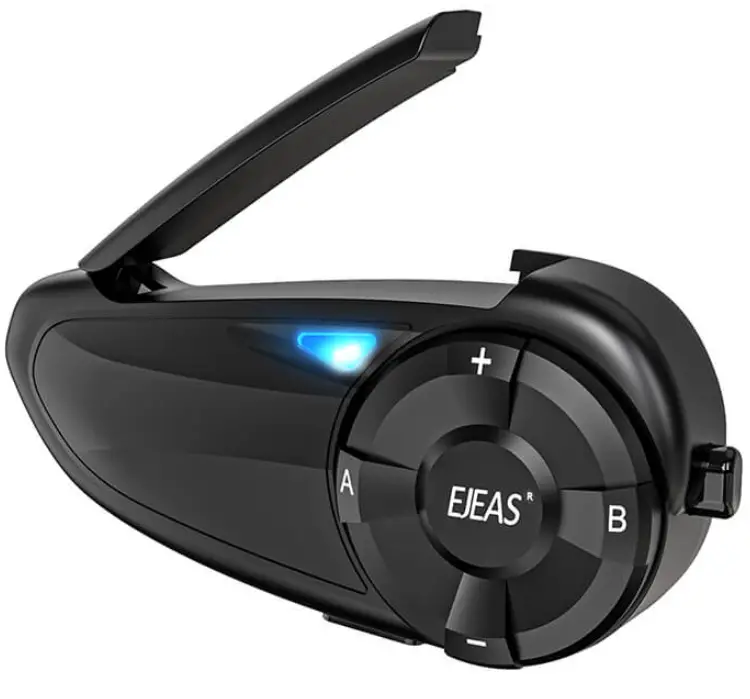
Ozi ngwaahịa
Nkọwapụta
- Nlereanya: Q7
- Ụdị: 7-Ndị na-agba ịnyịnya
- Functionality: Motorcycle Helmet Intercom System with Music Share
Product Derails
SaleRiding APP
The SafeRiding App allows you to set up your group and stay connected with your friends. Save time and enjoy your adventure even more! You can also see more product operations precautions and multiple language operations! Download the EJEAS SafeRiding App for Android and Apple operating systems from ejeas.com/support
Ntinye ngwaahịa

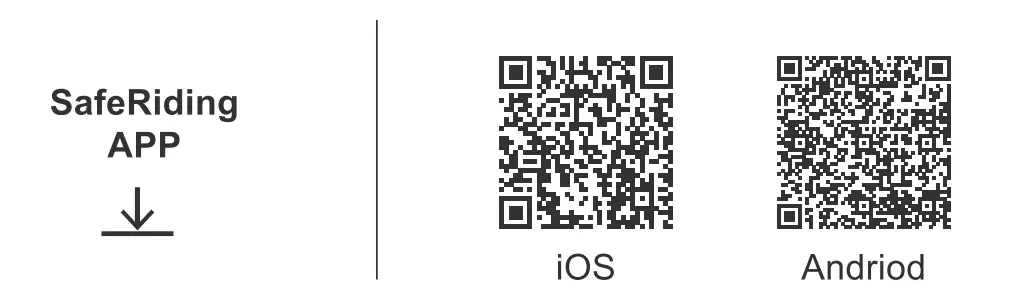
Ọrụ ngwaahịa
Eserese arụmọrụ
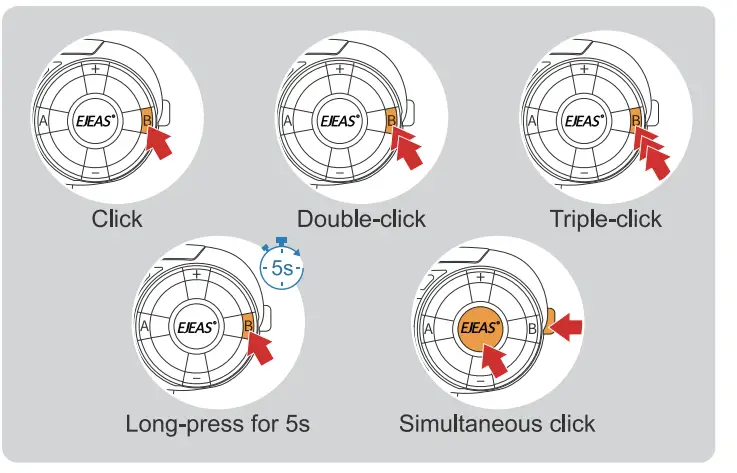 Ọrụ ndị bụ isi
Gbanyụọ/ Gbanyụọ
Biko kwụọ ya ụgwọ tupu i jiri ya.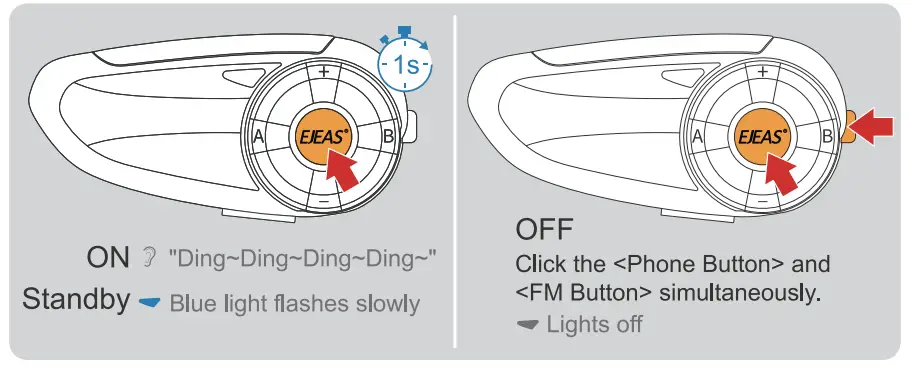
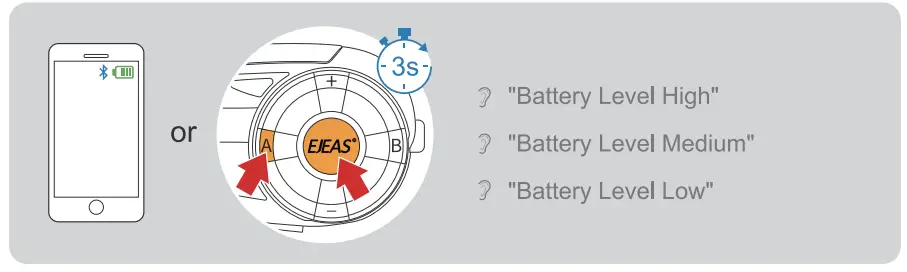
Ọkwa batrị
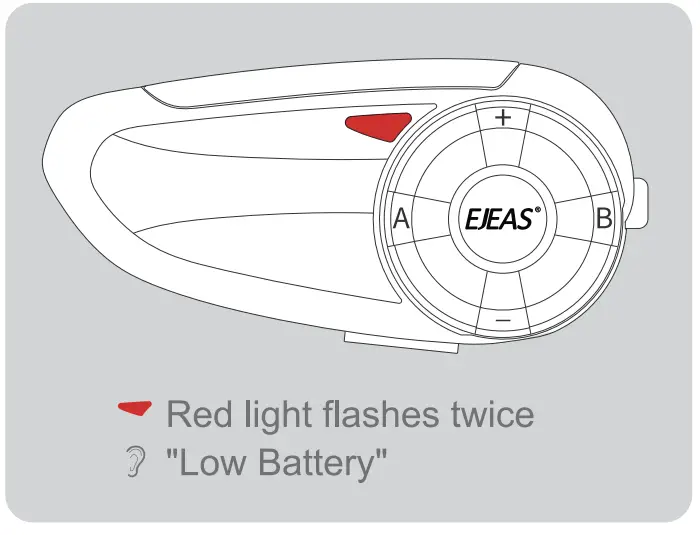
Ngosipụta batrị dị ala
Ngosipụta nchaji

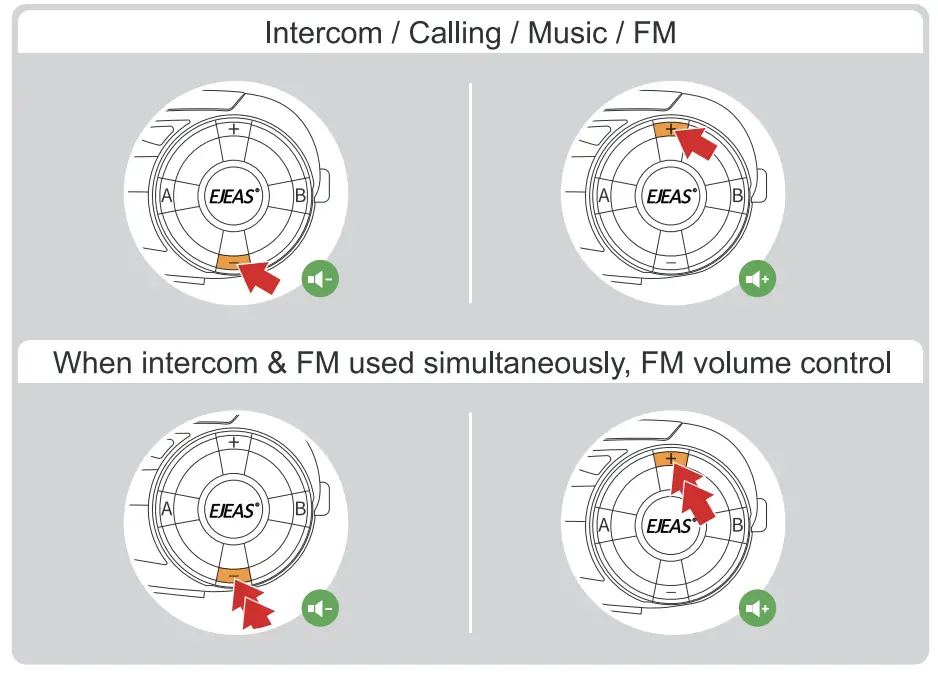
Enwere ike iji njikwa olu FM na intercom n'otu oge.
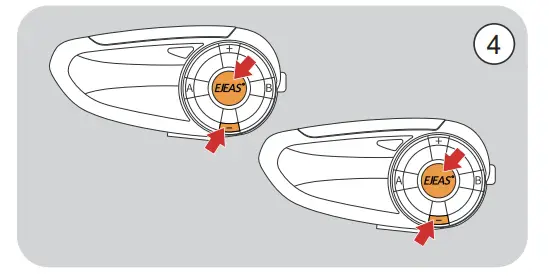
Ntọgharị ụlọ nrụpụta
Pịa ogologo , , maka 5s n'otu oge.
 Red light quick flashes three time, blue light flashes once
 "Weghachite Ntọala mbụ"

Njikọ Intercom Bluetooth
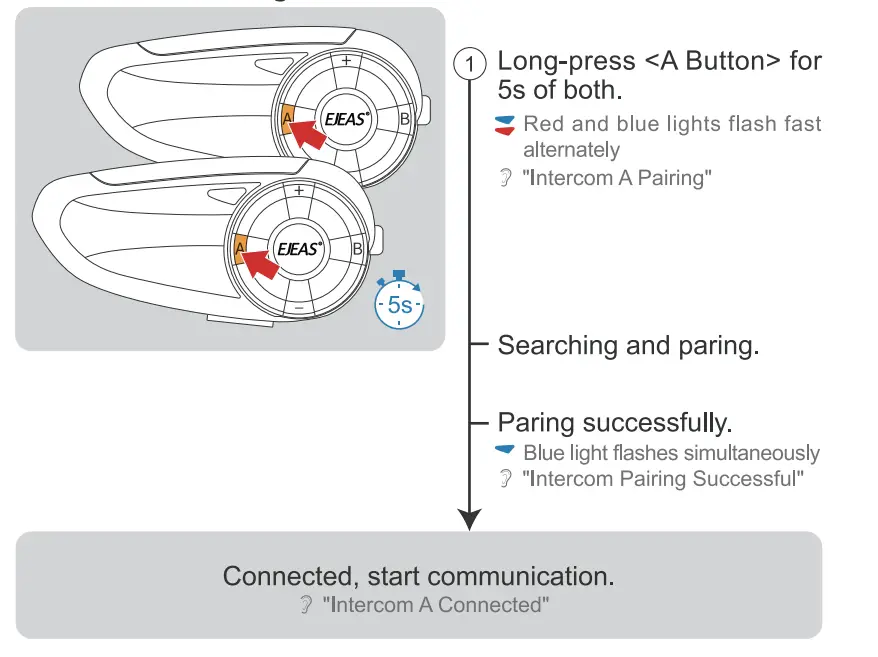
Two-Intercom Pairing
Multi-Intercom Pairing (3-7 models)
Okwu mkpali olu niile na-ezo aka na onye ọbịa.
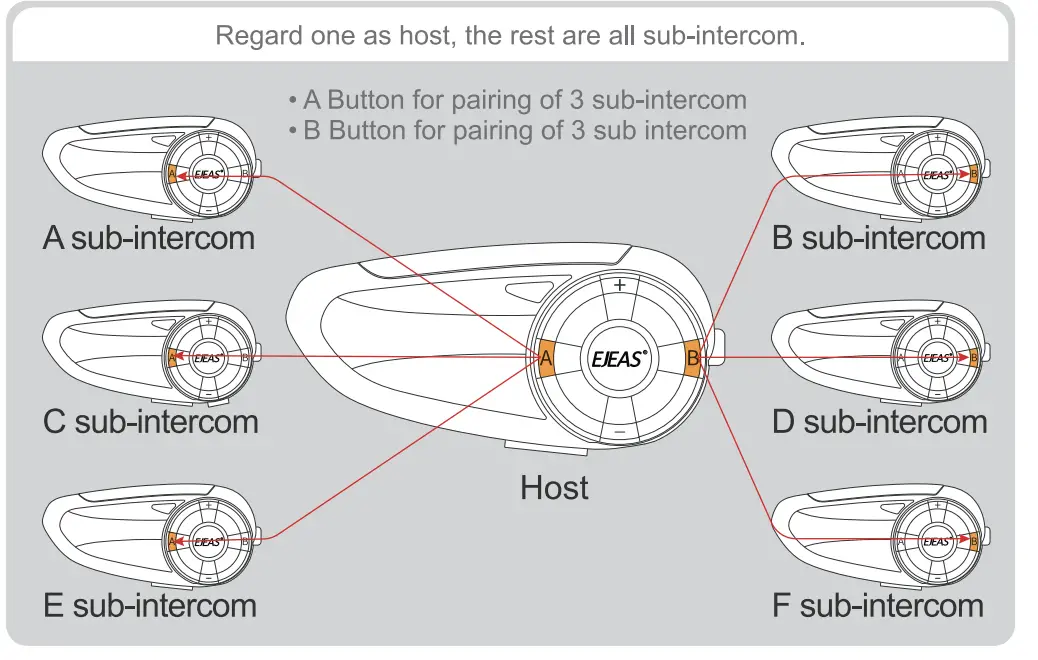
Jikọọ na A sub-intercom

Jikọọ na B sub-intercom

- 3 Pair with C sub-intercom
Long-press <A Button> for 5s of of both. - 4 Pair with D sub-intercom
Long-press <B Button> for 5s of of both. - 5 Pair with E sub-intercom
Long-press <A Button> for 5s of of both. - 6 Pair with F sub-intercom
Long-press <B Button> for 5s of of both.
(Recommend marking all the intercom for easy switching)
Intercom Switching Only the Host allows to switch.

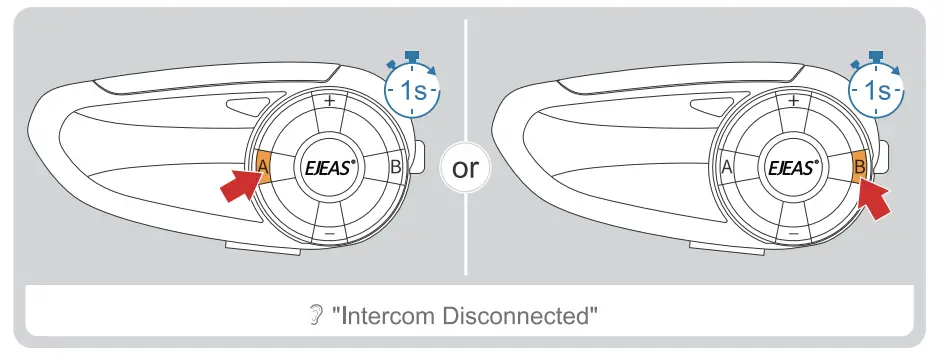
Ịkwụsị Intercom
Dakọtara na Old Intercom Pairing
- Long press< A Button> for 5s, while V4/V6 enter the pairing mode.
- : Red and blue lights flash fast alternately
- “Intercom A Pairing”
- Click < A Button> enter Bluetooth search mode.
- : Red and blue lights flash twice alternatively
- “Intercom A Searching”

Nhazi nke ọma.
Igwe ọkụ na-acha anụnụ anụnụ na-agba ọsọ ọsọ
“Intercom Pairing Successful”
Connected, start communication. : “Intercom A Connected”
Njikọ Bluetooth
Ekwentị ijikọ
- Long press the <Phone Button> for 5s to enter the pairing mode.
(If no phone connected, it will exit pairing mode after 2 mins)
: Red & blue lights flash fast alternately
"Mkpokọta ekwentị" - Open your phone’s Bluetooth, search and pair with the device.

Ijikọta successful – Blue light twice flashes slowly
"Mmekọrịta na-aga nke ọma, ejikọrọ"
A ga-egosi ike dị ugbu a na ekwentị gị.
(Phone must support HFP) 
Njikọ ekwentị
Jikọọ na akpaghị aka na njikọ ikpeazụ. 
Ekwentị mkpanaka
Zaa oku
Na-aza akpaaka n'ime 8s ma ọ bụrụ na enweghị ọrụ ọ bụla. 
Jụ oku

Mkpọgharị oku ikpeazụ

Kwụsị oku

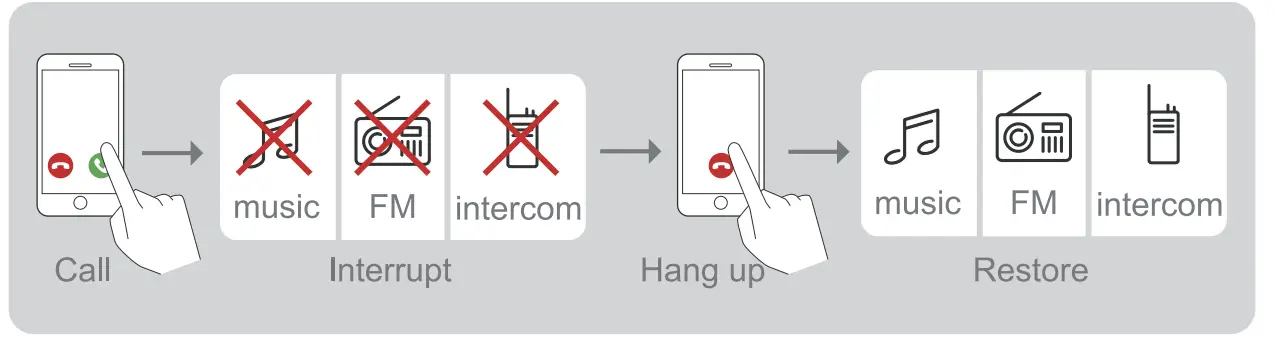
TEL Priority When listening to music/FM/intercom, and receiving a phone call.
Onye enyemaka olu
Ekwentị ga-akwado ma mepee onye enyemaka olu (Google assistant & Siri).

Njikwa egwu
Kpọọ egwu/kwụsịtụ

Ịgbanwe Egwu
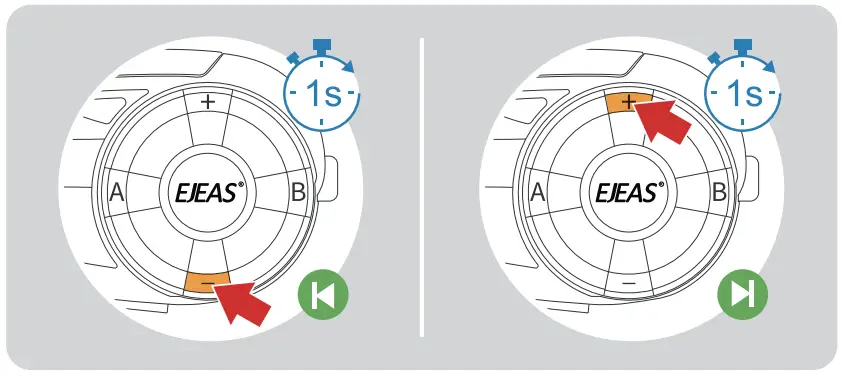
Redio FM
Mgbanwuo/gbanyụọ FM 76 ~ 108MHz
Ọchịchọ akpaaka na redio, intercom na redio nwere ike ịrụ ọrụ n'otu oge.

Mgbanwe ugboro ugboro
 Ekekọrịta egwu
Kekọrịta egwu Bluetooth na-akpọ na ekwentị gị na ngwaọrụ ọzọ, enweghị ike iji ọrụ a n'oge intercom Bluetooth. Enweghị ike iji ọrụ a mgbe ejikọrọ ekwentị abụọ n'otu oge.
- Were intercom dị ka onye ọbịa, jikọọ ya na ekwentị, nke ọzọ bụ ohu ahụ.
- Pịa + n'otu oge ahụ n'etiti onye ọbịa na ohu ịbanye na ọnọdụ njikọ ọchụchọ nkekọrịta egwu. "Ekekọrịta egwu"

- After the connection is successful play the phone music of the host, and the music can also be played from the speaker. Ejikọrọ "Ekekọrịta egwu"
- Pịa + ọzọ ịpụ na egwu nkekọrịta."Ejikọrọ nkekọrịta egwu"
Nkwupụta Fcc
IHE: A nwalere ngwa a wee hụ na ọ dabara na oke maka ngwaọrụ dijitalụ Klas B, dịka akụkụ 15 nke Iwu FCC. Emebere oke ndị a iji nye nchebe ezi uche dị na ya megide nnyonye anya na-emerụ emerụ na ntinye ụlọ. Akụrụngwa a na-ewepụta ojiji ma nwee ike ịgbasa ike ugboro redio yana, ọ bụrụ na etinyeghị ya ma jiri ya dịka ntuziaka ahụ siri dị, nwere ike ibute ndabichi na-emerụ ahụ na nkwukọrịta redio. Agbanyeghị, enweghị nkwa na nnyonye anya agaghị eme na otu nrụnye. Ọ bụrụ na akụrụngwa a na-ebute nnyonye anya na-emerụ ahụ na nnabata redio ma ọ bụ telivishọn, nke enwere ike ikpebi site na ịgbanyụ ma gbanye akụrụngwa, a na-agba onye ọrụ ume ka ọ nwaa idozi nnyonye anya site na otu ma ọ bụ karịa n'ime usoro ndị a:
- Megharịa ma ọ bụ bugharịa antenna nnata.
- Mee ka nkewa dị n'etiti akụrụngwa na nnata.
- Jikọọ akụrụngwa n'ime oghere na sekit dị iche na nke ejikọrọ onye nnata.
- Kpọtụrụ onye na-ere ahịa ma ọ bụ onye ọrụ redio/TV nwere ahụmahụ maka enyemaka
Mgbanwe ma ọ bụ mgbanwe ndị otu na-ahụ maka nnabata na-akwadoghị nke ọma nwere ike imebi ikike onye ọrụ iji rụọ ọrụ ahụ. Ngwaọrụ a na-akwado akụkụ 15 nke Iwu FCC. A na-arụ ọrụ n'okpuru ọnọdụ abụọ a:
- Ngwaọrụ a nwere ike ọ gaghị ebute nnyonye anya na-emerụ ahụ, yana
- Ngwaọrụ a ga-anabatarịrị nnyonye anya ọ bụla enwetara, gụnyere nnyonye anya nwere ike ibute ọrụ na-achọghị
Ijikọ ọrụ na njikwa EUC, biko lelee koodu ahụ ka ọ bụrụ view akwụkwọ ntuziaka kwekọrọ.

Ajụjụ a na-ajụkarị
- Ajụjụ: Enwere m ike iji ọrụ Ekekọrịta Egwu n'oge intercom Bluetooth?
A: No, the Music Share function cannot be used simultaneously with Bluetooth intercom. It is designed to share music between devices when not engaged in intercom conversations. - Ajụjụ: Enwere m ike jikọọ ekwentị abụọ n'otu oge maka Ekekọrịta Egwu?
A: No, the Music Share function does not support connecting two phones simultaneously. You can only pair one host device with one slave device for music sharing.
Akwụkwọ / akụrụngwa
 |
EJEAS Q7 Sistemụ ekweisi Intercom ikuku [pdf] Akwụkwọ ntuziaka onye ọrụ Q7, 7-Riders, Q7 Ikuku Intercom isi Sistemu, Q7, Ikuku Intercom isi Sistemu, Intercom headset Sistemu, Isi isi Sistemu |