Okwu mmalite
Thank you for choosing GOBOULT Tenet TWS Earbuds. This manual provides essential information for setting up, operating, and maintaining your earbuds. Please read it carefully before use to ensure optimal performance and longevity of your device.

Foto: Ofeview of GOBOULT Tenet TWS Earbuds features.
Kedu ihe dị na Igbe ahụ
- GOBOULT Tenet TWS Earbuds (Left and Right)
- Nchaji case
- USB Type-C Nchaji USB
- Nkịta ntị (nha dị iche iche)
- Akwụkwọ ntuziaka onye ọrụ
- Akwụkwọ ikike kaadị
Ngwaahịa gafereview
The GOBOULT Tenet TWS Earbuds are designed for a seamless audio experience with advanced features.
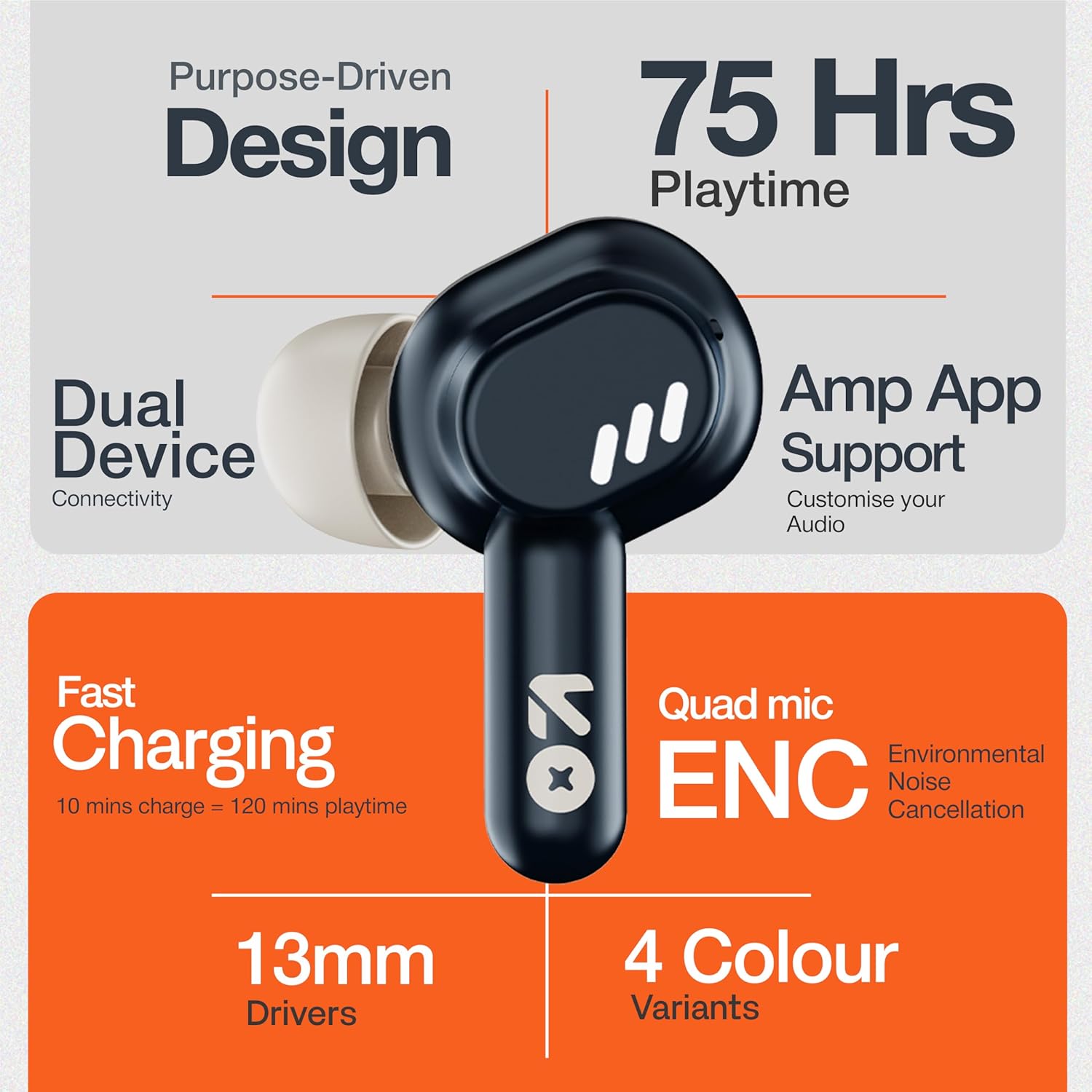
Image: GOBOULT Tenet TWS Earbuds and Charging Case.
Ngwa:
- Akpa ntị: Left and Right earbuds with touch control surfaces and built-in microphones.
- Nchaji akpa: Stores and charges the earbuds, featuring a USB Type-C port for charging.
- Ihe ngosi LED: On both earbuds and the charging case to show battery status and pairing mode.

Image: Quad Mic Environmental Noise Cancellation (ENC) technology.
Melite
1. Ịchaji ihe ntị na akpa
Tupu ojiji nke mbụ, chajie nke ọma ekwe ntị na akpa nchaji.
- Tinye ntị ntị n'ime akpa nchaji. Gbaa mbọ hụ na ha nọ ọdụ nke ọma.
- Jikọọ eriri USB Ụdị-C n'ọdụ ụgbọ mmiri na-ebufe n'okwu ahụ yana na isi iyi ọkụ.
- The LED indicator on the case will show charging status. A full charge typically takes approximately 1.5 hours.
Nchaji ngwa ngwa: A 10-minute charge provides up to 120 minutes of playtime.

Image: Charging the GOBOULT Tenet TWS Earbuds.
2. Ijikọ na ngwaọrụ
- Open the charging case. The earbuds will automatically enter pairing mode, indicated by flashing LED lights.
- Na ngwaọrụ gị (smartphone, mbadamba, laptọọpụ), gbanye Bluetooth.
- Chọọ maka "GOBOULT Tenet" in the list of available Bluetooth devices and select it to connect.
- Once connected, the earbud LEDs will stop flashing.
Njikọ ngwaọrụ abụọ: The earbuds support simultaneous connection to two devices. After pairing with the first device, connect to the second device. The earbuds will intelligently switch between them.

Image: Dual Device Connectivity.
3. Amp Nkwado ngwa
Enhance your listening experience by downloading the GOBOULT Amp App. The app allows for custom EQ settings, control customization, and other audio preferences.
- Download the "GOBOULT Amp" app from your device's app store.
- Open the app and follow the on-screen instructions to connect your Tenet earbuds.

Image: GOBOULT Amp App for custom audio tuning.
Ntuziaka ọrụ
Yi akwa ntị
Insert the earbuds gently into your ears and rotate them slightly to find a comfortable and secure fit. Choose the appropriate ear cushion size for optimal sound quality and comfort.
Gbanyụọ/ Gbanyụọ
- Ike Na: Open the charging case, or long-press the touch control area on both earbuds for 3 seconds.
- Gbanyụọ: Place the earbuds back into the charging case and close the lid, or long-press the touch control area on both earbuds for 5 seconds.
Njikwa mmetụ
The GOBOULT Tenet TWS Earbuds feature intuitive touch controls on each earbud.

Image: Touch Controls and AI Assistant.
| Omume | Ihe ntị aka ekpe | Nri ntị aka nri |
|---|---|---|
| Kpọọ/kwụsịtụ egwu | Otu mgbata | Otu mgbata |
| Track na-esote | Pịa ugboro abụọ | Pịa ugboro abụọ |
| Egwu gara aga | Pịa ugboro atọ | Pịa ugboro atọ |
| Zaa/Kwụsị Oku | Otu mgbata | Otu mgbata |
| Jụ oku | Ogologo Pịa (2s) | Ogologo Pịa (2s) |
| Mee ka onye enyemaka olu rụọ ọrụ | Ogologo Pịa (2s) | Ogologo Pịa (2s) |
Nlekọta
Nhicha
- Jiri akwa dị nro, kpọrọ nkụ na-adịghị na-ehicha ntị ntị na chaja mgbe niile.
- Ejila kemịkalụ siri ike, ihe mgbaze, ma ọ bụ ncha siri ike.
- Hichaa kọntaktị chajị dị na ntị ma na nke dị n'ime ya iji hụ na chajị ya nke ọma.
Nchekwa
- Mgbe ejighị ya, chekwaa earbuds n'ime akpa nchaji ha iji chebe ha ma debe ha ebubo.
- Chekwaa n'ebe dị jụụ, kpọrọ nkụ, pụọ na oke okpomọkụ na ìhè anyanwụ.
Mmiri Nguzogide
The GOBOULT Tenet TWS Earbuds are rated IPX5 mmiri na-eguzogide, meaning they are protected against low-pressure water jets from any direction. This makes them suitable for workouts and light rain. However, they are not designed for swimming or submersion in water.
Nchọpụta nsogbu
If you encounter any issues with your GOBOULT Tenet TWS Earbuds, please refer to the following common solutions:
- Igwe ntị anaghị ejikọta:
- Gbaa mbọ hụ na akwụgoro ekwe ntị abụọ ahụ.
- Place earbuds back in the case, close the lid, wait 5 seconds, then open again to re-enter pairing mode.
- Gbanyụọ ma gbanye Bluetooth na ngwaọrụ gị.
- Forget/delete "GOBOULT Tenet" from your device's Bluetooth list and try pairing again.
- Naanị otu earbud na-arụ ọrụ:
- Gbaa mbọ hụ na akwụgoro ekwe ntị abụọ ahụ.
- Tinyekwa ntị ntị abụọ ahụ n'ime akpa nchaji, mechie mkpuchi, wee mepee ya ọzọ.
- Try resetting the earbuds (refer to the Amp App or GOBOULT support for specific reset instructions).
- Enweghị ụda ma ọ bụ obere olu:
- Lelee ọkwa olu na ma ngwaọrụ gị yana ntị ntị.
- Gbaa mbọ hụ na ejikọrọ ekwe ntị nke ọma na ngwaọrụ gị.
- Clean any debris from the earbud speaker mesh.
- Nsogbu ịchaji:
- Gbaa mbọ hụ na ejikọrọ eriri chajị na echekwabara na ikpe ahụ yana isi iyi ike.
- Hichaa kọntaktị ịchaji na ntị ntị na n'ime akpa ahụ.
- Nwaa eriri USB Type-C dị iche na ihe nkwụnye ike.
If the issue persists, please contact GOBOULT customer support.
Nkọwapụta

Image: 13mm Dynamic Drivers for enhanced audio.
| Njirimara | Nkọwa |
|---|---|
| Aha Nlereanya | Airbass Earbuds |
| Teknụzụ Njikọta | Bluetooth 5.4 |
| Nha ọkwọ ụgbọ ala ọdịyo | 13mm Dynamic ọkwọ ụgbọ ala |
| Ndụ batrị (Ngụkọta) | Ruo awa 75 |
| Nchaji ngwa ngwa | 10 mins charge = 120 mins playtime |
| Nchaji ọdụ ụgbọ mmiri | USB Ụdị-C |
| Igwe okwu | Quad Mic nwere kagbuo mkpọtụ gburugburu (ENC) |
| Mmiri Nguzogide | IPX5 |
| Usoro njikwa | Metụ aka |
| Onye enyemaka olu | Built-In (Google Assistant, Siri) |
| Ejikọ ngwaọrụ abụọ | Akwadoro |
| Nzaghachi ugboro ugboro | 20 kHz |
| Mmetụta | 105 dB |
| Ibu Ibu | 54.5 grams |
| Akụkụ ngwaahịa (Ikpe) | 6.7 x 2.2 x 5.6 cm |
Akwụkwọ ikike na nkwado
Ozi akwụkwọ ikike
The GOBOULT Tenet TWS Earbuds come with a 1-afọ emeputa akwụkwọ ikike site na ụbọchị ịzụrụ. Akwụkwọ ikike a na-ekpuchi ntụpọ nrụpụta. Biko dowe ihe akaebe nke ịzụrụ ihe maka akwụkwọ ikike.
Akwụkwọ ikike a anaghị ekpuchi mmebi sitere na ojiji na-ezighị ezi, ihe mberede, mgbanwe na-enweghị ikike, ma ọ bụ mmebi nkịtị.
Nkwado ndị ahịa
For any questions, technical assistance, or warranty claims, please contact GOBOULT customer support through their official websaịtị ma ọ bụ ozi kọntaktị enyere na kaadị akwụkwọ ikike gị.
Please have your product model number (Airbass Earbuds) and proof of purchase ready when contacting support.


