1. Okwu mmalite
This manual provides instructions for the safe and efficient operation, maintenance, and troubleshooting of your oneisall PP02 Pet Air Purifier. This device is designed to improve indoor air quality by capturing pet hair, dander, and odors, utilizing a multi-layer filtration system.
2. Ntuziaka nchekwa dị mkpa
Please read and save these safety instructions before operating the air purifier to reduce the risk of fire, electric shock, or injury.
- Wepụ ihe nhicha ikuku mgbe niile tupu ị na-akwagharị, na-ehicha, ma ọ bụ na-arụzi ihe ọ bụla.
- Ejila unit ahụ rụọ ọrụ ma ọ bụrụ na eriri ọkụ ma ọ bụ plọg mebiri emebi.
- Debe ihe nhicha ikuku n'ebe dị anya na mmiri ma ọ bụ ebe mmiri dị.
- Etinyekwala mkpịsị aka ma ọ bụ ihe ndị mba ọzọ n'ime oghere ikuku ma ọ bụ mpụta.
- Ensure the air inlets and outlets are not blocked.
- Use only genuine oneisall replacement filters.
- Ebughị ngwa a maka ndị mmadụ (gụnyere ụmụaka) nwere ike anụ ahụ, mmetụta uche, ma ọ bụ nke uche, ma ọ bụ enweghị ahụmịhe na ihe ọmụma, ma ọ bụrụ na enyereghị ha nlekọta ma ọ bụ ntụziaka gbasara iji ngwa ahụ site n'aka onye na-ahụ maka nchekwa ha. .
3. Ihe ngwugwu
Chọpụta na ihe niile dị na ngwugwu:
- oneisall PP02 Pet Air Purifier
- HEPA Filter (Pre-installed)
- Nhicha ahịhịa
- Akwụkwọ ntuziaka onye ọrụ
4. Ngwaahịa gafereview
The oneisall PP02 Pet Air Purifier features dual-sided air intakes and a multi-stage filtration system to effectively capture pet hair, dander, and odors.

Foto 4.1: Gbawara view of the oneisall PP02 Pet Air Purifier, illustrating the dual-side air inlets and the internal multi-layer filtration system. This design allows for efficient capture of pet fur and airborne particles.
Isi ihe:
- Ogwe njikwa: Located on the top, with a digital display for air quality and fan speed.
- Ọnụba ikuku abụọ: Located on the sides, designed to maximize pet hair capture.
- Ọpụpụ ikuku: Located on the top for purified air release.
- Tupu nzacha: Captures large particles like pet hair and dust.
- HEPA Myọcha: Captures fine particles such as dander and allergens.
- Ihe nzacha carbon arụnyere: Absorbs odors from pets, cooking, and other sources.
5. Nhazi na ntinye
- Ịkwapu: Jiri nlezianya wepụ ihe nhicha ikuku n'ime ngwugwu ya.
- Ntinye nyocha: The HEPA filter is typically pre-installed. Open the filter compartment (refer to Figure 4.1 for location) and ensure all packaging materials are removed from the filter before use. Close the compartment securely.
- Nkwanye: Place the air purifier on a firm, level surface. Ensure there is at least 15 cm (6 inches) of space around all sides for optimal airflow. Avoid placing it directly against walls or furniture.
- Njikọ ike: Tinye eriri ọkụ n'ime oghere eletrik ọkọlọtọ.

Foto 5.1: The oneisall PP02 Pet Air Purifier positioned in a living room, demonstrating its ability to purify air in open-plan spaces. The unit is designed for efficient air circulation.
6. Ntuziaka ọrụ
The oneisall PP02 features intelligent controls for ease of use.
- Gbanyụọ/ Gbanyụọ: Pịa bọtịnụ Ike dị na panel njikwa iji gbanye ma ọ bụ gbanyụọ ngwaọrụ ahụ.
- Ndozi ọsọ onye ofufe: Cycle through available fan speeds (e.g., Low, Medium, High) by pressing the Fan Speed button.
- Nchekwa onwe na ọnọdụ: Activate Auto Mode by pressing the Auto button. In this mode, smart sensors monitor air quality in real-time and automatically adjust the fan speed based on detected pollutants (pets, odors, cooking fumes). When air quality improves, the unit shifts to a quieter mode.
- Modera Modera: Select Sleep Mode for quiet operation during rest periods. The display lights may dim or turn off.
- Ọrụ ngụ oge: Use the Timer button to set the operating duration (e.g., 2H, 4H, 8H). The unit will automatically turn off after the set time.

Foto 6.1: The control panel of the oneisall PP02 Pet Air Purifier, showing the real-time air quality indicator (PM2.5) and current fan speed. The display changes color to indicate air quality status (Good, Fair, Poor).

Foto 6.2: The oneisall PP02 Pet Air Purifier operating in a bedroom, highlighting its quiet operation (25dB) for undisturbed rest.
7. Nlekọta
Mmezi mgbe niile na-eme ka arụmọrụ kacha mma ma na-agbatị ndụ nke ihe nhicha ikuku gị.
7.1 Pre-filter Cleaning
The pre-filter is designed to capture large particles like pet hair and dust. It can be easily cleaned to maintain efficiency.
- Gbanyụọ: Kpupu ihe nchacha ikuku n'ofe ọkụ.
- Mepee mkpuchi: Mepee mkpuchi ngalaba nzacha.
- Remove Pre-filter: Carefully remove the pre-filter.
- Ọcha: Use the provided cleaning brush to brush away accumulated hair and dust from the pre-filter. The pre-filter is also washable; rinse it under running water if necessary. Ensure it is completely dry before reinstallation.
- Tinyegharịa: Place the clean pre-filter back into the compartment and close the cover securely.
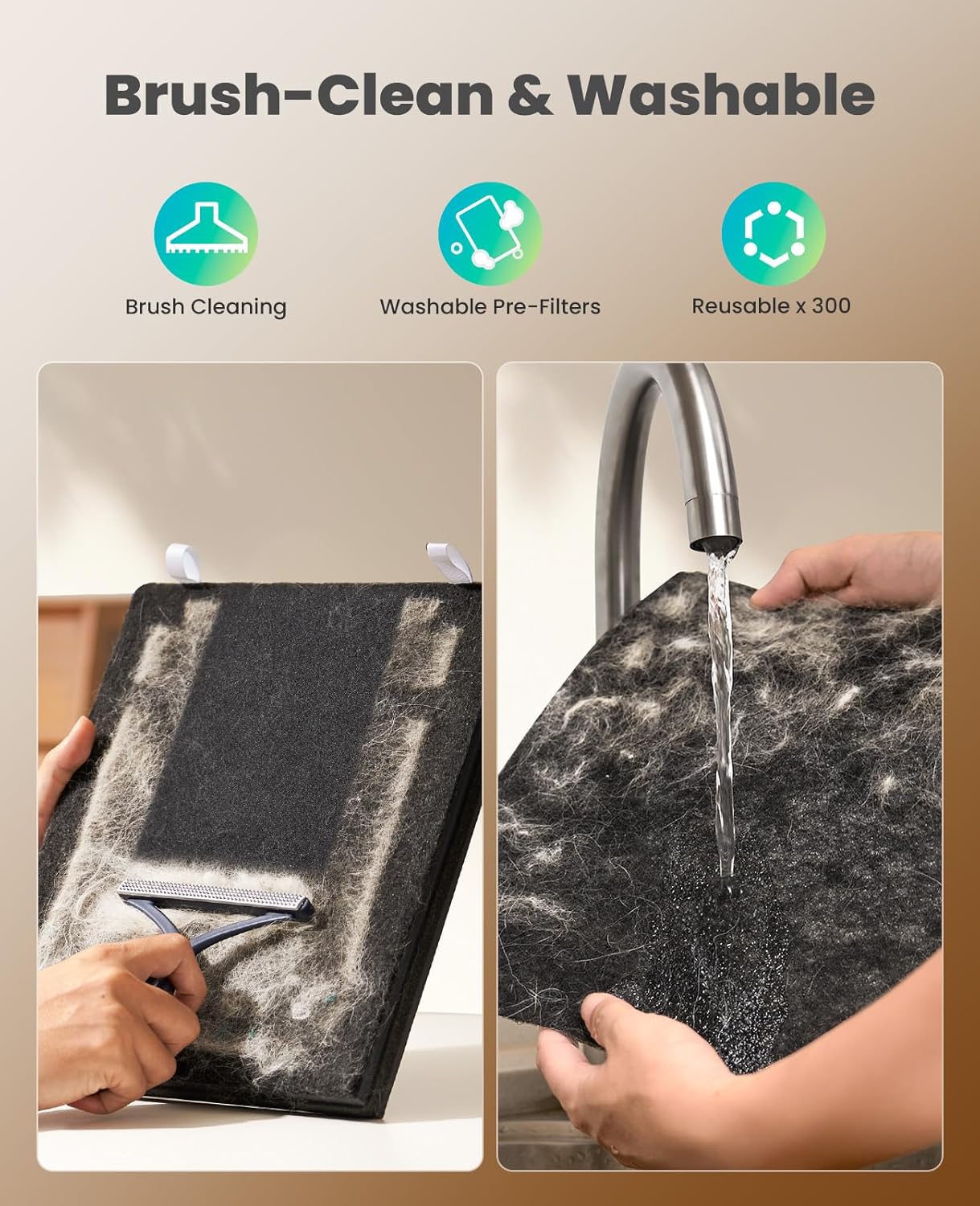
Foto 7.1: Illustration of the pre-filter cleaning process. The image on the left shows using a brush to remove pet hair and dust, while the image on the right demonstrates rinsing the washable pre-filter under water. Ensure the filter is dry before reinstallation.
7.2 HEPA and Activated Carbon Filter Replacement
The HEPA and Activated Carbon filters are not washable and must be replaced periodically. The filter life indicator on the control panel will alert you when replacement is needed. Filter replacement frequency depends on usage and air quality.
- Gbanyụọ: Kwupu ihe ikuku ikuku.
- Mepee mkpuchi: Mepee ngalaba nzacha.
- Wepu ihe nzacha ochie: Carefully remove the used HEPA and Activated Carbon filter assembly.
- Wụnye nzacha ọhụrụ: Insert a new oneisall replacement filter, ensuring it is correctly oriented.
- Mechie mkpuchi: Mechie oghere nzacha nke ọma.
- Reset Filter Life Indicator: After replacing the filter, press and hold the Filter Reset button (if available, or refer to the control panel diagram) for 3-5 seconds to reset the filter life indicator.

Foto 7.2: A visual comparison between a used oneisall filter (left) and a new filter (right), demonstrating the significant amount of pet fur and particles captured by the filtration system over time. This highlights the need for regular filter maintenance and replacement.

Foto 7.3: The oneisall PP02 Pet Air Purifier positioned near a cat and its litter box, illustrating its effectiveness in removing pet odors. The unit features a double activated carbon filter for enhanced odor absorption.
8. Nchọpụta nsogbu
| Nsogbu | Ihe nwere ike ime | Ngwọta |
|---|---|---|
| Unit anaghị agbanwuo. | Enweghị ọkụ. Ejinyeghị eriri ọkụ na nchekwa. | Lelee ma oghere ọkụ na-arụ ọrụ. Ensure the power cord is firmly plugged into the unit and the outlet. |
| Ikuku na-adịghị ike ma ọ bụ na-eme mkpọtụ. | Ihe nzacha ruru unyi ma ọ bụ mechie. Akpọchiela ụzọ mbata/ụzọ ikuku. | Clean the pre-filter. Replace the HEPA and Activated Carbon filter if necessary. Ensure nothing is obstructing the air inlets or outlets. |
| Odor is still present. | Activated Carbon filter is saturated. Unit is too small for the room size. | Replace the HEPA and Activated Carbon filter. Ensure the unit is placed optimally and consider its coverage area. |
| Air quality indicator is always "Poor". | High levels of pollutants in the environment. Sensọ ruru unyi. | Allow the unit to run longer on a higher fan speed. Gently clean the air quality sensor (refer to product diagram for location) with a dry cotton swab. |
9. Nkọwapụta
| Nọmba nlereanya | PP02 |
| Ụdị | onye |
| Ọnụ ego nnyefe ikuku dị ọcha (CADR) | 320m³/h (188 CFM) |
| Mpaghara mkpuchi | Up to 470 sq ft (20 minutes) / 1410 sq ft (60 minutes) |
| Sistemụ nzacha | Pre-filter, HEPA Filter, High-Density Activated Carbon Filter |
| Oriri ike | 36W |
| Ọkwa mkpọtụ | As low as 25dB (in quiet mode) |
| ASIN | B0GDFTQPX2 |
10. Akwụkwọ ikike na nkwado
For warranty information or technical support, please contact oneisall customer service. Refer to the product packaging or the official oneisall websaịtị maka nkọwa kọntaktị.
Websaịtị: oneisall Official Store


