1. Okwu mmalite
This manual provides essential information for setting up, operating, and maintaining your Prechen 15.6 Inch Portable Touchscreen Monitor. Featuring a 10-point multi-touch IPS FHD 1080P display with a 60Hz refresh rate, this monitor is designed for versatility and clear visuals. It includes built-in stereo speakers and supports various connectivity options, making it suitable for diverse environments and applications.
2. Kedu ihe dị na Igbe ahụ
Nyochaa na agụnyere ihe niile ndị a na ngwugwu gị:
- Prechen 15.6 Inch Portable Touchscreen Monitor
- HDMI ka HDMI USB
- USB-A ka eriri USB-C
- USB-C na eriri USB-C
- Ihe nkwụnye ọkụ
- Protective Carry Sleeve
- Akwụkwọ ntuziaka onye ọrụ & Ntuziaka mmalite ngwa ngwa

3. Ngwaahịa gafereview
3.1 Ọdụ ụgbọ mmiri na njikwa
The monitor features various ports and control buttons for connectivity and settings adjustment:
- Ntinye ike DC: Maka ike mpụga.
- Ntinye VGA: For connecting to devices with VGA output.
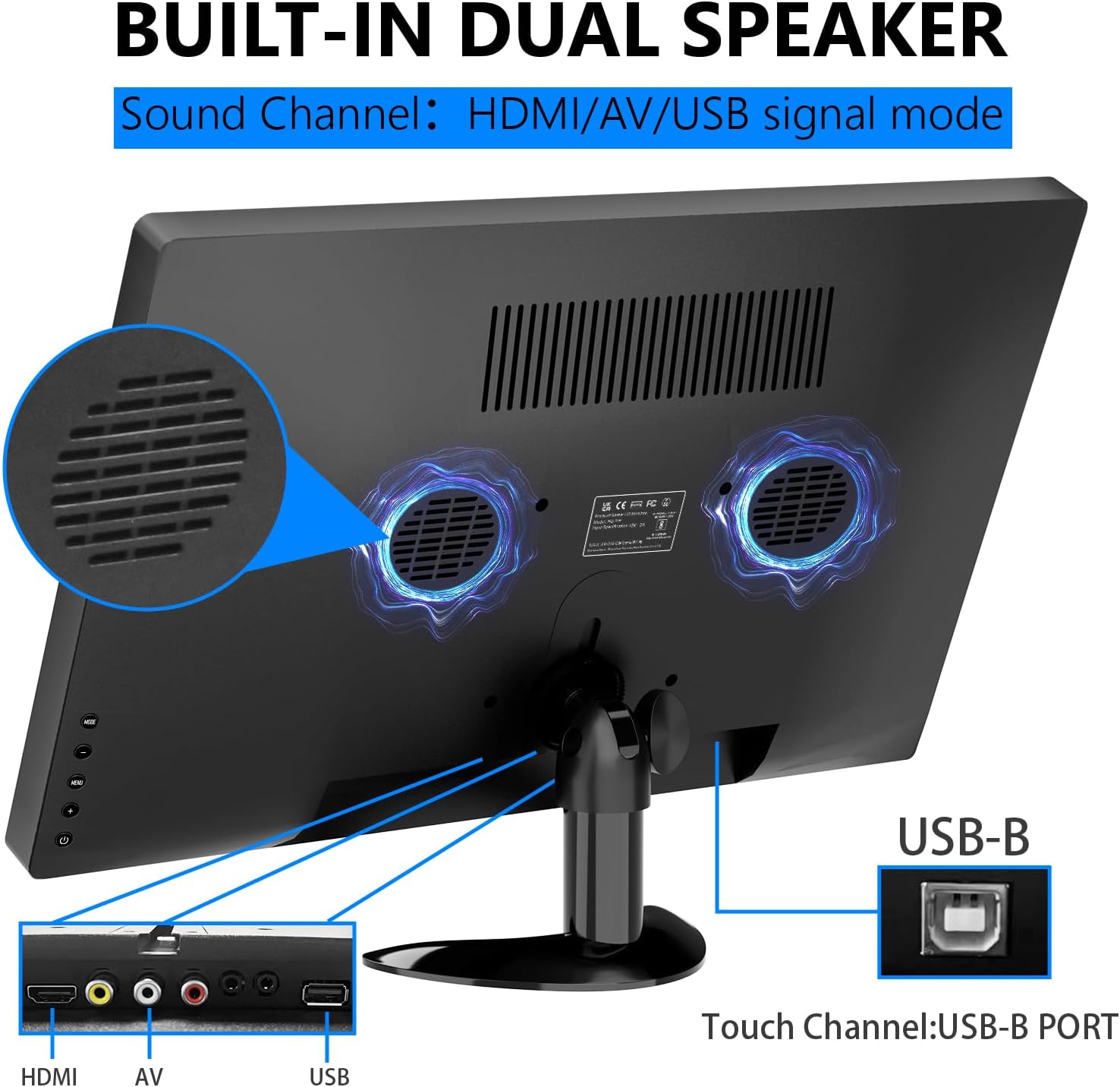
- Ntinye HDMI: Maka ntinye vidiyo na ọdịyo nkọwa dị elu.
- Ntinye AV: For analog video and audio input.
- Mic ọsọ ọsọ: Maka njikọ igwe okwu.
- Igwe ntị ntị: Maka ijikọ ekweisi ma ọ bụ igwe okwu mpụga.
- Ọdụ ụgbọ mmiri USB: Maka ijikọ ngwaọrụ USB.
- Ọdụ ụgbọ mmiri USB-B: Essential for enabling touch functionality when connected to a compatible device.
- bọtịnụ njikwa: For navigating the On-Screen Display (OSD) menu, adjusting brightness, volume, and other settings.

3.2 Nkwụzigharị
The monitor features an integrated adjustable stand that allows for up to 180° rotation, providing versatile viewing angles for various uses.

4. Nhazi
4.1 Njikọ ike
Connect the power adapter to the DC power input on the monitor and plug it into a power outlet. Alternatively, if using a USB-C connection that supports power delivery, the monitor can draw power directly from the connected device.
4.2 Video and Touch Connection
The monitor supports multiple connection methods. For touch functionality, a USB-B connection is required in addition to the video input.
- Njikọ HDMI: Connect one end of the HDMI cable to your device and the other end to the HDMI input on the monitor. For touch functionality, also connect the USB-B cable from your device to the USB-B port on the monitor.
- Njikọ USB-C: If your device has a full-featured USB-C port (supporting video, audio, and power delivery), connect the USB-C to USB-C cable directly from your device to one of the USB-C ports on the monitor. This single cable can provide video, audio, power, and touch functionality.
- VGA/AV Connection: Connect the appropriate VGA or AV cable from your device to the monitor. For touch functionality, a separate USB-B connection from your device to the monitor is required.

4.3 Compatibility Notes for Touch Function
The touch function is compatible with Windows and Chromebook systems. However, it is ekwekọghị yana ngwaọrụ ndị a:
- PS3/4/5
- Nintendo Switch
- Xbox consoles
- Ụgbọ mmiri Steam
- Fire TV Stick
- Ọkụ TV Cube
- Some Apple products

5. Na-arụ ọrụ nlekota oru
5.1 Gbanyụọ ma ọ bụ gbanyụọ
Press the power button located on the side of the monitor to turn it on or off. The power indicator light will illuminate when the monitor is active.
5.2 Ngosipụta Ngosipụta (OSD) NchNhr
Use the control buttons to navigate the OSD menu. Here you can adjust various settings:
- Icha ọkụ & ọdịiche: Adjust display luminosity and contrast levels.
- Olu: Control the output level of the built-in stereo speakers.
- Isi mmalite ntinye: Select between HDMI, USB-C, VGA, or AV inputs.
- Mmetụta agba: Choose from various color modes to optimize your viewahụmahụ.
- Asụsụ: Select your preferred language for the OSD menu.
- Ntọala sistemụ: Access advanced display and power management options.
5.3 Mmegharị ihuenyo mmetụ aka
The 10-point multi-touch display supports intuitive gestures for navigation and interaction:
- Kpatụ: Single tap to select items or activate functions.
- Ugboro abụọ Mgbata: Double tap to open files ma ọ bụ ngwa.
- Dọrọ: Touch and drag to move items or scroll through content.
- Mbugharị/Ọpụpụ: Use a two-finger pinch gesture to zoom in or out.
- Tụgharịa: Use a two-finger twist gesture to rotate images or objects.
- Mịpụta: Swipe across the screen to navigate between pages or applications.

5.4 Ndị ọkà okwu arụnyere n'ime
The monitor is equipped with integrated dual stereo speakers, providing audio output without the need for external devices. Volume can be adjusted via the control buttons or the OSD menu.
6. Nhọrọ nrịgo
In addition to the adjustable stand, the monitor supports VESA 75x75mm wall mounting for fixed installations in offices, homes, or kiosks.

7. Nkọwapụta
| Njirimara | Nkọwa |
|---|---|
| Akụkụ ngwaahịa | 14.17 x 1.18 x 9.05 sentimita asatọ |
| Ibu Ibu | 4.2 pound |
| Nha ihuenyo | 15.6 sentimita asatọ |
| Mkpebi | Pikselụ 1920 x 1080 (FHD 1080p) |
| Akụkụ akụkụ | 16:9 |
| Ihe onyonyo | 300 Candela |
| Nkọwa ihu ihu ihuenyo | kenkowaputa |
| Mgbakọta ọdụ ụgbọ mmiri USB | 1 (USB-B for touch) |
| Onye nrụpụta | Shenzhen Kenowa Electronics Co., LTD |
8. Nchọpụta nsogbu
- Enweghị Ngosipụta: Ensure the monitor is powered on and all video cables (HDMI, USB-C, VGA, AV) are securely connected to both the monitor and your source device. Try different cables or ports if available.
- Touch Function Not Working: Verify that the USB-B cable is correctly connected from your device to the monitor. Confirm your device's operating system (Windows/Chromebook) is compatible with the touch function. Note that gaming consoles and some Apple products do not support touch.
- Enweghị ụda: Check the monitor's volume settings via the OSD menu. Ensure your audio source is correctly selected and that any external headphones/speakers are properly connected to the earphone jack.
- Touch Screen Effect Displayed on Main Screen (Windows): If the touch effect is incorrectly displayed on your main laptop screen instead of the portable monitor, you may need to calibrate the touch screen. Access the 'Control Panel' -> 'Hardware and Sound' -> 'Tablet PC Settings'. In the 'Display Options', select 'InnoView' (or the corresponding name for your portable monitor) and then click 'Setup'. Follow the on-screen prompts to tap the portable monitor to identify it as the touchscreen.
9. Nlekọta
- Na-ehicha ihuenyo: Jiri akwa dị nro na-enweghị lint iji hichaa ihuenyo ahụ nwayọ. Maka isi ike smudges, ntakịrị dampen the cloth with water or a screen-cleaning solution. Avoid using harsh chemicals, abrasive cleaners, or alcohol-based solutions.
- Nchacha izugbe: Wipe the exterior of the monitor with a soft, dry cloth. Keep vents clear of dust and debris to ensure proper airflow.
- Nchekwa: When not in use or during travel, store the monitor in its protective carry sleeve to prevent scratches and damage.
10. Akwụkwọ ikike & Nkwado
For warranty information, technical support, or service inquiries, please refer to the documentation included in your product package or contact Prechen customer service directly. Keep your purchase receipt for warranty claims.


