1. Okwu mmalite
Thank you for choosing the GOBOULT Z40 V2.0 True Wireless Earbuds. These earbuds are designed to provide a high-quality audio experience with features such as extended playtime, clear call quality, and low-latency gaming. This manual provides instructions for setup, operation, maintenance, and troubleshooting to ensure optimal use of your device.

Image 1.1: GOBOULT Z40 V2.0 True Wireless Earbuds and Charging Case.
2. Ngwaahịa gafereview
2.1 Ngwa gụnyere
Ngwungwu ahụ gụnyere ihe ndị a:
- GOBOULT Z40 V2.0 Earbuds
- Nchaji case
- Igwe nchaji USB
- Eartips (nha dị iche iche)
- Akwụkwọ ntuziaka onye ọrụ
- Akwụkwọ ikike kaadị
2.2 Atụmatụ
- Ihe ruru awa 70 ngụkọta oge egwuregwu
- Quad Mic Environmental Noise Cancellation (ENC) for clear calls
- 13mm Bass Drivers for enhanced audio
- 45ms Low Latency Gaming Mode
- Bluetooth v5.4 for stable connectivity
- IPX5 Mmiri Nguzogide
- Smart Touch Controls with Voice Assistant support
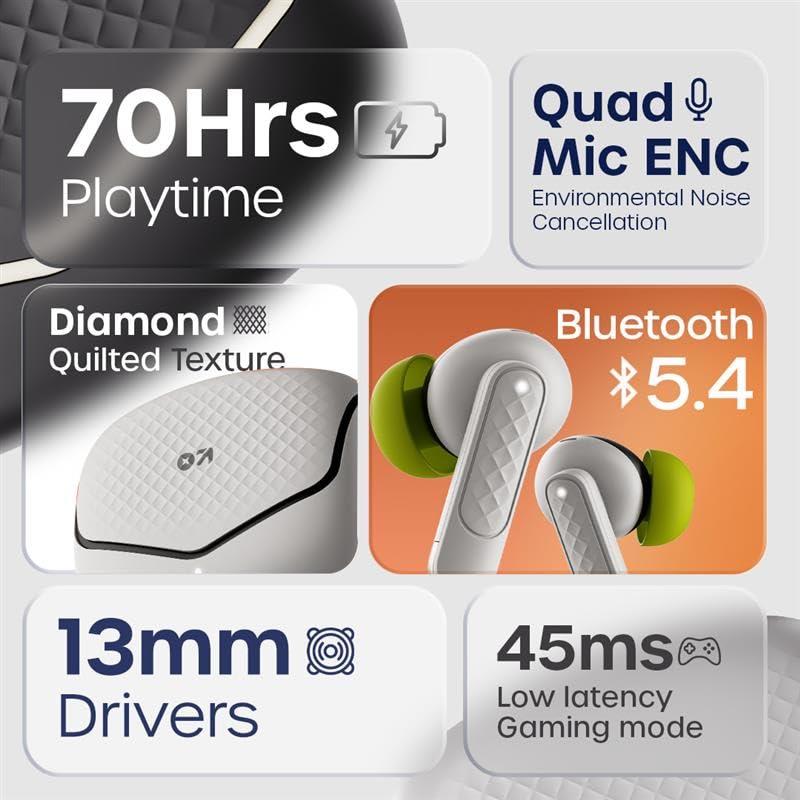
Foto 2.1: Ofeview of GOBOULT Z40 V2.0 key features.
3. Nhazi ntuziaka
3.1 Ịchaji ntị na akpa
Tupu ojiji nke mbụ, chajie nke ọma ekwe ntị na akpa nchaji.
- Tinye ntị ntị n'ime akpa nchaji.
- Jikọọ eriri chaja USB na ọdụ chaja dị na akpa ahụ na isi iyi ike.
- Ọkụ egosi na ikpe ahụ ga-egosi ọkwa nchaji.
- A 10-minute charge provides approximately 120 minutes of playtime. The case offers up to 70 hours of total battery life for the earbuds.

Image 3.1: Charging and battery life details.
3.2 Njikọ Bluetooth
The GOBOULT Z40 V2.0 earbuds utilize Bluetooth v5.4 for quick and reliable pairing.
- Open the charging case. The earbuds will automatically enter pairing mode (Blink&Pair™ Tech).
- Na ngwaọrụ gị (smartphone, mbadamba, laptọọpụ), gbanye Bluetooth.
- Chọọ maka available Bluetooth devices and select "GOBOULT Z40 V2.0" from the list.
- Ozugbo ejikọtara ya, ntị ntị ga-egosi njikọ na-aga nke ọma.
- The earbuds will automatically reconnect to the last paired device when removed from the case.

Image 3.2: Bluetooth 5.4 and Blink&Pair™ technology.
4. Ntuziaka ọrụ
4.1 Njikwa mmetụ
The earbuds feature intuitive touch controls for managing various functions:
- Gwuo/kwụsịtụ: Otu mgbata na ntị ntị.
- Track na-esote: Pịa bọtịnụ ntị aka nri ugboro abụọ.
- Gara aga Track: Kpatụ ntị ugboro abụọ n'akụkụ aka ekpe.
- Azịza/Kwụsị Oku: Otu mgbata na ntị ntị.
- Jụ oku: Pịa ma jide otu ntị ntị maka sekọnd 2.
- Mee ka onye enyemaka olu rụọ ọrụ: Pịa ugboro atọ na ntị ntị.
- Gbanwee Ọnọdụ Egwuregwu: Press and hold the right earbud for 2 seconds (specific gesture may vary, refer to quick start guide).

Image 4.1: Hands-free control and voice assistant activation.
4.2 Ịkpọ na ịnata oku
The Quad Mic ENC system ensures clear voice transmission during calls by reducing environmental noise.
- Ensure earbuds are connected to your device.
- Jiri njikwa mmetụ aka zaa, kwụsị, ma ọ bụ jụ oku.

Image 4.2: Quad Mic ENC for clear calls.
4.3 Ụdị egwuregwu
Activate Combat™ Gaming Mode for a low-latency audio experience, ideal for gaming and video playback.
- Refer to the touch control section for activating Gaming Mode (typically a press and hold gesture).
- This mode reduces audio latency to 45ms, providing synchronized sound with on-screen action.

Image 4.3: Low Latency Gaming Mode.
5. Nlekọta
5.1 Nhicha
Regular cleaning helps maintain the performance and longevity of your earbuds.
- Jiri akwa dị nro, kpọrọ nkụ, akwa na-enweghị lint ka ihichapụ ntị ntị na akpa nchaji.
- Gently remove any earwax or debris from the eartips and speaker mesh using a small brush or cotton swab.
- Zere iji ihe na-emebi emebi, mmanya na-egbu egbu, ma ọ bụ kemịkalụ ihicha.
5.2 Mgbochi mmiri (IPX5)
The earbuds are rated IPX5 water-resistant, meaning they can withstand sweat and light splashes.
- Ejila nkpu ntị ntị n'ime mmiri.
- Avoid exposing them to heavy rain or strong water jets.
- Ensure the earbuds are dry before placing them back into the charging case to prevent damage.
Image 5.1: IPX5 Water Resistance.
6. Nchọpụta nsogbu
If you encounter any issues with your GOBOULT Z40 V2.0 earbuds, please refer to the following common solutions:
- Enweghị ụda: Ensure the earbuds are charged and properly paired with your device. Check the volume level on both the earbuds and your device.
- Okwu ijikọ: Hụ na Bluetooth dị na ngwaọrụ gị, nakwa na ekweisi ndị ahụ dị n'ụdị njikọta. Gbalịa iwepụ ma jikọta ekweisi ndị ahụ ọzọ.
- Njikọ na-adịte aka: Ensure you are within the 10-meter Bluetooth range. Avoid obstacles between the earbuds and your device.
- Ịchaji nsogbu: Verify the charging cable is securely connected and the power source is active. Clean the charging contacts on both the earbuds and the case.
- Igwe okwu anaghị arụ ọrụ: Ensure the earbuds are properly seated in your ears. Check if any debris is blocking the microphone ports.
If the problem persists, please contact GOBOULT customer support for further assistance.
7. Nkọwapụta
Detailed technical specifications for the GOBOULT Z40 V2.0 True Wireless Earbuds:
| Njirimara | Nkọwapụta |
|---|---|
| Aha Nlereanya | Z40 V2.0 (Airbass Earbuds) |
| Teknụzụ Njikọta | Ikuku (Bluetooth) |
| Ụdị Bluetooth | 5.4 |
| Oke Bluetooth | 10 mita |
| Nha ọkwọ ụgbọ ala ọdịyo | 13 Millimita |
| Ụdị ọkwọ ụgbọ ala ọdịyo | Ọkwọ ụgbọala dị ike |
| Nzaghachi ugboro ugboro | 20 Hz |
| Mmetụta | 115 dB |
| Ndụ batrị (Earbuds) | Ruo elekere 70 (ya na igbe nchaji) |
| Oge Nchaji | 10 Minutes for 120 minutes playtime |
| Igwe okwu | Igwe okwu anọ nwere ENC |
| Oge Latịn | 45 Milliseconds (Gaming Mode) |
| Mmiri Nguzogide | IPX5 |
| Ụdị njikwa | Metụ aka |
| Ngwaọrụ Akụrụngwa | USB Ụdị C |
| Ntinye ntị | Na Ntị |
| Akụkụ ngwaahịa | 5.8 x 4 x 4.9 cm |
| Ibu Ibu | 600 g (total package weight) |

Image 7.1: 13mm Bass Drivers for enhanced audio.
8. Akwụkwọ ikike na nkwado
8.1 Akwụkwọ ikike nke onye nrụpụta
The GOBOULT Z40 V2.0 True Wireless Earbuds come with a 1-year manufacturer’s warranty. This warranty covers manufacturing defects and ensures product quality and durability.
8.2 Nkwado ndị ahịa
For any product-related queries, technical assistance, or warranty claims, please contact GOBOULT customer support. Refer to the warranty card included in your package for contact details or visit the official GOBOULT websaịtị.


