1. Okwu mmalite
The COUGAR CFV235 is an innovative PC case featuring a Central Floating Ventilation (CFV) structure. This design separates the power supply unit compartment from the main chamber, utilizing the space between them as a highly effective ventilation channel to enhance cooling performance. The CFV235 combines a full panoramic view, a compact footprint, and structurally reinforced cooling capabilities to achieve superior airflow beyond traditional case designs.
This manual provides essential information for the proper installation, operation, and maintenance of your COUGAR CFV235 PC case. Please read it thoroughly before beginning assembly.
2. Atụmatụ igodo
- Central Floating Ventilation (CFV) Structure: Innovative design for enhanced cooling efficiency.
- Full Panoramic View: Clear tempered glass panels for showcasing internal components.
- Nhazi oke ikuku: Optimized for superior air circulation.
- Ndakọrịta sara mbara: Supports Mini ITX, Micro ATX, ATX, and CEB motherboards.
- AmpNhọrọ Nchekwa: Multiple drive bays for 3.5" HDDs and 2.5" SSDs.
- Generous Component Clearance: Accommodates long GPUs, tall CPU coolers, and standard PSUs.
- Ihe owuwu na-adịgide adịgide: Built with robust materials for longevity.

Ọgụgụ 2.1: Akụkụ ihu view of the COUGAR CFV235 PC case, highlighting its panoramic glass panels and illuminated interior.

Figure 2.2: The COUGAR CFV235 PC case showcasing its design in both black and white variants, with internal components and customizable RGB lighting.
3. Ntuziaka Nhazi
3.1 Unpacking the Case
- Carefully remove the PC case from its packaging.
- Inspect the case for any signs of damage during transit. Contact your retailer immediately if any damage is found.
- Remove all protective films and internal packaging materials.
3.2 Ntinye akụrụngwa
Before installing components, ensure you have all necessary tools, including a Phillips head screwdriver.
- Nwụnye Motherboard:

Figure 3.1: Interior of the CFV235 case, showing pre-installed motherboard standoffs.
- Wụnye ọta I/O n'ime oghere azụ nke ikpe ahụ.
- Align your Mini ITX, Micro ATX, ATX, or CEB motherboard with the pre-installed standoffs.
- Chekwaa motherboard site na iji kposara enyere.
- Nwụnye Ngalaba Na-enye Ike (PSU):
- The CFV235 features a dedicated PSU compartment. Install your ATX PSU (up to 200mm length) into this compartment.
- Chekwaa PSU site na skru site n'azụ ikpe ahụ.
- Ntinye draịva nchekwa:

Figure 3.2: Rear interior of the CFV235, illustrating cable management options and locations for 2.5" and 3.5" drive bays.
- Install 3.5" HDDs into the designated drive bays (up to 2 drives).
- Install 2.5" SSDs into the dedicated SSD mounts (up to 4 drives, 2 of which are shared with 3.5" bays).
- Ensure all drives are securely fastened.
- Nwụnye kaadị eserese (GPU):

Figure 3.3: Diagram indicating the maximum GPU length of 430mm supported by the CFV235 case.
- The case supports GPUs up to 430mm in length.
- Insert your GPU into the appropriate PCIe slot on the motherboard and secure it with the retention clip and screw.
- Nwụnye CPU cooler:
- The case supports CPU coolers up to 175mm in height.
- Wụnye ngwa nju oyi CPU gị dịka ntuziaka onye nrụpụta ya siri dị.
- Njikwa USB:
- Utilize the cable routing cutouts and tie-down points behind the motherboard tray to manage cables neatly.
- Proper cable management improves airflow and aesthetics.
4. Ntuziaka ọrụ
4.1 Panel I/O n'ihu

Figure 4.1: The front I/O panel of the CFV235, featuring USB ports, audio jacks, and the power button.
Ogwe I/O n'ihu na-enye ohere dị mma maka ọdụ ụgbọ mmiri na njikwa dị mkpa:
- Bọtịnụ ike: Press to power on/off your system.
- Tọgharịa bọtịnụ: Press to restart your system.
- ọdụ ụgbọ mmiri USB: Jikọọ ngwaọrụ USB.
- Jacks ọdịyo: Connect headphones and microphones.
4.2 Ikuku na Oyi
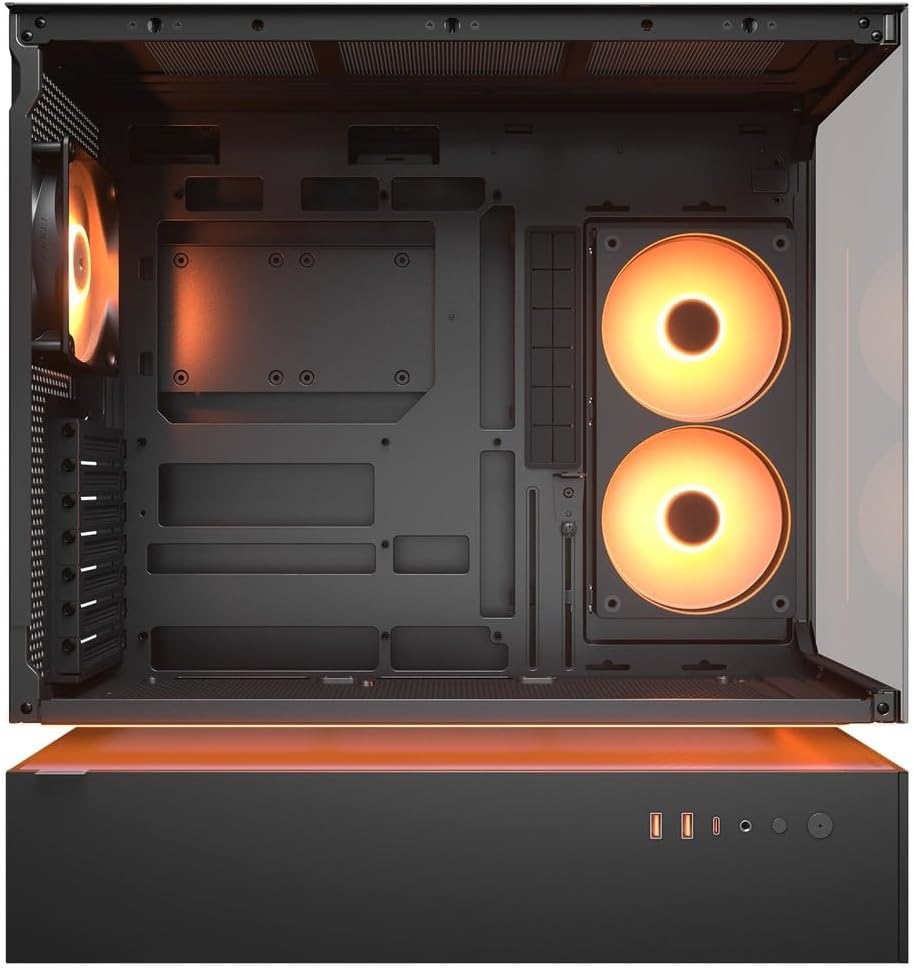
Ọgụgụ 4.2: Ime view of the CFV235 with fans installed, demonstrating the potential for high airflow.
The CFV235 is designed for optimal airflow. Ensure all fans are correctly installed and oriented to facilitate efficient cooling. The Central Floating Ventilation structure promotes direct airflow to critical components.
5. Nlekọta
5.1 Nhicha uzuzu uzuzu

Figure 5.1: Removable magnetic dust filter for easy cleaning.
Regular cleaning of dust filters is crucial for maintaining optimal airflow and preventing dust buildup inside your PC. The CFV235 features easily removable dust filters:
- Gently remove the magnetic dust filters located on the top and bottom of the case.
- Clean the filters using compressed air or by rinsing them with water. Ensure they are completely dry before reattaching.
- Reattach the filters to their respective positions.
5.2 Nhicha izugbe
- Jiri nwayọọ, damp cloth to wipe down the exterior surfaces of the case.
- Avoid using harsh chemicals or abrasive materials that could damage the finish or tempered glass.
- For internal cleaning, use compressed air to remove dust from components and fan blades.
6. Nchọpụta nsogbu
This section addresses common issues you might encounter. For more complex problems, please refer to the support section.
6.1 Sistemụ anaghị arụ ọrụ
- Check if the power cable is securely connected to both the PSU and the wall outlet.
- Ensure the PSU switch is in the "ON" position.
- Hụ na eriri bọtịnụ ike nke panel ihu jikọtara nke ọma na motherboard.
- Confirm that all internal power connections (24-pin ATX, CPU, GPU) are firmly seated.
6.2 Okwu ekpo oke ọkụ
- Gbaa mbọ hụ na ndị ọkpọ ikpe niile na igwe nju oyi CPU/GPU na-arụ ọrụ nke ọma.
- Clean any dust buildup from fans and dust filters (refer to Section 5.1).
- Verify that fans are oriented for optimal airflow (intake and exhaust).
- Check for proper cable management to avoid obstructing airflow.
6.3 USB/Audio Ports Not Working
- Ensure the front panel USB and audio cables are correctly connected to the motherboard headers.
- Check your operating system's device manager for any driver issues.
7. Nkọwapụta
| Njirimara | Nkọwapụta |
|---|---|
| Ụdị | COUGAR |
| Aha Nlereanya | CFV235 |
| Ngwaahịa (W x H x D) | 235 x 493 x 460 mm |
| Ibu ngwaahịa | 9.5 n'arọ |
| Ndị nne na nna akwadoro | Obere ITX / Micro ATX / ATX / CEB |
| Ụgbọ okporo ígwè | 5.25" x0 / 3.5" x2 / 2.5" SSD x2+2 (2 shared with 3.5" bays) |
| Ogologo ogologo GPU | 430 mm |
| Max CPU cooler elu | 175 mm |
| Ogologo PSU kacha | 200 mm |
| Agba | Nwa |
| Atụmatụ | Central Floating Ventilation, Panoramic Glass, High Airflow, Built-in Fans |
8. Akwụkwọ ikike na nkwado
Your COUGAR CFV235 PC case comes with a 1-afọ akwụkwọ ikike site na ụbọchị ịzụrụ. Akwụkwọ ikike a na-ekpuchi ntụpọ n'ichepụta yana ntụpọ ihe n'okpuru ojiji nkịtị.
For technical support, warranty claims, or further assistance, please visit the official COUGAR website or contact your local retailer. Please have your product model number (CFV235) and proof of purchase ready when contacting support.
Official COUGAR Websaịtị: cougargaming.com


