1. Okwu mmalite
Thank you for choosing the KAIWEETS KC200D Digital Clamp Meter. This device is a compact, high-precision instrument designed for electrical measurements in various settings, including home, commercial, and industrial environments. It features True RMS technology for accurate readings of complex waveforms, Non-Contact Voltage (NCV) detection for enhanced safety, and a clear backlit LCD for easy readability. This manual provides essential information for safe and effective use of your clamp mita.
2. Ozi nchekwa
To ensure safe operation, please read and understand all safety warnings and operating instructions before using this instrument. Failure to observe these warnings can result in serious injury or death.
- Na-agbaso koodu nchekwa mpaghara na nke obodo mgbe niile.
- Ejila mita ahụ ma ọ bụrụ na o yiri ka ọ mebiri emebi ma ọ bụ ma ọ bụrụ na mkpuchi dị na ihe nlele ahụ emebiela.
- Etinyekwala ihe karịrị ogo voltage, as marked on the meter, between terminals or between any terminal and ground. The maximum operating voltage bu 600v.
- Jiri nlezianya dị oke egwu mgbe ị na-arụ ọrụ na voltages above 60V DC or 30V AC RMS. These voltages na-ebute ihe egwu ujo.
- Keep your fingers behind the finger guards on the test leads during use.
- Ejila mita ahụ rụọ ọrụ n'ime ihe mgbawa gas, vepo, ma ọ bụ uzuzu.
- Remove the test leads from the circuit before changing functions.
- Always turn off the power to the circuit under test before connecting or disconnecting the test leads.
- Ensure the battery cover is securely closed before operating the meter.
3. Ihe ngwugwu
Verify that all items listed below are present and undamaged:
- 1 x KAIWEETS KC200D Digital Clamp Mita
- 1 x Akwụkwọ ntuziaka onye ọrụ
- 1 x Akpa nchekwa
- 2 x Test Leads (Red and Black)
- 2 x AAA 1.5V batrị
4. Ngwaahịa gafereview
The KAIWEETS KC200D is designed for ease of use and durability. Familiarize yourself with the main components:
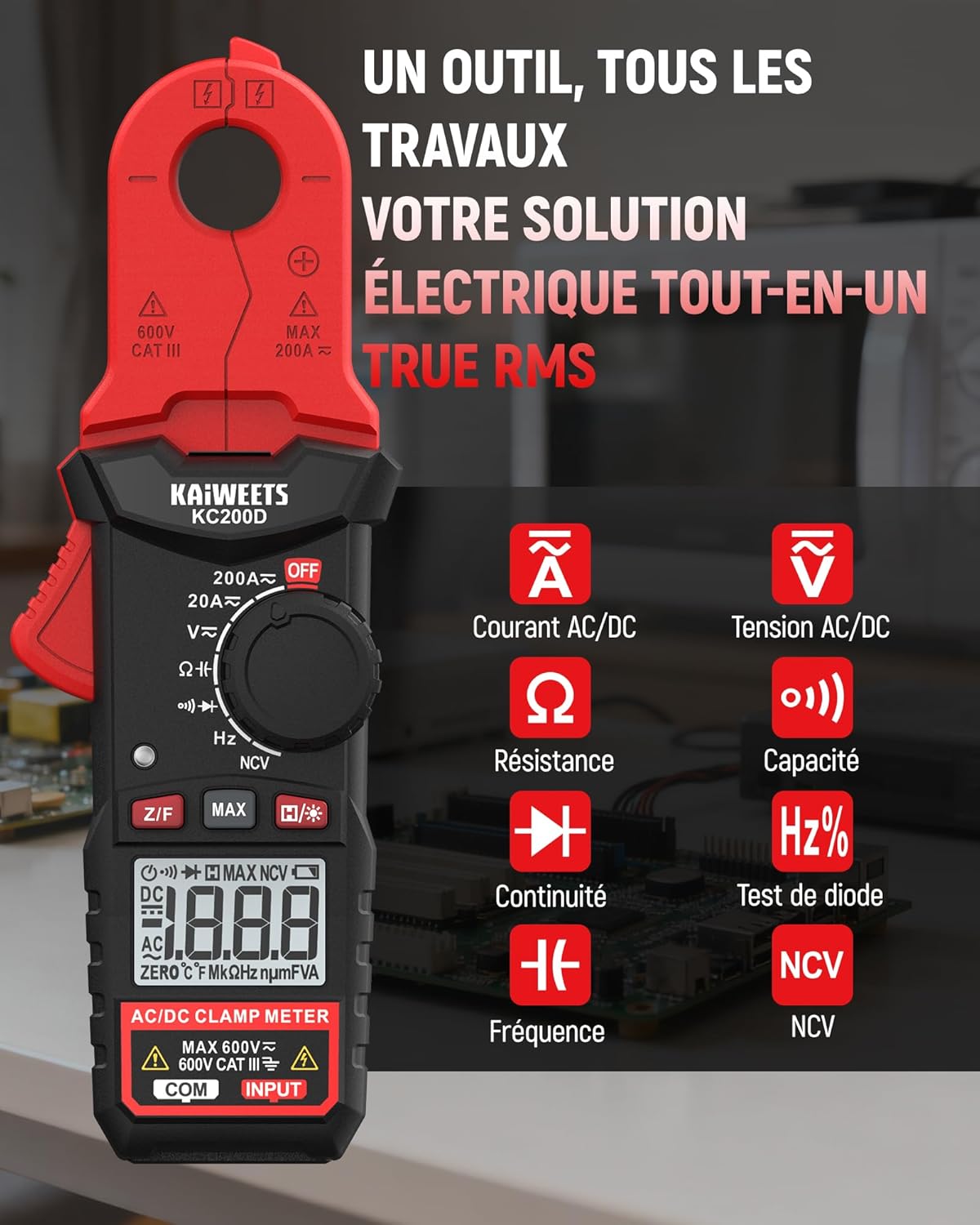
Foto 4.1: KAIWEETS KC200D Clamp Meter with its various measurement functions highlighted, including AC/DC Current, AC/DC Voltage, Resistance, Capacitance, Frequency, Diode Test, Continuity, and NCV.
Ngwa 4.1 igodo
- Clamp Nkịta: Used for non-contact AC/DC current measurement.
- Ịkpọ oku ọrụ: Mgbanwe Rotary iji họrọ ụdị nha.
- Ngosipụta LCD: Na-egosi ọgụgụ nha, nkeji, na ihe ngosi.
- Bọtịnụ: For special functions like Data Hold, MAX/MIN, DC Zero, Backlight, and NCV.
- Ọnụ ntinye: Maka ijikọ ndị ndu ule maka voltage, resistance, capacitance, frequency, diode, and continuity measurements.
5. Nhazi
5.1 Ntinye batrị
The KC200D requires two AAA 1.5V batteries (included).
- Hụ na agbanyụrụ mita ahụ.
- Chọta ebe batrị dị n'azụ mita ahụ.
- Jiri screwdriver mepee mkpuchi nke ebe batrị ahụ.
- Insert the two AAA batteries, observing the correct polarity (+ and -).
- Dochie mkpuchi nke batrị batrị ma jiri nkedo chekwaa ya.
5.2 Njikọ Ndị Nnwale Nlele
For measurements requiring test leads (voltage, resistance, capacitance, frequency, diode, continuity):
- Insert the red test lead into the "INPUT" terminal.
- Insert the black test lead into the "COM" (Common) terminal.
6. Ntuziaka ọrụ
Always select the appropriate function before making any measurement. Turn the function dial to the desired measurement mode.
6.1 Nha ugbu a AC/DC (Cl)amp)
Jiri clamp jaw for non-contact current measurement. This method is ideal for safely measuring current without breaking the circuit.

Foto 6.1: Ihe clamp jaw of the KC200D measuring current on a single electrical wire, demonstrating its compact design and precision.
- Tụgharịa ọkpụkpọ ọrụ na 20A~ or 200A~ position for AC current, or 20A= or 200A= for DC current.
- Pịa clamp trigger to open the jaw.
- Encircle only otu conductor with the clamp jaw. Do not clamp around multiple wires, as this will result in an inaccurate reading.
- For DC current measurement, press the Z/F button to zero the display before clamping.
- Gụọ uru dị ugbu a na ngosipụta LCD.
6.2 AC/DC Voltage Ntụ
Iji tụọ voltage, use the test leads.
- Tụgharịa ọkpụkpọ ọrụ na V~ (Mpịakọta ACtage) ma ọ bụ V= (DC Voltage) ọnọdụ.
- Connect the red test lead to the positive side of the circuit and the black test lead to the negative side (or ground).
- Gụọ voltage uru na LCD ngosi.
6.3 Nledo Nguzogide
Hụ na sekit ahụ anaghịzi enye ike tupu ị tụọ ihe ndị na-eguzogide ya.
- Tụgharịa ọkpụkpọ ọrụ na Ω ọnọdụ.
- Jikọọ ihe nlele ndị a ga-eji tụọ.
- Gụọ uru iguzogide na ngosipụta LCD.
6.4 Mmesho ikike
Discharge capacitors completely before measurement to avoid damage to the meter or injury.
- Tụgharịa ọkpụkpọ ọrụ na Ike position (often shared with Diode/Continuity, press FUNC to cycle).
- Connect the test leads across the capacitor.
- Gụọ uru capacitance na ngosi LCD.
6.5 Nleta ugboro ugboro
Iji tụọ ugboro:
- Tụgharịa ọkpụkpọ ọrụ na Hz% ọnọdụ.
- Connect the test leads across the circuit where frequency is to be measured.
- Gụọ uru ugboro ole na ngosi LCD.
6.6 Diode Ule
Gbaa mbọ hụ na a kwụsịrị diode na sekit.
- Tụgharịa ọkpụkpọ ọrụ na Diode position (often shared with Capacitance/Continuity, press FUNC to cycle).
- Connect the red test lead to the anode and the black test lead to the cathode.
- A forward voltage drop will be displayed for a good diode. Reverse the leads; the display should show OL (Open Loop).
6.7 Nnwale na-aga n'ihu
Jide n'aka na sekit ahụ anaghị arụ ọrụ nke ọma.
- Tụgharịa ọkpụkpọ ọrụ na Na-aga n'ihu position (often shared with Diode/Capacitance, press FUNC to cycle).
- Connect the test leads across the component or wire.
- If there is continuity (low resistance), the meter will emit an audible beep.
6.8 Ndị anaghị akpọtụrụ Voltage (NCV) Nchọpụta
The NCV function allows for quick and safe detection of live AC voltage enweghị kọntaktị kpọmkwem.

Foto 6.2: The KC200D performing Non-Contact Voltage (NCV) detection near an electrical outlet, showing visual indicators for low and high voltage ọnụnọ.
- Tụgharịa ọkpụkpọ ọrụ na NCV ọnọdụ.
- Bring the top end of the meter near the conductor or outlet.
- The meter will emit an audible beep and illuminate LED indicators, with frequency increasing as voltage strength increases.
6.9 Ọrụ Pụrụ Iche

Foto 6.3: The KC200D highlighting its user-friendly functions: MAX for peak value, Z/F for DC current zeroing, H for data hold, backlight for low-light conditions, and auto-off for battery saving.
- Data Hold (H/* button): Press to freeze the current reading on the display. Press again to release.
- MAX/MIN (MAX button): Press to display the maximum or minimum measured value. Press again to cycle.
- DC Current Zero (Z/F button): For DC current measurements, press this button before clamping to zero out any residual readings.
- Backlight (H/* long press): Long press the H/* button to turn the display backlight ON or OFF for improved visibility in low-light conditions.
- Gbanyụọ onwe: The meter automatically powers off after approximately 15 minutes of inactivity to conserve battery life. Press any button or rotate the function dial to wake it up.
7. Nlekọta
7.1 Nhicha
Wipe the meter with a dry, soft cloth. Do not use abrasives or solvents.
7.2 nnọchi batrị
When the battery indicator appears on the LCD, replace the batteries as described in the Setup section (5.1 Battery Installation).
7.3 Nchekwa
If the meter is not used for an extended period, remove the batteries to prevent leakage and damage. Store the meter in its carrying bag in a cool, dry place.
8. Nchọpụta nsogbu
| Nsogbu | Ihe nwere ike ime | Ngwọta |
|---|---|---|
| Mita anaghị arụ ọrụ | Batrị nwụrụ anwụ; Ntinye batrị ezighi ezi | Replace batteries; Check battery polarity |
| Inaccurate current reading | Ọtụtụ ndị nduzi na clamp jaw; DC current not zeroed | Ensure only one conductor is clamped; Press Z/F button for DC current |
| "OL" displayed (Overload) | Measurement exceeds range; Open circuit (for continuity/resistance) | Select a higher range (if available); Check circuit connections |
| Enweghị nchọpụta NCV | Enweghị AC voltage present; Meter not close enough to source | Nyochaa AC voltage presence; Move meter closer to the live conductor |
9. Nkọwapụta
Technical specifications for the KAIWEETS KC200D Digital Clamp Mita:
| Njirimara | Nkọwapụta |
|---|---|
| Nọmba nlereanya | KC200D |
| Ngosipụta | 2000 Counts, Backlit LCD |
| AC Ugbu a | 20A/200A (±(2.5% + 5 digits)) |
| DC ugbu a | 20A/200A (±(2.5% + 5 digits)) |
| AC Voltage | 2V/20V/200V/600V (±(1.0% + 5 digits)) |
| DC Voltage | 200mV/2V/20V/200V/600V (±(0.5% + 5 digits)) |
| Nguzogide | 200Ω/2kΩ/20kΩ/200kΩ/2MΩ/20MΩ (±(1.0% + 5 digits)) |
| Ike | 2nF/20nF/200nF/2µF/20µF/200µF/2mF/20mF (±(4.0% + 5 digits)) |
| Ugboro ugboro | 2Hz/20Hz/200Hz/2kHz/20kHz/200kHz/2MHz/20MHz (±(1.0% + 3 digits)) |
| Nnwale Diode | Ee |
| Nnwale na-aga n'ihu | Ee |
| Nchọpụta NCV | Ee |
| Ịnye ọkụ | 2 x AAA 1.5V batrị |
| Ogo nchekwa | CAT III 600V, Pollution Level: 2 |
| Akụkụ | 20.7 x 11.3 x 4.7 cm (Ngwugwu) |
| Ibu | 308 grams (ngwugwu) |
10. Akwụkwọ ikike na nkwado
KAIWEETS products are designed for reliability and performance. For warranty information, technical support, or service inquiries, please refer to the contact information provided on the KAIWEETS official website or contact your local distributor. Please retain your purchase receipt as proof of purchase for warranty claims.


