1. Okwu mmalite
The House of Marley Get Together Go is a portable Bluetooth speaker designed for high-quality audio and outdoor durability. It features sustainable materials, multiple sound modes, and a robust, adventure-ready design.

Figure 1: Get Together Go Speaker in an outdoor environment.
Key features include IP67 waterproof and dustproof rating, up to 20 hours of playtime, customizable EQ modes, and Auracast multi-speaker pairing. The speaker is crafted from renewable bamboo and REGRIND silicone, reflecting a commitment to sustainable design.

Nyocha 2: N'eluview of main features including EQ settings, playtime, IP67 protection, and ambient lighting.
2. Ihe ngwugwu
Gbaa mbọ hụ na ihe niile dị na ngwugwu:
- House of Marley Get Together Go Portable Bluetooth Speaker
- USB-C eriri USB
- Ntuziaka mmalite ngwa ngwa (anaghị etinye ya na ntuziaka a)
3. Nhazi
3.1 Ịchaji ọkà okwu
- Connect the provided USB-C charging cable to the speaker's charging port.
- Jikọọ nsọtụ nke ọzọ nke eriri ahụ na ihe nkwụnye ike USB dakọtara (anaghị etinye ya).
- Ọkụ na-egosi nchaji ga-enwu n'oge ịchaji wee gbanyụọ mgbe chajịrị ya.
3.2 Gbanyụọ/ gbanyụọ
- To power on, press and hold the Power button until the indicator lights activate.
- Ka ịgbanyụ, pịa ma jide bọtịnụ ike ọzọ ruo mgbe ihe ngosi ga-agbanyụ.

Foto 3: N'ihu view of the speaker, illustrating general layout and control area.
3.3 Njikọ Bluetooth
- Gbaa mbọ hụ na agbanyere ọkà okwu.
- Press and hold the Bluetooth button on the speaker until the Bluetooth indicator light begins to flash, indicating pairing mode.
- Na ngwaọrụ gị (smartphone, tabletị, wdg), gbanye Bluetooth wee chọọ ngwaọrụ dịnụ.
- Select "Get Together Go" from the list of devices.
- Ozugbo ejikọrọ, ọkụ egosi Bluetooth ga-esi ike.
3.4 Auracast Multi-Speaker Pairing
The Get Together Go supports Auracast for connecting multiple compatible speakers for a larger sound experience. Refer to the official House of Marley website for detailed instructions on Auracast setup.
4. Ntuziaka ọrụ
4.1 Ngwugharị ọdịyo
- Once paired via Bluetooth, play audio from your connected device.
- Use the Volume Up (+) and Volume Down (-) buttons on the speaker to adjust the volume.
- Pịa bọtịnụ Play/Pause iji chịkwaa ọkpụkpọ egwu.

Figure 4: Speaker control panel for power, Bluetooth, volume, and playback.
4.2 Custom EQ Modes
The speaker features three customizable EQ modes to optimize sound for different environments:
- Marley Signature Sound: Ọkachamara ọdịyo kwesịrị ekwesịfile.
- Bass agbam ume: Enhanced low-frequency response.
- Ụdị n'èzí: Optimized for open-air listening.
To switch between EQ modes, briefly press the Power button while the speaker is on. The ambient lighting may change to indicate the active mode.

Figure 5: Speaker in an outdoor setting, demonstrating its durability and suitability for various environments, where EQ modes can be adjusted.
4.3 Ambient ọkụ
The speaker includes ambient lighting at its base. This lighting can be toggled or adjusted by pressing a dedicated button (refer to the speaker's physical controls for exact button location, often integrated with power or EQ controls).
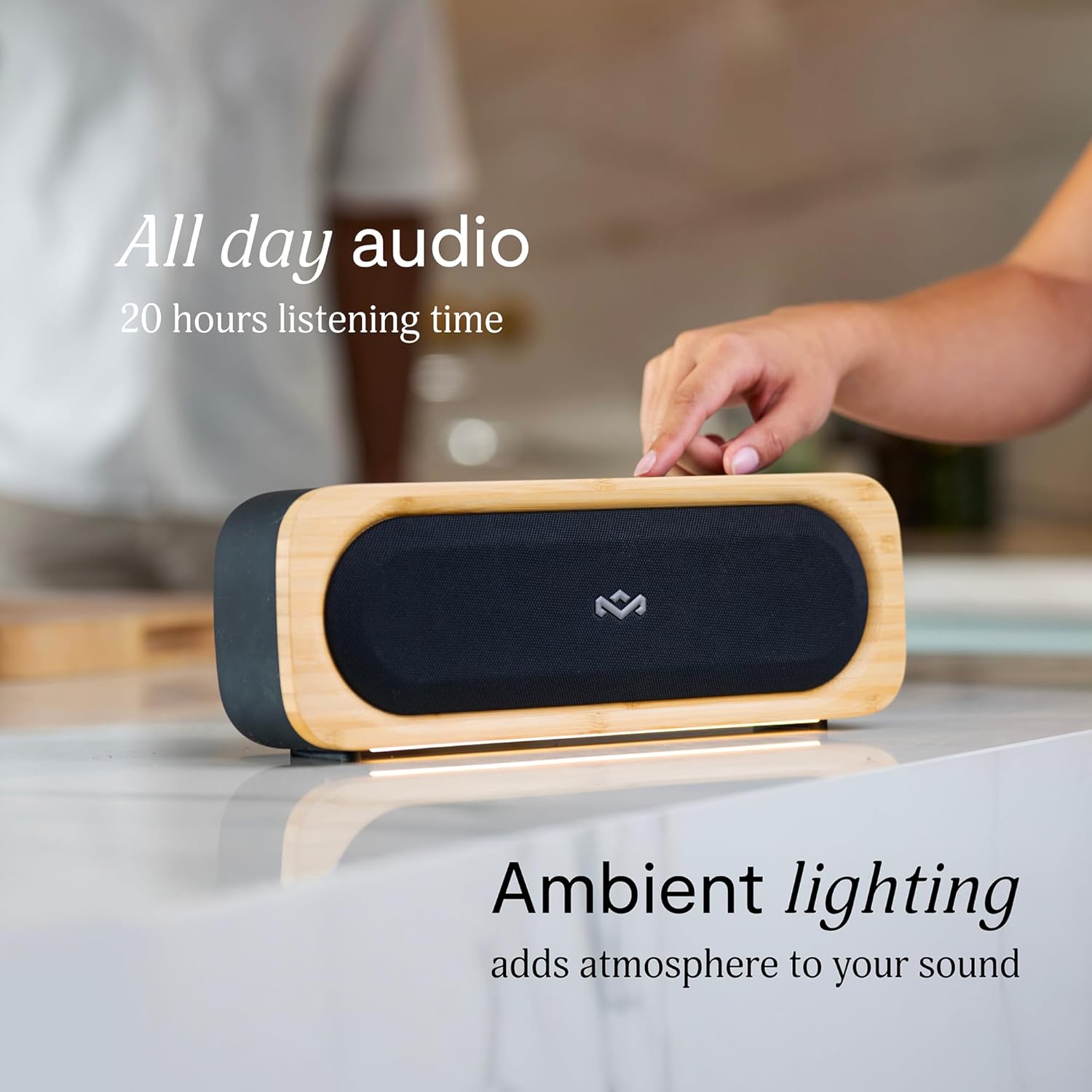
Figure 6: Speaker with ambient lighting active.
4.4 Built-in Bottle Opener
A bottle opener is integrated into the speaker's design for convenience. Locate the bottle opener on the rear or side of the speaker and use it as you would a standard bottle opener.

Figure 7: Demonstrating the use of the built-in bottle opener.
5. Nlekọta
5.1 Nhicha
- The speaker features a removable grill for easy cleaning. Gently detach the grill to clean any dust or debris from the speaker drivers.
- Jiri ihe dị nro hichaa mpụta okwu ahụamp akwa . Zere iji kemịkalụ siri ike ma ọ bụ ihe nchacha.
- Ensure the speaker is completely dry before reattaching the grill or using it near water.

Figure 8: Speaker with removable grill detached for cleaning.
5.2 Water and Dust Protection (IP67)
- The IP67 rating means the speaker is protected from dust ingress and can withstand immersion in water up to 1 meter for 30 minutes.
- Hụ na e mechiri mkpuchi ọdụ chaja nke ọma tupu i tinye igwe okwu n'ime mmiri ma ọ bụ uzuzu.
- Mgbe i jiri mmiri kpughee ya, kpoo igwe okwu ahụ nke ọma tupu ị chajie ya.
5.3 Nlekọta batrị
- For optimal battery life, avoid fully discharging the speaker frequently.
- Chekwaa ọkà okwu n'ebe dị jụụ ma kpọọ nkụ mgbe ọ naghị eji ya ogologo oge.
6. Nchọpụta nsogbu
6.1 Speaker Not Powering On
- Ensure the battery is charged. Connect the speaker to a power source and allow it to charge for at least 30 minutes before attempting to power on again.
- Press and hold the Power button for a few seconds to ensure it's not a brief press.
6.2 Okwu njikọta Bluetooth
- Hụ na ọkà okwu ahụ nọ n'ọnọdụ njikọta (ihe ngosi Bluetooth na-egbukepụ egbukepụ).
- Ensure your device's Bluetooth is enabled and within range (typically 10 meters or 33 feet).
- Try forgetting the speaker from your device's Bluetooth settings and re-pairing.
- Malitegharịa ekwentị ma ọkà okwu na ngwaọrụ Bluetooth gị.
6.3 Enweghị ụda ma ọ bụ olu dị ala
- Lelee ọkwa olu na ma ọkà okwu na ngwaọrụ gị ejikọrọ.
- Ensure the speaker is properly paired and connected to your device.
- Try playing audio from a different application or source on your device.
7. Nkọwapụta
| Njirimara | Nkọwa |
|---|---|
| Aha Nlereanya | Jikọọ gaa |
| Nọmba Nlereanya ihe | EM-JA036-SB |
| Teknụzụ Njikọta | Bluetooth |
| Ike Nwepu kacha elu | 20 Watt |
| Ogo IP | IP67 (mmiri na-egbochi uzuzu) |
| Oge egwuregwu | Ruo awa iri abụọ |
| Akụkụ ngwaahịa | 5.75"D x 16.13"W x 4.75"H |
| Ibu Ibu | 4.05 pound |
| Akụrụngwa | Renewable Bamboo, REGRIND Silicone, REWIND Fabric |
| UPC | 846885011706 |
8. Akwụkwọ ikike na nkwado
For warranty information and technical support, please refer to the official House of Marley websaịtị ma ọ bụ kpọtụrụ ndị ahịa ha ozugbo. Debe ihe akaebe nke ịzụrụ ihe maka akwụkwọ ikike.
9. Sustainability Commitment
The House of Marley Get Together Go speaker is designed with sustainability in mind, utilizing:
- Renewable Bamboo: Crafted from one of the world's fastest-growing plants.
- REWIND Fabric: Made from recycled plastic bottles for a durable finish.
- REGRIND Silicone: Produced using reclaimed and upcycled post-process and post-consumer waste.

Figure 9: Details on the sustainable materials used in the speaker's construction.


