1. Okwu mmalite
Thank you for choosing the NEEWER Basics TP14B Travel Tripod Monopod. This versatile and compact tripod is designed for photographers and videographers seeking a portable and stable support solution for cameras and smartphones. It features a 360° ball head, adjustable height, and the ability to convert into a monopod, making it ideal for various shooting scenarios.

Figure 1: NEEWER Basics TP14B Travel Tripod Monopod (folded)
Vidiyo 1: Agafeeview of NEEWER Basics 72" / 182 cm Travel Tripod Monopod features and quick setup.
2. Kedu ihe dị na Igbe ahụ
- 1 x NEEWER Basics TP14B Travel Tripod Monopod
- 1 x Onye njide ekwentị
- 1 x L-Shaped Hex Key
- 1 x Akpa na-ebu

Ọgụgụ 2: Ihe ngwugwu
3. Ngwaahịa gafereview
Familiarize yourself with the main components of your NEEWER Basics TP14B tripod.

Figure 3: Tripod Components
4. Nhazi
4.1 Ịmeghe Tripod ahụ
- Remove the tripod from its carrying bag.
- Gently spread the tripod legs outwards until they lock into one of the preset angle positions.
- Ensure all leg locks are securely fastened.
4.2 Na-edozi ịdị elu
The tripod offers adjustable height from 19 inches (48 cm) to 72 inches (182 cm).
- To extend the legs, open the flip locks on each leg section. Extend the legs to the desired height and close the flip locks securely.
- To extend the center column, loosen the center column locking knob, pull the center column upwards, and then tighten the knob to secure it.
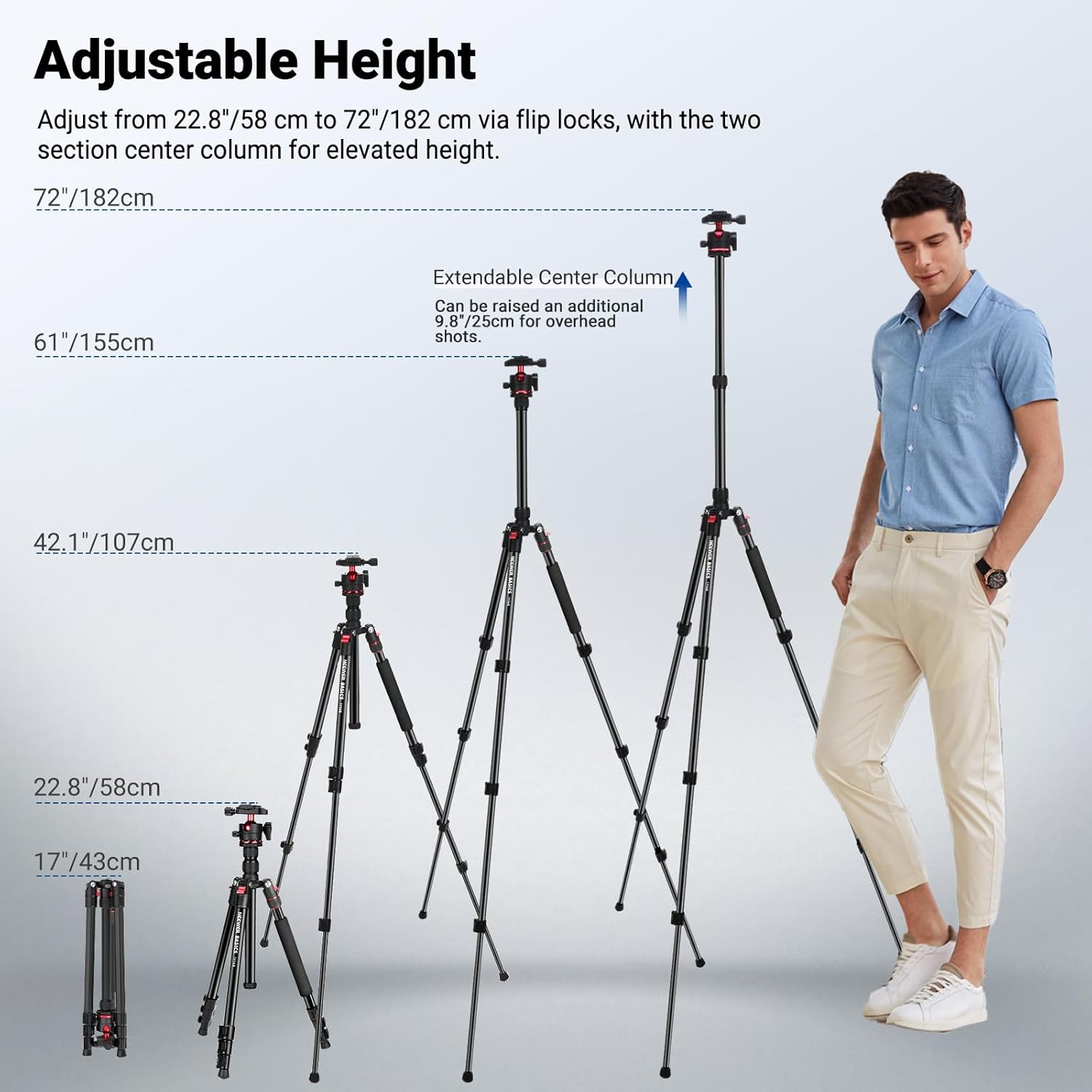
Figure 4: Adjustable Height Options
4.3 Ịtinye Ngwaọrụ Gị
- Maka igwefoto: Attach your camera to the 1/4" screw on the Arca-type quick release plate. Slide the plate into the ball head and secure it with the quick release plate locking knob.
- Maka smartphones: Attach the included phone holder to the 1/4" screw on the quick release plate. Insert your smartphone into the phone holder, ensuring it is securely gripped.
4.4 Mgbanwe Monopod
One of the tripod legs can be detached and used as a monopod.
- Locate the leg with the foam grip. Unscrew the leg from the tripod body by twisting the red ring at the top of the leg.
- Unscrew the center column with the ball head from the main tripod body.
- Attach the ball head and center column assembly to the detached leg to form a monopod.
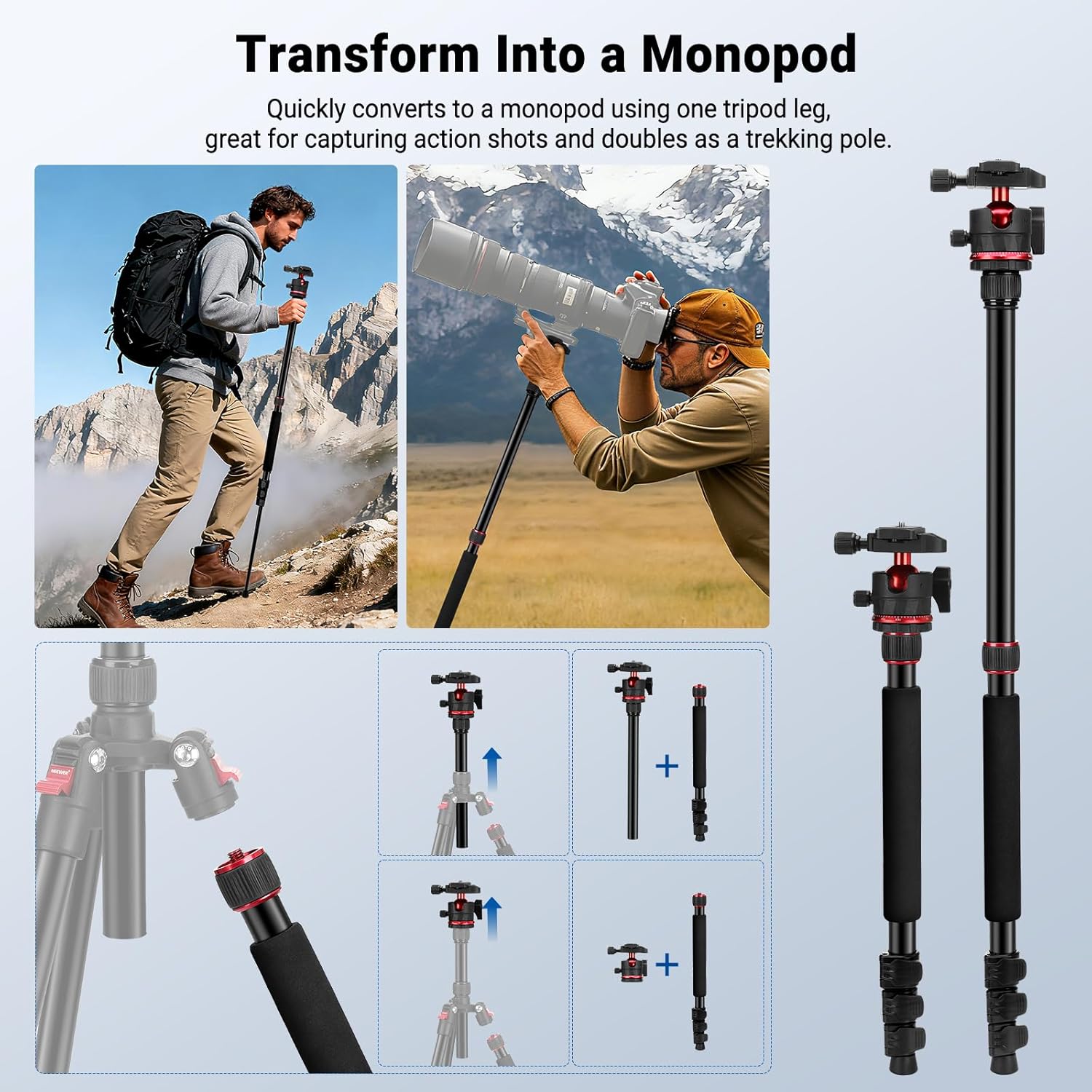
Figure 5: Monopod Conversion
5. Ntuziaka ọrụ
5.1 360° Ball Head Operation
The Arca-type ball head allows for flexible positioning of your camera.
- Akụkụ na-agbanwe: Loosen the ball head locking knob to tilt and swivel your camera. Tighten the knob to secure the desired angle.
- Mgbanwe Panoramic: Loosen the base locking knob to rotate the camera 360° horizontally for panoramic shots. The integrated leveling scale helps with precise adjustments.
- Agbapụ kwụ ọtọ: Utilize the 90° tilt notch on the ball head for quick transitions to vertical shooting.

Figure 6: 360° Ball Head Features
5.2 Leg Angle Adjustment
Each leg features an angle adjustment button, allowing you to set the legs at different angles (e.g., 24°, 57°, 86°) for stability on uneven terrain or for specific shooting perspectives.
5.3 Low Angle and Macro Shots
The center column can be inverted for extremely low-angle shots or macro photography. To do this, fully extend and remove the center column, then reinsert it upside down into the tripod body.

Figure 7: Swappable Center Columns for Versatile Shooting
6. Nlekọta
- Clean the tripod regularly with a soft, dry cloth.
- Avoid exposing the tripod to extreme temperatures or harsh chemicals.
- Ensure all locking mechanisms are free of dirt and debris for smooth operation.
- Store the tripod in its carrying bag when not in use to protect it from dust and scratches.
7. Nchọpụta nsogbu
| Nsogbu | Ngwọta |
|---|---|
| Tripod adịghị akwụsi ike. | Ensure all leg sections are fully extended and their flip locks are securely closed. Adjust leg angles for better balance on uneven surfaces. |
| Ball head movement is stiff or loose. | Check the ball head locking knob and base locking knob. Loosen to adjust, tighten to secure. Clean any debris if movement is stiff. |
| Monopod conversion difficulty. | Ensure the correct leg (with foam grip) is being detached and the center column is properly unscrewed before reassembly. |
8. Nkọwapụta
| Njirimara | Nkọwa |
|---|---|
| Nlereanya | KP14B |
| Ụdị ihe | Njem njem |
| Ndakọrịta | Igwefoto, Smartphone |
| Ngwa | Foto & Vidiyo |
| Isi atụmatụ | Flexible Center Column |
| Ebe mgbago | 1/4", Arca type |
| Isi ihe | Aluminom |
| Ibu Ibu | 13.2 lbs / 6 n'arọ |
| Ogologo kachasị elu | 72 sentimita asatọ / 182 cm |
| Ogologo kacha nta | 19 sentimita asatọ / 48 cm |
| Nha agbakọtara | 17 sentimita / 43 cm |
| Ibu Ibu | 51 Ounces / 1.45 kg |
| Ụdị isi Tripod | Ndị isi bọọlụ |
9. Akwụkwọ ikike & Nkwado
Ngwaahịa a na-abịa na a Akwụkwọ ikike nke onye nrụpụta afọ 1.
For technical support, warranty claims, or further inquiries, please visit the official NEEWER website or contact their customer service directly. You can also refer to the Ụlọ Ahịa NEEWER na Amazon maka ihe ndi ozo.


