Okwu mmalite
Thank you for choosing the HONOR Choice Earbuds Clip. These open-ear wireless headphones are designed for comfortable listening with advanced features like Bluetooth 5.2 connectivity, AI call noise cancellation, and a long-lasting battery. This manual provides detailed instructions for setup, operation, maintenance, and troubleshooting to ensure optimal performance and user experience.
Ihe ngwugwu
- HONOR Choice Earbuds Clip (Left and Right Earbuds)
- Akpa nchaji ikuku
- Igwe nchaji USB
- Akwụkwọ ntuziaka onye ọrụ
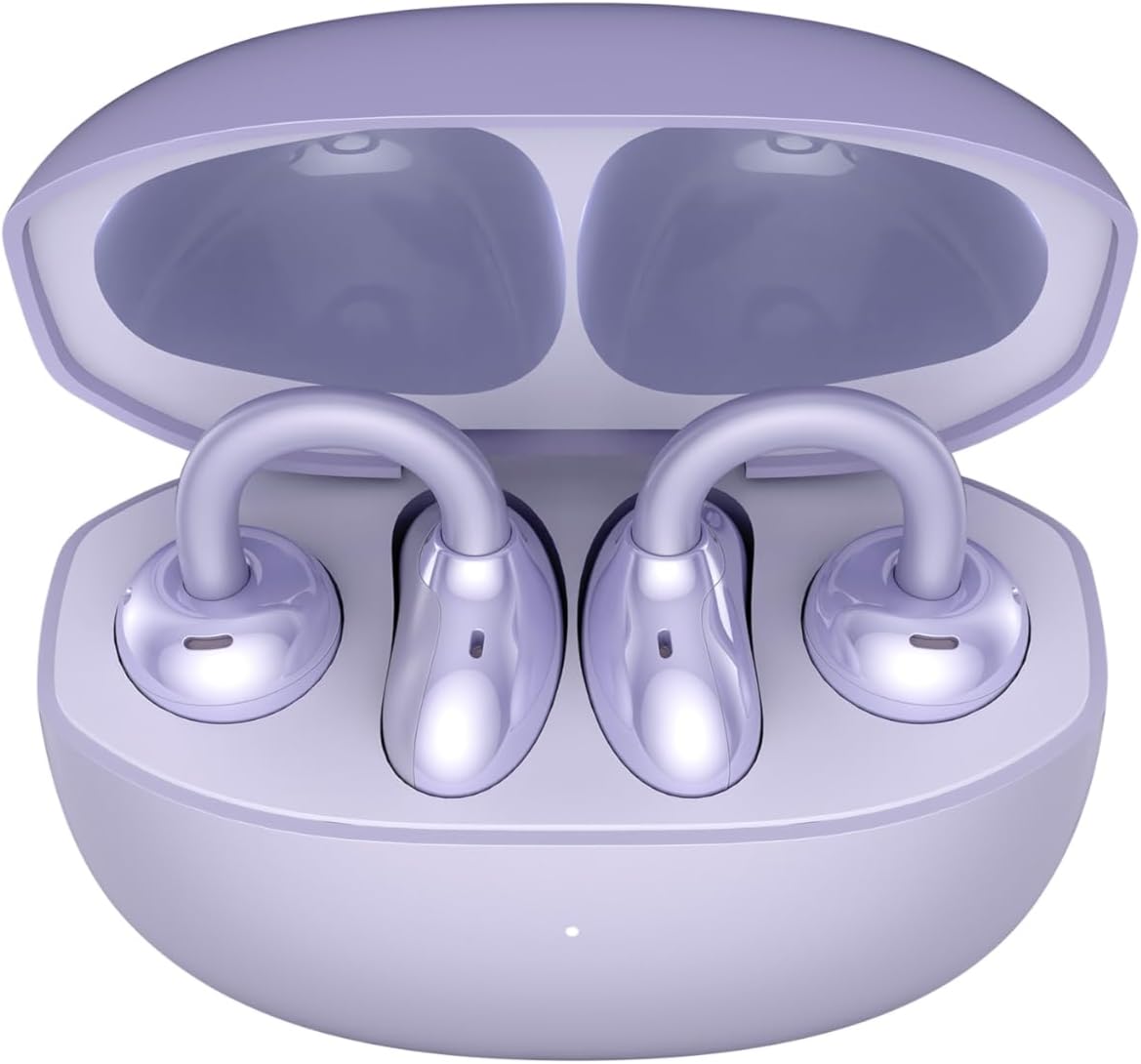
Image: The HONOR Choice Earbuds Clip, showing both earbuds inside their open charging case.
Ngwaahịa gafereview
The HONOR Choice Earbuds Clip features an innovative design and advanced technology for a superior audio experience.
Akụkụ ndị bụ isi:
- Titanium Arch Bridge Design: High-performance titanium alloy material covered with scratch and corrosion-resistant PC material for strength and lightweight comfort.
- Asymmetrical Open-Ear Design: Adapts naturally to the ear cup, combined with two rear vents for direct sound waves and reduced sound leakage.
- Dual Magnetic Driver: 10.8 mm driver with PEEK + Pen titanium-coated membrane for stronger bass, lower distortion, and higher sensitivity.
- Ndụ batrị agbatịkwuru: Up to 7 hours of single-song playback, extendable to 36 hours with the charging case.
- AI Call Noise Cancellation (DNN): Dual highly sensitive microphones intelligently filter ambient noise for crystal clear calls.
- Njikọ Bluetooth 5.2: Na-eme ka njikọ ikuku kwụsiri ike ma dị irè.
- IP54 Mgbochi mmiri: Provides protection against dust and splashes.

Image: Diagram highlighting the Titanium Alloy Arch Design of the earbuds, emphasizing comfort and aesthetics.
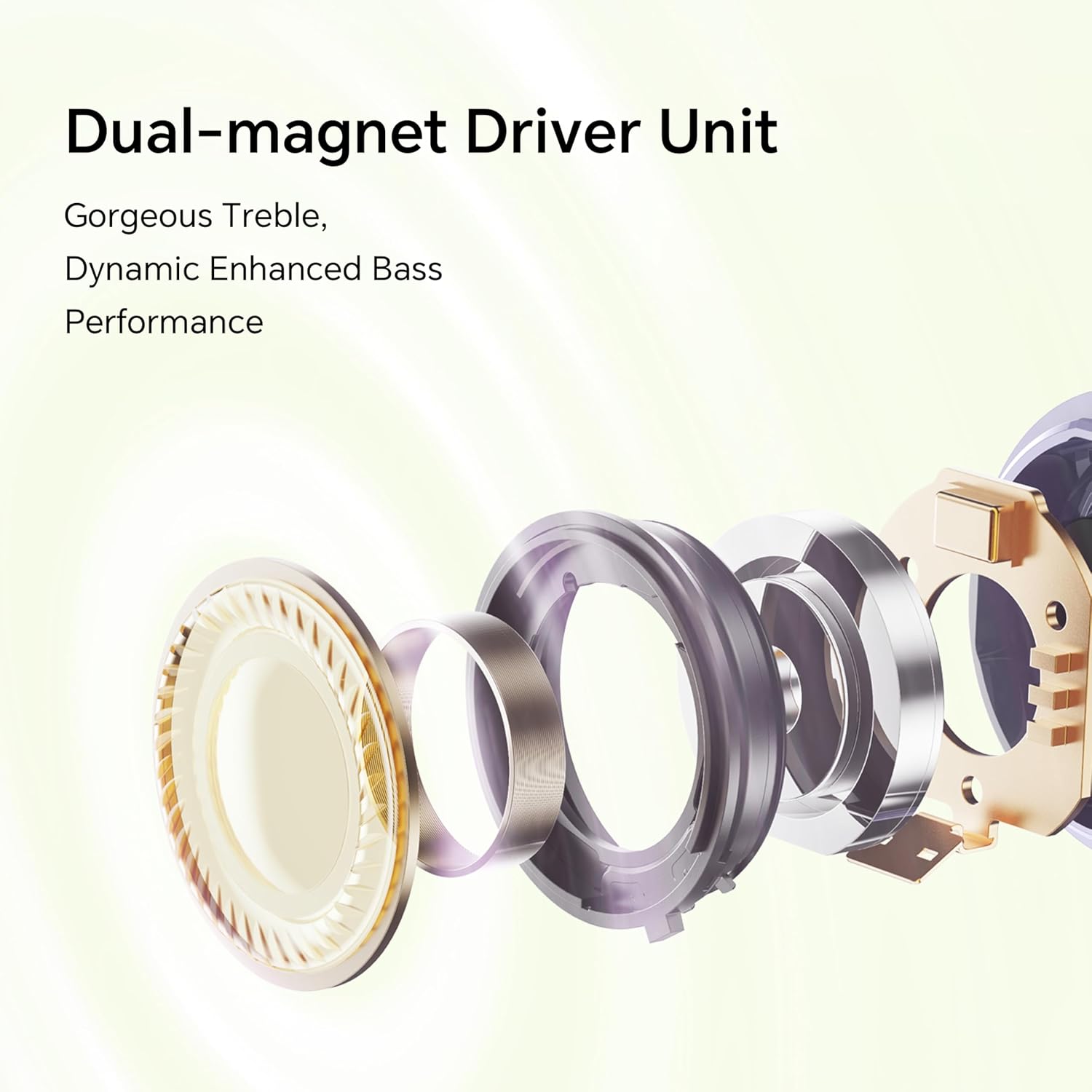
Foto: gbawara view diagram of the dual-magnet driver unit, illustrating its components for enhanced audio performance.
Melite
1. Ịchaji ihe ntị na akpa
Tupu ojiji nke mbụ, chajie nke ọma ekwe ntị na akpa nchaji.
- Tinye ntị ntị abụọ n'ime akpa chaja.
- Connect the charging case to a power source using a USB charging cable.
- The indicator light on the charging case will show the charging status. A full charge provides up to 36 hours of total listening time.

Image: Graphic illustrating the 36-hour extended battery life of the earbuds with their charging case.
2. Ijikọ na ngwaọrụ
Follow these steps to pair your HONOR Choice Earbuds Clip with your Bluetooth-enabled device.
- Gbaa mbọ hụ na ekwe ntị nọ na nchaji na mkpuchi ikpe ghe oghe.
- On your device (e.g., smartphone, laptop), go to the Bluetooth settings.
- Chọọ maka available devices and select "HONOR Choice Earbuds Clip" from the list.
- Ozugbo ejikọrọ, ị ga-anụ ngwa ngwa odiyo, na ntị ntị ga-adị njikere maka ojiji.
3. Yiri ekwe ntị
The open-ear clip design ensures a comfortable and secure fit.
- Gently clip each earbud onto your ear, ensuring the sound outlet is positioned towards your ear canal.
- Adjust for a comfortable and stable fit. The asymmetrical curve is designed to adapt naturally to the ear cup.

Image: A woman demonstrating the proper way to wear the HONOR Choice Earbuds Clip, highlighting its open clip design and natural fit.
Ntuziaka ọrụ
Njikwa mmetụ
Igwe ntị ntị na-egosipụta njikwa mmetụ mmetụ maka ijikwa ịkpọghachi ọdịyo na oku.
- Gwuo/kwụsịtụ: Otu mgbata na ntị ntị.
- Track na-esote: Pịa bọtịnụ ntị aka nri ugboro abụọ.
- Gara aga Track: Kpatụ ntị ugboro abụọ n'akụkụ aka ekpe.
- Azịza/Kwụsị Oku: Otu mgbata na ntị ntị.
- Jụ oku: Pịa ma jidesie ntị nke ọ bụla n'ime ha maka sekọnd abụọ.
- Mee ka onye enyemaka olu rụọ ọrụ: Pịa ugboro atọ na ntị ntị.
AI Call Noise Cancellation
The earbuds utilize dual microphones and an AI multi-channel call noise cancellation algorithm (DNN) to reduce ambient noise during calls, ensuring your voice is clear to the recipient. This feature is automatically active during phone calls.
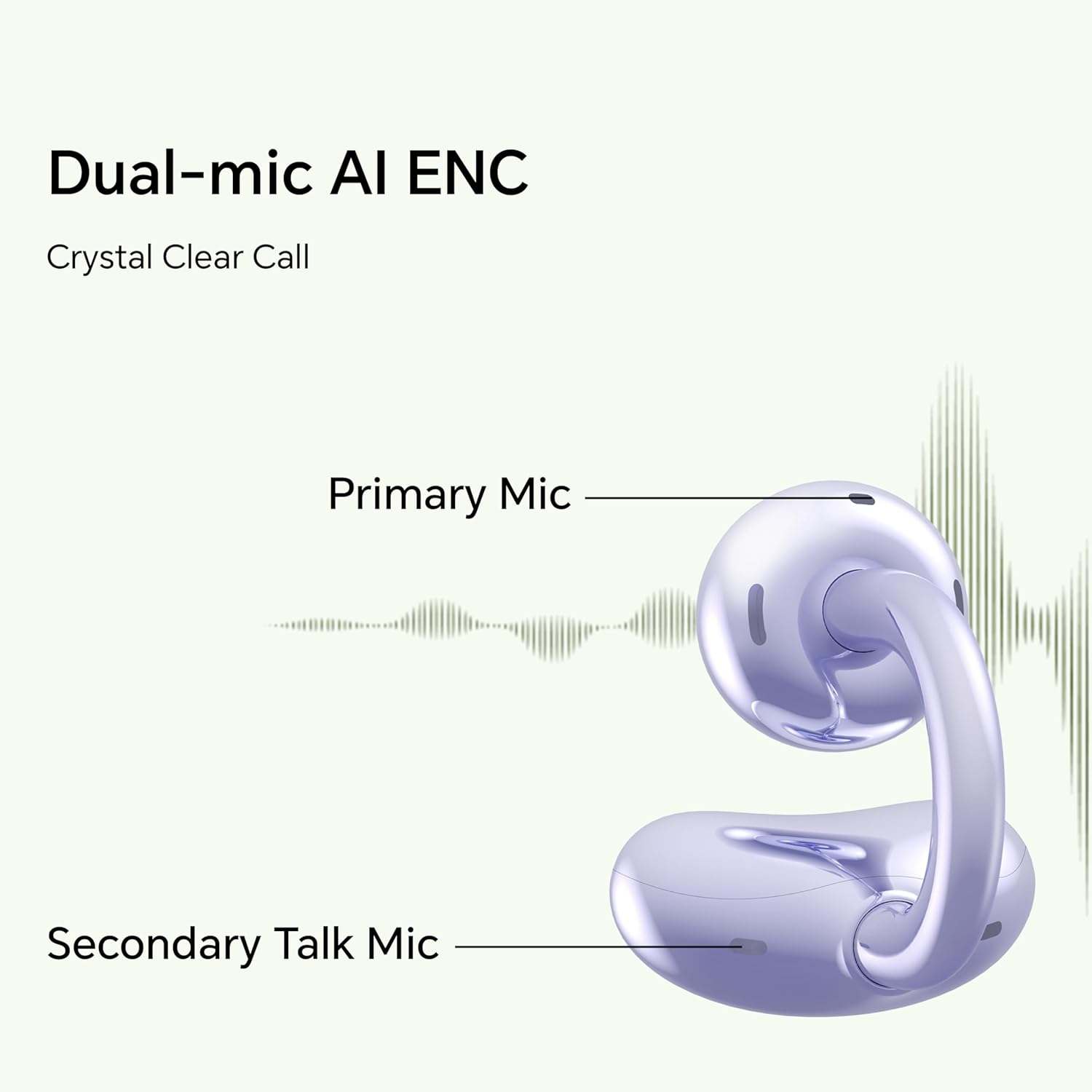
Image: Diagram illustrating the primary and secondary microphones used for AI Enhanced Noise Cancellation (ENC) during calls.
Njikọ ngwaọrụ abụọ
The HONOR Choice Earbuds Clip supports simultaneous connection to two devices. This allows for seamless switching between audio sources, such as listening to music on a laptop and answering a call on a smartphone.
- Pair the earbuds with your first device.
- Disconnect from the first device (or put earbuds back in case and re-enter pairing mode if needed).
- Jikọọ ntị ntị na ngwaọrụ nke abụọ gị.
- The earbuds will now remember both devices and automatically switch between them based on active audio or call.
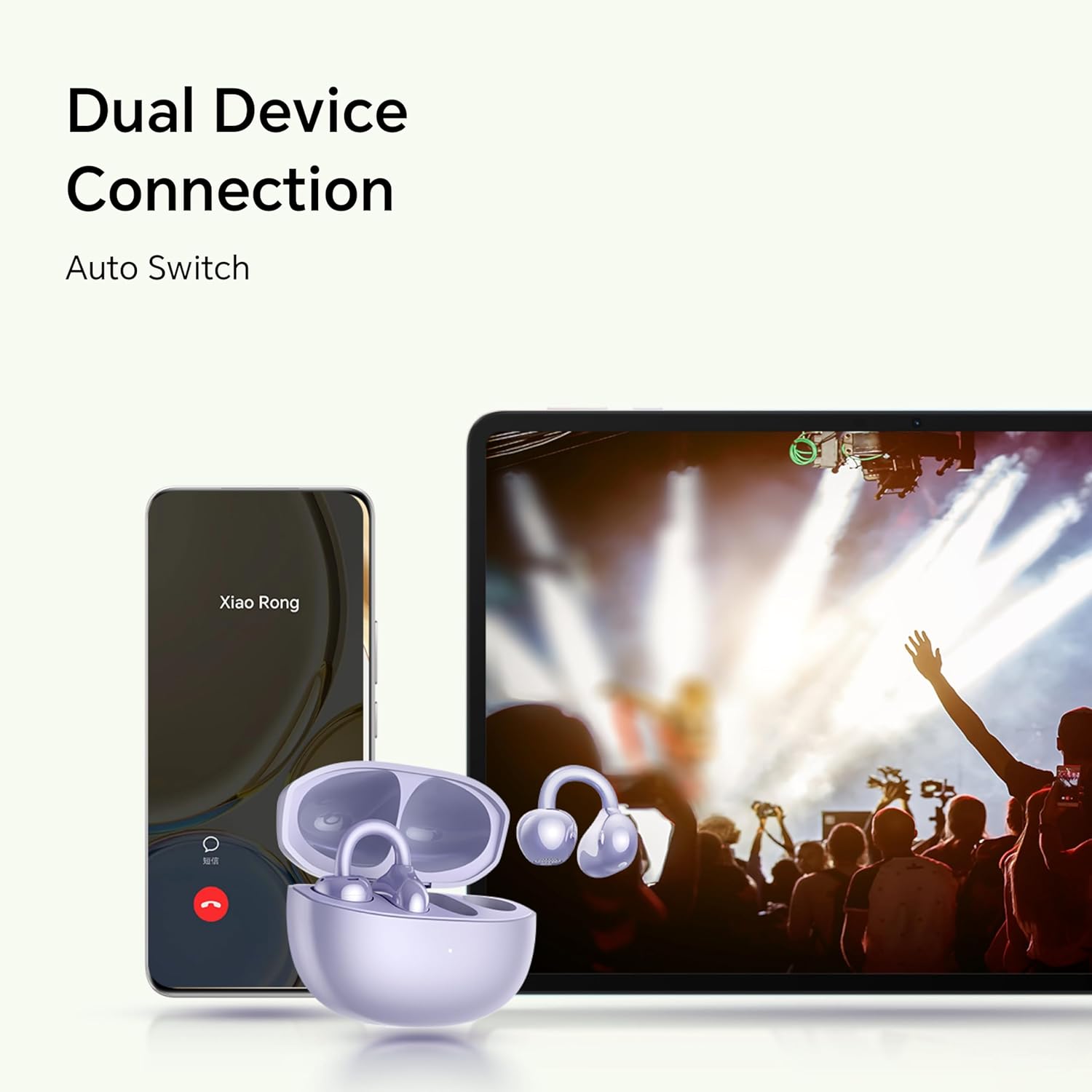
Image: Illustration showing the earbuds connected to both a smartphone and a tablet, demonstrating the dual device connection feature with automatic switching.
Nlekọta
Nlekọta kwesịrị ekwesị na-eme ka ntị ntị gị dị ogologo ma rụọ ọrụ nke ọma.
- Nhicha: Use a soft, dry, lint-free cloth to clean the earbuds and charging case. Avoid using abrasive materials or harsh chemicals.
- Nguzogide mmiri: The earbuds are IP54 rated, meaning they are protected against dust ingress and splashing water from any direction. Do not submerge them in water or expose them to heavy rain. Dry them thoroughly if they get wet.
- Nchekwa: Mgbe ị na-ejighị ya, debe ekweisi ntị n'ime akpa chaja ha iji chebe ha ma mee ka ha dị ọkụ. Debe ha n'ebe dị jụụ ma kpọọ nkụ, ebe okpomọkụ na-adịghị oke njọ.
- Kọntaktị na-akwụ ụgwọ: Periodically check and clean the charging contacts on both the earbuds and inside the case to ensure proper charging.
Nchọpụta nsogbu
If you encounter issues with your earbuds, refer to the following common solutions.
| Nsogbu | Ngwọta |
|---|---|
| Earbuds do not turn on or charge. |
|
| Earbuds do not pair with my device. |
|
| Enweghị ụda ma ọ bụ obere olu. |
|
| Ogo oku adịghị mma. |
|
| Otu ntị anaghị arụ ọrụ. |
|
Nkọwapụta
Detailed technical specifications for the HONOR Choice Earbuds Clip.
| Aha Nlereanya | KPỌRỌ EARBUds Clip |
| Nọmba nlereanya | 5504ADMY |
| Ụdị | Nsọpụrụ |
| Teknụzụ Njikọta | Ikuku (Bluetooth) |
| Ụdị Bluetooth | 5.2 |
| Ntinye ntị | Mepee Ntị |
| Ụdị Ihe | Na Ntị |
| Njikwa mkpọtụ | None (AI Call Noise Cancellation only) |
| Njirimara Pụrụ Iche | Noise Cancellation (AI Call Noise Cancellation) |
| Ụdị ọkwọ ụgbọ ala ọdịyo | Ọkwọ ụgbọala dị ike |
| Nha ọkwọ ụgbọ ala ọdịyo | 10 millimeters |
| Ndụ batrị (Earbuds) | Awa 7 (otu ụgwọ) |
| Mkpokọta ndụ batrị (ya na ikpe) | Ruo awa 36 |
| Ụdị njikwa | Njikwa aka |
| Ihe onwunwe | Titanium Alloy, Plastic |
| Ibu Ibu | 0.12 Kilogram (4.2 ounces) |
| Akụkụ ngwaahịa | 2.36 x 2.36 x 1.18 sentimita asatọ |
| Ogo IP | IP54 |
| Ngwa gụnyere | Akpa nchaji ikuku |
Akwụkwọ ikike na nkwado
For warranty information and customer support, please refer to the official HONOR website or contact your local HONOR service center. Keep your proof of purchase for warranty claims.
- Nkwado n'ịntanetị: Visit the official HONOR support website for FAQs, drivers, and software updates.
- Ozi mkpọtụrụ: Gaa na nkwakọ ngwaahịa ma ọ bụ nke gọọmentị websaịtị maka nkọwa kọntaktị ọrụ ndị ahịa.


