
Okwu mmalite
This manual provides essential information for the setup, operation, and maintenance of your Hyperkin The Competitor Wired Controller. Designed for precision and performance, this controller is compatible with Xbox Series X|S, Xbox One, and Windows PC. Please read this manual thoroughly before use to ensure optimal performance and longevity of your device.
Ihe ngwugwu
Chọpụta na ihe niile dị na ngwugwu gị:
- Hyperkin The Competitor Wired Controller
- USB-C USB nwere ike ịwepụ
- Ntuziaka mmalite ngwa ngwa
- Swappable Stick Caps (Domed & Concave)

Image: Contents of the Hyperkin The Competitor package, including the controller, cable, and documentation.
Melite
The Hyperkin The Competitor Wired Controller offers plug-and-play functionality for supported platforms.
Connecting to Xbox Series X|S or Xbox One:
- Ensure your Xbox console is powered on.
- Connect the detachable USB-C cable to the USB-C port on the top of the controller.
- Plug the USB-A end of the cable into an available USB port on your Xbox console.
- The controller will automatically connect and be ready for use.
Connecting to PC (Windows):
- Gbaa mbọ hụ na agbanyere PC gị.
- Connect the detachable USB-C cable to the USB-C port on the top of the controller.
- Plug the USB-A end of the cable into an available USB port on your PC.
- Windows will automatically detect and install the necessary drivers. The controller will be ready for use once the installation is complete.
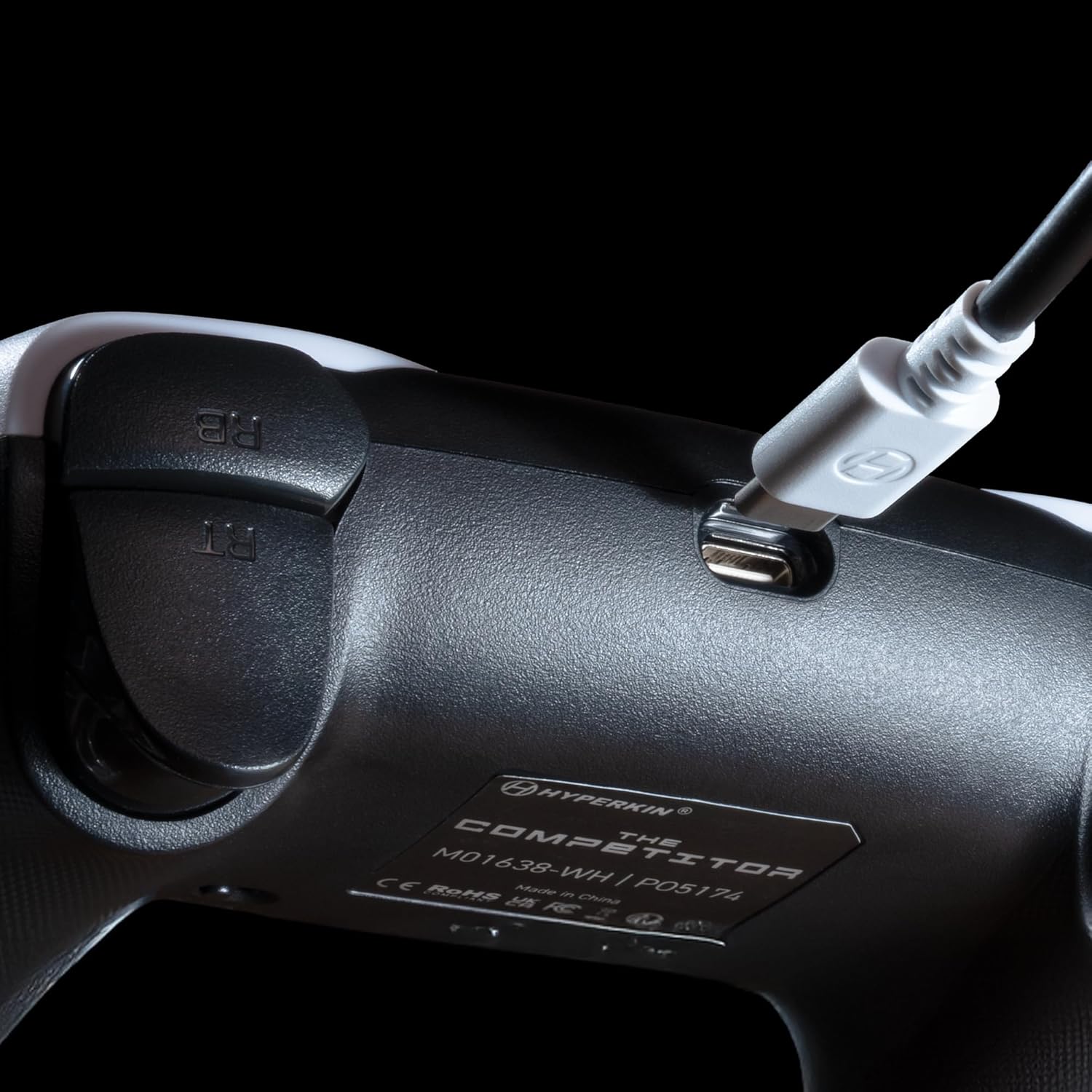
Foto: nso nso view of the USB-C port on the Hyperkin The Competitor controller, illustrating the connection point for the detachable cable.
Na-arụ ọrụ njikwa
Familiarize yourself with the key features and controls of your Hyperkin The Competitor controller.
Akụkụ ndị bụ isi:
- Joysticks mmetụta Hall: Experience drift-free accuracy and magnetic precision for ultra-smooth movement and long-lasting durability.
- Ihe na-akpata mkpali: Provides immersive and reliable haptic feedback for enhanced gameplay.
- Symmetrical Analog Stick Layout: Offers a balanced and comfortable design, supporting precision play.
- Segmented Traditional D-pad: Delivers ultra-responsive control and satisfying feedback for pinpoint accuracy.
- Bọtịnụ azụ enwere ike ịhazi: Two customizable rear buttons for on-the-fly remapping to suit your playstyle.
- Dedicated Mute Button: Quickly mute your microphone during gameplay.
- Swappable Stick Caps: Customize your feel with included Domed and Concave stick caps.
- Anti-Friction Gates & Metal Glide Rings: Engineered for ultra-smooth control and reduced wear.

Image: Diagram highlighting the Hall Effect Sticks and the Symmetrical Twin Stick Layout of the controller.

Image: Diagram illustrating the Hall Effect Impulse Triggers and the location of the programmable Back Buttons.

Foto: Zuru ezu views of the Traditional Segmented D-Pad, the interchangeable Dome and Concave stick caps, and the Metal Glide Rings.
Programming Back Buttons:
Specific instructions for programming the back buttons are typically found in the Quick Start Guide included with your product or on the Hyperkin official support website. Generally, this involves a combination of holding a program button and pressing the desired back button and the button you wish to map.
Nlekọta
Iji hụ na onye njikwa gị dị ogologo ma rụọ ọrụ nke ọma, soro ntuziaka mmezi ndị a:
- Nhicha: Jiri ákwà dị nro ma kpọọ nkụ hichaa ihe njikwa ahụ. Maka unyi siri ike, jiri obere d hichaa ya.ampen akwa na mmiri. Zere iji kemịkalụ siri ike ma ọ bụ ihe nchacha.
- Nchekwa: Chekwaa onye njikwa ahụ n'ebe dị jụụ, kpọrọ nkụ na-adịghị na ìhè anyanwụ kpọmkwem na oke okpomọkụ.
- Nlekọta USB: Avoid sharply bending or twisting the USB-C cable. Always grasp the connector, not the cable, when plugging or unplugging.
- Zere mbelata: Chebe onye njikwa ka ọ ghara ịdaba na mmetụta, nke nwere ike imebi ihe ndị dị n'ime.
Nchọpụta nsogbu
If you encounter issues with your Hyperkin The Competitor controller, try the following steps:
- Onye njikwa anaghị aza:
- Ensure the USB-C cable is securely connected to both the controller and the console/PC.
- Try plugging the controller into a different USB port.
- Malitegharịa ekwentị gị ma ọ bụ kọmputa gị.
- Test the controller on another compatible device if possible.
- Buttons/Joysticks Not Working Correctly:
- Gbaa mbọ hụ na ọ nweghị irighiri ihe dị n'akụkụ bọtịnụ ma ọ bụ joysticks.
- Perform a system update on your console or PC to ensure the latest drivers are installed.
- Ọ bụrụ na ị na-eji PC, lelee ntọala nhazi njikwa na sistemụ arụmọrụ gị.
- Audio Issues (Mic Mute Button):
- Ensure the dedicated mute button is not activated.
- Check your in-game or system audio settings.
If problems persist after attempting these steps, please contact Hyperkin customer support for further assistance.
Nkọwapụta
| Nọmba nlereanya | M01638-WH |
| Ndakọrịta | Xbox Series X|S, Xbox One, PC (Windows) |
| Njikọta | Wired (Detachable USB-C to USB-A cable) |
| Joysticks | Mmetụta Ụlọ Nzukọ |
| Ihe na-akpalite | Ihe na-akpali akpali |
| Nhazi | Symmetrical Analog Sticks |
| D-Pad | Segmented Traditional D-pad |
| Bọtịnụ | ABXY, Menu, View, Share, Xbox Guide, 2 Programmable Back Buttons, Dedicated Mic Mute Button |
| Nhazi | Swappable Stick Caps (Domed & Concave) |
| Akụkụ | 6.25 x 2.5 x 5 sentimita asatọ |
| Ibu | 15.6 ounces |
Akwụkwọ ikike na nkwado
Ozi akwụkwọ ikike:
Warranty details for the Hyperkin The Competitor Wired Controller are typically provided with your product packaging or can be found on the official Hyperkin websaịtị. Biko dowe akwụkwọ ikike ịzụrụ ihe ọ bụla.
Nkwado ndị ahịa:
For technical assistance, troubleshooting, or further inquiries, please visit the official Hyperkin support page or contact their customer service directly. Refer to the contact information provided in your product's Quick Start Guide or on the Hyperkin websaịtị.


