1. Okwu mmalite
Thank you for choosing the BrickSoul Upgrade Light Kit for your LEGO Wall-E & EVE 43279 Building Set. This kit is designed to enhance your LEGO model with integrated lighting, featuring a wired one-touch dimming switch and hidden cable technology for a clean, professional display. This manual provides comprehensive instructions for installation, operation, and maintenance to ensure a satisfying experience.
2. Ozi nchekwa
- This product is intended for users aged 14 na elu. Adult supervision is recommended for younger users.
- The light kit operates on stable 5V low-voltage. Do not connect to higher voltage ike isi mmalite.
- Debe obere akụkụ n'ebe ụmụntakịrị nọ iji gbochie ihe egwu ịkpagbu.
- Do not expose the components to water or extreme temperatures.
- Handle wires and LED components carefully to avoid damage.
- The LEGO building set is agụnyeghị with this light kit.
3. Ihe ngwugwu
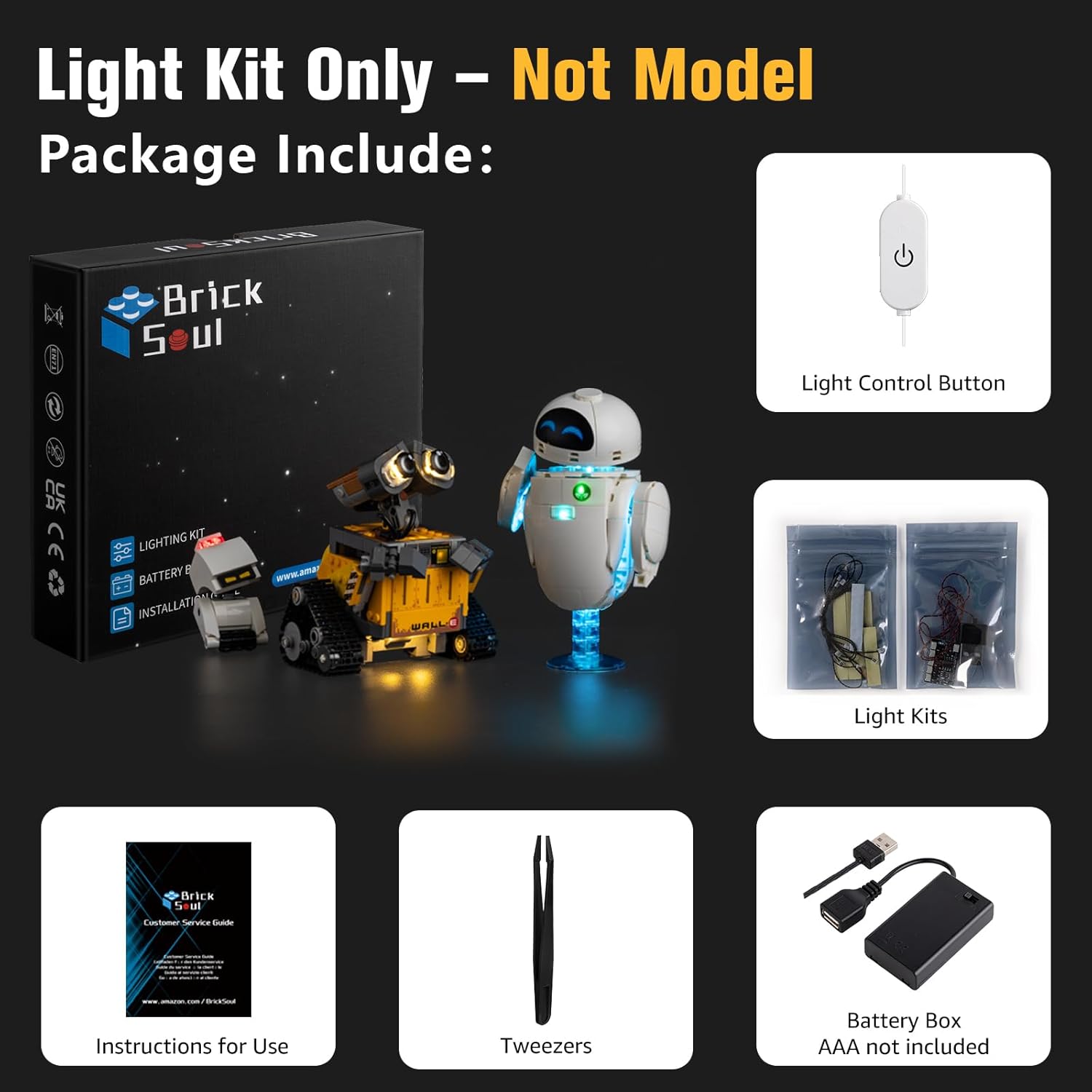
Biko chọpụta na akụrụngwa niile dị tupu ịmalite nrụnye:
- LED Light Kits (various components for Wall-E, EVE, and M-O)
- Light Control Button (wired ON/Off and dimmer switch)
- USB Power USB
- Battery Box (requires 3 AAA batteries, not included)
- Tweezers (for precise placement)
- Instructions for Use (online video or PDF)
4. Ntọala na nwụnye
The BrickSoul light kit is designed for easy and enjoyable assembly. Detailed online video or PDF instructions are available to guide you through each step. The kit includes clearly numbered light bags that correspond to the installation sequence.
4.1 General Installation Tips
- Refer to the specific online video or PDF instructions for your 43279 model for precise guidance.
- Utilize the included tweezers for placing small LED components and routing wires.
- Our upgraded cable-hiding technology features pre-routed internal channels. Ensure wires are neatly tucked away to maintain the aesthetic integrity of your model.
- Use the intuitive snap-on connectors for secure and straightforward connections.


5. Ntuziaka ọrụ
Your BrickSoul light kit features an upgraded wired one-touch dimming switch for convenient control of your illuminated LEGO model.
5.1 Powering the Light Kit
The light kit offers dual power options:
- Ike USB: Connect the included USB cable to a 5V USB power adapter (not included) or a USB port on a computer/power bank.
- Igbe batrị: Insert 3 AAA batteries (not included) into the battery box and connect it to the light kit.
5.2 Using the Dimmer Switch
- Gbanye/ Gbanyụọ: Press the button on the light control switch briefly to turn the lights ON or OFF.
- Gbanwee ihie: When the lights are ON, hold down the button to cycle through brightness levels (0% to 100%). Release the button when the desired brightness is reached.


5.3 Video ngwaahịa
6. Nlekọta
- Nhicha: Use a soft, dry cloth to gently wipe dust from the LED components and wires. Avoid using liquid cleaners.
- Nchekwa: When not in use for extended periods, disconnect the power source (unplug USB or remove batteries). Store the model in a cool, dry place away from direct sunlight.
- Nyocha waya: Periodically check wires for any signs of wear or damage. If damage is found, discontinue use and contact customer support.
7. Nchọpụta nsogbu
| Nsogbu | Ihe nwere ike ime | Ngwọta |
|---|---|---|
| Ọkụ anaghị agbanwu. | No power, loose connection, or dead batteries. | Ensure USB cable is securely connected to a working power source or replace AAA batteries in the battery box. Check all wire connections. |
| Ọkụ na-ada ada ma ọ bụ na-egbuke egbuke. | Low battery power or insufficient power from USB source. | Replace batteries or try a different USB power adapter/port. Ensure the dimmer switch is set to the desired brightness. |
| Some lights are not working. | Loose connection or damaged LED/wire. | Carefully inspect the connections for the non-working lights. If a component is damaged, contact customer support. |
| Wires are visible or messy. | Improper wire routing during installation. | Refer to the online installation guide to re-route wires through the designated hidden channels. |
8. Nkọwapụta
- Akara: BrickSoul
- Ụdị: 43279 Touch Dimmer + Hidden Wires Version
- Ihe: Plastic
- Ntinye ike: 5V DC (via USB cable or 3 AAA batteries)
- Ibu ihe: Ihe dị ka 0.3 Pound (4.8 ounce)
- Akụkụ ngwaahịa: 6.36 x 4.32 x 1.33 inch (nkwakọ ngwaahịa)
- Nkwanye afọ: Afọ 14 na karịa
- Atụmatụ pụrụ iche: Non-Toxic, Wired One-Touch Dimmer Switch, Hidden Cable Design
9. Akwụkwọ ikike na nkwado
BrickSoul is committed to your satisfaction. We provide responsive customer support to swiftly resolve any questions or issues you may encounter.
- 1-Year Hassle-Free Support: Enjoy peace of mind with our dedicated support for one year from the date of purchase.
- Free & Fast Replacement: In case of any manufacturing defects or issues, we offer free and fast replacements.
- Efficient Problem-Solving: Our team is ready to assist you with any installation or operational challenges.
For assistance, please contact BrickSoul customer support through the platform where you purchased the product or visit our official websaịtị.


