1. Okwu mmalite
The FiiO K13 R2R is a high-fidelity desktop Digital-to-Analog Converter (DAC) and Headphone Amplifier designed to deliver exceptional audio performance. It features a proprietary 24-bit R2R DAC, powerful output capabilities, versatile connectivity, and advanced sound customization options. This manual provides essential information for setting up, operating, and maintaining your FiiO K13 R2R.
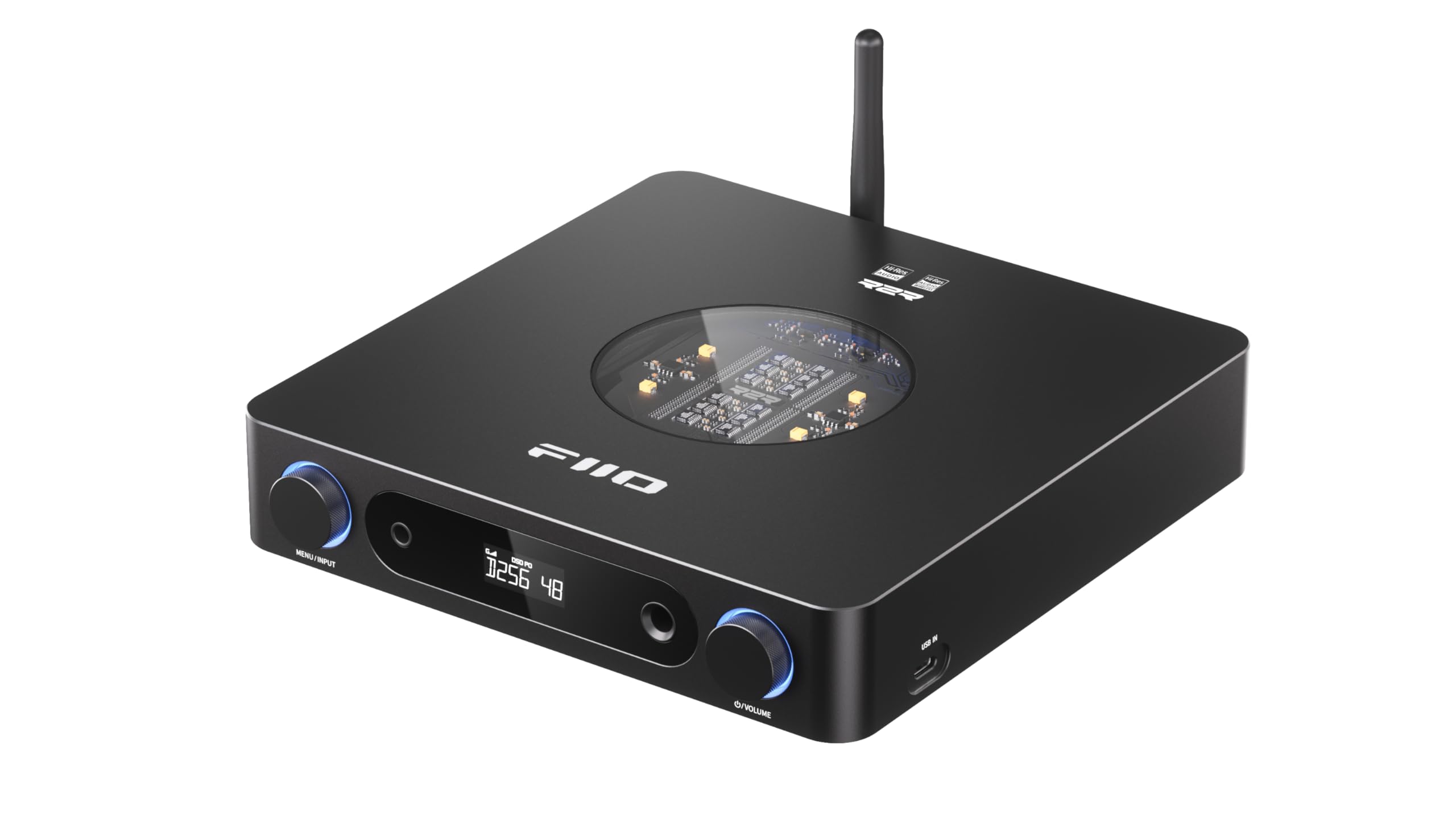
Figure 1: FiiO K13 R2R Desktop DAC & Headphone Amp (ojii)
Key features include a fully differential 24Bit R2R DAC, NOS/OS dual modes for flexible listening, versatile desktop DAC and preamp/ ekweisi amp functionality, 10-band high-precision PEQ with auto EQ, and LDAC Bluetooth 5.4 wireless HiFi support.
2. Kedu ihe dị na Igbe ahụ
Please check the contents of your FiiO K13 R2R package:
- Ntuziaka mmalite ngwa ngwa
- AC power cord*1
- Infrared remote control*1
- USB data USB * 1
- Headphone adapter*1

Figure 2: Package contents of the FiiO K13 R2R.
3. Ngwaahịa gafereview
Ogwe ihu
The front panel of the FiiO K13 R2R features essential controls and output ports for easy access and operation.

Foto 3: N'ihu view of the FiiO K13 R2R, showing the display, headphone outputs, and control knobs.
- Menu/Input Knob: Rotate to navigate menus or adjust settings. Press to confirm selection or switch input sources.
- Ngosipụta ihuenyo: Shows current input, sampling rate, volume level, and menu options.
- 6.35mm Single-Ended Headphone Output: Standard headphone jack.
- Mmepụta Ekweisi Nhazi 4.4mm: Balanced headphone jack for enhanced audio performance.
- Mpịakọta Mpịakọta: Gbanwee iji gbanwee olu mmepụta.
Ogwe azụ
The rear panel provides a comprehensive array of input and output connections for integration into various audio systems.

Ọgụgụ 4: N'azụ view of the FiiO K13 R2R, detailing the various input and output ports.
- Balanced XLR Output (L/R): For connecting to balanced amplifiers ma ọ bụ ndị na-ekwu okwu na-arụ ọrụ.
- RCA Line Out (L/R): For connecting to unbalanced amplifiers ma ọ bụ ndị na-ekwu okwu na-arụ ọrụ.
- Ntinye Coaxial: Ntinye ọdịyo dijitalụ.
- Ntinye anya: Ntinye ọdịyo dijitalụ.
- USB IN (Type-C): For connecting to a computer or other USB audio sources.
- DC IN (12V): External DC power input option.
- AC Power Input (100-240V): Main power connection.
- Antenna Bluetooth: For wireless Bluetooth reception.
Internal Architecture Highlights
The FiiO K13 R2R incorporates advanced internal components for superior audio fidelity.

Figure 5: Diagram illustrating the fully differential 24Bit R2R DAC resistor arrays.
- Fully Differential 24Bit R2R DAC: Composed of 192 ultra-precise 0.1% thin-film resistors for a unique analog-like timbre.
- Specially-designed DC/AC Dual Power Supplies: Built-in 30W switching power supply with alloy nickel-plated shielding, plus an external DC power input option for cleaner power.
- ELNA RA3 Audiophile-grade Electrolytic Capacitors: Ensures a pure, stable power supply for warm and natural sound.
- Fully Balanced Audio AmpCircuit iwu: Utilizes fully differential signal processing for excellent interference rejection, minimal distortion, and high dynamic range.
4. Nhazi
Njikọ Ike
- Connect the provided AC power cord to the AC Power Input on the rear panel of the K13 R2R.
- Plug the other end of the AC power cord into a suitable wall outlet.
- Alternatively, for an external DC power supply, connect a 12V-2.5A (or greater) supply with a 5.5*2.1mm connector to the DC IN port.
Njikọ ọdịyo
Choose the appropriate connection method based on your audio source and output devices.
- Njikọ USB: Connect your computer or other USB audio source to the USB IN (Type-C) port using the provided USB data cable.
- Njikọ anya/Coaxial: Connect your digital audio source (e.g., CD player, TV) to the Optical Input or Coaxial Input ports.
- Mmepụta ekweisi: Connect your headphones to either the 6.35mm Single-Ended or 4.4mm Balanced Headphone Output on the front panel. Use the provided adapter if necessary.
- Mpụta akara: Connect the Balanced XLR Output or RCA Line Out to your amplifier ma ọ bụ ndị na-ekwu okwu na-arụ ọrụ.
Njikọ Bluetooth
The FiiO K13 R2R supports high-resolution Bluetooth 5.4 streaming.
- Ensure the Bluetooth antenna is securely attached to the rear panel.
- Power on the FiiO K13 R2R.
- Press the Menu/Input knob to cycle through input modes until 'BT' (Bluetooth) is selected on the display.
- On your mobile device or Bluetooth player, enable Bluetooth and search for available devices.
- Select 'FiiO K13 R2R' from the list to pair. Once connected, the display will indicate a successful Bluetooth connection.
Video 1: This video demonstrates Bluetooth receiver functionality using a similar FiiO product (K9 Pro). The pairing process for the K13 R2R is similar.
5. Ntuziaka ọrụ
Isi ọrụ
- Gbanyụọ/ Gbanyụọ: Press the power button (usually integrated with the Menu/Input knob or a dedicated button) to turn the device on or off.
- Njikwa olu: Rotate the Volume Knob on the front panel to adjust the output volume for headphones or line outputs.
- Nhọrọ ntinye: Press the Menu/Input knob to cycle through available input sources (USB, Optical, Coaxial, Bluetooth). The selected input will be shown on the display.
NOS/OS Dual Modes
The K13 R2R offers two distinct operating modes for audio processing:

Figure 6: Illustration of NOS (Non-Oversampling) and OS (Oversampling) modes.
- NOS (Non-Oversampling) Mode: Preserves the original sampling rate for a pure, natural, and organic sound.
- OS (Oversampling) Mode: Agbali eluamples audio to 384kHz for improved audio metrics, delivering finer and clearer sound.
- To switch between modes, navigate through the device's menu using the Menu/Input knob.
10-Band High-Precision PEQ
Customize your sound with the integrated 10-band Parametric Equalizer (PEQ).

Ọgụgụ 7: Ọpụample of the 10-band high-precision PEQ interface.
- The PEQ can be accessed and customized via the FiiO Control app or a web interface.
- Adjust 10 frequency bands to tailor the sound to your preference or correct headphone response.
- Access presets like vintage PEQ or share EQ profiles.
6. Nlekọta
- Nhicha: Jiri ákwà dị nro ma kpọọ nkụ hichaa mpụta nke ngwaọrụ ahụ. Zere iji ihe nhicha mmiri ma ọ bụ ihe mgbaze.
- Nchekwa: Chekwaa ngwaọrụ ahụ n'ebe dị jụụ, kpọrọ nkụ na-adịghị na ìhè anyanwụ kpọmkwem na oke okpomọkụ.
- Ijikwa: Handle the device with care to prevent damage from drops or impacts.
7. Nchọpụta nsogbu
- Enweghị mpụta ụda:
- Check all cable connections (power, input, output) are secure.
- Ensure the correct input source is selected on the K13 R2R.
- Gbaa mbọ hụ na edobeghi ọkwa olu ka ọ dị obere ma ọ bụ mechie ya.
- Test with different headphones or speakers to isolate the issue.
- Okwu njikọ Bluetooth:
- Ensure the K13 R2R is in Bluetooth pairing mode.
- Move your mobile device closer to the K13 R2R to improve signal strength.
- Forget the device on your mobile device's Bluetooth settings and attempt to re-pair.
- Audio gbagọrọ agbagọ:
- Lelee ogo isi iyi ọdịyo.
- Ensure the volume is not set too high, causing clipping.
- Verify that the correct sampling rate is being used.
8. Nkọwapụta
| Njirimara | Nkọwapụta |
|---|---|
| Nọmba nlereanya | K13 R2R |
| Ụdị DAC | FiiO Self-Developed Fully Differential 24Bit R2R DAC |
| Ike mmepụta | Powerful 2400mW Output |
| Ụdị Bluetooth | Bluetooth 5.4 (LDAC, AAC, SBC codecs) |
| Nkwado ngbanwe | PCM 384kHz/32bit, DSD256 |
| Ihe nha nhata | 10-Band High-Precision PEQ |
| Nsonaazụ | XLR Balanced Line Out, Dual RCA Outputs, 4.4mm Balanced Headphone Out, 6.35mm Single-Ended Headphone Out |
| Ịnye ọkụ | Dual Power Supply (Built-in 30W, External DC 12V-2.5A option) |
| Ibu Ibu | 3.24 pound |
| Akụkụ ngwugwu | 12.24 x 9.53 x 2.52 sentimita asatọ |
9. Akwụkwọ ikike na nkwado
For warranty information, technical support, and further assistance, please refer to the official FiiO websaịtị ma ọ bụ kpọtụrụ ndị ahịa ha ozugbo. Debe akwụkwọ nnata ịzụrụ maka akwụkwọ ikike.
FiiO gọọmentị Websaịtị: www.fiio.com


