1. Okwu mmalite
The DOOGEE Note56X Pro is an Android 16 smartphone designed for optimal performance and user experience. It features a sleek design, a powerful octa-core processor, a high-capacity battery, and advanced camera capabilities. This manual provides essential information for setting up, operating, and maintaining your device.

This image displays the DOOGEE Note56X Pro smartphone in light blue and black, showcasing ọkachamara ya mara mmafile and key features such as its 8.45mm ultra-thin design, 6150mAh silicon-carbon battery, integrated Gemini AI with Android 16, 128GB expandable ROM, and a 6.56-inch HD+ 90Hz display.
2. Kedu ihe dị na Igbe ahụ
Chọpụta na ihe niile dị na nkwakọ ngwaahịa gị:
- 1 x DOOGEE Note56X Pro Smartphone
- 1 x eriri nchaji
- 1 x chaja
- 1 x Ihe nchekwa ihuenyo ( etinyere ya nke ọma)
- 1 x SIM Card Ejection Tool
- 1 x Okwu nchekwa
- 1 x Igbe nkwakọ ngwaahịa
- 1 x Akwụkwọ ntuziaka onye ọrụ
- 1 x Kaadị ọrụ
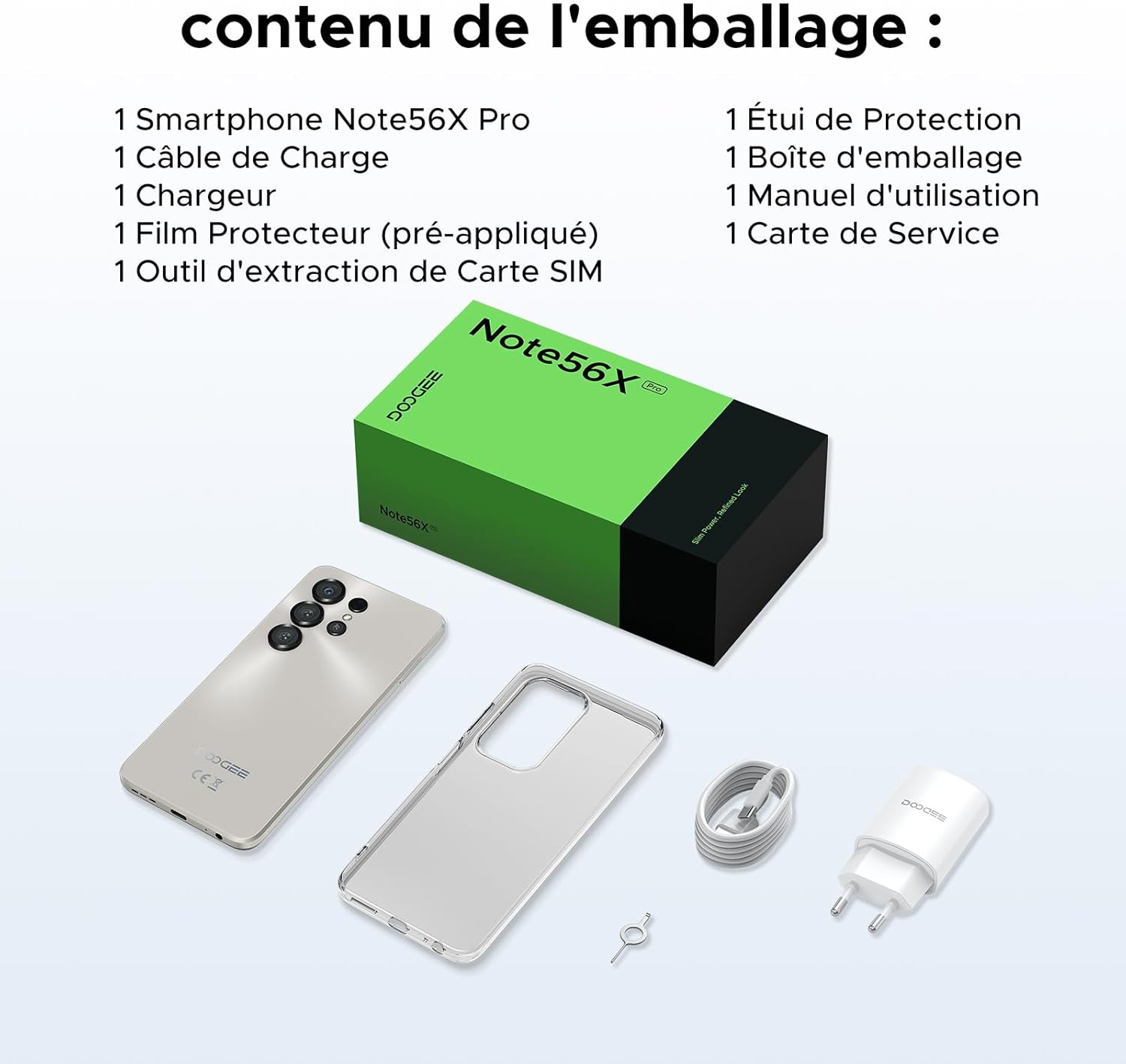
This image shows the contents included in the DOOGEE Note56X Pro packaging: the smartphone, a charging cable, a charger, a pre-applied screen protector, a SIM card ejection tool, a protective case, the packaging box, a user manual, and a service card.
3. Mmalite
3.1. Ịtinye kaadị SIM
The DOOGEE Note56X Pro supports Dual SIM functionality. To insert your SIM card(s):
- Chọta tray kaadị SIM n'akụkụ ngwaọrụ ahụ.
- Use the provided SIM ejection tool to open the tray.
- Tinye kaadị Nano-SIM gị na/ma ọ bụ kaadị microSD gị n'ime tray ahụ ka ihe ndị e ji ọlaedo mee na-eche ihu ala.
- Jiri nlezianya pịa tray ahụ n'ime oghere ahụ ruo mgbe ọ ga-adaba na ngwaọrụ ahụ.
3.2. Ịgbanye / gbanyụọ
- Iji gbanye: Pịa ma jide bọtịnụ ike ruo mgbe akara DOOGEE pụtara.
- Iji gbanyụọ: Press and hold the Power button until the power options appear on the screen, then select "Power off".
- Ka Malitegharịa ekwentị: Press and hold the Power button until the power options appear, then select "Restart".
3.3. Mbido Mbido
Ozugbo agbanyere ya na mbụ, soro ntuziaka ndị dị na ihuenyo iji mezue ntọala mbụ:
- Họrọ asụsụ gị.
- Jikọọ na netwọk Wi-Fi.
- Jiri akaụntụ Google gị banye ma ọ bụ mepụta nke ọhụrụ.
- Set up screen lock (PIN, pattern, password, fingerprint, or Face ID).
- Review ma nabata usoro na ọnọdụ.
4. Ijikwa ngwaọrụ gị
4.1. Ngosipụta
The Note56X Pro features a 6.56-inch HD+ IPS Waterdrop display with a 90Hz refresh rate, offering smooth visuals and vibrant colors. The 90% screen-to-body ratio provides an immersive viewahụmahụ.

This graphic highlights the display features of the DOOGEE Note56X Pro, including a 90Hz refresh rate for smooth visuals, support for 16.7 million colors, and a 90% screen-to-body ratio for an immersive viewahụmahụ.
A brief video demonstrating the smooth gaming experience on the DOOGEE Note56X Pro's 6.56-inch HD+ 90Hz display, showing responsive gameplay.
4.2. Arụmọrụ
Powered by an UNISOC T7225 Octa-Core processor, the Note56X Pro ensures fluid multitasking and efficient application launch. It comes with 32GB of RAM (4GB physical + 28GB virtual) and 128GB of internal storage, expandable up to 2TB via a TF card (sold separately).

This image presents a technical diagram of the UNISOC T7225 Octa-Core processor, highlighting its 1.8 GHz high frequency and Mali G57 ARM GPU, ensuring smooth performance for web browsing, online learning, and chats.

This graphic illustrates the memory configuration of the DOOGEE Note56X Pro, featuring 32GB RAM (4GB physical + 28GB virtual) and 128GB ROM, expandable up to 2TB with a TF card (sold separately), providing ample ohere maka ngwa na mgbasa ozi.
A short video highlighting the internal components of the DOOGEE Note56X Pro, specifically the Octa-Core UNISOC T7225 processor and the 32GB RAM (4GB + 28GB virtual) and 128GB ROM configuration.
4.3. Batrị
Equipped with a 6150mAh Silicon-Carbon battery, the Note56X Pro offers extended usage time and supports 5W reverse charging. The battery is designed for durability, with up to 1000 charge/discharge cycles and an estimated 4-year lifespan.

A detailed diagram showing the internal structure of the 6150mAh Silicon-Carbon battery within the DOOGEE Note56X Pro, emphasizing its extended endurance, 1000 charge/discharge cycles, 4-year lifespan, 20% reduced size, and 5W reverse charging capability.
Ihe ngosi vidiyo dị mkpirikpiasing the sleek design, vertical lens arrangement, ultra-thin 8.45mm body, lightweight 195g build, and available colors (Midnight Black, Glacier Blue, Titanium Grey Mist) of the DOOGEE Note56X Pro.
4.4. Igwefoto
Capture clear and vibrant photos with the Note56X Pro's camera system:
- Igwefoto isi: 13MP with AI recognition, HDR, Pro Mode, Smile Capture, Panoramas, Burst Mode, Night Mode, and Fun Filters.
- Igwefoto ihu: 8MP with Beauty Mode and Portrait Mode for natural selfies.

This graphic highlights the features of the 13MP main camera on the DOOGEE Note56X Pro, including AI recognition, HDR, Pro Mode, Smile Capture, Panoramas, Burst Mode, Night Mode, and Fun Filters, illustrated with a landscape photo taken by the phone.

This image showcases the 8MP front camera features of the DOOGEE Note56X Pro, including Beauty Mode and Portrait Mode, designed to simplify photography and produce bright, natural selfies.

This graphic details the intelligent features of the Google Smart Camera on the DOOGEE Note56X Pro, such as displaying search results, text extraction and translation, homework analysis, plant and animal identification, and online search capabilities.
4.5. Njikọta
The device supports 4G cellular networks, Wi-Fi, Bluetooth 5.0, and NFC for secure contactless payments. It also includes GPS for precise navigation and OTG functionality for connecting external devices.
4.6. Nchekwa atụmatụ
The Note56X Pro offers multiple security options to protect your data:
- NJ ihu: Unlock your phone using facial recognition.
- Nchọpụta akara mkpịsị aka: A side-mounted fingerprint sensor provides quick and secure access.
- Standard PIN, Pattern, and Password options are also available.
4.7. Operating System and AI
Running on Android 16, the Note56X Pro provides an intuitive and secure user experience. It integrates Google Gemini AI, offering intelligent assistance for various tasks.

A visual representation of the Android 16 operating system interface on the DOOGEE Note56X Pro, showcasing various application icons and a clean, intuitive user experience.

This image shows the Google Gemini AI chat interface on the DOOGEE Note56X Pro, demonstrating its capability for planning vacations, discussing current events, and practicing interview ajụjụ.
5. Nkọwapụta
| Njirimara | Nkọwapụta |
|---|---|
| Ụdị | DOOGEE |
| Aha Nlereanya | Note56X Pro |
| Sistemụ nrụọrụ | Android 16 |
| Nha ihuenyo | 6.56 sentimita asatọ |
| Mkpebi ihuenyo | 720 x1612 |
| Ọnụego ume ọhụrụ | 90 Hz |
| Nhazi | UNISOC T7225 Octa-isi |
| Ogo RAM arụnyere | 32 GB (4GB anụ ahụ + 28GB mebere emebere) |
| Ike Nchekwa ebe nchekwa | 128 GB (A pụrụ ịgbasa ruo 2TB) |
| Ụdị batrị | Lithium-polymer |
| Ike batrị | 6150 mAh |
| Teknụzụ ekwentị | 4G |
| Onye na-ebu ikuku | Ndị na-ebuga ihe niile (Emegheela) |
| Njikọta | Wi-Fi, Bluetooth 5.0, NFC |
| Atụmatụ pụrụ iche | Dual SIM, Integrated GPS, USB OTG Support, Face ID, Fingerprint Recognition |
| Jack ọdịyo | 3.5 mm |
| Akụkụ (ọkpụrụkpụ) | 8.45 mm |
| Ibu | 195 g |

Akụkụ view of the DOOGEE Note56X Pro, emphasizing its ultra-thin 8.45mm profile and lightweight 195g construction, designed for easy portability and comfortable handling throughout the day.

This image displays the DOOGEE Note56X Pro in its available elegant colors: Midnight Black, Titanium Grey Mist, and Glacier Blue, showcasing the aesthetic options for the device.
6. Nlekọta
To ensure the longevity and optimal performance of your DOOGEE Note56X Pro, follow these maintenance guidelines:
- Nhicha: Jiri akwa dị nro na-enweghị lint hichaa ihuenyo na ahụ. Zere ihe na-emebi emebi ma ọ bụ kemịkalụ siri ike.
- Mmelite ngwanrọ: Regularly check for and install system updates to benefit from the latest features, security patches, and performance improvements. Go to Ntọala> Sistemu> Mmelite sistemụ.
- Nlekọta batrị: Avoid extreme temperatures. Do not let the battery completely drain frequently. Use the original charger for optimal charging.
- Njikwa nchekwa: Na-ekpochapụ oge ụfọdụ na-adịghị mkpa files and uninstall unused apps to free up storage space and maintain device speed.
- Nchedo: Use the provided protective case and screen protector to guard against scratches and minor impacts.
7. Nchọpụta nsogbu
If you encounter issues with your DOOGEE Note56X Pro, try the following solutions:
- Ngwaọrụ anaghị agbanwu: Gbaa mbọ hụ na agbagoro batrị. Jikọọ chaja wee chere nkeji ole na ole tupu ị nwaa ịgbanye ọzọ.
- Ihuenyo anaghị anabata: Force restart the device by pressing and holding the Power button for about 10-15 seconds.
- Ngwa ndị na-emebi/na-eme ka oyi gbụpụta: Hichapụ ebe nchekwa nke ngwa nwere nsogbu (Ntọala> Ngwa> [Aha ngwa]> Nchekwa & cache> Kpochapụ cache). If the issue persists, uninstall and reinstall the app.
- Ndụ batrị adịghị mma: Check background app usage (Ntọala > Batrị). Reduce screen brightness, disable unused features like Wi-Fi, Bluetooth, GPS when not needed.
- Okwu Njikọta netwọkụ: Toggle Airplane Mode on and off. Restart the device. Check SIM card insertion. Reset network settings (Ntọala> Sistemu> Nhọrọ Tọgharia> Tọgharia Wi-Fi, mkpanaka & Bluetooth).
- Mkpisiaka/Njirimara Ihu Anaghị arụ ọrụ: Ensure your fingers are clean and dry for fingerprint scanning. For Face ID, ensure adequate lighting and that your face is clearly visible to the front camera. Re-register your fingerprint or face if necessary.
- Ịrụ ngwa ngwa: Close unused background apps. Clear cache and temporary files. Consider a factory reset as a last resort (Ntọala> Sistemu> Nhọrọ Tọgharia> Hichapụ data niile (ntọgharị ụlọ ọrụ) - Mara: Nke a ga-ehichapụ data niile dị na ekwentị gị. Buru ụzọ kwado ozi dị mkpa.).
8. Akwụkwọ ikike na nkwado
Your DOOGEE Note56X Pro comes with a 24-month warranty and a 30-day return policy. For any questions or assistance, please contact DOOGEE customer service via Amazon. Our dedicated support team is available to help you.

This image displays DOOGEE's customer service commitments: a 30-day money-back and free return guarantee, a 2-year limited warranty, and 24/7 online individual assistance.


