1. Okwu mmalite
Thank you for choosing the pTron Bassbuds Trendz Open Ear Wireless Earbuds. These earbuds are designed to provide a comfortable and pressure-free listening experience while keeping you aware of your surroundings. Featuring 14.2mm dynamic drivers, Bluetooth v6.0 connectivity, and AI-ENC for clear calls, these earbuds offer up to 45 hours of total playtime with the charging case. This manual provides detailed instructions for setup, operation, and maintenance to ensure optimal performance.
2. Ihe ngwugwu
- pTron Bassbuds Trendz Open Ear Wireless Earbuds
- Nchaji case
- USB Type-C Nchaji USB
- Akwụkwọ ntuziaka onye ọrụ
3. Ngwaahịa gafereview
The pTron Bassbuds Trendz feature an open-ear design for comfort and situational awareness. They are equipped with advanced audio and connectivity technologies.

Image: pTron Bassbuds Trendz Open Ear Wireless Earbuds and their charging case.
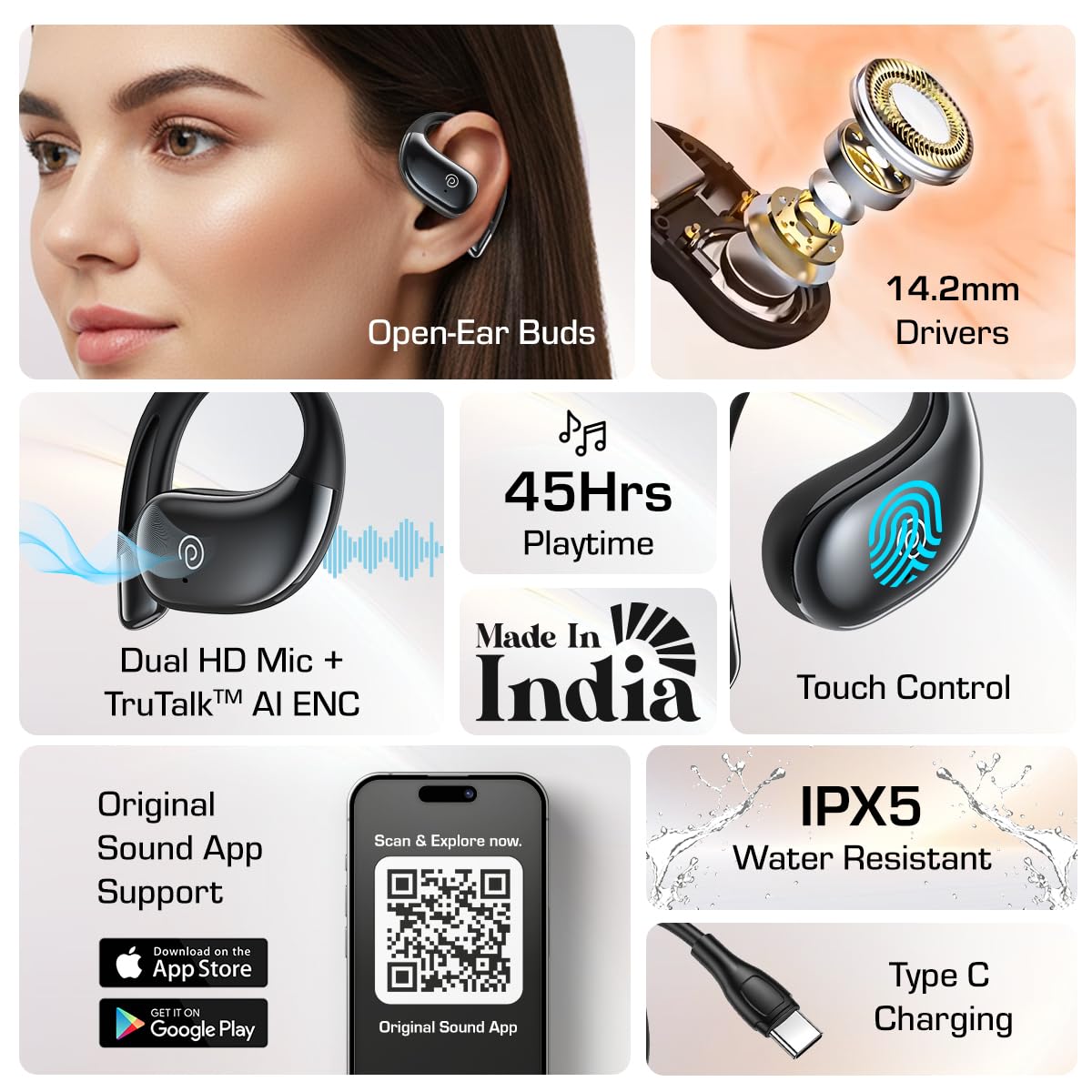
Foto: Ofeview of key features including open-ear design, 14.2mm drivers, 45 hours playtime, Dual HD Mic, Touch Control, App Support, IPX5 water resistance, and Type-C charging.
3.1. SafeBeats Open-Ear Design
The SafeBeats design ensures a comfortable and pressure-free fit, allowing you to remain aware of your surroundings during use, which is ideal for outdoor activities.

Image: A person wearing the pTron Bassbuds Trendz, highlighting the open-ear design for safe listening.
3.2. Audio Drivers
Each earbud is equipped with a 14.2mm dynamic driver, engineered to deliver clear stereo sound quality. For the best audio experience and minimal sound leakage, it is recommended to keep the volume between 60%-70%.

Foto: Ihe gbawara view illustrating the internal components of the 14.2mm dynamic driver.
4. Nhazi
4.1. Ịchaji ihe ntị na akpa
Before first use, fully charge the earbuds and the charging case. Use the provided Type-C USB cable to connect the charging case to a power source. The earbuds will charge automatically when placed inside the case.
- Ndụ batrị: The earbuds offer up to 45 hours of total playtime with the charging case.
- Ngosipụta chaja: Refer to the LED indicators on the case for charging status.

Image: A visual representation of the 45-hour total playtime provided by the earbuds and their charging case.
4.2. Ijikọ na ngwaọrụ
The pTron Bassbuds Trendz utilize Bluetooth v6.0 for quick and stable wireless connectivity.
- Gbaa mbọ hụ na ebubo na ekwe ntị.
- Mepee igbe nchaji. Igwe ntị ga-abanye na ọnọdụ njikọta na-akpaghị aka.
- Na ngwaọrụ gị (smartphone, mbadamba, laptọọpụ), gbanye Bluetooth.
- Chọọ maka available Bluetooth devices and select "pTron Bassbuds Trendz" from the list.
- Ozugbo ejikọrọ, ị ga-anụ ngwa ngwa odiyo, na ọkụ egosi earbuds ga-agbanwe.

Image: A close-up graphic highlighting the advanced Bluetooth V6.0 chip for quick and stable wireless connection.
5. Ntuziaka ọrụ
5.1. Aka njikwa
The earbuds feature intuitive touch controls for managing audio playback, calls, and voice assistant functions.
- Gwuo/kwụsịtụ: Otu mgbata na ntị ntị.
- Track na-esote: Pịa bọtịnụ ntị aka nri ugboro abụọ.
- Gara aga Track: Kpatụ ntị ugboro abụọ n'akụkụ aka ekpe.
- Azịza/Kwụsị Oku: Otu mgbata na ntị ntị.
- Jụ oku: Pịa ma jide otu ntị ntị maka sekọnd 2.
- Mee ka onye enyemaka olu rụọ ọrụ: Pịa ugboro atọ na ntị ntị.
5.2. Call Management with AI-ENC
The Bassbuds Trendz are equipped with Dual HD Microphones and AI-ENC (Environmental Noise Cancellation) technology to ensure crystal-clear calls by reducing background noise.

Image: A person making a call with the earbuds, illustrating the TruTalk AI-ENC feature for clear communication.
5.3. Original Sound App Support
Enhance your listening experience by downloading the 'Original Sound' app. The app allows you to customize touch controls, choose or create sound EQs, and switch between game and music modes.

Image: A smartphone screen displaying the 'Original Sound' app interface with a QR code for easy download. Scan the QR code or visit ptron.in/pages/original-sound-app ibudata.
6. Nlekọta na nlekọta
- Nhicha: Jiri akwa dị nro na-ehicha ihe ntị ntị na chaja mgbe niile. Zere iji kemịkalụ siri ike ma ọ bụ ihe na-emebi emebi.
- Nguzogide mmiri: The earbuds are IPX5 water resistant, meaning they can withstand splashes and sweat. Do not submerge them in water or expose them to heavy rain.
- Nchekwa: Chekwaa ntị ntị n'akpa chaja ha mgbe anaghị eji ya iji chebe ha ma debe ya ebubo.
- Okpomọkụ: Zere ikpughe ekwe ntị na oke okpomọkụ (ọkụ ma ọ bụ oyi) n'ihi na nke a nwere ike imetụta ndụ batrị yana ịrụ ọrụ.
7. Nchọpụta nsogbu
- Igwe ntị anaghị ejikọta: Ensure both earbuds are charged and out of the case. Turn off and on your device's Bluetooth, then try pairing again. If issues persist, reset the earbuds (refer to the app or pTron support for specific reset instructions).
- Enweghị ụda sitere na otu ntị ntị: Place both earbuds back in the charging case, close it, then open it again. Ensure they are properly connected to your device.
- Nsogbu ịchaji: Check the Type-C cable and power adapter. Ensure the charging contacts on the earbuds and inside the case are clean and free of debris.
- Ogo oku na-adịghị mma: Ensure the earbuds are positioned correctly. Check for strong Bluetooth signal. Use the 'Original Sound' app to verify settings.
- Njikwa mmetụ anaghị anabata: Gbaa mbọ hụ na mkpịsị aka gị dị ọcha ma kpọọ nkụ. Gbalịa ịmalitegharị igwe ntị site na itinye ya na akpa ahụ wee bupụ ya ọzọ.
8. Nkọwapụta
| Njirimara | Nkọwapụta |
|---|---|
| Aha Nlereanya | Bassbuds Trendz |
| Teknụzụ Njikọta | Ikuku (Bluetooth) |
| Ụdị Bluetooth | 6.0 |
| Oke Bluetooth | 10 mita |
| Ụdị ọkwọ ụgbọ ala ọdịyo | Ọkwọ ụgbọala dị ike |
| Nha ọkwọ ụgbọ ala ọdịyo | 14.2 Millimita |
| Ndụ batrị | Awa 45 (ya na igbe nchaji) |
| Usoro njikwa | Metụ aka |
| Igwe okwu | Dual HD Mic with AI-ENC |
| Ọkwa Nguzogide mmiri | IPX5 |
| Ihe onwunwe | Acrylonitrile Butadiene Styrene (ABS) |
| Ibu Ibu | 57 grams |
| Akụkụ ngwaahịa | 8.5 x 6 x 2.8 cm |
9. Akwụkwọ ikike na nkwado
The pTron Bassbuds Trendz come with a Akwụkwọ ikike nrụpụta ọnwa 6 on manufacturing defects from the date of purchase.
For customer support, inquiries, or warranty claims, please contact:
- Onye nrụpụta: PALRED ELECTRONICS PVT. LTD.
- Kọntaktị nlekọta ndị ahịa: 040-67138888
- Nkwado email: Support@ptron.in


