Okwu mmalite
Thank you for choosing the POSEIDON Wireless Tattoo Machine Kit PTK207-FR. This comprehensive kit is designed for both professional tattoo artists and beginners, offering advanced features for precision and flexibility. This manual provides detailed instructions for setup, operation, maintenance, and troubleshooting to ensure optimal performance and longevity of your device.
Ihe ngwugwu
Your POSEIDON Wireless Tattoo Machine Kit PTK207-FR includes 77 pieces, ensuring you have everything needed to begin. Please verify all items are present:
- 1 x High-Performance Wireless Tattoo Machine
- 2 x 2300 mAh High-Capacity Batteries
- 20 x Assorted Tattoo Cartridge Needles (5x1205RL, 5x1207RL, 5x1209RS, 5x1207CM)
- Ejide
- Stencil Paper
- Ink Set (11 bottles)
- Ink Cups
- Table Mats
- 3mm Practice Skin
- USB-C eriri USB
- Other essential accessories

Image: Complete POSEIDON Wireless Tattoo Machine Kit contents.
Njirimara ngwaahịa
- Total Wireless Freedom: Advanced wireless design eliminates tangled cables and power limitations, offering ultimate mobility.
- Adjustable Stroke Settings: Features 7 precise stroke settings (2.4 mm to 4.2 mm) to adapt to various techniques including lining, shading, and intricate details.
- Ụdị ọrụ dịgasị iche iche: Seamlessly switch between Normal mode (standard operation) and Stippling mode (precise dot work/stippling) for fine lines, soft shading, realism, and geometric patterns.
- Dual 2300 mAh Batteries with Fast Charging: Provides 5 to 8 hours of wireless tattooing per charge. Two long-lasting batteries with USB-C fast charging ensure uninterrupted sessions.
- Integrated Session Timer & LED Screen: A built-in digital timer with a bright LED screen helps track session duration, manage client appointments, and optimize workflow. Adjustable voltage in 9 levels (4-12V ±0.1V).

Image: Multifunction LED screen displaying operational data.
Melite
1. Ịchaji batrị
- Gbaa mbọ hụ na chajịrị batrị nke ọma tupu ejie ya mbụ.
- Connect the provided USB-C charging cable to the battery's charging port and to a suitable USB power adapter (not included).
- The LED screen will indicate charging status. A full charge typically takes approximately 2 hours.
- Each fully charged battery provides 5-8 hours of operation.

Image: Dual 2300 mAh batteries with charging information.
2. Attaching the Cartridge Needle
- Carefully unpackage a sterile tattoo cartridge needle.
- Insert the cartridge needle into the machine's grip, twisting gently until it locks securely into place.
- Ensure the needle is firmly seated to prevent movement during operation.

Image: Assorted tattoo cartridge needles.
3. Adjusting the Stroke
- The machine features 7 adjustable stroke lengths from 2.4mm to 4.2mm.
- Rotate the grip or the designated adjustment ring on the machine body to select your desired stroke length.
- Refer to the markings on the machine for precise adjustment.

Image: Adjustable stroke length mechanism.
Ntuziaka ọrụ
1. Gbanyụọ / gbanyụọ
- To power on, press and hold the power button until the LED screen illuminates.
- Iji gbanyụọ ọkụ, pịa ma jide bọtịnụ ike ahụ ọzọ ruo mgbe ihuenyo ahụ gbanyụrụ.
2. Na-edozi Voltage
- Use the '+' and '-' buttons on the machine to adjust the voltage.
- Voltage can be adjusted in 9 levels, ranging from 4V to 12V, with 0.1V increments.
- Nke ugbu a voltage will be displayed on the LED screen.
3. Switching Operating Modes (Normal/Stippling)
- The machine supports Normal and Stippling modes.
- Press the 'M' button to toggle between these modes. The active mode will be indicated on the LED screen.
- Normal mode is suitable for general lining and shading.
- Stippling mode provides precise dot work for detailed textures and effects.
4. Using the Session Timer and Memory Modes
- The integrated LED screen displays a session timer, allowing you to track the duration of your work.
- The machine also features 3 memory modes (M1, M2, M3) to save your preferred voltage and mode settings for quick recall.
- Consult the full product manual for detailed instructions on setting and recalling memory modes.
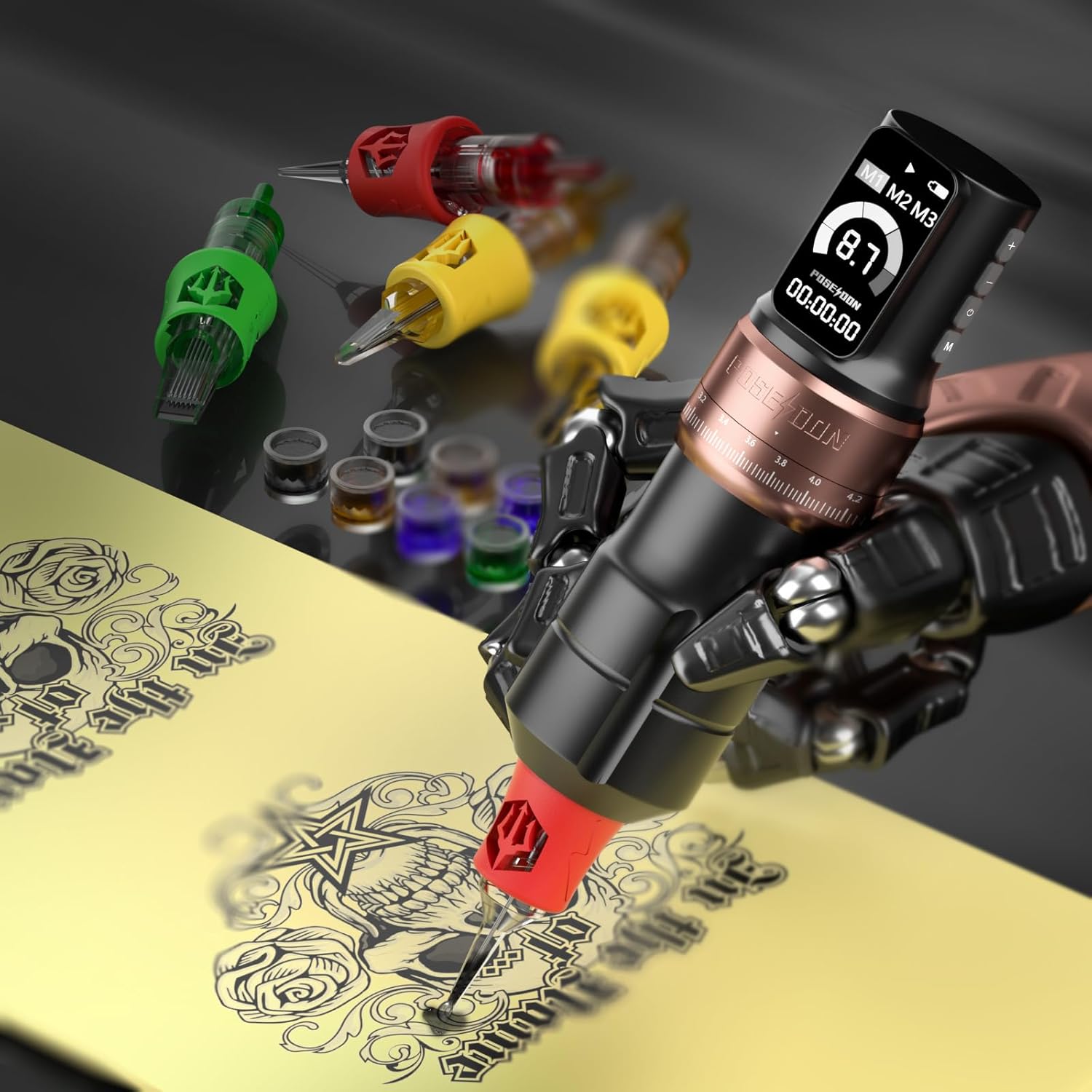
Image: Wireless tattoo machine in operation.
Nlekọta
1. Na-ehicha igwe
- Kpupu batrị mgbe niile tupu ihicha.
- Wipe the machine body with a clean, damp cloth and a mild, non-abrasive disinfectant.
- Do not immerse the machine in liquid. The machine is not waterproof.
- Ensure all surfaces are dry before reattaching the battery or storing.
2. Nlekọta batrị
- Zenarị chaja karịa ma ọ bụ igbapu batrị kpamkpam.
- Chekwaa batrị n'ebe dị jụụ, kpọrọ nkụ na-adịghị na ìhè anyanwụ kpọmkwem na oke okpomọkụ.
- If not in use for an extended period, charge the batteries to approximately 50% capacity before storage.
3. Nchekwa
- Store the tattoo machine and its components in the original packaging or a protective case when not in use.
- Debe ebe ụmụaka na anụ ụlọ na-apụghị iru.
Nchọpụta nsogbu
| Nsogbu | Ihe nwere ike ime | Ngwọta |
|---|---|---|
| Igwe anaghị agbanwuo | Batrị agwụla ma ọ bụ na ejikọtaghị ya nke ọma. | Charge the battery fully. Ensure the battery is securely attached to the machine. |
| Inconsistent needle movement | Needle cartridge not properly seated or damaged. Low battery. | Ensure the needle cartridge is securely locked. Replace with a new cartridge if damaged. Charge the battery. |
| Igwe na-ekpo oke ọkụ | Ojiji na-aga n'ihu ruo ogologo oge. | Allow the machine to cool down. Use the dual battery system to swap batteries and let one rest. |
| LED screen not responding | Ngwa ngwa glitch ma ọ bụ obere batrị. | Restart the machine. Ensure the battery is charged. If the issue persists, contact customer support. |
Nkọwapụta
| Njirimara | Nkọwa |
|---|---|
| Ụdị | POSEIDON |
| Nọmba nlereanya | PTK207-FR (TK207-FR) |
| Ụdị batrị | Lithium-polymer |
| Ike batrị | 2 x 2300 mAh |
| Nrụ ọrụ Voltage | 4-12V (9 adjustable levels, ±0.1V) |
| Stroke Lengths | 2.4mm, 2.7mm, 3.0mm, 3.3mm, 3.6mm, 3.9mm, 4.2mm (7 settings) |
| Nchaji ọdụ ụgbọ mmiri | USB-C |
| Oge ịkwụ ụgwọ | Ihe ruru. awa 2 |
| Oge ọrụ | 5-8 hours per battery |
| Ụdị arụ ọrụ | Normal, Stippling |
| Ngosipụta | LED Screen (Voltage, Battery, Timer, Mode) |
| Number of Pieces in Kit | 77 |
| Ọkwa Nguzogide mmiri | Ọ bụghị ihe mgbochi mmiri |
| Akụkụ ngwugwu | 26.7 x 21.3 x 11.2 cm |
| Ibu ngwugwu | 1.2 kilogram |
| UPC | 716597329942 |
Akwụkwọ ikike na nkwado
For warranty information and customer support, please refer to the documentation included with your purchase or contact the retailer where the product was acquired. Keep your proof of purchase for any warranty claims.


