1. Okwu mmalite
This manual provides detailed instructions for the setup, operation, and maintenance of your BTFO 0.01Hz-100000Hz Schumann Sine Wave Resonance Generator. This device is designed to emit adjustable frequencies, including the 7.83Hz Schumann Resonance, for various applications such as sleep support, meditation, yoga, and electronic equipment testing.
Please read this manual thoroughly before using the device to ensure proper function and longevity.
2. Ihe ngwugwu
Nyochaa na etinyere ihe niile edepụtara n'okpuru na ngwugwu gị:
- 1 x Schumann Resonance Generator with magnetic acrylic case
- 1 x eriri USB
- Akwụkwọ ntuziaka onye ọrụ 1 x (akwụkwọ a)

Figure 2.1: Package contents including the generator and USB cable. The generator measures 16x11cm, and the USB cable is 100cm long.
3. Akụrụngwa Ngwaahịa
- Nhazi na-adịgide adịgide & nke enwere ike ibugharị: Features a magnetic acrylic case for protection and a lightweight, compact size (16x11cm) for easy placement and transport. Operates on USB power with ultra-low energy consumption (<1W).
- Schumann Resonance Technology: Emits the 7.83Hz natural Earth frequency, known for supporting sleep onset, deeper rest, and refreshed mornings.
- Ogologo oge zuru oke: Offers precise adjustable frequencies from 0.01Hz to 100,000Hz. Supports popular solfeggio frequencies (174Hz, 285Hz, 396Hz, 417Hz, 528Hz, 639Hz, 741Hz, 852Hz, 963Hz) for customizable experiences.
- Professional Waveform Output: Delivers sinusoidal waves, suitable for sleep support, meditation spaces, or advanced laboratory research.

Figure 3.1: Key features of the generator, including the acrylic case, PCB antenna, frequency display, and secure internal components.
4. Nkọwapụta
| Nkọwapụta | Uru |
|---|---|
| Ụdị | BTFO |
| Nọmba nlereanya | Y30229 |
| Agba | Green, Gold |
| Ihe onwunwe | Acrylic shell, metal plate, PVC, metal |
| Nha ngwaahịa | 16 x 11 cm (6.29 x 4.33 sentimita) |
| Ibu Ibu | 290 g |
| Oke ugboro ugboro | 0.01Hz - 100,000Hz |
| Ịnye ọkụ | USB (5V) |
| Oriri ike | <1W |
5. Nhazi
- Mepee ngwaọrụ ahụ: Carefully remove the Schumann Resonance Generator and all accessories from the packaging.
- Lelee maka mmebi: Check the device and components for any visible damage. If any damage is found, do not proceed with setup and contact customer support.
- Njikọ Ike: Use the provided USB cable to connect the generator to a 5V USB power source (e.g., computer USB port, USB wall adapter). The device will power on automatically.

Figure 5.1: The Schumann Resonance Generator ready for use on a desk.
6. Ọrụ
6.1 Gbanyụọ ma ọ bụ gbanyụọ
The device powers on automatically when connected to a USB power source. To power off, disconnect the USB cable.
6.2 Adjusting Frequency
The generator features a keypad and an LCD display for frequency adjustment. The default Schumann Resonance frequency is 7.83Hz.
- To enter a new frequency, press the "Input(Hz):" button on the keypad.
- Use the numeric buttons to enter the desired frequency in Hertz (Hz).
- Press the "OK" button to confirm and apply the new frequency.
- The device will then output the set frequency.
Video 6.2.1: Demonstration of adjusting the frequency on the Schumann Resonance Generator. The video shows the user pressing buttons on the keypad to input a new frequency value on the LCD screen.
Vidiyo 6.2.2: Agafeeview of the Schumann Resonance Generator's components and basic functionality, including the display and controls. The video also shows a small ball moving on the antenna, indicating active frequency generation.
Video 6.2.3: A brief demonstration of setting the 7.83Hz frequency on the generator and observing the movement of a small ball on the antenna, indicating the device is active.
6.3 Backlight Switch
A backlight switch is provided for night use, allowing you to illuminate the LCD display as needed.
6.4 Mmepụta ọdịyo
The device includes an audio interface for connecting earphones (not included) to experience the frequencies directly. This is particularly useful for specific frequency therapies or personal meditation.
6.5 akwadoro ojiji
For general well-being, meditation, or sleep support, it is recommended to use the device daily for 30 to 60 minutes per session. Place the device in your desired environment, such as a bedroom, meditation space, or studio.
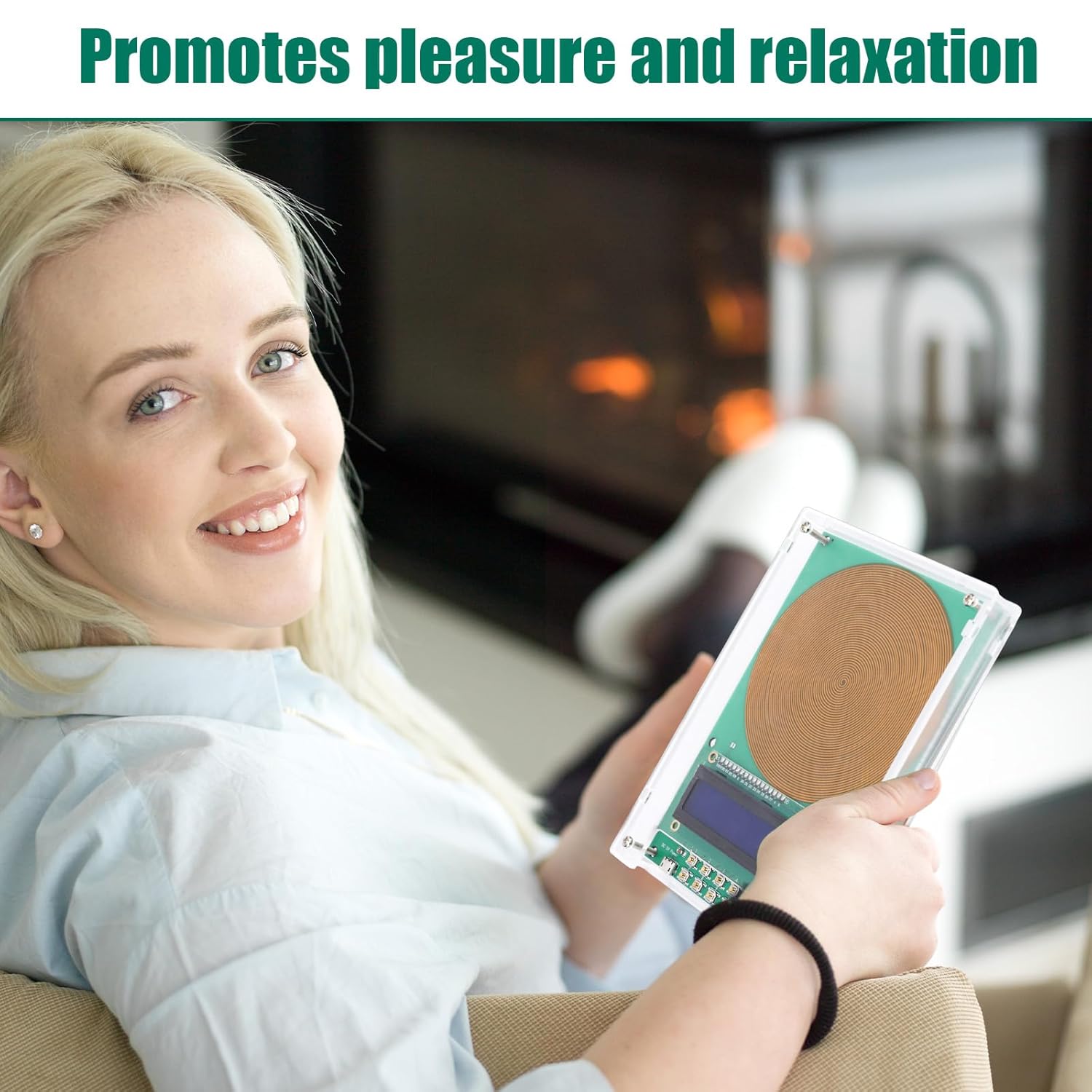
Figure 6.5.1: The generator in a home setting, used for relaxation.

Figure 6.5.2: The generator being utilized for electronic equipment testing and scientific experiments.
7. Nlekọta
- Nhicha: Use a soft, dry cloth to clean the acrylic case. Avoid abrasive cleaners or solvents.
- Nchekwa: Chekwaa ngwaọrụ ahụ n'ebe dị jụụ, kpọrọ nkụ na-adịghị na ìhè anyanwụ kpọmkwem na oke okpomọkụ.
- Ijikwa: Handle the device with care to prevent damage to the internal components or acrylic casing.
8. Nchọpụta nsogbu
| Nsogbu | Ihe nwere ike ime | Ngwọta |
|---|---|---|
| Ngwaọrụ anaghị agbanwu ọkụ. | No power supply or faulty USB cable/port. | Ensure the USB cable is securely connected to a 5V power source. Try a different USB cable or power adapter. |
| Frequency display is not changing. | Incorrect button sequence or unresponsive buttons. | Follow the frequency adjustment steps precisely (Section 6.2). Ensure buttons are pressed firmly. |
| No noticeable effect from the device. | Individual sensitivity varies; improper placement or usage duration. | Ensure the device is placed in an optimal location (e.g., near your bed or meditation area). Use for recommended durations (30-60 minutes). Effects may be subtle and vary per individual. |
| Power cord keeps falling out. | Loose USB port or cable connection. | Ensure the USB cable is fully inserted. If the issue persists, try a different USB cable. |
9. Akwụkwọ ikike na nkwado
Specific warranty details are not provided in the product information. For any issues, questions, or support needs, please refer to the seller's return policy or contact the seller directly through your purchase platform.
Always ensure to follow the instructions in this manual to maintain product integrity and performance.