1. Okwu mmalite
The Raddy SH-908 is a versatile and robust emergency radio designed to keep you informed and connected in various situations, from power outages to outdoor adventures. It features multiple power sources, including a 10,000mAh internal battery, solar panel, hand crank, and USB-C charging, along with AM/FM/SW radio reception, an LED flashlight, a reading lamp, an SOS alarm, and a built-in compass. This manual provides detailed instructions for its proper use and maintenance.
2. Ntuziaka nchekwa
- Ekpughela ngwaọrụ ahụ n'ebe okpomọkụ dị oke elu ma ọ bụ anwụ kpọmkwem ruo ogologo oge.
- Debe ngwaọrụ ahụ pụọ na oghere magnetik siri ike.
- Emela ka ngwaọrụ ahụ gbawaa ma ọ bụ gbalịa ịrụzi ya n'onwe gị. Gaa na ndị ọrụ ruru eru.
- Ensure all ports are dry before charging to prevent damage.
- When using the hand crank, apply steady, moderate force. Excessive force may cause damage.
- Tụfuo batrị dịka iwu mpaghara siri dị.
3. Ihe ngwugwu
Chọpụta na ihe niile dị na ngwugwu:
- Raddy SH-908 Emergency Radio
- USB-C eriri USB
- Eriri aka
- Obere screwdriver
- Nhicha ahịhịa
- Akwụkwọ ntuziaka (akwụkwọ a)

Image: Raddy SH-908 radio and its accessories, including a USB-C cable, wrist strap, small screwdriver, and cleaning brush.
4. Ngwaahịa gafereview
Familiarize yourself with the main components and controls of the Raddy SH-908 radio.
- Ngosipụta ihuenyo: Shows frequency, battery level, and time.
- Tuning Knob (TUN): Na-emezi ugboro redio.
- Mkpọ olu (MKPỌ): Na-emezi ọkwa mmepụta ọdịyo.
- Band/Scan Button: Switches between AM/FM/SW bands and initiates auto-scan.
- Oghere bọtịnụ: Mebie/na-ewepụ ụda olu.
- Bọtịnụ oge: Sets time.
- M-/M+ Buttons: Navigate through preset stations or fine-tune frequency.
- Bọtịnụ SOS: Activates emergency alarm and light.
- Igwe ọkụ: Integrated LED light on one end.
- Ọgụgụ Lamp: Fold-out lamp maka ọkụ ambient.
- Ogwe anyanwụ: Top-mounted panel for solar charging.
- Mkpịsị aka: Foldable crank for manual power generation.
- Ọdụ ụgbọ mmiri USB-C: For charging the radio's internal battery.
- Ọdụ ụgbọ mmiri USB-A: Maka ịchaji ngwaọrụ mpụga.
- AAA Battery Compartment: For optional backup power.
- Antenna telescopic: Maka mma nnabata redio.
- Kompas: Built-in for navigation.
5. Ntọlite na mbido ojiji
5.1 Nchaji izizi
Before first use, fully charge the internal 10,000mAh battery using the USB-C port.
- Connect the provided USB-C cable to the radio's USB-C input port.
- Connect the other end of the cable to a standard USB power adapter (not included) or a computer USB port.
- The battery indicator on the display will show charging status. Charging is complete when the indicator shows full.
5.2 Installing AAA Batteries (Optional)
For additional backup power, you can install 3 AAA batteries (not included).
- Locate the AAA battery compartment cover, usually on the side or back of the radio.
- Use the provided screwdriver to open the compartment.
- Fanye batrị AAA 3, na-ahụ polarity ziri ezi (+/-).
- Mechie mkpuchi nkebi ahụ nke ọma.
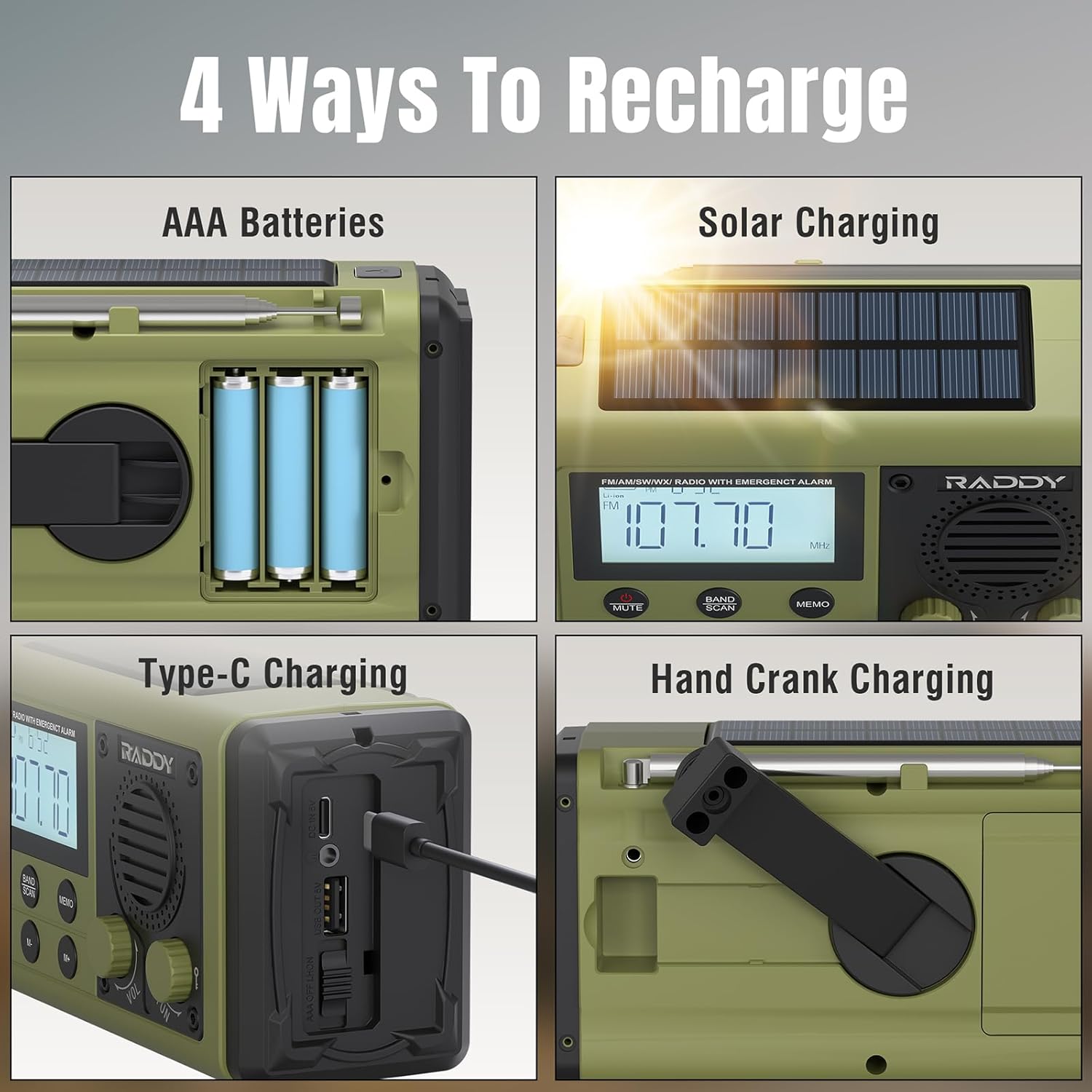
Image: The Raddy SH-908 radio demonstrating its four charging methods: AAA battery installation, solar panel charging, USB-C port charging, and hand crank operation.
6. Ntuziaka ọrụ
6.1 Gbanyụọ/ gbanyụọ
Pịa ma jide IKE button (if available, otherwise assume a dedicated button or a long press on a multi-function button) to turn the radio on or off. The display will illuminate.
6.2 Radio Operation (AM/FM/SW)
- Extend the Antenna: Gbatịa antenna telescopic ahụ nke ọma maka nnabata kacha mma.
- Họrọ Eriri: Pịa BAND/SCAN button to cycle through FM, AM, and SW bands.
- Ọdụ Tune:
- Akwụkwọ ntuziaka: Tugharia ihe TUN bọtịnụ iji hazie ugboro ole e ji aka hazie.
- Nyocha akpaaka: Pịa ma jide BAND/SCAN button to automatically scan for and save available stations.
- Preset Navigation: Jiri ihe M- na M+ buttons to cycle through saved preset stations.
- Gbanwee olu: Tugharia ihe VOL knob ka iwelie ma ọ bụ ibelata olu.

Image: The Raddy SH-908 radio with its telescopic antenna extended, illustrating its AM/FM/SW radio capabilities.
6.3 Flashlight and Reading Lamp
- Igwe ọkụ: Pịa raara onwe ya nye ÌHÈ button (or similar) once to turn on the flashlight. Press again to turn off.
- Ọgụgụ Lamp: Welie ọgụgụ lamp panel to activate the lamp. Close the panel to turn it off.
6.4 SOS mkpu
In an emergency, activate the SOS alarm:
- Pịa SOS button. The radio will emit a loud siren and flash its lights.
- Pịa SOS button again to deactivate the alarm.
6.5 Iji dị ka Bank Power
The 10,000mAh internal battery can charge external devices.
- Connect your device's charging cable to the radio's USB-A Ọpụpụ Port.
- The radio will begin charging your device. Monitor your device's charging status.

Image: The Raddy SH-908 radio charging a smartphone, demonstrating its 10,000mAh power bank functionality.
6.6 Ịchaji redio
The Raddy SH-908 offers four ways to recharge its internal battery:
- Nchaji USB-C: (Refer to Section 5.1 Initial Charging).
- Nchaji crank aka: Rotate the hand crank clockwise or counter-clockwise at a steady pace (approximately 120-150 RPM) for 3-5 minutes to generate power for short-term use.
- Ịchaji anyanwụ: Place the radio with the solar panel facing direct sunlight. This method is primarily for maintaining battery charge or for slow charging in emergencies.
- Batrị AAA: If installed, the radio can draw power from the AAA batteries when the internal rechargeable battery is depleted.
6.7 Compass Usage
The integrated compass can assist with basic navigation. Hold the radio level and away from metallic objects to get an accurate reading.
7. Nlekọta
7.1 Nhicha
Jiri nwayọ hichaa redio, damp cloth. Do not use harsh chemicals or abrasive cleaners. Use the provided cleaning brush to remove dust from crevices.
7.2 Mgbochi mmiri (IPX6)
The Raddy SH-908 is IPX6 waterproof, meaning it is protected against powerful water jets. It is not designed for submersion. Ensure all port covers are securely closed to maintain water resistance.

Image: The Raddy SH-908 radio being splashed with water, illustrating its IPX6 water resistance.
7.3 Nlekọta batrị
- For optimal battery life, fully charge the internal battery at least once every three months if not in regular use.
- Remove AAA batteries if the radio will not be used for an extended period to prevent leakage.
8. Nchọpụta nsogbu
| Nsogbu | Ihe nwere ike ime | Ngwọta |
|---|---|---|
| Redio anaghị agba. | Batrị agwụla. | Charge the radio via USB-C, hand crank, or solar panel. Check AAA batteries if installed. |
| Nnabata redio adịghị mma. | Antenna not extended; weak signal; interference. | Fully extend the telescopic antenna. Try repositioning the radio. |
| Cannot charge external device. | Radio battery is low; incorrect cable; device not compatible. | Ensure the radio's internal battery is sufficiently charged. Use a compatible USB cable. |
| Hand crank is stiff or not charging. | Crank mechanism obstructed or damaged. | Ensure no debris is obstructing the crank. Apply steady, moderate force. If persistent, contact support. |
9. Nkọwapụta
| Njirimara | Nkọwa |
|---|---|
| Nlereanya | SH-908 |
| Ndị otu redio | AM, FM, SW |
| Batrị dị n'ime | 10,000mAh (nwere ike ibugharị) |
| Ike ndabere | Batrị 3 x AAA (anaghị etinye ya) |
| Ụzọ nchaji | USB-C, Hand Crank, Solar Panel |
| Mmepụta Port | USB-A (for charging external devices) |
| Mmiri Nguzogide | IPX6 |
| Ọkụ | LED Flashlight, Reading Lamp |
| Atụmatụ ndị ọzọ | SOS Alarm, Built-in Compass |
| Akụkụ (ihe dị ka.) | 16.7 cm (L) x 8.5 cm (W) x 6.7 cm (H) |
| Ibu (ihe dị ka.) | 680 g |
10. Akwụkwọ ikike na nkwado
Raddy products are designed for reliability and performance. For warranty information, please refer to the warranty card included with your purchase or visit the official Raddy website. For technical support or inquiries, please contact Raddy customer service through the contact information provided on the product packaging or websaịtị.
Biko dowe akwụkwọ ikike ịzụrụ ihe ọ bụla.