1. Ngwaahịa gafereview
The OtterBox Commuter Series Case is engineered to provide robust protection for your Google Pixel 10 or Pixel 10 Pro. This case features a dual-layer design, combining a soft inner slipcover with a rigid outer shell to guard against drops, bumps, and daily wear. Its slim profile ensures pocket-friendliness while maintaining comprehensive device security.
Akụkụ ndị bụ isi:
- Dual-Layer Protection: Soft inner slipcover and hard outer shell work together to absorb impact and resist scratches.
- Mkpuchi ọdụ ụgbọ mmiri: Integrated covers block dust, dirt, and lint from entering ports.
- Njide echekwara Textured sides enhance grip, reducing the chance of accidental drops.
- Nchaji ikuku dakọtara: Designed to allow seamless wireless charging without removing the case.
- Eco-Conscious Design: Crafted from over 35% recycled plastic.
ndakọrịta:
This case is specifically designed for the Google Pixel 10 na Google Pixel 10 Pro. Ọ bụ ekwekọghị with the Google Pixel 10 Pro XL or any other device models.
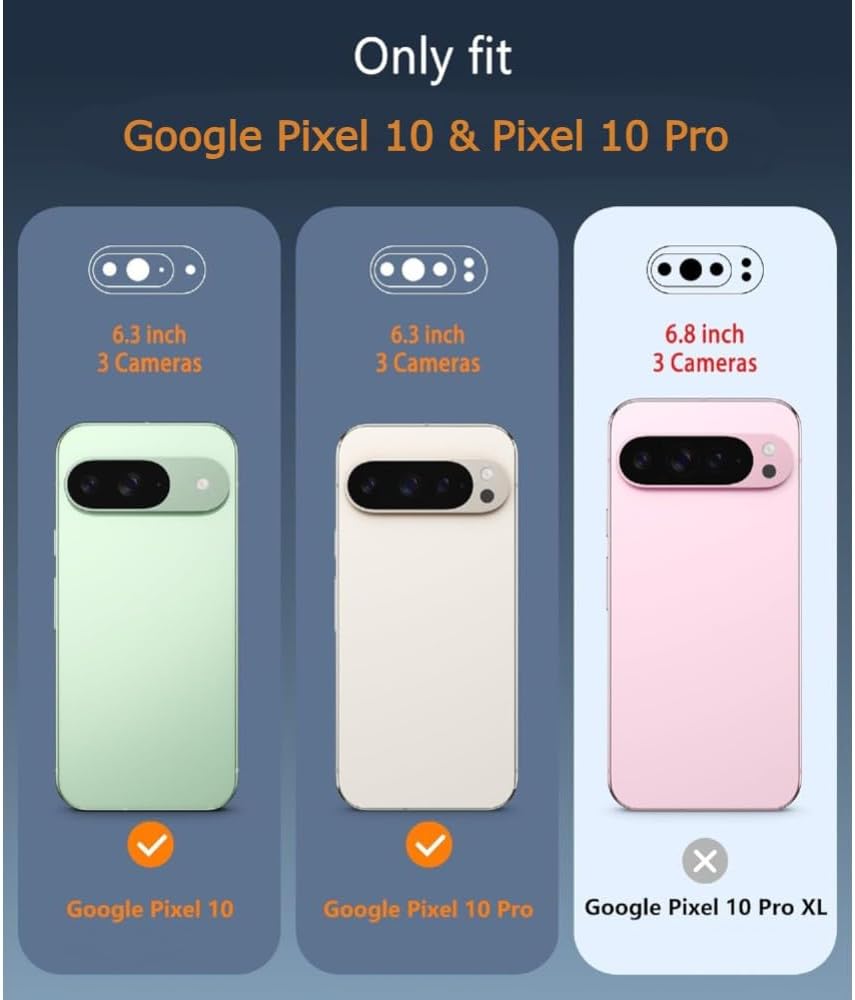
Figure 1: Compatibility chart for Google Pixel 10 series.
2. Ntọala na nwụnye
Follow these steps to properly install your OtterBox Commuter Series Case on your Google Pixel 10 or Pixel 10 Pro.
- Separate the Case Components: The Commuter Series case consists of two main parts: a soft inner rubber slipcover and a rigid outer polycarbonate shell. Gently separate these two components.
- Install the Inner Slipcover: Carefully place your Google Pixel 10 or Pixel 10 Pro into the soft inner rubber slipcover. Ensure all edges of the phone are securely seated within the slipcover and that the buttons align correctly with the slipcover's button covers.
- Attach the Outer Shell: Once the phone is fully encased in the slipcover, slide the assembly into the rigid outer polycarbonate shell. Press firmly around the edges until you hear or feel a click, indicating that the outer shell has securely snapped into place around the slipcover.
- Nyochaa nwụnye: Check that all buttons are functional, the camera opening is clear, and the port covers operate smoothly. Ensure there are no gaps between the slipcover and the outer shell.

Figure 2: Disassembled OtterBox Commuter Series case.
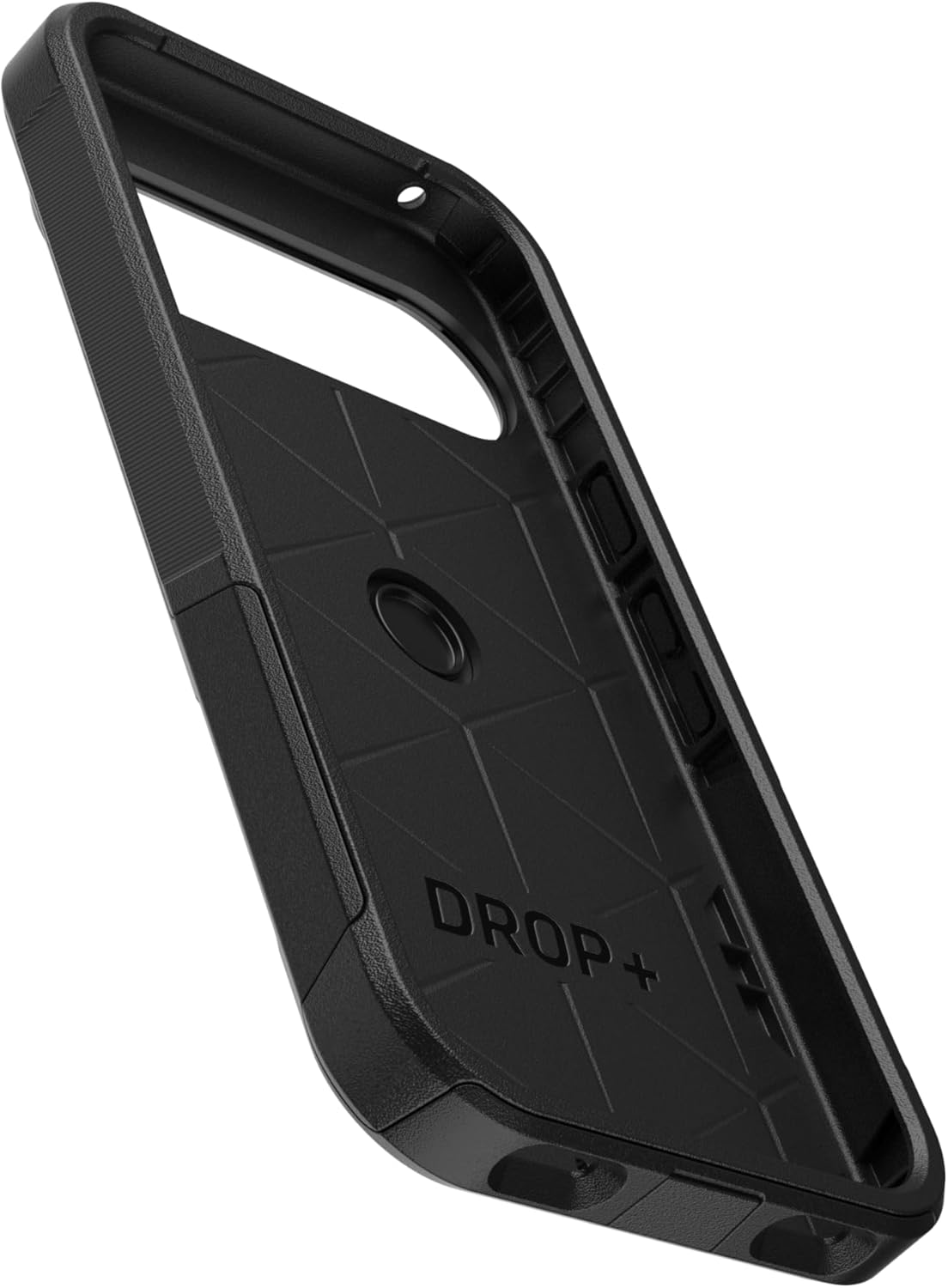
Figure 3: Inner view of the case, showing impact-absorbing design.

Figure 4: Assembled OtterBox Commuter Series case.
Nwụnye vidiyo:
Video 1: Demonstrates the installation process for an OtterBox Commuter Series case. While the video title mentions Pixel 9, the installation steps are generally applicable to the Commuter Series design.
3. Ntuziaka ọrụ
The OtterBox Commuter Series Case is designed for everyday use, providing protection without hindering functionality.
- Ịnweta ọdụ ụgbọ mmiri: The integrated port covers protect against dust and debris. To access the charging port or headphone jack (if applicable), gently lift the corresponding cover. Ensure to press the cover back into place after use to maintain protection.
- Ọrụ bọtịnụ: The case features integrated button covers that maintain the tactile feel and responsiveness of your phone's buttons.
- Nchaji ikuku: The case is compatible with most Qi wireless chargers. Simply place your phone with the case on a compatible wireless charging pad. If you experience issues, ensure the phone is centered on the charger and there are no foreign objects between the phone and the charger.
- Nchedo ihuenyo: The case features a raised bezel around the screen to help protect the display when placed face down. For comprehensive screen protection, consider using an OtterBox screen protector (sold separately).
4. Nlekọta na nlekọta
To ensure the longevity and effectiveness of your OtterBox Commuter Series Case, follow these simple maintenance guidelines:
- Nhicha: Regularly clean your case with a soft, damp cloth. For stubborn dirt, a mild soap solution can be used. Avoid harsh chemicals, abrasive cleaners, or solvents, as these can damage the case material.
- Nyocha: Periodically inspect the case for any signs of wear or damage, especially around the edges, ports, and buttons. If the case is significantly damaged, consider replacing it to ensure optimal protection for your device.
- Nchekwa: When not in use, store the case in a clean, dry place away from direct sunlight and extreme temperatures.
5. Nchọpụta nsogbu
If you encounter any issues with your OtterBox Commuter Series Case, refer to the following common solutions:
- Difficulty Installing/Removing Case: Ensure you are separating the inner slipcover from the outer shell before attempting to install or remove. Apply gentle, even pressure. Do not force the components.
- Port Cover Not Sealing: Check for any debris or lint obstructing the port cover. Clean the area if necessary. Ensure the cover is fully pressed into its seated position.
- Nsogbu Nchaji Ikuku: Verify that your phone is correctly aligned on the wireless charger. Remove any metal objects or thick accessories that might interfere with the charging signal. Ensure your wireless charger is compatible with your Google Pixel 10/10 Pro.
- Bọtịnụ ndị na-anaghị aza: Re-check the case installation to ensure the phone is perfectly seated within the slipcover and outer shell, and that the button covers align correctly with the phone's buttons.
- Camera Bezel Protection: The Commuter Series case is designed with a raised edge around the camera module to provide protection. If you feel the camera is not adequately protected, ensure the case is fully seated on the phone.
6. Nkọwapụta
| Njirimara | Nkọwa |
|---|---|
| Akụkụ ngwaahịa | 0.58 x 3.11 x 6.28 sentimita asatọ |
| Ibu Ibu | 2.11 ounces |
| Nọmba nlereanya | aos201 |
| Ihe onwunwe | Thermoplastic Elastomer slipcover, Polycarbonate Layer |
| Ụdị ekwentị dakọtara | Google Pixel 10 & Pixel 10 Pro |
| Agba | Nwa |
7. Akwụkwọ ikike na nkwado
OtterBox products are known for their quality and durability. For detailed information regarding product warranty, returns, or technical support, please visit the official OtterBox websaịtị ma ọ bụ kpọtụrụ ndị ahịa ha ozugbo.
Keep your purchase receipt or order confirmation for warranty claims.


