1. Okwu mmalite
Welcome to the DOOGEE Note56 user manual. This guide provides essential information on setting up, operating, and maintaining your new smartphone. The DOOGEE Note56 is a SIM-free smartphone running on Android 16, featuring a 6.56-inch 90Hz HD+ display, a large 6150mAh battery, and an 8MP AI camera. Please read this manual carefully to ensure optimal performance and longevity of your device.
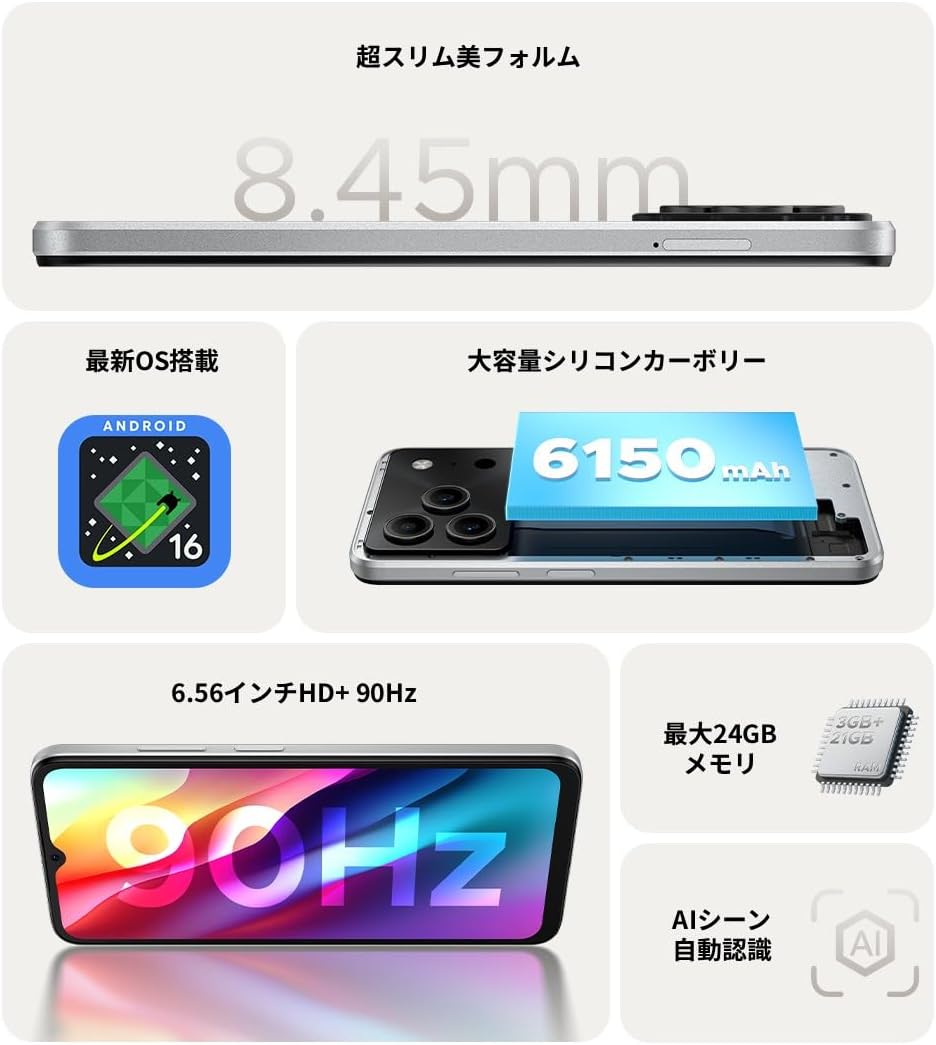
Nyocha 1.1: N'eluview of DOOGEE Note56 key features.
2. Ngwaọrụ gafereview
The DOOGEE Note56 is designed with a sleek and lightweight profile, measuring 8.45mm thin and weighing 195g. It features a geometric lens module for its camera system and a durable build.

Figure 2.1: The ultra-slim and lightweight design of the DOOGEE Note56.
3. Mmalite
Ihe ngwugwu 3.1
Gbaa mbọ hụ na ihe niile dị na ngwugwu ngwaahịa gị:
- 1 x DOOGEE Note56 Smartphone
- 1 x Ụdị-C eriri USB
- 1 x nkwụnye ọkụ
- 1 x Ihe nkiri Nchedo etinyeburu ya
- 1 x SIM Tray Ejector Pin
- 1 x Akpa ekwentị
- Igbe ngwugwu 1 x
- 1 x Akwụkwọ ntuziaka
- 1 x kaadị ikike

Figure 3.1: Included accessories with your DOOGEE Note56.
3.2 nwụnye kaadị SIM
Your DOOGEE Note56 supports Dual SIM functionality. To install your SIM card(s):
- Chọta tray SIM n'akụkụ ngwaọrụ ahụ.
- Insert the SIM ejector pin into the small hole next to the tray and press gently until the tray pops out.
- Tinye kaadị Nano-SIM gị na/ma ọ bụ kaadị microSD n'ime oghere ndị a kapịrị ọnụ dị na tray ahụ. Hụ na kọntaktị ọlaedo ahụ na-eche ihu ala.
- Jiri nlezianya pịa tray ahụ n'ime ngwaọrụ ahụ ruo mgbe ọ ga-adaba n'akụkụ ya.
3.3 Ike mbido na ịtọlite
Iji gbanye ngwaọrụ gị maka oge mbụ:
- Pịa ma jide bọtịnụ ike ruo mgbe akara DOOGEE pụtara.
- Soro mkpali na ihuenyo ka ịhọrọ asụsụ gị, jikọọ na Wi-Fi, wee guzobe akaụntụ Google gị.
- You can also set up security features like face recognition during this process.
3.4 Ịchaji ngwaọrụ
Connect the Type-C USB cable to the charging port at the bottom of the phone and the other end to the power adapter. Plug the adapter into a wall outlet. The battery indicator on the screen will show charging status. For optimal battery life, fully charge the device before first use.
4. Ijikwa ngwaọrụ gị
4.1 Android 16 Sistemụ arụmọrụ
The DOOGEE Note56 runs on the latest Android 16 operating system, offering a faster, more secure, and intuitive user experience. Key features include:
- Arụmọrụ emelitere: Improved app launch speeds and overall system responsiveness.
- Simplified UI: An easy-to-navigate interface suitable for all users.
- Stronger Security: Advanced privacy protection features to keep your data safe.
- Atụmatụ amamihe: Customize screen colors, Super Clipboard, Dual System Mode, Smart Body Sensing, Memory Expansion, and Screen Optimization.

Figure 4.1: Key features of the Android 16 operating system.
4.2 Ngosipụta atụmatụ
Experience smooth visuals on the 6.56-inch HD+ IPS display with a 90Hz refresh rate. This ensures fluid scrolling and video playback, reducing eye strain. The display also includes dedicated Reading Mode and Night Mode for comfortable viewing na ọnọdụ ọkụ dị iche iche.

Figure 4.2: The 6.56-inch HD+ 90Hz display for a smooth visual experience.
4.3 Ọrụ igwefoto
Capture vibrant and natural photos with the 8MP AI main camera and 5MP front camera. The AI correction automatically optimizes settings for various scenes, including people, landscapes, and food. Enjoy diverse shooting modes:
- HDR: For balanced exposure in challenging lighting.
- Ụdị Pro: Manual control over camera settings.
- Njide ọnụ ọchị: Automatically takes a photo when a smile is detected.
- panorama: Sere ebe mara mma sara mbara views.
- Ụdị abalị: Improved low-light photography.
- Ihe nzacha: Apply various effects to your photos.
- Beauty Mode (Front Camera): Enhance selfies.
- Portrait Effects (Front Camera): Add depth to your selfies.

Figure 4.3: AI scene recognition automatically adjusts camera settings for optimal results.

Figure 4.4: Capturing clear moments with the 8MP main camera.

Figure 4.5: Easy selfies with the 5MP front camera.
4.4 Njikwa batrị
The DOOGEE Note56 is equipped with a large 6150mAh Silicon-Carbon battery, providing extended usage throughout the day. The convenient Type-C charging port ensures easy and smooth charging.
- Supports approximately 1000 charge/discharge cycles.
- 20% smaller in size for a lighter design.
- Estimated usage times: 7 hours web browsing, 49.5 hours music playing, 14 hours video watching, 28 hours calling.
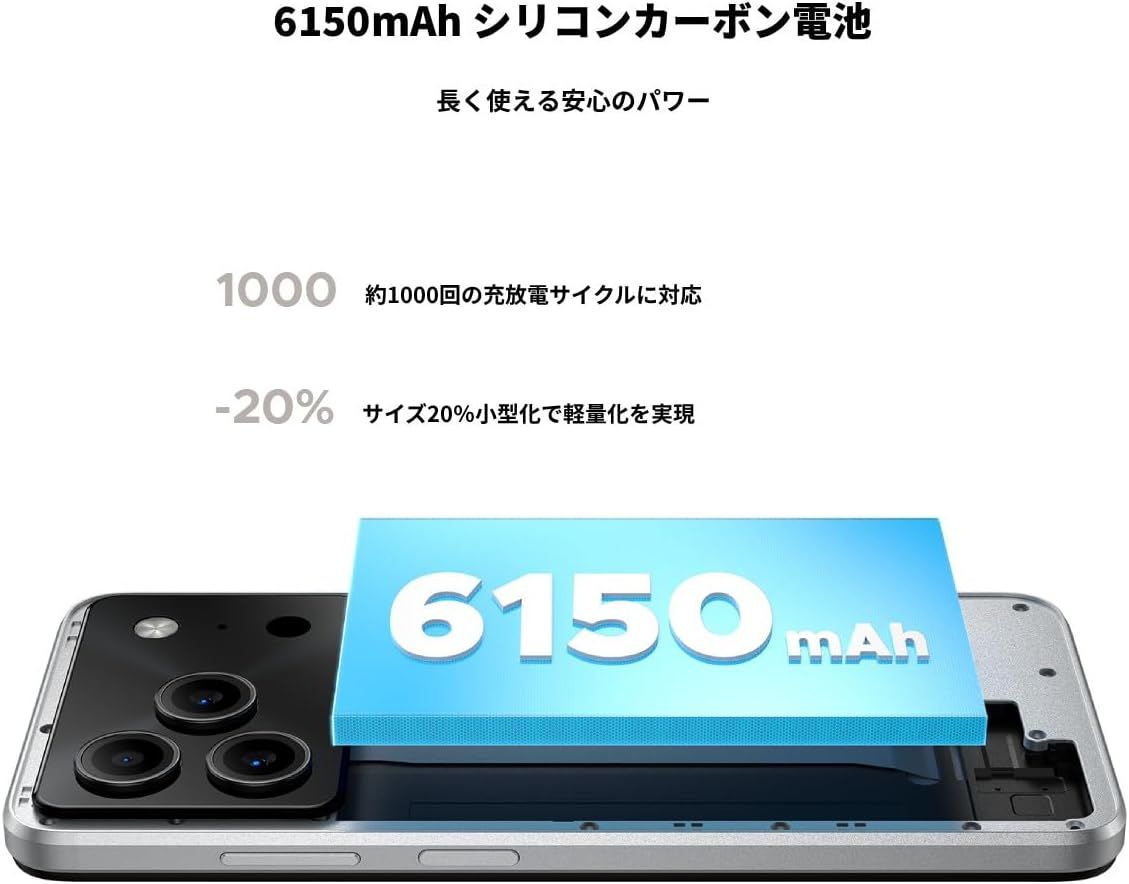
Figure 4.6: The 6150mAh Silicon-Carbon battery provides long-lasting power.

Figure 4.7: Slim design with powerful battery performance.
4.5 Arụmọrụ na Nchekwa
The DOOGEE Note56 is powered by a Unisoc SC9863A Octa-core processor for smooth and efficient operation. It comes with 24GB of RAM (including virtual expansion) and 64GB of internal storage, expandable up to 2TB with a microSD card, ensuring ampohere maka ngwa gị, foto, na files.

Figure 4.8: Internal memory configuration for smooth multitasking.
4.6 Connectivity and Other Features
The device supports 4G Dual SIM, allowing you to manage work and personal life separately. It includes standard connectivity options like Bluetooth and Wi-Fi. Additional features:
- USB OTG: Jikọọ ngwaọrụ USB mpụga.
- GPS: Maka ịnyagharịa ziri ezi.
- Jack ekweisi 3.5mm: Enjoy music and calls with wired headphones.
- Igwe Redio: Listen to your favorite radio stations anytime.

Figure 4.9: Face recognition, GPS navigation, and FM radio features.

Figure 4.10: Connect wired headphones via the 3.5mm jack.
4.7 Atụmatụ nchekwa
The DOOGEE Note56 offers convenient and secure unlocking methods:
- Nghọta ihu: Unlock your device quickly and securely using your face.
- Nchọpụta akara mkpịsị aka: (If applicable, check device for sensor) Another secure method for unlocking and authenticating.
5. Nlekọta na nlekọta
To ensure the longevity and optimal performance of your DOOGEE Note56, follow these maintenance guidelines:
- Nhicha: Jiri akwa dị nro na-enweghị lint hichaa ihuenyo na ahụ. Zere kemịkalụ siri ike ma ọ bụ ihe na-emebi emebi.
- Ọnọdụ gburugburu: Zere ikpughe ngwaọrụ ahụ na oke okpomọkụ, anwụ kpọmkwem, ma ọ bụ oke mmiri mmiri.
- Mmelite ngwanrọ: Na-enyocha ma wụnye mmelite sistemụ mgbe niile iji rite uru na atụmatụ kachasị ọhụrụ, ihe mkpuchi nchekwa, na mmezi arụmọrụ.
- Nlekọta batrị: Avoid fully discharging the battery frequently. For long-term storage, keep the battery charged to around 50%.
- Nchedo: Use the provided phone case and screen protector to guard against scratches and minor impacts.
6. Nchọpụta nsogbu
If you encounter issues with your DOOGEE Note56, try the following basic troubleshooting steps:
- Ngwaọrụ anaghị agba ọkụ: Gbaa mbọ hụ na agbagoro batrị. Jikọọ chaja wee chere nkeji ole na ole tupu ị nwaa ịgbanye ọzọ.
- Okwu ịchaji: Check the charging cable and adapter for damage. Try a different outlet or charging accessory.
- Nsogbu Njikọta netwọkụ: Ensure your SIM card is correctly inserted. Check if airplane mode is off. Restart the device.
- App Freezing/Crashing: Mechie ngwa nsogbu ahụ wee meghee ya. Ọ bụrụ na nsogbu ahụ anọgide, malitegharịa ekwentị gị.
- Ịrụ ngwa ngwa: Close unnecessary background apps. Clear cache for frequently used apps. Consider freeing up storage space.
For more detailed troubleshooting or persistent issues, please refer to the FAQ section on the product page or contact customer support.
7. Nkọwapụta
Key technical specifications for the DOOGEE Note56:
| Njirimara | Nkọwapụta |
|---|---|
| Nha ihuenyo | 6.56 sentimita asatọ |
| Ike batrị | 6150 mAh |
| Agba | Ọcha |
| Aha ika | DOOGEE |
| Onye nrụpụta | DOOGEE |
| Afọ mwepụta | 2025 |
| Ngwa gụnyere | SIM Tray Ejector, USB Cable, Power Adapter, Phone Case |
| OS dakọtara | Android 16 |
| Ọrụ ndị ọzọ | USB OTG, Dual SIM, Expandable Memory |
| Njikọta | Bluetooth, WiFi |
| Ụdị ngosi | LCD |
| Akụkụ ngwaahịa | 16.38 x 7.58 x 0.84 cm; 195 g |
| Sistemụ nrụọrụ | Android 16 |
| Ogo RAM arụnyere | 24 GB |
| Ọsọ CPU | 1.6 GHz |
| Ike Nchekwa ebe nchekwa | 64 GB |
8. Akwụkwọ ikike na nkwado
Your DOOGEE Note56 comes with a 12-month quality warranty (excluding human-caused damage) and a 30-day refund guarantee. The product is fully compatible with major Japanese carrier networks.
If you require support or have any questions, please contact our customer service. You can typically find contact information by clicking on the seller's name below the "Add to Cart" button on the product page and selecting "Ask a Question."


