1. Okwu mmalite
This manual provides instructions for the operation and maintenance of your LIGE FV26-F Smartwatch. Please read this manual carefully before using the device to ensure proper function and to maximize its features. The smartwatch is designed for women, featuring a round display, silver stainless steel band with diamond accents, and a silicone strap option.
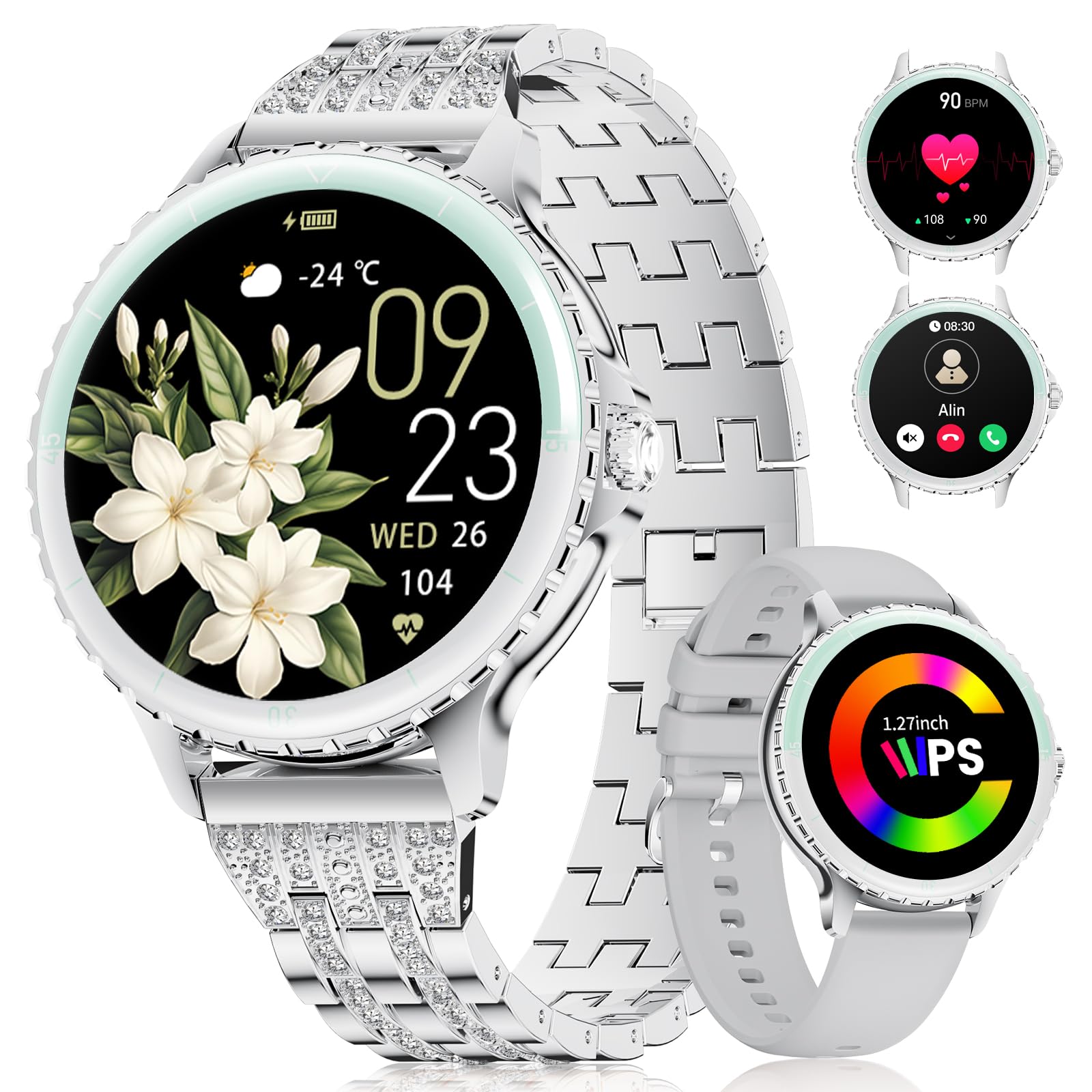
Image: LIGE FV26-F Smartwatch displaying its elegant design with both stainless steel and silicone strap options.
2. Nhazi
2.1 Ịchaji elekere smart
- Jikọọ eriri chaja ahụ na ọdụ chaja dị n'azụ elekere smart ahụ.
- Tinye njedebe USB nke eriri ahụ n'ime ihe nkwụnye ike USB nkịtị (anaghị etinye ya) ma ọ bụ ọdụ USB nke kọmputa.
- Ensure the charging pins are properly aligned with the smartwatch's contacts.
- A charging indicator will appear on the screen. Allow approximately 2-3 hours for a full charge.
2.2 Ngwa nwụnye na ijikọ
- Budata ya FitcloudPro application from your smartphone's app store (Google Play Store for Android, Apple App Store for iOS).
- Ensure your smartphone meets the compatibility requirements: Android 6.0 or higher, or iOS 9.0 or higher.
- Kwado Bluetooth na ekwentị gị.
- Open the FitcloudPro app and follow the on-screen instructions to create an account or log in.
- In the app, navigate to the device pairing section and search for your LIGE FV26-F smartwatch.
- Select your smartwatch from the list of available devices to initiate the pairing process. Confirm any pairing requests on both your phone and the smartwatch.
Once paired, the smartwatch will synchronize data with the app, and you can customize settings.
3. Ntuziaka ọrụ
3.1 Nsoro ụzọ
- Ihuenyo mmetụ aka: Mịgharịa aka ekpe, aka nri, elu, ma ọ bụ ala iji lelee menu na atụmatụ. Pịa iji họrọ nhọrọ.
- Bọtịnụ akụkụ: Typically used to return to the home screen or to power on/off the device (long press).
3.2 Bluetooth Calls
- After successful Bluetooth pairing, you can make and receive calls directly from your wrist.
- The smartwatch supports contact uploading from your phone and displays call history.
- Utilize the integrated AI voice assistant for hands-free control of your phone's calling functions.
3.3 Real-time Notifications
- Receive alerts for incoming calls, messages, WhatsApp, and other application activities.
- The smartwatch will gently vibrate to notify you.
- Note for WhatsApp: To ensure WhatsApp notifications are received, set your WhatsApp notification settings on your phone to "Show comments - Always show." If your software is connected to a computer, the watch may not send messages.
3.4 Nlekọta ahụike
- Ọnụọgụgụ obi: Continuous 24/7 heart rate measurement.
- SpO2: Blood oxygen saturation measurement (data for reference only).
- Women's Health: Features include menstrual cycle prediction, pregnancy preparation mode, and pregnancy mode.
- Nleba anya ụra: Tracks and analyzes sleep patterns.
- Nti mkpu na ịnọdụ ala: Reminds you to move after periods of inactivity.
- Ihe omume iku ume: Mmega iku ume nke e duziri maka izu ike.
Ụdị egwuregwu 3.5
- The smartwatch supports over 100 sport modes.
- Ten built-in sports include yoga, cycling, running, and badminton.
- Use the "Sport Push" function in the FitcloudPro app to transfer additional sport modes to your watch.
- During workouts, the watch provides comprehensive data such as steps, training time, distance, calories burned, and heart rate (data for reference only).
3.6 Camera Remote and Music Control
- Ime igwefoto: Jikwaa igwefoto ama ama gị n'ime ime ka ịse foto.
- Njikwa egwu: Play, pause, skip tracks, and adjust volume for music playing on your connected smartphone.
Ihu elekere 3.7 nwere ike ịhazi ya
- Personalize your smartwatch by setting photos from your phone (e.g., family, pets) as watch faces through the FitcloudPro app.
4. Nlekọta
- Nhicha: Wipe the smartwatch and straps regularly with a soft, dry cloth. Avoid harsh chemicals.
- Nlekọta batrị: The 300 mAh battery provides approximately 3 to 5 days of usage depending on feature use. Charge the device before the battery is completely depleted to prolong its lifespan.
- Nchekwa: Chekwaa smartwatch n'ebe dị jụụ, kpọrọ nkụ mgbe anaghị eji ya.
5. Nchọpụta nsogbu
- Okwu Njikọta: If the smartwatch disconnects from your phone, ensure Bluetooth is enabled on both devices and that the FitcloudPro app is running in the background. Try restarting both the smartwatch and your phone.
- Anabataghị ọkwa: Verify that app notifications are enabled in your phone's settings and within the FitcloudPro app. For WhatsApp, ensure the specific setting "Show comments - Always show" is active.
- Data ahụike ezighi ezi: Ensure the smartwatch is worn snugly on your wrist, but not too tight. Environmental factors and movement can affect sensor readings. Health data is for reference only and not for medical diagnosis.
- Ihuenyo anaghị anabata: Try restarting the smartwatch by long-pressing the side button. If the issue persists, ensure the device is charged.
6. Nkọwapụta
| Njirimara | Nkọwapụta |
|---|---|
| Ụdị | LIGE |
| Nọmba nlereanya | FV26-F |
| Agba | Ọlaọcha |
| Sistemụ nrụọrụ | iOS, Android |
| Nha ihuenyo | 1.27 sentimita asatọ |
| Ụdị | Gburugburu |
| Teknụzụ Njikọta | Bluetooth |
| Ikuku Communication Standard | Bluetooth |
| Atụmatụ pụrụ iche | Phone Call, Voice Control, Email, Notification, Touchscreen |
| Ngwa dakọtara | Ekwentị mkpanaaka |
| Ike batrị | 300 mAh |
| Ngwakọta batrị | Lithium-polymer |
| Batrị enwere ike ịchaji | Ee |
| Ike Nchekwa ebe nchekwa | 256 MB |
| GPS | GPS via smartphone |
7. Akwụkwọ ikike na nkwado
Specific warranty information for the LIGE FV26-F Smartwatch is not provided in the product data. Please refer to the manufacturer's official website or your point of purchase for detailed warranty terms and conditions.
For technical support, software updates, or further assistance, please consult the FitcloudPro application or visit the LIGE official support channels.


