1. Okwu mmalite
Thank you for choosing the Jesebang S75 Wireless Sport Earbuds. These earbuds are designed to provide a high-quality audio experience with features tailored for active lifestyles. This manual will guide you through the setup, operation, and maintenance of your new earbuds.
Kedu ihe dị na igbe:
- S75 Wireless Earbuds (x2)
- Akpa nchaji ikuku
- USB-C eriri USB
- Akwụkwọ ntuziaka onye ọrụ
- Eartips (3 sizes: S, M, L)

Image: Contents of the Jesebang S75 package.
2. Ngwaahịa gafereview
The Jesebang S75 earbuds feature advanced technology for superior sound and user convenience.
Akụkụ ndị bụ isi:
- Bluetooth Bluetooth: Ensures stable, fast, and low-latency wireless connection up to 15 meters.
- Ndị ọkwọ ụgbọ ala dị ike 14.2mm: Delivers powerful stereo sound with deep bass, clear mids, and bright highs.
- ENC Noise-Canceling Mic: Reduces up to 80% of background noise for clear calls.
- IPX7 Nkwanye mgbochi mmiri: Protects against sweat and water splashes, ideal for workouts.
- Ergonomic Earhooks: Provides a secure and comfortable fit, preventing slippage during intense activities.
- 50 Hours Total Playtime: 10 hours on a single charge, with an additional 40 hours from the charging case.
- Dual LED Digital Display: Shows battery levels for both the charging case and individual earbuds.
- Njikwa Smart Touch: Easy management of music, calls, and voice assistant.
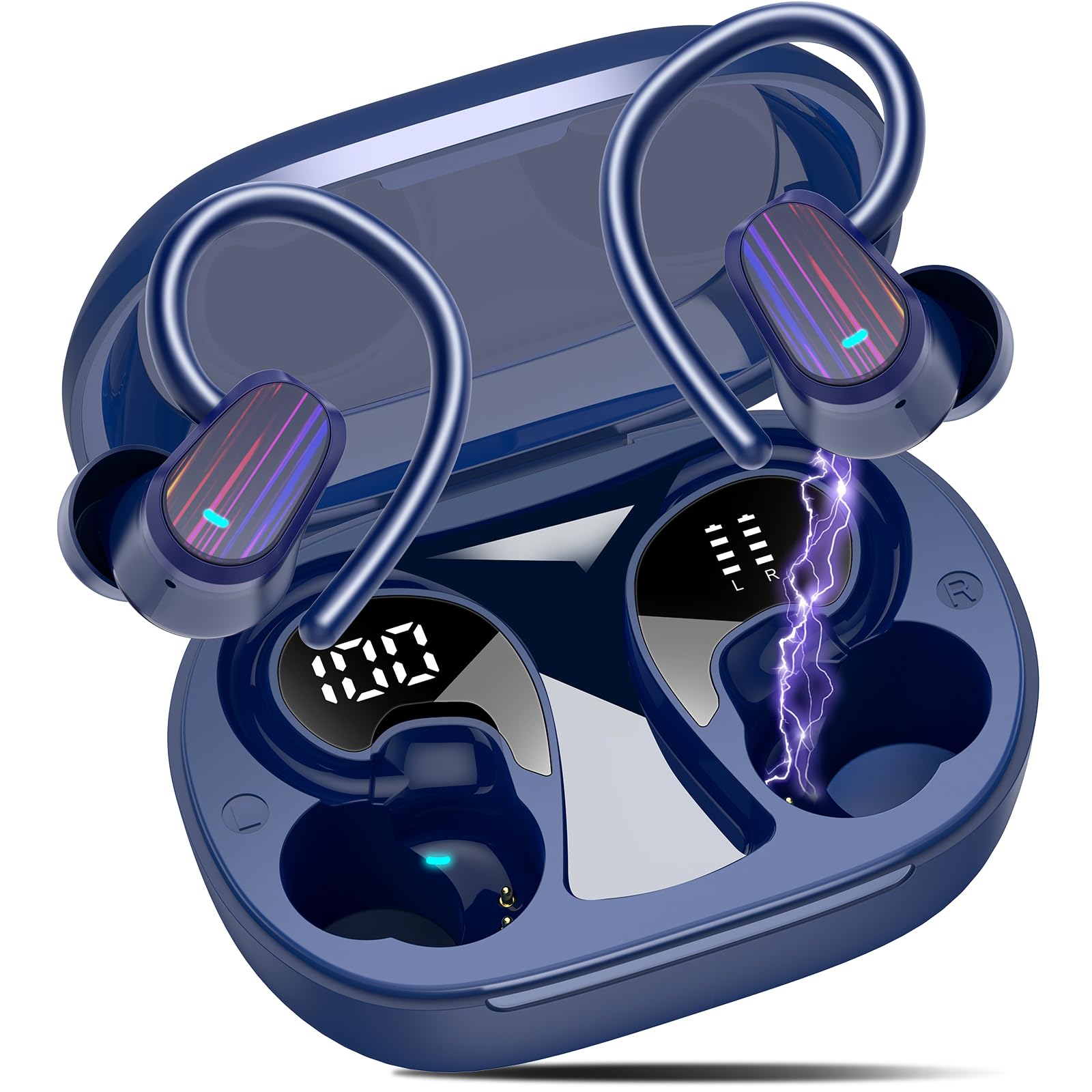
Image: Jesebang S75 Wireless Sport Earbuds and charging case.

Image: Internal structure highlighting the 14.2mm dynamic speaker for powerful stereo sound.

Image: ENC noise reduction technology for clear calls.
3. Nhazi
3.1 Ịchaji ntị na akpa
Tupu ojiji nke mbụ, chajie nke ọma ntị na akpa nchaji.
- Connect the provided USB-C charging cable to the charging port on the back of the case.
- Jikọọ nsọtụ nke ọzọ nke eriri na ihe nkwụnye ọkụ USB (anaghị etinye ya) ma ọ bụ ọdụ ụgbọ USB nke kọmputa.
- Ngosipụta dijitalụ LED dị na ikpe chaja ga-egosi pasentị batrịtage of the case and individual earbuds. Ensure both earbuds and the case are fully charged (100%) before initial use.

Image: Charging the earbuds and case with LED display.
3.2 Jikọọ na ngwaọrụ gị
The earbuds use Bluetooth 5.4 for a seamless connection.
- Njikọ oge mbụ: Mepee igbe nchaji. Igwe ntị ga-abanye na ọnọdụ njikọta na-akpaghị aka.
- On your device (smartphone, tablet, computer), go to Bluetooth settings and turn on Bluetooth.
- Look for "S75" in the list of available devices and select it to connect.
- Once paired, the earbuds will automatically reconnect to the last paired device when you open the charging case.

Image: One-step auto pairing process.

Image: Bluetooth 5.4 Technology.
4. Ọrụ
4.1 Yiri ekwe ntị
The S75 earbuds are designed with soft and elastic earhooks for a secure and comfortable fit.
- Choose the correct size eartips (S, M, L) for the best fit and sound quality.
- Tinye ihe mkpuchi ntị n'ime ọwa ntị gị.
- Gently adjust the earhook over your ear until it feels secure and comfortable.

Image: Comfortable design with IPX7 waterproof rating and flexible earhooks.

Image: Instructions for easy and stable wearing of the earbuds.
4.2 Njikwa Smart Touch
The earbuds feature highly sensitive touch sensors for easy control.
- Gwuo/kwụsịtụ: Single tap on either earbud (L/R).
- Zaa oku: Short tap on either earbud (L/R).
- Kpochapụ oku: Long tap on either earbud (L/R).
- Olu elu: Otu pịa na ntị aka nri.
- Olu ala: Otu pịa na ntị aka ekpe.
- Track na-esote: Long tap (2s) on the Right earbud.
- Gara aga Track: Long tap (2s) on the Left earbud.
- Mee ka onye enyemaka olu rụọ ọrụ: Triple click on either earbud (L/R).

Image: Smart touch control functions.
5. Nlekọta
Nlekọta kwesịrị ekwesị na-eme ka ntị ntị gị dị ogologo ma rụọ ọrụ nke ọma.
5.1 Nhicha
- Regularly clean the eartips with a soft, dry cloth.
- Wipe the earbuds and charging case with a slightly damp akwa, wee kpoo nke ọma.
- Zere iji kemịkalụ siri ike ma ọ bụ ihe na-emebi emebi.
5.2 Nchekwa
- Chekwaa ntị ntị n'akpa chaja ha mgbe anaghị eji ya iji chebe ha ma debe ya ebubo.
- Keep the earbuds and case in a cool, dry place, away from extreme temperatures and direct sunlight.

Image: IPX7 Waterproof design for daily use.
6. Nchọpụta nsogbu
Ọ bụrụ na ịnwee nsogbu ọ bụla, biko rụtụ aka na azịza ndị a na-ahụkarị:
6.1 Ekwe ntị anaghị ejikọta
- Gbaa mbọ hụ na ebubo na ekwe ntị.
- Gbaa mbọ hụ na agbanyere Bluetooth na ngwaọrụ gị.
- Place the earbuds back in the case, close the lid, wait a few seconds, then open it again to re-enter pairing mode.
- Forget the device "S75" from your device's Bluetooth list and try pairing again.
6.2 Enweghị ụda ma ọ bụ olu dị ala
- Lelee ọkwa olu dị na ngwaọrụ gị na ekweisi gị.
- Ensure the earbuds are properly seated in your ears and the eartips provide a good seal.
- Jikọọkwa ntị ntị na ngwaọrụ gị.
6.3 Okwu nchaji
- Hụ na eriri chaja ahụ ejikọtara ya na akpa ahụ na isi iyi ike ahụ nke ọma.
- Gbalịa eriri USB-C dị iche ma ọ bụ ihe nkwụnye ọkụ.
- Gbaa mbọ hụ na kọntaktsị chaja dị na ntị ntị na n'ime akpa ahụ dị ọcha na enweghị irighiri ihe.
7. Nkọwapụta
| Njirimara | Nkọwa |
|---|---|
| Aha Nlereanya | S75 |
| Ụdị Bluetooth | 5.4 |
| Oke Bluetooth | 15 mita |
| Nha ọkwọ ụgbọ ala ọdịyo | 14.2 millimeters |
| Njikwa mkpọtụ | ENC Noise Canceling Mic |
| Ọkwa Nguzogide mmiri | IPX7 enweghị mmiri |
| Ndụ batrị (Earbuds) | Ruo awa 10 |
| ngụkọta oge egwuregwu (ya na ikpe) | Ruo awa 50 |
| Nchaji Interface | USB-C |
| Ntinye ntị | N'elu Ntị |
| Ihe onwunwe | Rọba, Silikọn |
| Ibu Ibu | 3.84 ounces |
8. Ozi nchekwa
Please read and follow these safety guidelines to prevent damage to your device or injury to yourself.
- Do not disassemble or modify the earbuds or charging case.
- Debe ngwaọrụ ahụ ka ọ ghara ịdị oke okpomọkụ, ìhè anyanwụ kpọmkwem, na ọkụ mepere emepe.
- Avoid exposing the device to excessive moisture, although it is IPX7 waterproof, prolonged submersion is not recommended.
- Jiri naanị eriri nchaji enyere ma ọ bụ eriri USB-C akwadoro maka ịchaji.
- Do not use the earbuds at excessively high volumes for extended periods to prevent hearing damage.
- Debe ebe ụmụaka na anụ ụlọ na-apụghị iru.
9. Akwụkwọ ikike na nkwado
Specific warranty details are not provided in this manual. For warranty information, technical support, or customer service, please refer to the product packaging or contact Jesebang customer support directly through their official websaịtị ma ọ bụ onye na-ere ahịa ebe a zụrụ ngwaahịa ahụ.
10. Video ngwaahịa
Vidiyo: Efereview of the Jesebang Wireless Earbuds, highlighting their sports features and Bluetooth connectivity.


