1. Okwu mmalite
Thank you for choosing the Jesebang S75 Wireless Earbuds. These earbuds are designed to provide a high-quality audio experience with advanced features such as Bluetooth 5.4 connectivity, Environmental Noise Cancellation (ENC) for clear calls, IPX7 waterproofing, and a secure over-ear hook design, making them ideal for sports and active lifestyles. This manual provides detailed instructions for setup, operation, and maintenance to ensure optimal performance and longevity of your device.
2. Kedu ihe dị na Igbe ahụ
Biko lelee ọdịnaya nke ngwugwu ahụ ka ị hụ na ihe niile dị:
- S75 Wireless Earbuds (2 units)
- Portable Charging Case (1 unit)
- Eriri Nchaji USB-C (otu nkeji)
- Silicone Earplugs (S / M / L sizes, 3 pairs)
- Akwụkwọ ntuziaka (akwụkwọ a)

Image: Contents of the Jesebang S75 Wireless Earbuds package.
3. Nhazi
3.1 Ịchaji ntị na akpa
Before first use, fully charge the earbuds and the charging case. The charging case features a dual LED digital display to show the battery levels of both the case and individual earbuds.
- Connect the provided USB-C charging cable to the charging port on the case and to a USB power source.
- The LED display on the charging case will illuminate to indicate charging status. The numbers will increase as the case charges, and the earbud battery indicators will show their charging progress.
- Once fully charged, the display will show '100' for the case and full battery icons for the earbuds. A full charge typically takes approximately 2 hours.

Image: Charging the S75 Earbuds and Case with LED display.
3.2 Jikọọ na ngwaọrụ gị
The S75 earbuds feature one-step auto-pairing for convenience.
- Mmakọ izizi: Mepee igbe nchaji. Igwe ntị ga-agbanye na-akpaghị aka wee banye ọnọdụ njikọta.
- Na ngwaọrụ gị (smartphone, tabletị, wdg), gbanye Bluetooth wee chọọ ngwaọrụ dịnụ.
- Select "S75" from the list of found devices to connect. You will hear a voice prompt confirming the connection.
- Njikọta akpaaka: After the first successful pairing, the earbuds will automatically reconnect to the last paired device when you open the charging case.

Image: One-step auto-pairing process for Jesebang S75 Earbuds.
Vidiyo: Efereview of the Jesebang S75 Wireless Earbuds, demonstrating features like battery life, Bluetooth 5.4, sound quality, ENC, IPX7 waterproofing, ergonomic earhooks, and smart touch control. This video illustrates the product's key functionalities and design.
4. Na-arụ ọrụ ihe ntị ntị
4.1 Yiri ekwe ntị
The S75 earbuds are designed with soft, elastic earhooks for a secure and comfortable fit, especially during physical activity.
- Choose the silicone earplugs (S, M, L) that best fit your ear canal for optimal sound and comfort.
- Jiri nwayọọ tinye ntị ntị n'ime ọwa ntị gị.
- Adjust the earhook to rest securely over and behind your ear. Ensure a snug fit to prevent movement during exercise.

Image: Proper wearing of Jesebang S75 Earbuds with earhooks.
4.2 Njikwa Smart Touch
The S75 earbuds feature highly sensitive touch sensors for easy control of music, calls, and voice assistant functions.
| Omume | Ọrụ |
|---|---|
| One Click (L/R) | Kpọọ/kwụsịtụ egwu |
| Short Tap (L/R) | Zaa/Kwụsị Oku |
| Long Tap (L/R) | Jụ oku |
| One Click Tap R | Elu elu |
| One Click Tap L | Mpịakọta ọnụ |
| Ogologo mgbata 2s L | Egwu gara aga |
| Long Tap 2s R | Track na-esote |
| Triple Click (L/R) | Mee ka onye enyemaka olu rụọ ọrụ |
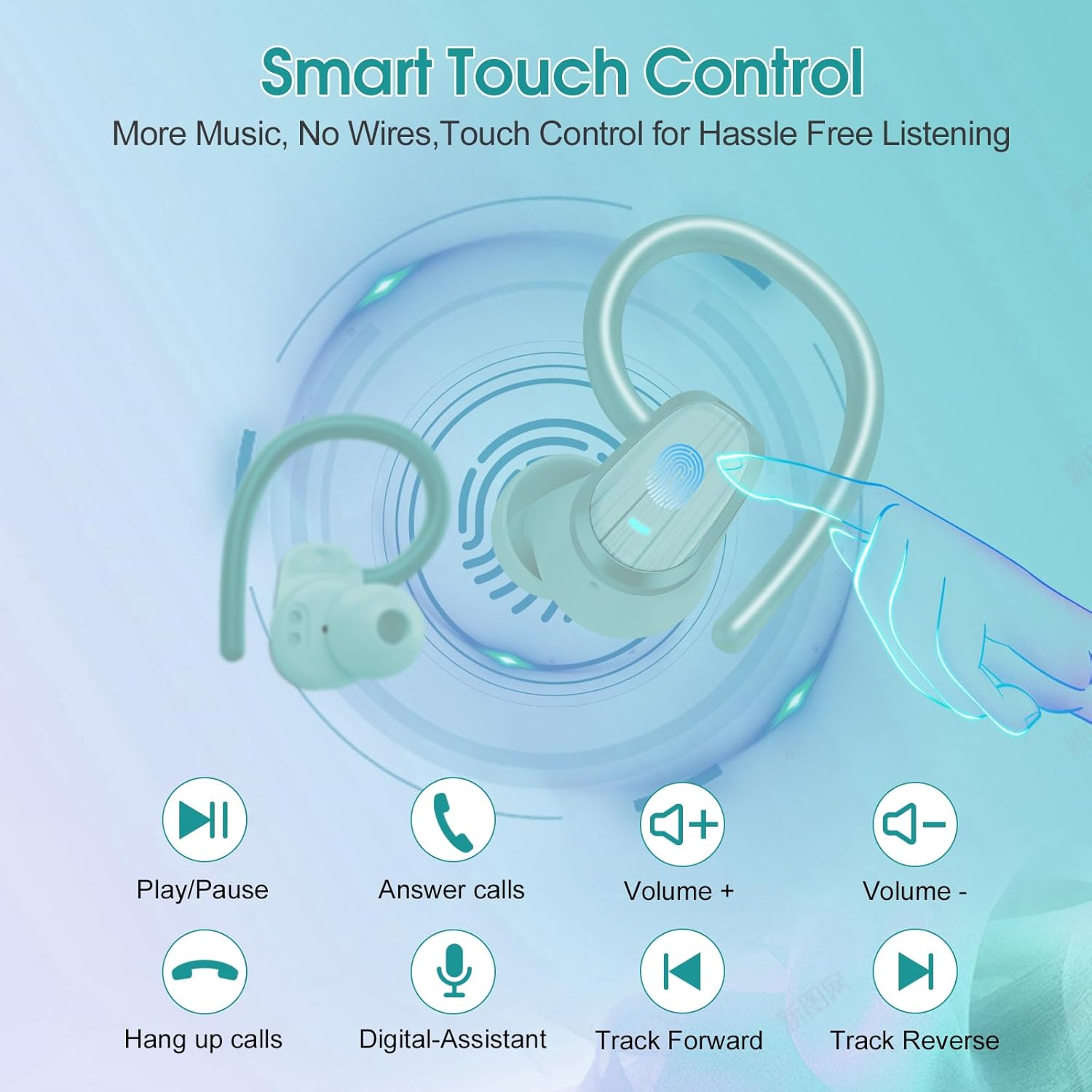
Image: Smart Touch Control functions on the S75 Earbuds.
5. Nlekọta
5.1 Waterproofing (IPX7)
The S75 earbuds are rated IPX7 waterproof, meaning they can withstand immersion in water up to 1 meter for 30 minutes. This makes them suitable for workouts, running, and protection against sweat and rain.
- Do not intentionally submerge the earbuds for extended periods or in depths greater than specified.
- Gbaa mbọ hụ na ọdụ ụgbọ mmiri ahụ akpọnwụwo tupu chajịa iji gbochie mmebi.
5.2 Nhicha
Ịdị ọcha mgbe niile na-enyere aka ịnọgide na-adị mma na ịdị ọcha.
- Jiri akwa dị nro, kpọrọ nkụ, akwa na-enweghị lint ka ihichapụ ntị ntị na akpa nchaji.
- Remove the silicone earplugs and clean them with mild soap and water. Ensure they are completely dry before reattaching.
- Zere iji ihe na-emebi emebi, mmanya na-egbu egbu, ma ọ bụ kemịkalụ ihicha.
6. Nchọpụta nsogbu
If you encounter any issues with your Jesebang S75 earbuds, please refer to the following common solutions:
| Nsogbu | Ngwọta |
|---|---|
| Igwe ntị anaghị ejikọta ọnụ | Ensure earbuds are charged. Turn off and on your device's Bluetooth. Forget "S75" in your device's Bluetooth settings and re-pair. |
| Naanị otu earbud na-arụ ọrụ | Place both earbuds back in the charging case, close the lid, wait a few seconds, then open the lid again. This should reset the connection between them. |
| Obere olu ma ọ bụ ogo ụda adịghị mma | Adjust volume on both your device and earbuds. Ensure earplugs are correctly sized and seated in your ear canal. Clean any debris from the earbud speakers. |
| Nchaji anaghị akwụ ụgwọ | Lelee eriri USB-C na nkwụnye ọkụ. Gbaa mbọ hụ na ọdụ ụgbọ mmiri ahụ dị ọcha na enweghị irighiri ihe. |
| Earbuds anaghị akwụ ụgwọ ma ọ bụrụ na | Ensure the charging contacts on both the earbuds and the case are clean and dry. Verify the charging case itself has sufficient battery. |
7. Nkọwapụta
Key technical specifications for the Jesebang S75 Wireless Earbuds:
- Aha nlereanya: S75
- Teknụzụ Njikọta: Ikuku (Bluetooth)
- Ụdị Bluetooth: 5.4
- Ogologo Bluetooth: 15 mita
- Ụdị ọkwọ ụgbọala ọdịyo: Ọkwọ ụgbọala dị ike
- Nha ọkwọ ụgbọ ala ọdịyo: 14.2 millimeters
- Ọkwa Nguzogide mmiri: IPX7 enweghị mmiri
- Ntinye ntị: N'elu Ntị
- Ihe kpatara ụdị: Na Ntị
- Ndụ batrị (Earbuds): Ruo awa 10 (ụgwọ otu)
- Total Playtime (with Charging Case): Ruo awa iri abụọ
- Oge nchaji: Approximately 2 hours (for full charge)
- Ibu ihe: 3.17 ounces
- Onye nrụpụta: Dongguan Huien Electronic Technology Co., Ltd
8. Akwụkwọ ikike na nkwado
Your Jesebang S75 Wireless Earbuds come with a standard return policy of 30 days from the date of purchase for refunds or replacements, as per Amazon's policy. For specific warranty details beyond this period, please refer to the information provided by the manufacturer or contact Jesebang customer support directly.
For further assistance, technical support, or inquiries, please visit the official Jesebang store on Amazon or contact their customer service channels.
Storelọ ahịa n'ịntanetị: Jesebang Store


