1. Okwu mmalite
This manual provides essential instructions for setting up, operating, and maintaining your IMSVEPR Smart Watch LC211. Please read this manual thoroughly before using the device to ensure proper function and safety. The IMSVEPR Smart Watch LC211 is designed to enhance your daily life with features such as Bluetooth calling, GPS tracking, health monitoring, and various sports modes.

Image 1.1: The IMSVEPR Smart Watch LC211 displaying time and date.
2. Ihe ngwugwu
Chọpụta na ihe niile dị na ngwugwu ngwaahịa gị:
- IMSVEPR Smart Watch LC211 (1 unit)
- Watch Band (1 unit)
- Eriri Nchaji (otu nkeji)
- Akwụkwọ ntuziaka onye ọrụ (1 nkeji)

Image 2.1: Illustration of the IMSVEPR Smart Watch LC211 and its included accessories, along with product dimensions.
3. Nhazi
3.1 Ịchaji ngwaọrụ
Before initial use, fully charge your smart watch. Connect the magnetic charging cable to the charging contacts on the back of the watch and plug the USB end into a standard USB power adapter (not included). A full charge typically takes 2-3 hours.

Image 3.1: The smart watch connected to its magnetic charging cable, illustrating the charging process.
3.2 Ngwa nwụnye na ijikọ
To unlock the full functionality of your IMSVEPR Smart Watch, download and install the companion app on your smartphone. The app is typically named 'Da Fit' and can be found on the App Store (iOS) or Google Play Store (Android).
- Scan the QR code in the manual or on the watch screen (if available) to download the 'Da Fit' app, or search for it directly in your phone's app store.
- Gbaa mbọ hụ na agbanyere Bluetooth na ekwentị gị.
- Mepee ngwa 'Da Fit' wee soro ntuziaka dị na ihuenyo iji mepụta akaụntụ ma ọ bụ banye.
- In the app, navigate to 'Device' or 'Add Device' and select your IMSVEPR Smart Watch from the list of available devices.
- Kwenye arịrịọ maka njikọta na ma elekere gị na ama ama gị.
4. Ntuziaka ọrụ
4.1 Nsoro ụzọ
- Ihuenyo mmetụ aka: Swipe left/right to navigate between main screens, swipe up/down to access quick settings or notifications. Tap to select.
- Bọtịnụ akụkụ: Press to wake the screen, return to the home screen, or access the app menu.
4.2 Oku na Ọkwa Bluetooth
Once paired with your smartphone, the watch supports Bluetooth calls and message notifications.
- Ịkpọ oku: Nweta mpe mpe akwa ma ọ bụ ndepụta kọntaktị dị na elekere gị ka ibido oku.
- Ịnata oku: When a call comes in, you can answer or reject it directly from your watch.
- Amamọkwa: The watch will vibrate and display notifications from social media apps (e.g., Facebook, WhatsApp, Instagram, Twitter) and other applications configured in the 'Da Fit' app.

Image 4.1: The smart watch displaying call functions, including dial pad, contacts, and incoming call interface.
Ihu elekere 4.3 nwere ike ịhazi ya
Personalize your watch by choosing from over 200 watch faces available through the 'Da Fit' app. You can also upload your own photos to create custom watch faces.
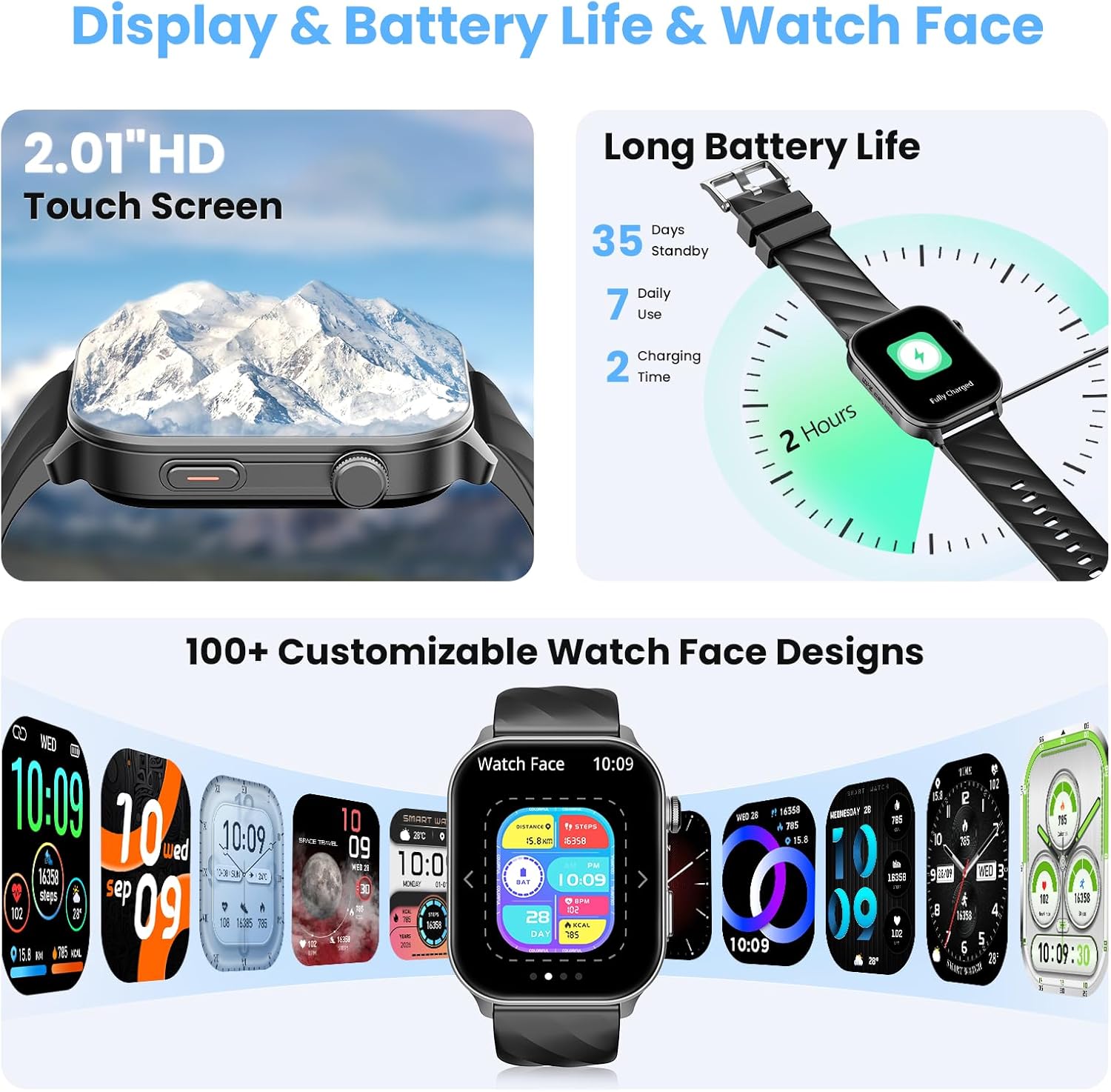
Image 4.2: A selection of customizable watch faces available for the IMSVEPR Smart Watch LC211.
5. Nlekọta ahụike
The IMSVEPR Smart Watch LC211 is equipped with an optical sensor for comprehensive health tracking.
- Nlekota obi obi: Tracks your heart rate continuously throughout the day. View real-time data and historical trends in the app.
- Nyocha ọbara oxygen (SpO2): Na-enyocha ọkwa oxygen dị n'ọbara gị.
- Nchicha ụra: Monitors your sleep patterns, including deep sleep, light sleep, and awake times, providing a detailed sleep quality report.
- Nleba anya nrụgide: Assesses your stress levels over time.
- Nsochi okirikiri ụmụ nwanyị: Provides scientific cycle tracking to predict menstruation and ovulation, helping you manage your body rhythms.
- Water Drinking Reminder: Set reminders to ensure adequate hydration.
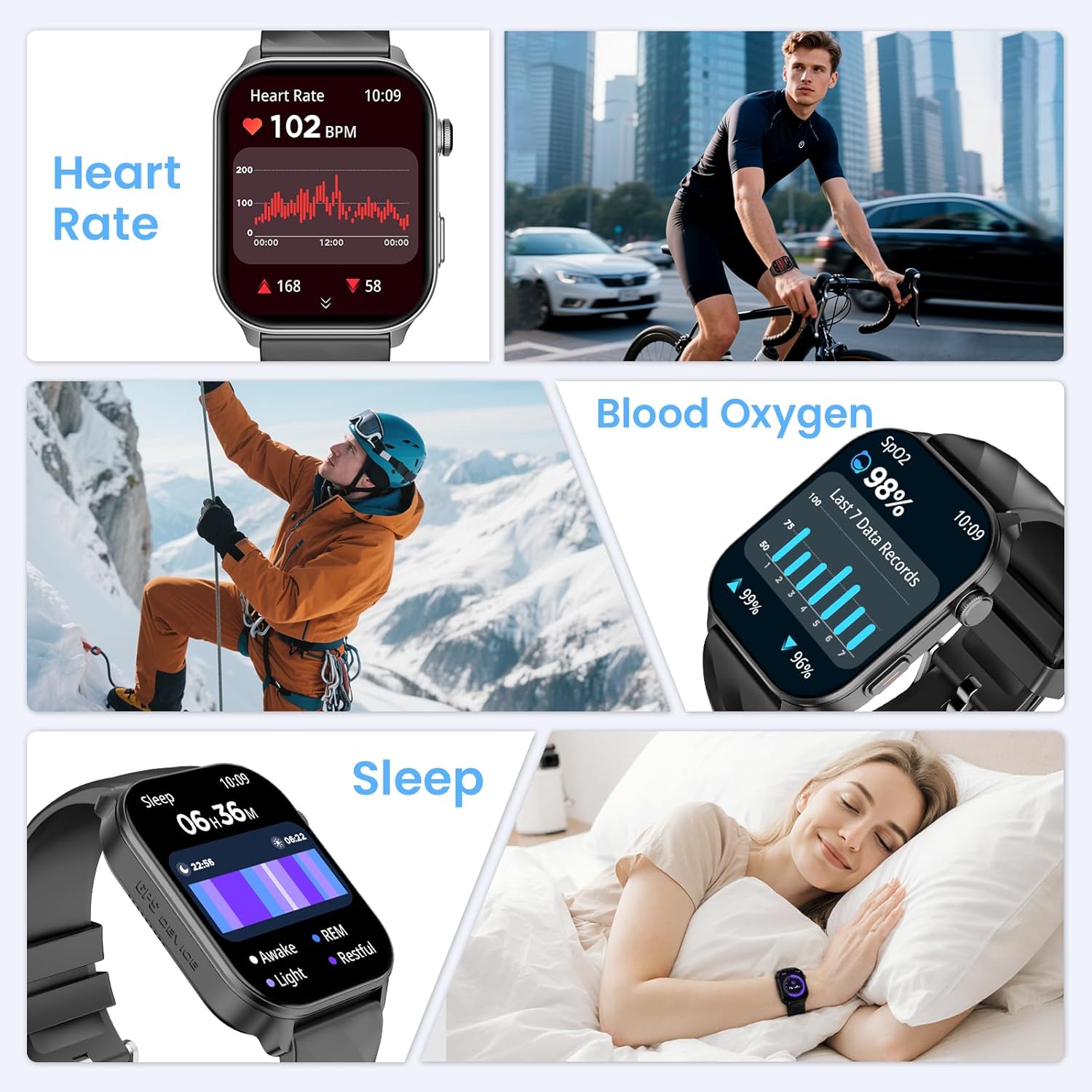
Image 5.1: Displays of heart rate, blood oxygen, and sleep tracking data on the smart watch.
6. Sports Tracking
The watch features built-in GPS and supports over 110 sport modes to accurately track your physical activities.
- GPS arụnyere: Provides precise location tracking for outdoor activities like running, cycling, and hiking.
- Compass Navigation: Utilize the high-precision outdoor compass for navigation during adventures.
- Ụdị egwuregwu 110+: Select from a wide range of activities to track real-time data such as calorie consumption, steps, distance, pace, and duration.
- Ndepụta mmemme: Monitors daily steps, distance covered, and calories burned.

Image 6.1: The smart watch displaying compass navigation and GPS outdoor sports tracking with a map route.
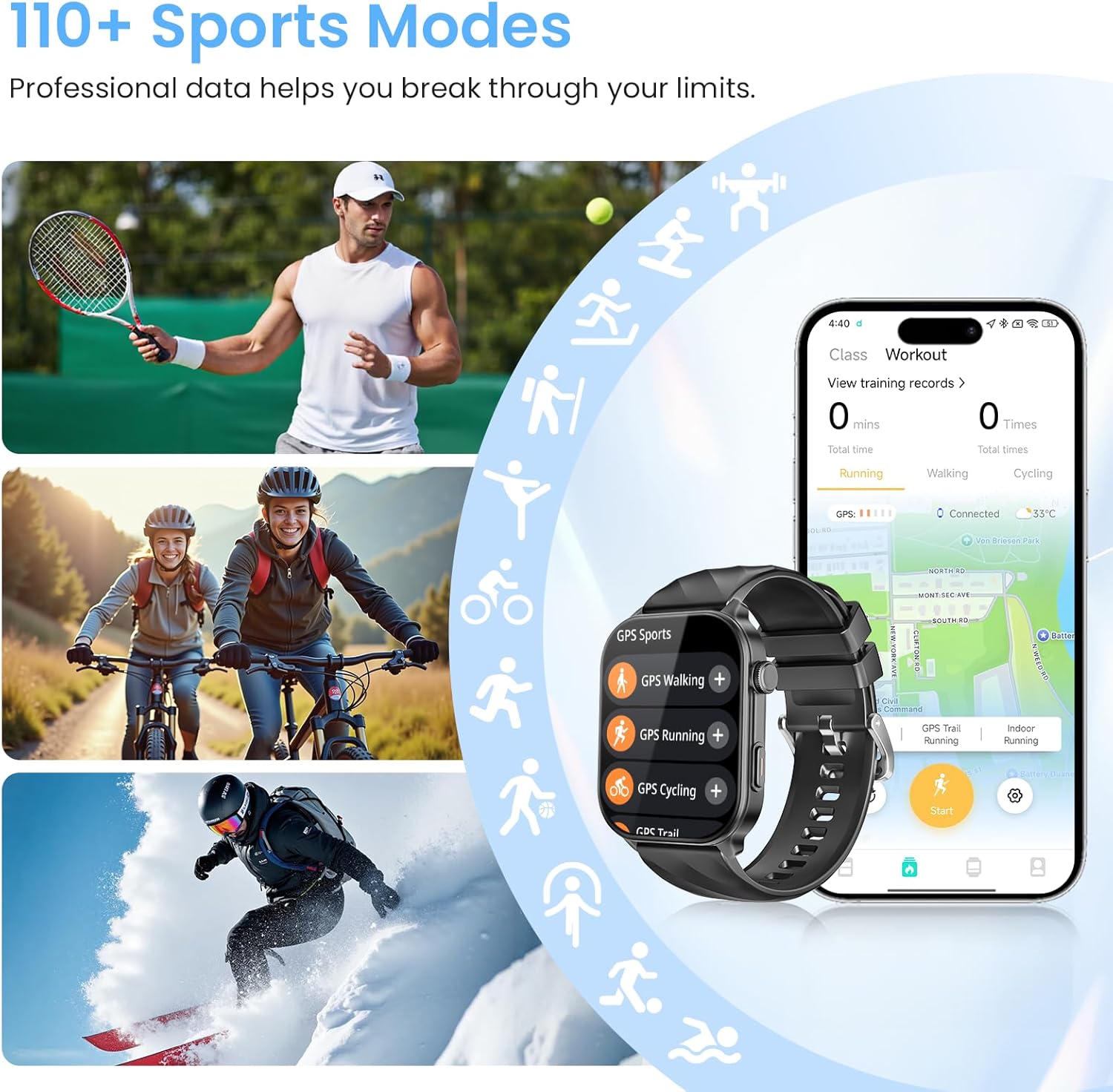
Image 6.2: Various sports activities being tracked by the smart watch, highlighting the 110+ sports modes feature.
7. Mmiri Nguzogide
The IMSVEPR Smart Watch LC211 boasts a 1 ATM water resistance rating. This means it is suitable for daily activities such as hand washing, showering, and sweating during workouts. It is not recommended for swimming, diving, or exposure to high-pressure water.

Image 7.1: Visual representation of the smart watch's 1 ATM water resistance, showing it can withstand hand washing, showering, and sweating.
8. Ndụ batrị
The smart watch is equipped with a 360mAh battery, offering:
- Up to 35 days of standby time.
- Up to 7 days of typical daily use.
- Approximately 3 days with extended use of calls and GPS.
Charging time is 2-3 hours for a full charge.
9. Multifunctional Applications
Beyond core features, the IMSVEPR Smart Watch LC211 includes several practical applications:
- Enyemaka Olu: Control your watch and phone with voice commands.
- Njikwa egwu: Manage music playback on your smartphone directly from your wrist.
- Amụma ihu igwe: Nweta mmelite ihu igwe ozugbo.
- Njikwa foto: Jiri elekere gị dị ka ihe mkpuchi anya maka igwefoto ekwentị gị.
- Chọta ekwentị gị: Locate your misplaced smartphone by triggering an alarm.
- Oge nche & elekere: Essential tools for timing activities.
- Elekere mkpu: Set silent vibrating alarms.
- Mini-games: Includes 'Jumping Bird' and '2048' for entertainment.

Foto 9.1: Ofeview of various multifunctional applications available on the smart watch, including music control, weather, and find phone.
10. Nchọpụta nsogbu
If you encounter issues with your IMSVEPR Smart Watch LC211, refer to the following common solutions:
| Okwu | Ngwọta enwere ike |
|---|---|
| Lelee anaghị agbanwuo | Gbaa mbọ hụ na chajịrị elekere ahụ nke ọma. Jikọọ ya na chaja opekata mpe nkeji iri atọ. |
| Enweghị ike ijikọ na ekwentị | Make sure Bluetooth is enabled on your phone. Restart both the watch and phone. Ensure the 'Da Fit' app is open and searching for devices. Check if the watch is already paired with another device. |
| Amamọkwa anaghị apụta | Verify that notification permissions are enabled for the 'Da Fit' app in your phone's settings. Ensure app notifications are enabled within the 'Da Fit' app itself. |
| Data ahụike ezighi ezi | Hụ na elekere ahụ dị n'aka gị nke ọma, ọ bụghị nke siri ike ma ọ bụ nke na-adịghị oke ike. Hichaa ihe mmetụta dị n'azụ elekere ahụ. Zere mmegharị gabiga ókè n'oge nha. |
| Ndụ batrị dị mkpụmkpụ | Reduce screen brightness, disable continuous heart rate monitoring if not needed, limit GPS usage, and turn off unnecessary notifications. |
11. Nkọwapụta
| Njirimara | Nkọwa |
|---|---|
| Aha Nlereanya | LC211 |
| Ụdị | IMSVEPR |
| Nha ihuenyo | 2.01 sentimita asatọ |
| Ụdị ngosi | HD ihuenyo mmetụ |
| GPS | GPS arụnyere n'ime ya |
| Mmiri Nguzogide | 1 ATM |
| Ike batrị | 360mAh |
| Njikọta | Bluetooth |
| Sistemụ nrụọrụ | watchOS 3 (as per product data, though this is typically Apple's OS, it's listed in the source) |
| Ibu Ibu | 3.84 ounces |
| Akụkụ ngwugwu | 5.87 x 2.99 x 1.22 sentimita asatọ |
12. Nlekọta
- Nhicha: Regularly clean your watch and watch band with a soft, dry cloth. If necessary, use a slightly damp ákwà na ncha dị nro, wee sachaa ma kpoo ya nke ọma.
- Zere Chemicals: Do not expose the watch to strong chemicals, solvents, or detergents, as these can damage the finish and seals.
- Nchekwa: Chekwaa elekere n'ebe dị jụụ, kpọrọ nkụ mgbe anaghị eji ya. Zere oke okpomọkụ.
- Ịchaji: Use only the provided charging cable. Avoid overcharging the battery.
13. Akwụkwọ ikike na nkwado
IMSVEPR is committed to providing quality products and customer satisfaction.
- Akwụkwọ ikike: The product includes a 2-year free replacement warranty.
- Nkwado oge ndụ: IMSVEPR offers lifetime support and satisfied solutions for its products.
- Ndị ọrụ nlekọta ndị ahịa: For any inquiries or support needs, quick service is available via email within 24 hours. Please refer to the contact information provided in your product packaging or on the official IMSVEPR websaịtị.
14. Ozi nchekwa
- Anwala ịkwasa ma ọ bụ gbanwee elekere.
- Keep the watch away from extreme heat or open flames.
- Consult a medical professional before starting any new exercise regimen or if you have pre-existing health conditions. The health monitoring features are for informational purposes and not intended for medical diagnosis or treatment.
- Debe ebe ụmụaka na-apụghị iru.


