Okwu mmalite
The BIGBEN EPOK REWIND+ BTTAPEBL is a portable cassette player and recorder designed to combine the classic audio experience of cassette tapes with modern Bluetooth 5.4 wireless technology. This device allows for both playback and recording of audio cassettes, offering versatile connectivity options including an integrated speaker, 3.5mm headphone jack, and bidirectional Bluetooth functionality. It features an auto-reverse mechanism for uninterrupted listening and is powered by a rechargeable USB-C battery.
Ihe ngwugwu
Tupu e jiri ya, biko hụ na ihe niile dị na ngwugwu ahụ:
- BIGBEN EPOK REWIND+ Cassette Player
- Vintage-style Wired Headphones (3.5mm jack)
- Blank Audio Cassette
- USB-C eriri USB
- Wooden Pencil (for manual tape winding)

The product packaging clearly displays the cassette player and its included accessories: headphones, a blank cassette, and a USB-C cable.

Nfefeview of the BIGBEN EPOK REWIND+ components: the blue cassette player, orange-padded wired headphones, a blank audio cassette, and a wooden pencil.
Melite
1. Ịchaji ngwaọrụ
The EPOK REWIND+ features a built-in 1200mAh rechargeable battery. Before first use, fully charge the device.
- Connect the supplied USB-C charging cable to the USB-C port on the side of the player.
- Connect the other end of the cable to a standard USB power adapter (not included) or a computer's USB port.
- Ọkụ ihe ngosi chaja ga-enwu. Ozugbo chajịchara ya nke ọma, ọkụ ahụ nwere ike ịgbanwe agba ma ọ bụ gbanyụọ, dabere na ụdị ya.
2. Inserting a Cassette
- Locate the 'OPEN' switch or button on the player and slide/press it to open the cassette compartment door.
- Insert an audio cassette with the exposed tape facing towards the player's head mechanism. Ensure the cassette fits securely.
- Close the cassette compartment door firmly until it clicks into place.
3. Connecting Headphones (Optional)
For private listening, connect the included 3.5mm wired headphones or any compatible headphones to the 3.5mm headphone jack on the side of the player.

A user holding the EPOK REWIND+ cassette player while listening through wired headphones, demonstrating portable use.
Ntuziaka ọrụ
Basic Cassette Playback
- Insert a cassette as described in the Setup section.
- Pịa KWURU bọtịnụ ka ịmalite ịkpọghachi.
- Adjust the volume using the rotary volume knob.
- Iji kwụsị igwu egwu, pịa KWỤSỊ bọtịnụ.
- Iji mee ngwa ngwa gaa n'ihu, pịa FF bọtịnụ. Pịa KWỤSỊ to cease fast forwarding.
- Ka iweghachi azụ, pịa REW bọtịnụ. Pịa KWỤSỊ to cease rewinding.
Ọrụ-atụgharị akpaaka
The EPOK REWIND+ features an auto-reverse function, allowing continuous playback of both sides of a cassette without manual flipping.
- During playback, the player will automatically switch to the other side of the cassette once the current side ends.
- To manually reverse the tape direction, press the DIR (Direction) button.
Bluetooth Connectivity (5.4)
The device supports bidirectional Bluetooth 5.4, functioning as both a transmitter (TX) and a receiver (RX).
Transmitter Mode (TX): Streaming Cassette Audio to Bluetooth Headphones/Speakers
- Slide the Bluetooth mode selector switch to the TX ọnọdụ.
- Hụ na ekweisi Bluetooth gị ma ọ bụ igwe okwu gị nọ n'ọnọdụ njikọta.
- The EPOK REWIND+ will automatically search for and connect to nearby Bluetooth audio devices. A successful connection will be indicated by a specific LED light pattern or audio cue.
- Begin cassette playback. The audio will now stream wirelessly to your connected Bluetooth device.
Receiver Mode (RX): Playing Smartphone Audio through the Player's Speaker/Headphones
- Slide the Bluetooth mode selector switch to the RX ọnọdụ.
- On your smartphone or other audio source, search for Bluetooth devices and select "EPOK REWIND+" to pair.
- Once connected, audio from your smartphone will play through the EPOK REWIND+'s integrated speaker or connected wired headphones.
Recording to Cassette
The EPOK REWIND+ allows recording from two sources: an integrated microphone or a Bluetooth audio source (in RX mode).
Recording from Integrated Microphone
- Insert a blank or recordable cassette.
- Pịa REC (Record) button. The KWURU button will also engage simultaneously.
- Speak into the integrated microphone or place the player near the sound source you wish to record.
- Ka ịkwụsị ndekọ, pịa KWỤSỊ bọtịnụ.
Recording from Bluetooth Source (Mixtape Creation)
- Insert a blank or recordable cassette.
- Set the Bluetooth mode selector switch to RX and pair your smartphone or audio source as described above.
- Start playing audio on your smartphone.
- Pịa REC button on the EPOK REWIND+. The KWURU bọtịnụ ga-etinyekwa aka.
- The audio from your smartphone will now be recorded onto the cassette.
- Ka ịkwụsị ndekọ, pịa KWỤSỊ bọtịnụ.

A zuru ezu view of the EPOK REWIND+ cassette player, highlighting the cassette window and control buttons for playback and recording.
Nlekọta
Na-ehicha ngwaọrụ
- Use a soft, dry cloth to wipe the exterior of the player.
- For the tape head and pinch rollers, use a cotton swab lightly dampened with isopropyl alcohol. Gently clean these components to ensure optimal sound quality and prevent tape damage. Perform this cleaning periodically, especially after extended use.
- Ensure the device is powered off and disconnected from any power source before cleaning.
Nlekọta Cassette
- Store cassettes in their cases to protect them from dust and physical damage.
- Avoid exposing cassettes to extreme temperatures or direct sunlight.
- If a tape becomes loose, use the included wooden pencil to manually wind the tape taut before inserting it into the player. Insert the pencil into one of the cassette's spools and rotate it gently.

A hand demonstrates the traditional method of using a pencil to manually wind a cassette tape, a useful technique for tape maintenance.
Nlekọta batrị
- Ka ịgbatị ndụ batrị ogologo, zere ịchaji batrị ugboro ugboro.
- If storing the device for an extended period, charge it to approximately 50% capacity.
Nchọpụta nsogbu
- Enweghị ike: Ensure the device is charged. Connect the USB-C cable and check the charging indicator.
- No Sound from Cassette:
- Check if headphones are properly plugged in or if Bluetooth is connected (in TX mode).
- Ensure the volume knob is turned up.
- Verify the cassette is inserted correctly and the tape is not tangled or damaged.
- Clean the tape head and pinch rollers.
- Bluetooth Not Connecting (TX Mode):
- Ensure the Bluetooth mode selector is in the TX ọnọdụ.
- Put your receiving Bluetooth device (headphones/speaker) into pairing mode.
- Bugharịa ngwaọrụ ndị ahụ nso na ibe ha.
- Turn off and on both devices to reset Bluetooth.
- Bluetooth Not Connecting (RX Mode):
- Ensure the Bluetooth mode selector is in the RX ọnọdụ.
- On your smartphone, ensure Bluetooth is enabled and search for "EPOK REWIND+".
- Forget the device on your smartphone and re-pair if issues persist.
- Okwu ndekọ:
- Ensure a recordable cassette is inserted and the record protection tabs are intact.
- Verify the audio source (microphone or Bluetooth in RX mode) is active and providing sound.
- Check microphone placement for clear voice recording.
Nkọwapụta
| Njirimara | Nkọwa |
|---|---|
| Ụdị | Big Ben |
| Nọmba nlereanya | BTTAPEBL |
| Njikọta | Bluetooth 5.4 (Bidirectional TX/RX) |
| Mmepụta ọdịyo | Integrated Speaker, 3.5mm Headphone Jack |
| Edekọ | Integrated Microphone, Bluetooth (RX mode) |
| Atụmatụ pụrụ iche | Nchekwa onwe |
| Batrị | Rechargeable 1200mAh (USB-C charging) |
| Akụkụ (Ihe dị ka) | 11 cm (Length) x 7.7 cm (Height) x 2.4 cm (Width) |
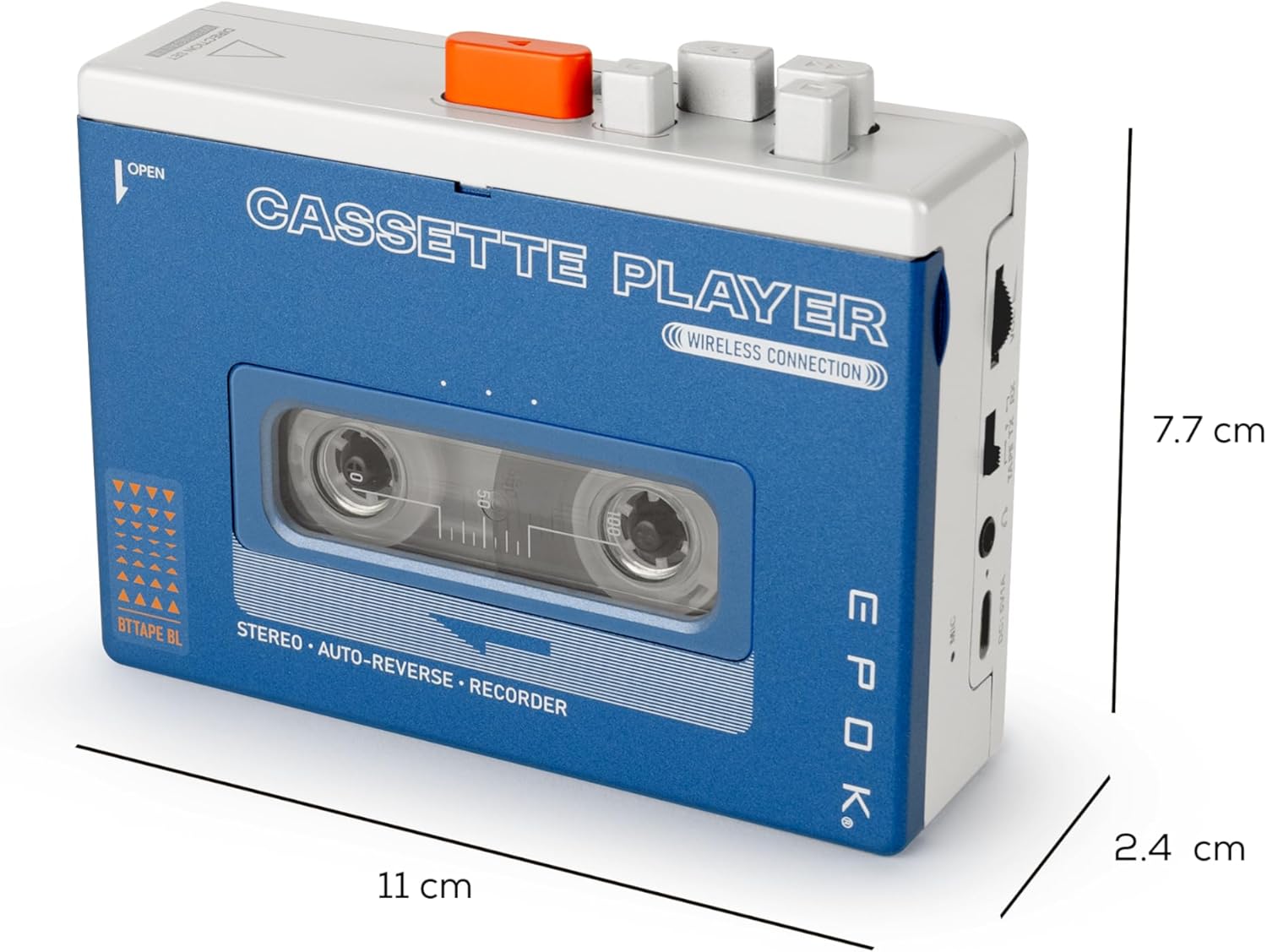
The EPOK REWIND+ cassette player shown with its approximate dimensions: 11 cm in length, 7.7 cm in height, and 2.4 cm in width.


