Okwu mmalite
The VAIO FS 16-inch Laptop is a powerful and versatile device designed for both productivity and entertainment. Featuring an Intel Core Ultra 7 processor, 16GB of RAM, and a 1TB SSD, it delivers fast and efficient performance. The 16-inch Full HD touch display with THX Spatial Audio provides an immersive user experience. This manual will guide you through the essential steps to get the most out of your new laptop.
Melite
1. Unboxing na mbido nyocha
Carefully remove your VAIO FS laptop and all accessories from the packaging. Ensure all components are present and undamaged. The box should contain the laptop, power adapter, and this instruction manual.

Image: The VAIO FS 16-inch Laptop, still partially covered in its protective sleeve, resting within its black packaging box.
2. Ijikọ na Ike
Connect the power adapter to the laptop's power port and then plug it into a wall outlet. It is recommended to fully charge the battery before initial use.

Image: A closed VAIO FS 16-inch Laptop, highlighting its slim profile and the VAIO logo on the lid.
3. Mbido Mmalite na Ntọala Windows
Open the laptop lid and press the power button. Follow the on-screen instructions to complete the Windows 11 Home setup process. This includes setting up your user account, network connection, and privacy settings.
4. Fingerprint Reader and Windows Hello IR Setup
For enhanced security and convenience, set up the integrated fingerprint reader and Windows Hello IR camera. Navigate to Windows Settings > Accounts > Sign-in options to configure these features for fast, secure logins.
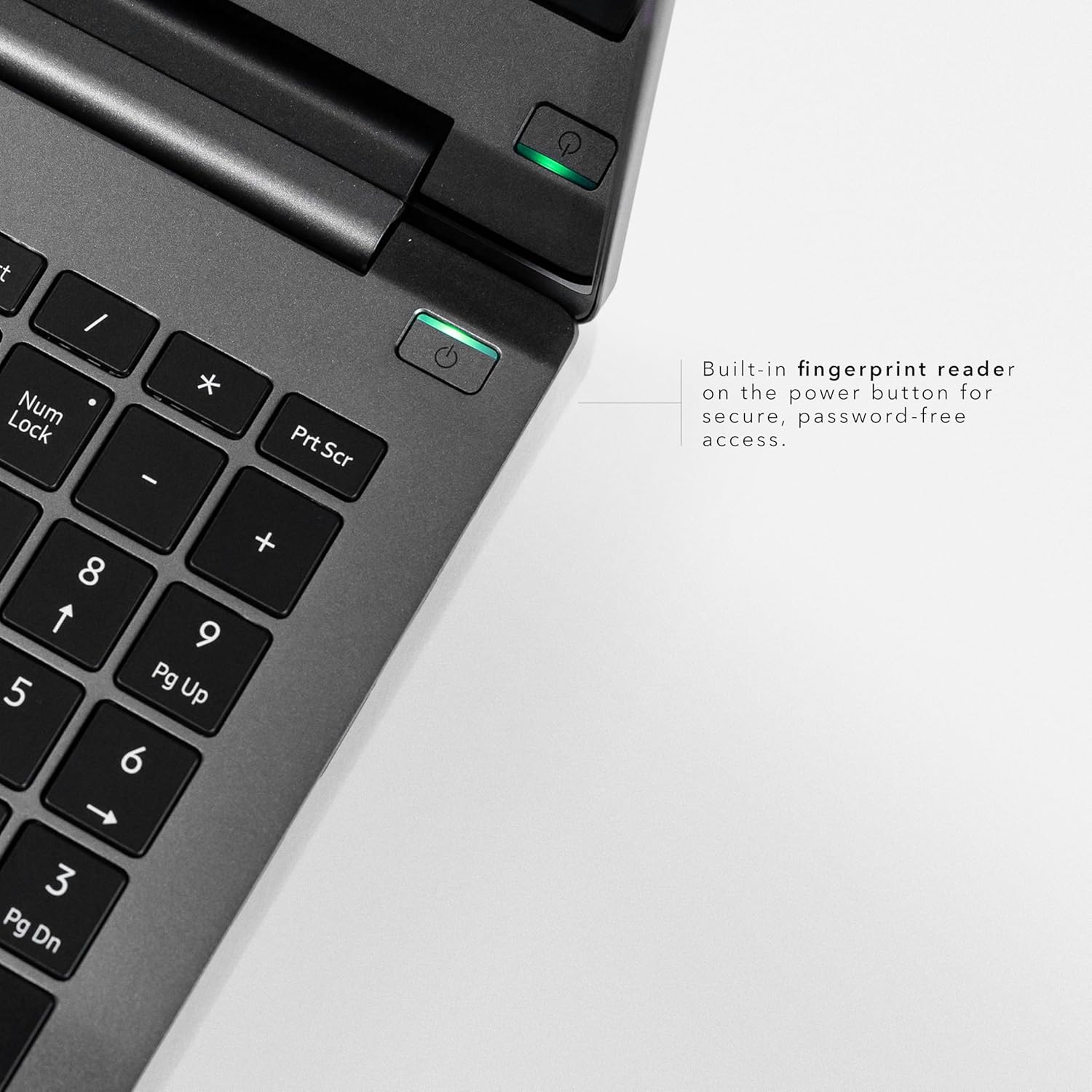
Foto: nkọwa zuru ezu view of the VAIO FS 16-inch Laptop's keyboard area, focusing on the power button with its built-in fingerprint reader for secure, password-free access.
Operating Your VAIO FS Laptop
1. Display and Touch Functionality
The 16-inch Full HD IPS touch display (1920x1200, 300 nits) with a 16:10 aspect ratio offers sharp visuals and more vertical space. Utilize the touch functionality for intuitive navigation and interaction with Windows 11.
2. Ahụigodo na Touchpad
The laptop features a spill-resistant backlit keyboard for comfortable typing in various lighting conditions. The precision touchpad supports multi-touch gestures for smooth control.
3. Ports na Njikọta
Your VAIO FS laptop is equipped with a variety of ports for versatile connectivity:
- 2 x USB Type-C Ports with Charge Capability
- 1 x HDMI V.4 with 8K Display Support
- 2 x USB 3.2 Super Speed ports
- 1 x RJ45 Ethernet Port
- x SD card reader with eMMC Support
- Jack ekweisi 3.5mm

Foto: Akụkụ view of the VAIO FS 16-inch Laptop, clearly labeling its various ports including USB-C, HDMI, USB 3.2, RJ45 Ethernet, and an SD card reader.
4. THX Odiyo Oghere
Experience enhanced audio quality with THX Spatial Audio. This technology optimizes sound for immersive listening, 3D audio, and crystal-clear voice capture during calls and streams.

Image: A graphic detailing THX-tuned audio features, including immersive sound, 3D audio optimization, and crystal-clear voice capture, highlighting the audio capabilities of the VAIO FS 16-inch Laptop.
5. AI-Powered Performance
The Intel Meteor Lake H-series CPU with Intel Arc graphics and AI capabilities ensures smooth multitasking and fast performance. The integrated AI features optimize device performance based on usage patterns, enhancing CPU and memory efficiency.
6. Copilot Assistant
Utilize the dedicated Copilot button to quickly launch Microsoft's AI assistant, enhancing your productivity and workflow.
Nlekọta
1. Na-ehicha laptọọpụ gị
Use a soft, lint-free cloth to clean the screen and exterior. For stubborn smudges, lightly dampen akwa na mmiri ma ọ bụ ihe na-echebe ihuenyo. Zere kemịkalụ siri ike.
2. Nlekọta batrị
To prolong battery life, avoid extreme temperatures and fully discharging the battery frequently. The AI optimizer helps manage battery usage for all-day power.
3. Mmelite ngwanrọ
Regularly check for and install Windows updates and VAIO driver updates to ensure optimal performance and security.
Nchọpụta nsogbu
Okwu na azịza ndị nkịtị:
- Laptọọpụ adịghị arụ ọrụ: Hụ na e jikọtara ihe nkwụnye ike ahụ nke ọma, ebe ihe nkwụnye ahụ na-arụkwa ọrụ nke ọma. Nwaa ebe nkwụnye ike ọzọ.
- Gosipụta nsogbu: If the screen is blank or flickering, try restarting the laptop. Check external display connections if applicable.
- Nsogbu njikọta: For Wi-Fi issues, restart your router and the laptop. For wired connections, ensure the Ethernet cable is properly connected.
- Ịrụ ọrụ nwayọ: Close unnecessary applications, check for background updates, or restart the laptop. The AI optimizer should help maintain performance.
For further assistance, please refer to the support section or contact VAIO customer service.
Nkọwapụta
| Njirimara | Nkọwa |
|---|---|
| Aha Nlereanya | VAIO FS16 Touch |
| Nha ihuenyo | 16 sentimita asatọ |
| Mkpebi ihuenyo | 1920 x 1200 pikselụ |
| Nhazi | Intel Core Ultra 7 (1.4 GHz) |
| RAM | 16GB LPDDR5 |
| Draịvụ ike | 1 TB SSD (PCIe Gen 4) |
| Kaadị eserese | Intel Arc Graphics (Agbakwunyere) |
| Sistemụ nrụọrụ | Windows 11 Ụlọ |
| Atụmatụ pụrụ iche | Backlit Keyboard, Fingerprint Reader, HD Audio, Lightweight, Spill Resistant |
| Nkezi Ndụ batrị | Awa 10 |
| Ibu Ibu | 8.1 pound |
| Akụkụ ngwaahịa | 14.45 x 10.11 x 0.7 sentimita asatọ |
Akwụkwọ ikike na nkwado
Your VAIO FS 16-inch Laptop comes with a manufacturer's warranty. Please refer to the warranty card included in your packaging for specific terms and conditions. For technical support, driver downloads, or service inquiries, please visit the official VAIO support websaịtị ma ọ bụ kpọtụrụ ndị ahịa ha ọrụ.
Nkwado n'ịntanetị: www.vaio.com/support
Vidiyo ngwaahịa
VAIO Manufacturing and Durability Testing
Video: This video showcases the rigorous manufacturing process and durability testing that VAIO laptops undergo, ensuring high quality and reliability.
FS16 from VAIO
Vidiyo: Mkpebi dị mkpirikpiview of the VAIO FS16 laptop, highlighting its key features and design.
VAIO SX-R The Best All-Round Laptop You're Not Using!
Video: An in-depth review of the VAIO SX-R laptop, discussing its features, performance, and user experience. While this video refers to the SX-R model, many features and design principles are shared with the FS series.


