1. Okwu mmalite
This manual provides essential information for the safe and efficient operation of your TOPTRO Quadra Projector. Please read this manual thoroughly before using the projector and retain it for future reference. The TOPTRO Quadra Projector is designed to deliver a high-quality visual and audio experience with its advanced features and smart capabilities.
2. Ozi nchekwa
- Do not block the ventilation openings. Ensure adequate airflow around the projector to prevent overheating.
- Do not expose the projector to rain or moisture to avoid electric shock or fire.
- Jiri naanị ihe nkwụnye ike enyere na ihe ngosi ahụ.
- Zere ile anya ozugbo na oghere projector mgbe lamp dị na ya, ebe ọ bụ na ìhè na-egbuke egbuke nwere ike imebi anya.
- Place the projector on a stable, level surface to prevent it from falling.
- Agbalịla ịkwatu ma ọ bụ rụzie ihe onyonyo ahụ n'onwe gị. Nye ndị ọrụ ruru eru ọrụ niile.
3. Ihe ngwugwu
Chọpụta na ihe niile dị na ngwugwu:
- 1 x TOPTRO Quadra Projector
- 1 x HDMI USB
- 1 x Akwụkwọ ntuziaka onye ọrụ
- 1 x Njikwa anya
4. Ngwaahịa gafereview
Familiarize yourself with the main components and interfaces of your TOPTRO Quadra Projector.
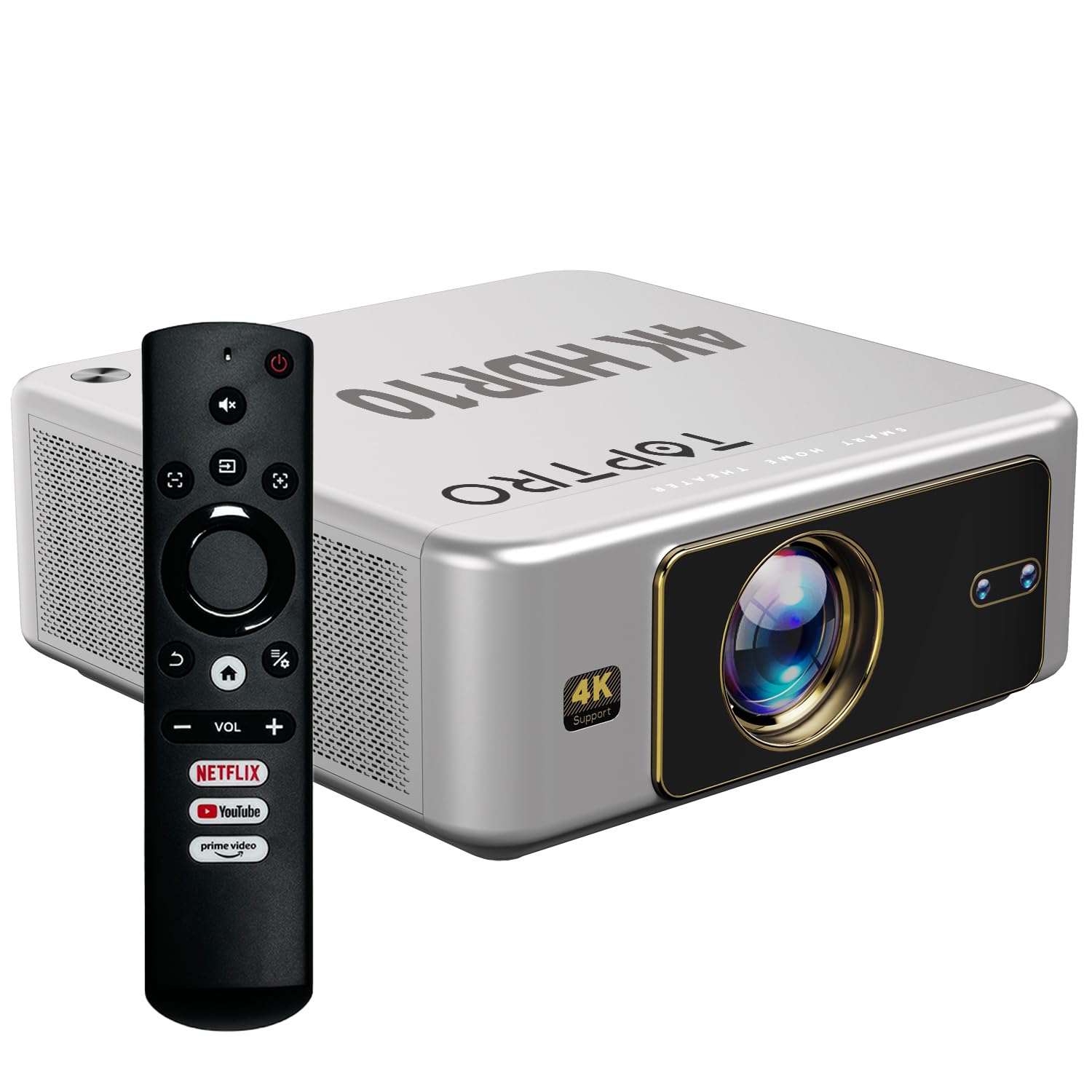
Foto 4.1: N'ihu view of the TOPTRO Quadra Projector with included remote control.

Figure 4.2: Rear panel of the projector displaying the power input, audio jack, HDMI ports, and USB ports.
5. Nhazi
5.1 Placement and Projection Size
Position the projector on a stable surface. The TOPTRO Quadra Projector supports a maximum screen size of 300 inches. Adjust the distance from the wall or screen to achieve your desired image size.

Figure 5.1: Recommended projection distances for different screen sizes.
5.2 Njikọ ike
- Jikọọ eriri ọkụ na ọdụ ụgbọ mmiri ntinye ike nke projector.
- Tinye nsọtụ nke ọzọ nke eriri ọkụ eletrik n'ime oghere ọkụ eletrik kwesịrị ekwesị.
5.3 Ike mbido na ntọala ntọala
- Pịa bọtịnụ ike dị na projector ma ọ bụ remote control ka ịgbanwuo ya.
- Upon first use, the projector may guide you through initial setup steps, including language selection and network connection.
5.4 Ndozi Isi Ihe na Ndozi Isi Ihe
The TOPTRO Quadra Projector features AI-powered automatic focus and keystone correction. This system automatically adjusts the image for optimal clarity and shape.
- Lekwasịrị anya na akpaaka: The projector will automatically adjust the image sharpness.
- Nkume isi akpaaka: The projector will automatically correct trapezoidal distortion to ensure a rectangular image.
- Auto Obstacle Avoidance & Screen Fit: The projector can detect obstacles and adjust the image to fit the screen area.
If automatic adjustments are not satisfactory, manual adjustments can be made through the settings menu. Navigate to the 'Display & Sound' settings to access these options.

Figure 5.2: Automatic image correction features.
6. Ọrụ
6.1 Njikọta na Nsoro Onye Ọrụ
The TOPTRO Quadra Projector runs on a Net-Flix Certified Linux OS, providing a user-friendly interface. Use the remote control to navigate through menus and select applications.

Figure 6.1: Home screen with pre-installed streaming applications.
6.2 Njikọta
The projector offers various connectivity options for external devices.
- HDMI: Connect your laptop, MacBook, Blu-ray player, TV sticks, TV boxes, or gaming consoles (e.g., PS4) using the dual HDMI ports. The projector supports HDMI CEC and HDMI EARC for enhanced audio return channel functionality.
- USB: Two USB ports are available for connecting pendrives or hard disks to play media files ozugbo.
- 3.5mm Audio pụta: Connect external headphones or speakers for a personalized audio experience.
- Wi-Fi: Utilize the 6th Gen Dual Band Wi-Fi (2.4 GHz + 5 GHz) for internet access and streaming.
- Bluetooth Bluetooth: Connect Bluetooth speakers, headphones, or other compatible audio devices. The projector also supports two-way Bluetooth, allowing it to function as a Bluetooth speaker.
- Miracast: Wirelessly mirror your screen from compatible devices.

Figure 6.2: Connectivity options for external devices.
6.3 Ntọala ngosi
Adjust image quality and display features through the 'Display & Sound' menu.
- Ụdị foto: Select from various preset picture modes (e.g., Vivid) or customize settings like brightness, contrast, and color.
- 4K HDR10+ Support: The projector plays true 4K resolution HDR10+ videos, offering enhanced contrast and color depth.
- MEMC (Ntụle Motion, Ụgwọ Mkpesa): This technology improves video smoothness and clarity, especially for fast-moving scenes, by interpolating frames.

Figure 6.3: MEMC technology for smoother visuals.
6.4 Ntọala ọdịyo
Manage audio output and formats via the 'Display & Sound' menu.
- Dolby Atmos & Dolby Digital Plus: The projector supports these advanced audio technologies for immersive sound.
- Ụdị eARC: Enable eARC for high-quality audio return from compatible devices.
- Ụdị mmepụta: Select the appropriate audio output format (e.g., Auto, PCM, Passthrough, Dolby Digital, Dolby Digital Plus) based on your connected audio system.

Figure 6.4: Immersive audio with Dolby Atmos support.
7. Nlekọta
Nlekọta kwesịrị ekwesị na-eme ka ihe ngosi gị dị ogologo oge ma rụọ ọrụ nke ọma.
- Nchacha oghere: Jiri nwayọ hichaa anya projector ahụ na ákwà dị nro, nke na-enweghị lint nke e mere kpọmkwem maka elu anya. Zere ihe ndị na-emebi emebi ma ọ bụ kemịkalụ siri ike.
- Nchacha mpụta: Use a soft, dry cloth to clean the exterior of the projector.
- Mgbochi uzuzu: The TOPTRO Quadra Projector features a fully sealed optical engine, which helps prevent dust, dirt, and moisture from entering the light path. This design reduces the need for frequent internal cleaning and maintains consistent image quality.
8. Nchọpụta nsogbu
Ọ bụrụ na ị na-enwe nsogbu na projector gị, rụtụ aka na nsogbu na azịza ndị a na-ahụkarị:
| Nsogbu | Ihe nwere ike ime | Ngwọta |
|---|---|---|
| Ọnweghị onyonyo egosiri | Incorrect input source selected; loose HDMI/USB connection; power issue. | Verify input source in settings; check cable connections; ensure projector is powered on. |
| Enweghị ụda | Volume too low or muted; incorrect audio output setting; external audio device not connected properly. | Adjust volume; check 'Sound output' settings; ensure external speakers are connected and powered. |
| Onyonyo na-agbagọ ma ọ bụ agbagọ | Focus or keystone correction issues; projector not placed correctly. | Allow auto-focus/keystone to complete. If issues persist, manually adjust focus and keystone in 'Display & Sound' settings. Ensure the projector is perpendicular to the screen. |
| Njikwa anya anaghị arụ ọrụ | Batteries are low or depleted; remote not pointed at IR receiver; obstruction. | Dochie batrị; hụ na ahịrị anya doro anya na onye na-anabata IR nke ihe ngosi ahụ. |
| Fan noise is noticeable | Normal operation; projector is working hard; ventilation blocked. | Ensure adequate ventilation around the projector. Fan noise is a normal part of projector operation, especially during high-performance tasks. |
9. Nkọwapụta
Key technical specifications of the TOPTRO Quadra Projector:
| Njirimara | Nkọwa |
|---|---|
| Ụdị | TOPTRO |
| Aha Nlereanya | TOPTRO Quadra Projector 4K HDR10+ Dolby |
| Akụkụ ngwaahịa | 24 x 20 x 10 cm |
| Ibu Ibu | 2 n'arọ |
| Ngwaọrụ Akụrụngwa | 3.5mm Audio, Bluetooth 5.2, Dual HDMI (CEC, EARC), Dual USB |
| Ngwa dakọtara | Gaming Console, Laptop, Smartphone, Speaker, Television |
| Atụmatụ pụrụ iche | Dolby Atmos - Dolby Digital Plus, 4K HDR 10+/HLG, Net-Flix Certified Linux OS, 2GB RAM, 32GB ROM, Auto Focus & Keystone, Native 1080p Full HD & True 4K Support, 32000 Lumens Brightness (2600 ANSI), 15W Big Speakers, HDMI ARC, Dual HDMI, Built-in Apps, Dual 5G & 2.4G WiFi 6, Bluetooth, WiFi Display, Electronic Focus & 6D Electronic correction, Fully Sealed Optical Engine, MEMC |
| Ngosipụta teknụzụ | LCD |
| Ihe onyonyo | 32000 Lumens (2600 ANSI) |
| Foto dị iche na foto | 22000:1 |
| Akụkụ akụkụ | 16:9 |
| Native Screen Resolution | 1920 x 1080 (HD zuru ezu) |
| Mkpebi akwadoro | Up to 3840 x 2160 Pixels (4K) |
| Ọnụego ume ọhụrụ | 60 Hz |
| Lamp Ndụ | Awa 50000 |
| Ụdị Ihe | Enwere ike ibugharị |
| Ụdị nkwụnye | Ugwu elu ụlọ |
| Mba onye si | China |
10. Akwụkwọ ikike na nkwado
For warranty information, technical support, or service inquiries, please contact TOPTRO Projectors India using the details below:
- Email: support@toptro.in or sreeprojectors@gmail.com
- WhatsApp: 8341888860
- Websaịtị: toptro.in
Please have your product model number (Quadra 4K HDR10+ Dolby) and purchase details ready when contacting support.


