1. Ntuziaka nchekwa
Always prioritize safety when using welding equipment. This welding helmet is designed to protect your face and eyes from harmful light and sparks during welding, cutting, and grinding operations. However, it is crucial to follow all safety guidelines to prevent injury.
- Nchedo anya: The auto-darkening filter provides protection against harmful UV and IR radiation. Ensure the filter is clean and free from damage before each use.
- Face Protection: The helmet shell protects your face from sparks, spatter, and heat.
- Additional PPE: This product protects your face and eyes only. Always wear appropriate personal protective equipment (PPE) such as welding gloves, arm covers, and protective clothing to shield other exposed skin from welding hazards.
- Igwe ikuku: Ensure adequate ventilation in your work area to avoid inhaling welding fumes.
- Ọrụ nnwale: Utilize the test function before starting any welding operation to confirm the auto-darkening feature is working correctly.
- Lelee batrị: If the battery indicator light illuminates, replace the battery promptly to prevent unexpected power loss during operation.
2. Ngwaahịa gafereview
The EENOUR EN600G Automatic Light-Shielding Welding Helmet features advanced optical technology and user-friendly adjustments for a comfortable and safe welding experience. Its lightweight design and multiple modes make it suitable for various applications.
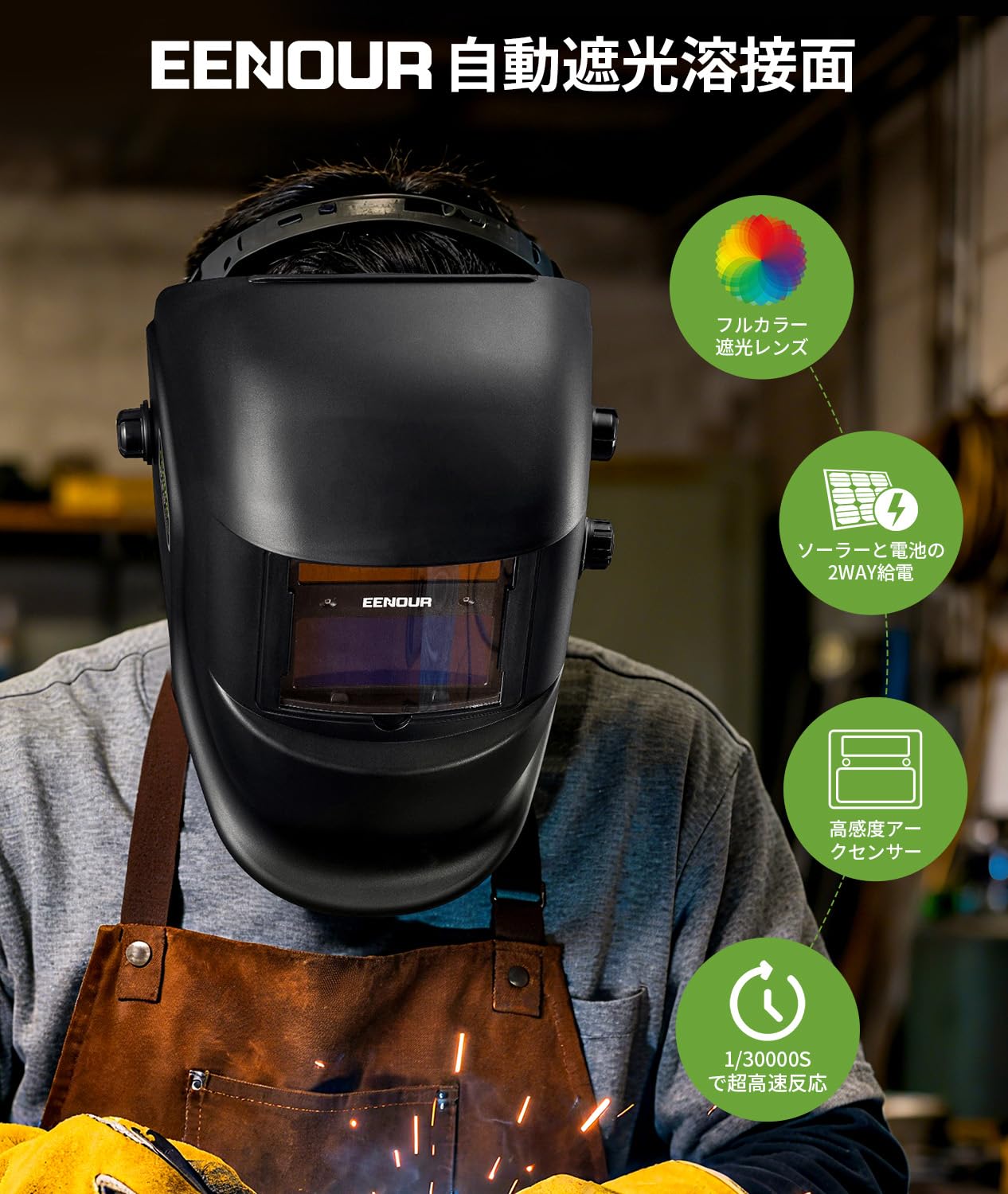
Figure 2.1: EENOUR EN600G Automatic Light-Shielding Welding Helmet with highlighted features including full-color lens, solar and battery power, high-sensitivity arc sensor, and ultra-high-speed reaction.
Akụkụ ndị bụ isi:
- Optical Class 1/1/1/2 High-Definition Lens: Provides a clear, true-color view of the welding area, enhancing resolution and color accuracy for precise work.
- Ultra-High-Speed Auto-Darkening (1/30000s): Protects eyes instantly upon arc ignition, faster than a human blink.
- Isi Iyi Ike Abụọ: Features a replaceable battery and solar assist charging to extend battery life and prevent sudden power loss.
- Lightweight and Durable Design: Constructed from high-durability PP material, weighing only 480g, reducing strain during prolonged use.
- Adjustable Headgear: Allows fine-tuning of viewing angle, lens-to-eye distance, and overall fit for maximum comfort. Includes a removable sweat-absorbing cushion.
- Ụdị arụ ọrụ ọtụtụ: Supports Welding (DIN9-13), Cutting (DIN5-9), and Grinding (DIN4) modes, adaptable for various applications.
- Nchekwa UV/IR: Effectively blocks harmful arc light, UV, and IR rays to safeguard eye health.
3. Nhazi
3.1 Ndozi Isi
Proper adjustment of the headgear is essential for comfort and optimal viewing. The helmet offers multiple adjustment points:
- Ndozi nha: Use the dial at the back of the headgear to adjust the circumference for a snug fit (fits head sizes 53-65cm / 21"-25.6").
- ViewNdozi akụkụ: Adjust the angle of the helmet to reduce neck strain and improve work efficiency.
- Lens-to-Eye Distance Adjustment: Adjust the front-to-back position of the headgear to optimize the distance between your eyes and the lens, reducing eye strain.
- Face Angle Adjustment: Securely fix the face angle to prevent slippage and allow real-time confirmation of welding conditions.

Ọgụgụ 3.1: Zuru ezu view of headgear adjustments including viewing angle, sweat-absorbing pad, depth, size, face angle, and distance.
3.2 Battery and Solar Power
The helmet is powered by a replaceable battery and supplemented by a solar panel. The solar panel automatically charges the battery when exposed to light, extending its lifespan.
- Ngbanwe batrị: When the battery indicator light turns on, it signals that the battery needs replacement. Simply twist the battery cover to access and replace the battery.
- Ịchaji anyanwụ: The integrated solar panel provides auxiliary charging, reducing battery consumption.

Figure 3.2: Illustration of the replaceable battery and solar panel for dual power supply.
4. Ntuziaka ọrụ
4.1 Auto-Darkening Function
The helmet features an ultra-high-speed auto-darkening function that activates within 1/30000 seconds of detecting a welding arc, protecting your eyes from harmful light.

Figure 4.1: Visual representation of the helmet's ultra-high-speed auto-darkening feature, showing the clear state before welding and the darkened state during welding.
4.2 Mode Selection and Adjustment
The EN600G offers three distinct operating modes and adjustable settings to suit various tasks:
- Welding Mode (DIN9-13): Suitable for arc, TIG, and MIG welding.
- Cutting Mode (DIN5-9): Ideal for plasma cutting.
- Grinding Mode (DIN4): Provides clear vision for grinding tasks without darkening.
Adjustments for sensitivity, delay, and shade level can be made using the dials on the side of the helmet.

Figure 4.2: Control panel showing sensitivity, delay, and mode selection dials for precise adjustment.
4.3 Ọrụ nnwale
Before beginning any work, press the 'TEST' button on the control panel to verify that the auto-darkening function is operating correctly. This ensures your eyes are protected from unexpected arc flashes.
5. Nlekọta
5.1 Nhicha
- Regularly clean the outer and inner protective plates with a soft cloth and mild cleaning solution.
- Do not use abrasive cleaners or solvents that could damage the lens or helmet material.
- The sweat-absorbing cushion on the headgear is removable for easy cleaning.
5.2 Nchekwa
Store the welding helmet in a dry, clean place away from direct sunlight and extreme temperatures. Protect the lens from scratches and impacts.
6. Nchọpụta nsogbu
- Lens Not Darkening: Check the battery level and replace if necessary. Ensure the arc sensors are clean and unobstructed. Verify the sensitivity setting is appropriate for your welding current.
- Ahụghị Anya nke Ọma: Clean the protective plates and the auto-darkening filter. Adjust the shade level to a comfortable setting for your task.
- Fit adịghị mma: Re-adjust the headgear settings (size, angle, distance) as described in Section 3.1.
7. Nkọwapụta
| Nkọwapụta | Uru |
|---|---|
| Onye nrụpụta | EENOUR |
| Nọmba akụkụ | EN600G |
| Ibu ngwaahịa | 480 g |
| Akụkụ ngwaahịa | 25 x 22 x 30 cm |
| Batrị | 1 batrị lithium metal (gụnyere) |
| Ngwa gụnyere | Efere Nchekwa |
| Batrị gụnyere | Ee |
| Ojiji batrị | Ee |
| Ụdị batrị | Lithium metal |
| ASIN | B0FKFVPR6Z |
| Ụbọchị mbụ dị | 2025/7/30 |
8. Ojiji Example (EENOUR MIG120L Welding Machine)
This video demonstrates the setup and use of an EENOUR MIG120L semi-automatic welding machine, which is often used in conjunction with a welding helmet like the EN600G. While the video focuses on the welding machine, it provides a visual context for welding operations where the EN600G helmet would be utilized.
Video 8.1: EENOUR Semi-automatic welding machine MIG120L in use. This video demonstrates welding operations, providing context for the use of a welding helmet.
9. Akwụkwọ ikike na nkwado
For warranty information, technical support, or service inquiries, please refer to the contact details provided with your product packaging or visit the official EENOUR websaịtị. Debe nnata nzụta gị ka ihe akaebe nke ịzụrụ.


