YOUKAIN 52-Inch Ceiling Fan with Lights (Model 52-YJ817-BK) - Instruction Manual
Comprehensive guide for installation, operation, and maintenance of your YOUKAIN ceiling fan.
1. Nhazi ntuziaka
Before beginning installation, ensure the power supply to the ceiling fan location is turned off at the circuit breaker. Always consult a qualified electrician if you are unsure about any electrical connections.
1.1. Unboxing na akụkụ njirimara
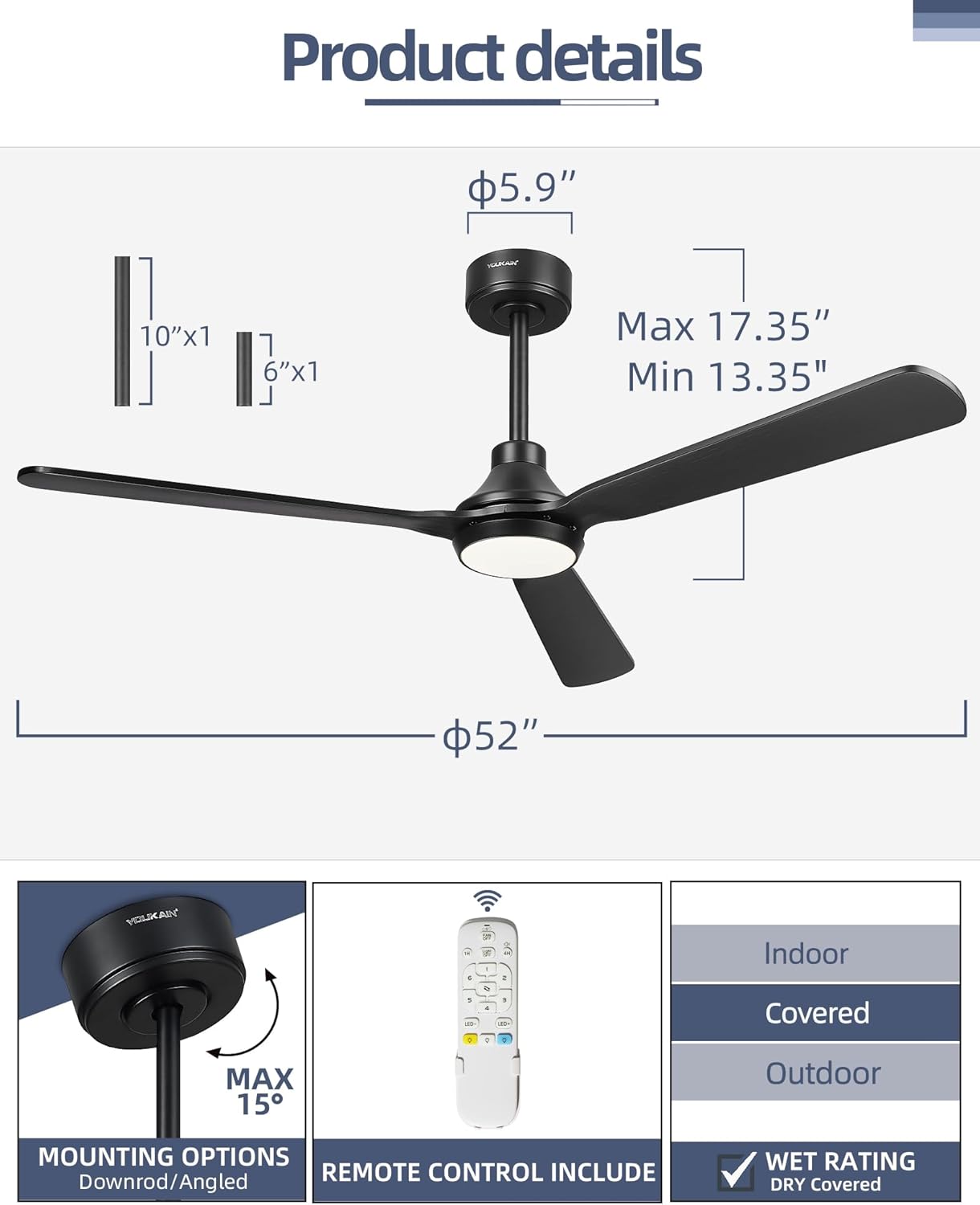
Carefully remove all components from the packaging. Verify that all parts listed in your product manual are present and undamaged. The package includes the fan motor, three solid wood blades, a remote control, down rods (6" and 10"), and a light kit.
Image: All components of the YOUKAIN 52-inch ceiling fan laid out for inspection before assembly.
1.2. Nwụnye bracket
Attach the mounting bracket securely to the ceiling junction box. Ensure the bracket is firmly fastened to support the weight of the fan. If installing on a sloped ceiling (up to 15 degrees), ensure the bracket is correctly oriented.
Image: A person securing the mounting bracket to the ceiling's electrical junction box.
1.3. Downrod and Motor Assembly
Thread the electrical wires from the fan motor through the chosen downrod (6" or 10"). Secure the downrod to the fan motor assembly. Slide the decorative canopy over the downrod.
Foto: Zuru ezu view of the downrod being connected to the fan motor, with wires threaded through.
1.4. Njikọ njikọ
Carefully connect the fan's electrical wires to the household wiring according to the color codes (typically black to black, white to white, and green/bare copper to ground). Ensure all connections are secure using wire nuts. The remote receiver should be connected as per the detailed instructions in the manual.
Image: Hands connecting the electrical wires of the fan to the ceiling's power supply.
1.5. Ịtinye agịga fan
Attach each of the three solid wood blades to the fan motor using the provided screws. Ensure they are tightened firmly but do not overtighten. Proper blade attachment is crucial for balanced operation.
Image: A person securing a fan blade to the motor housing with a screwdriver.
1.6. Light Kit Installation
Jikọọ LED lamp to the fan's light kit wiring. The LED lamp is designed to magnetize to the LED board for easy installation. Secure the light cover by twisting it into place.
Image: A person installing the LED light module and attaching the light cover to the fan.
1.7. Nduzi Vidiyo Nwụnye
For a visual step-by-step guide, please refer to the official installation video below:
Video: Official YOUKAIN guide on how to install the 52-inch YJ817 Ceiling Fan with Light.
2. Ntuziaka ọrụ
Your YOUKAIN ceiling fan is operated via a convenient remote control, offering various settings for comfort and ambiance.
2.1. Ọrụ njikwa anya
The all-in-one remote control allows independent operation of the fan and light. It features buttons for power, fan speed, light on/off, light dimming, color temperature adjustment, reversible motor, and timer settings.
Image: The remote control for the YOUKAIN ceiling fan, highlighting its various function buttons.
2.2. Fan Speed Settings
The fan offers 6-speed settings to suit your preference:
Ọsọ 1-2: Comfortable, gentle breeze.
Ọsọ 3-4: Natural, medium wind.
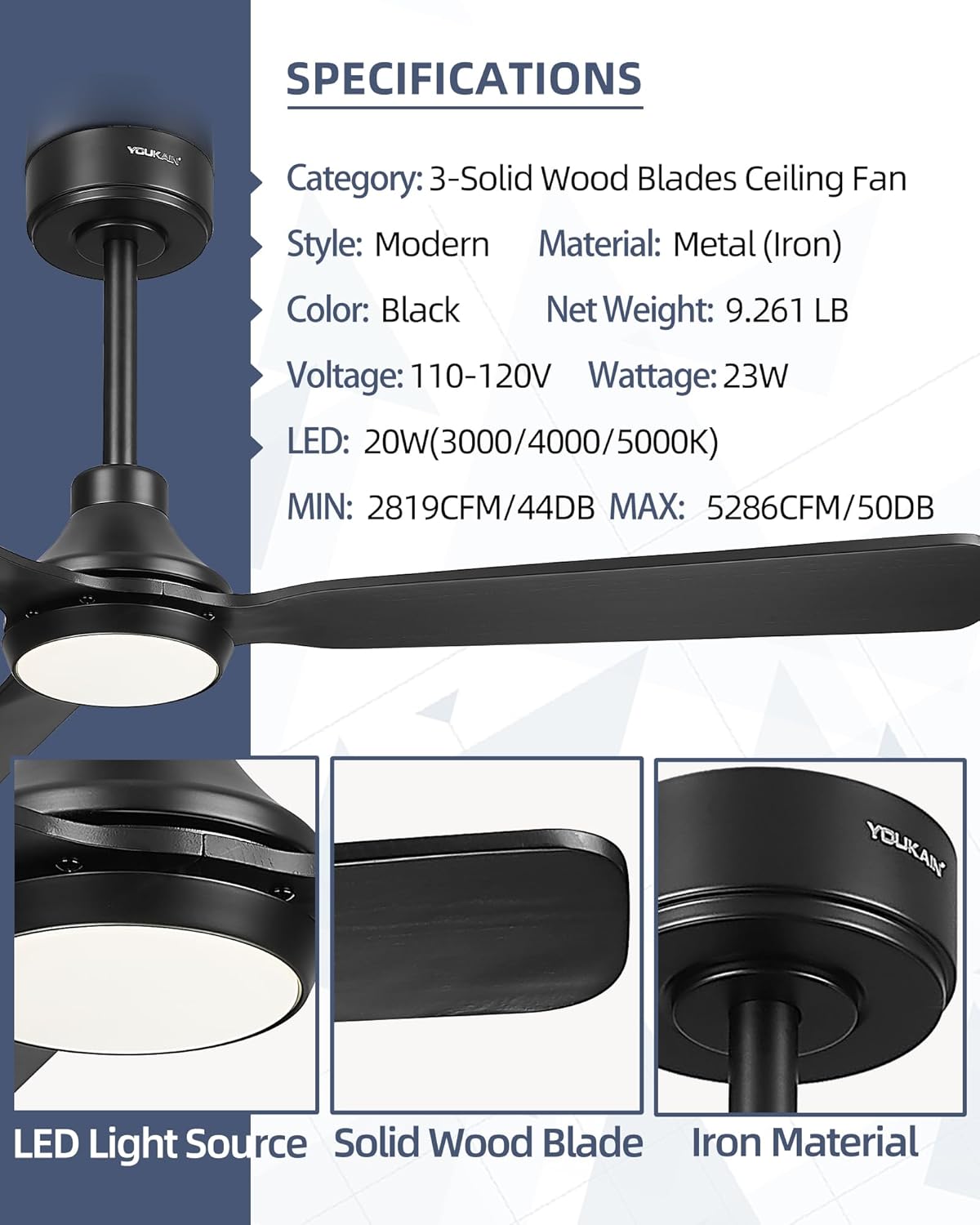
Ọsọ 5-6: Cooling, high wind for maximum airflow (up to 5286 CFM).
2.3. Light Settings
The integrated LED light is 1400 lumens, 20 watts, and offers three color temperature options (3000K/4000K/5000K). It is fully dimmable from 5% to 100% to satisfy different brightness requirements. Use the dedicated light buttons on the remote to adjust.
2.4. Reversible Motor Function
The DC motor features a reversible function, allowing year-round use:
Ụdị okpomọkụ: Counter-clockwise rotation creates a downward airflow for a cooling effect.
Ụdị oyi: Clockwise rotation creates an upward airflow to circulate warm air, helping to reduce heating costs.
2.5. Ọrụ ngụ oge
Set the fan to automatically turn off after a specified period using the timer buttons (1H/4H) on the remote control. This feature is useful for energy saving, especially during sleep.
2.6. Ogbi na ọnọdụ
The remote control includes a mute mode switch to turn off key sounds, providing a quieter user experience.
2.7. Operating Video Guide
Watch the video below for a demonstration of the fan's operating features:
Video: Demonstration of the YOUKAIN 52-YJ817-BK ceiling fan's features and remote control functionality.
3. Nlekọta
Nlekọta anya mgbe niile na-eme ka ogologo ndụ na ịrụ ọrụ kachasị mma nke onye na-akwado uko ụlọ gị.
3.1. Nhicha
To clean the fan blades and motor housing, use a soft, damp cloth. Avoid using abrasive cleaners or solvents that could damage the finish. Ensure the fan is turned off and completely stopped before cleaning.
3.2. Nyochaa mgbe niile
Periodically check all screws and connections for tightness. Over time, vibrations can cause screws to loosen. Tighten any loose screws to prevent wobbling or noise. No lubrication is required for the DC motor.
4. Nchọpụta nsogbu
If you encounter any issues with your YOUKAIN ceiling fan, refer to the following common troubleshooting steps:
Onye ofufe anaghị ebido: Check if the power is on at the circuit breaker and wall switch. Ensure all electrical connections are secure. Verify the remote control batteries are functional and the remote is paired correctly with the fan.
Ìhè anaghị arụ ọrụ: Check the light switch and circuit breaker. Ensure the LED lamp is properly connected and the light cover is securely in place.
Fans na-ama jijiji: Ensure all blade screws are tightened. Check that the mounting bracket is securely installed and all downrod connections are firm.
Remote anaghị aza: Replace the remote control batteries. Ensure there are no obstructions between the remote and the fan's receiver. Re-pair the remote if necessary (refer to the pairing instructions in your full manual).
Mkpọtụ: Ensure all screws are tight. Check for any loose parts or obstructions. The DC motor is designed for quiet operation (minimum 44dB).
5. Nkọwapụta ngwaahịa
Ụdị
YOUKAIN
Aha Nlereanya
YJ817
Nha
52 inch
Agba
Nwa
Ọnụọgụ agụba
3 (Solid Wood)
Ụdị moto
DC Motor (23W)
Ike ikuku
5286 CFM (Max)
Ọkwa mkpọtụ
44 dB (Min)
Isi Iyi Ìhè
Integrated LED (1400 Lumens, 20W)
Okpomọkụ agba
3000K/4000K/5000K (Adjustable)
Enwere ike ibelata
5%-100%
Usoro njikwa
Njikwa anya
Downrod Lengths
6" na 10"
Ojiji ime ime/n'èzí
Indoor, Outdoor (Covered Installations)
Voltage
110 volts
Ibu Ibu
9.26 pound
6. Akwụkwọ ikike na nkwado ndị ahịa
YOUKAIN provides comprehensive support for your ceiling fan:
Akwụkwọ ikike: 2 years free replacement quality services.
Nkwado ndị teknuzu: 24 hours a day technical support service.
If you have any questions about installation, use, or require support, please contact YOUKAIN customer service directly.