1. Nhazi
1.1 Kedu ihe dị na igbe ahụ
The Insta360 GPS Preview Remote with Built-in Mic package includes the following items:
- 1 × GPS Preview Remote with Built-In Mic
- 1 × Mic Fur Cover
- 1 × Clip
- 1 × Wrist Strap
- 1 × Remote Base
- 2 × Button Stickers

Image: All components included in the Insta360 GPS Preview Remote with Built-in Mic package.
1.2 Physical Setup and Accessories
The remote offers multiple mounting options for various scenarios:
- eriri aka: Attach the remote to the included wrist strap for convenient, hands-free operation, ideal for activities like cycling or running.
- Clip: Use the clip to attach the remote to clothing, a selfie stick, or other objects for flexible placement.
- Ebe dị anya: The remote base provides a secure attachment point for various mounting accessories.
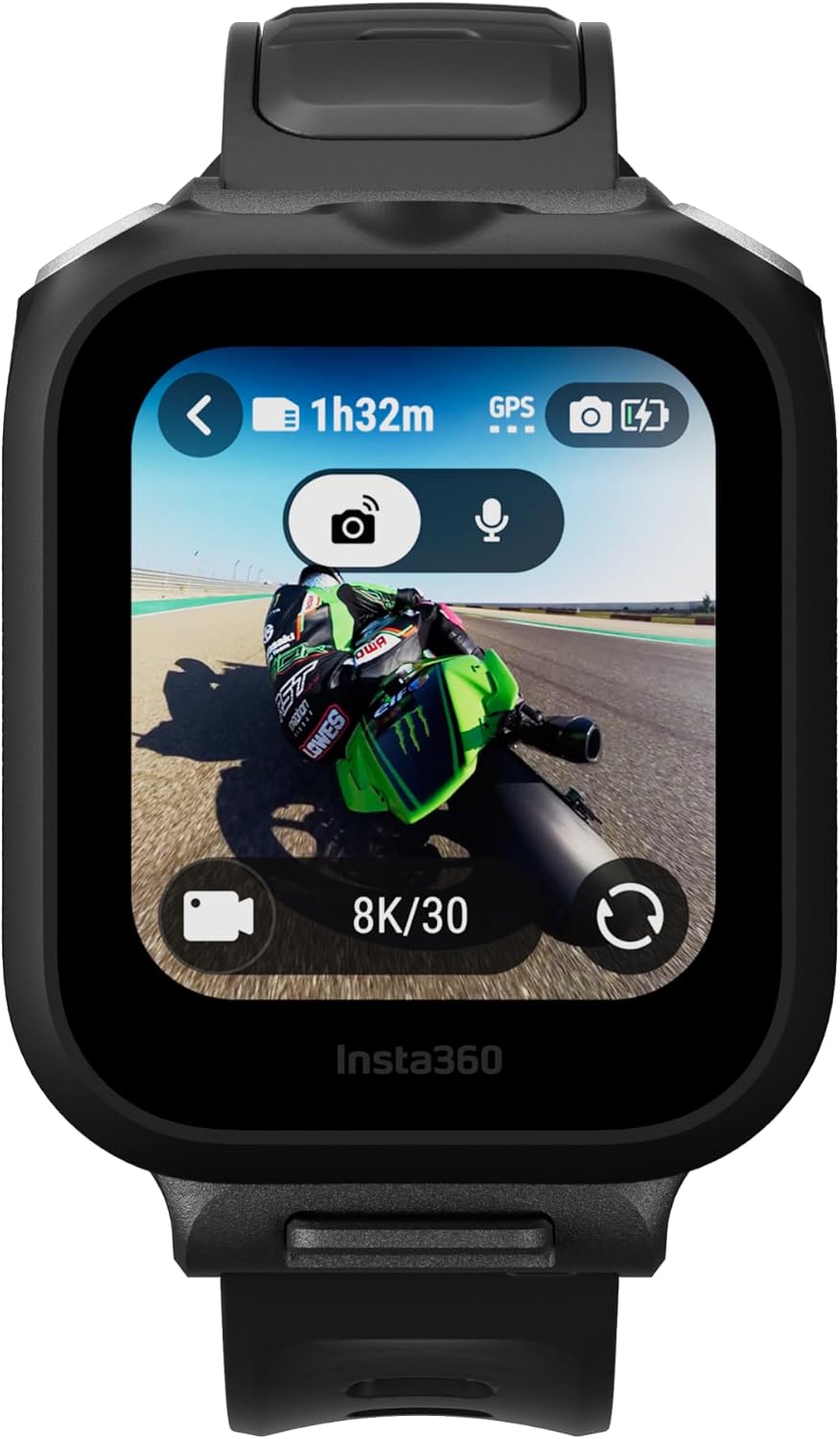
Image: The remote attached to its wrist strap, showing the live preview interface.

Image: The remote attached to its clip, demonstrating a different mounting option.
1.3 Mmalite Ike na Njikọta
To power on the remote, press and hold the power button. The remote can be paired with compatible Insta360 cameras (e.g., Insta360 Ace Pro 2 or X5) or connected to your phone via the Insta360 app. Follow the on-screen prompts on both devices to complete the pairing process. Once connected, the remote will load data and vibrate to confirm connection.
1.4 Nwelite femụwe
Ensure your remote's firmware is up to date for optimal performance and access to the latest features. Firmware updates can typically be performed through the Insta360 app when the remote is connected to your phone.
2. Ịrụ ọrụ nke Remote
2.1 Basic Controls and Screen Navigation
The remote features a clear LCD screen for easy navigation and control. You can swipe through various modes and settings directly on the remote's display. The screen provides active display of the camera's view, battery life, and other relevant information.

Image: The GPS Preview Remote with Built-in Mic, highlighting its audio and preview ike.
2.2 Camera Control and Live Preview
When paired with a compatible camera, the remote allows for live image preview, enabling you to perfectly frame your shots. You can also remotely control camera settings and initiate recording from up to 328ft (100m) away. For 360 cameras, 360 shots can be previewed.

Image: Demonstrating full control of the camera from the remote, even at a distance.

Image: The remote allows for live image preview and angle adjustment for precise shot composition.
2.3 Audio Recording Features
The built-in microphone delivers high-quality audio. You can select between 24-bit (default) or 32-bit floating point recording for richer audio depth. The remote also features two adjustable AI noise reduction modes (Strong, Normal, Off) and a low-cut filter to minimize low-frequency sounds below 100Hz for clearer audio.

Image: The remote provides professional-grade audio with clear vocals and pure sound.
2.4 GPS Data Recording
The integrated GPS accurately records data such as route, speed, and direction. This real-time data can be easily imported and synced to your videos using the Insta360 app or Studio software, allowing you to display dynamic statistics in your content.

Image: Collect real-time data such as speed, route, and location, and easily add it to your videos.
2.5 Customizable Wallpaper
Personalize your remote's LCD screen by uploading custom wallpapers. This feature allows you to display your unique style or showcase your brand's logo directly on the device.

Image: Upload your own wallpaper to personalize the remote's display.
2.6 Gestures and Screen Lock
The remote supports gestures, such as twisting your wrist to trigger shooting actions. You can also lock the screen to prevent accidental inputs during use.
3. Nlekọta
3.1 Batrị na Nchaji
The remote is equipped with a long-life battery and a USB-C port for convenient on-the-go charging. It provides up to 7 hours of battery life in Audio Recording Mode when connected to the camera with the screen off.

Image: The remote features a USB-C port for convenient charging.
3.2 Nlekọta n'ozuzu
To ensure the longevity of your device, keep it clean and free from dust and debris. Avoid exposing it to extreme temperatures or harsh chemicals. Always ensure the USB-C port cover is properly sealed when not charging to protect against moisture.
4. Nchọpụta nsogbu
4.1 Okwu Njikọta
If the remote fails to connect to your camera or phone, ensure both devices are in pairing mode and within range. Restarting both the remote and the host device can often resolve minor connectivity glitches. Verify that Bluetooth is enabled on your phone or camera.
4.2 Audio Quality Concerns
If you experience issues with audio quality, check the AI noise reduction settings on the remote. Experiment with 'Strong', 'Normal', or 'Off' modes to find the best setting for your environment. Ensure the mic fur cover is properly installed in windy conditions to reduce wind noise.
4.3 Screen Display Problems
If the screen turns off too quickly or is unresponsive, adjust the auto-sleep settings in the remote's display menu. Ensure the brightness is set to a comfortable level for visibility.
4.4 General Malfunctions
For any other unexpected behavior, ensure the remote's firmware is updated to the latest version. A factory reset may be considered as a last resort, but this will erase custom settings.
5. Nkọwapụta
| Nkọwapụta | Nkọwa |
|---|---|
| Ibu Ibu | 1.57 ounces |
| Akụkụ ngwugwu | 1.92 x 1.64 x 0.62 sentimita asatọ |
| Nọmba Nlereanya ihe | CINSCAVX |
| Batrị | 1 batrị AAA achọrọ (gụnyere) |
| Ngosipụta nha | 10.1 sentimita asatọ |
| Onye nrụpụta | Insta360 |
6. Akwụkwọ ikike na nkwado
6.1 Akwụkwọ ikike ngwaahịa
The Insta360 GPS Preview Remote with Built-in Mic comes with a 3-month warranty from the date of purchase. Please retain your proof of purchase for warranty claims.
6.2 Nkwado ndị ahịa
For further assistance, technical support, or warranty inquiries, please visit the official Insta360 website or contact their customer service team. You can find more information and support resources at the Insta360 Store on Amazon.


