1. Okwu mmalite
This manual provides detailed instructions for the safe and efficient use of your boAt Rockerz Plus 550 Bluetooth Headphones. Please read this manual thoroughly before using the product and retain it for future reference.
2. Kedu ihe dị na Igbe ahụ
- boAt Rockerz Plus 550 Headphones
- Ịchaji eriri
- eriri AUX
- Akwụkwọ ntuziaka onye ọrụ

Image: boAt Rockerz Plus 550 Bluetooth Headphones, showcasing the Blue Psyche color variant and customizable earcups.
3. Ngwaahịa gafereview na njikwa
Familiarize yourself with the various parts and controls of your headphones.

Foto: Zuru ezu view of the headphone's control buttons and ports, including the charging port and AUX input.
Njikwa Isi:
- Bọtịnụ ike: Pịa ma jide ka ịgbanwuo/ gbanyụọ.
- Elu elu/Egwu na-esote: Pịa mkpirisi maka ibuli olu, ogologo pịa maka egwu ọzọ.
- Egwu ala/Oge gara aga: Pịa obere oge maka mbelata olu, pịa ogologo oge maka egwu gara aga.
- Bọtịnụ ọtụtụ ọrụ (MFB): Play/pause, answer/end calls, activate voice assistant.
- Ọdụ ụgbọ mmiri AUX: Maka njikọ waya.
- Nchaji ọdụ ụgbọ mmiri: Maka ịchaji ekweisi.
4. Nhazi
4.1 Ịchaji ekweisi
- Connect the charging cable to the charging port on the headphones.
- Jikọọ nsọtụ nke ọzọ nke eriri na ihe nkwụnye ọkụ USB (anaghị etinye ya) ma ọ bụ ọdụ ụgbọ USB nke kọmputa.
- The LED indicator will show charging status. It will turn off or change color when fully charged.
A full charge provides up to 100 hours of playback time.

Image: The boAt Rockerz Plus 550 headphones highlighting their extended battery life of up to 100 hours.
4.2 Njikọ Bluetooth
- Gbaa mbọ hụ na chajịrị ekweisi nke ọma.
- Pịa ma jide bọtịnụ ike ruo mgbe akara ọkụ ọkụ na-acha anụnụ anụnụ na ọbara ọbara, na-egosi ọnọdụ njikọ.
- Na ngwaọrụ gị (smartphone, tabletị, laptọọpụ), gbanye Bluetooth wee chọọ ngwaọrụ dị.
- Select "boAt Rockerz Plus 550" from the list of devices.
- Ozugbo ejikọrọ, ihe ngosi LED ga -eji nwayọ na -acha anụnụ anụnụ.
4.3 Njikọta abụọ
The headphones support dual pairing, allowing connection to two devices simultaneously.
- Pair the headphones with the first device as described in section 4.2.
- Disable Bluetooth on the first device. The headphones will re-enter pairing mode.
- Jikọọ ekweisi na ngwaọrụ nke abụọ.
- Enable Bluetooth on the first device. The headphones will automatically connect to both devices.
You can now seamlessly switch between audio sources from both connected devices.
Image: Visual representation of the dual pairing functionality, showing a phone and a tablet simultaneously connected to the headphones.
4.4 Njikọ AUX
For a wired connection, use the provided AUX cable.
- Connect one end of the AUX cable to the headphone's AUX port.
- Connect the other end to your audio device's 3.5mm audio jack.
- The headphones will automatically switch to AUX mode.
5. Ntuziaka ọrụ
5.1 Nghaghachi egwu
- Gwuo/kwụsịtụ: Pịa MFB otu ugboro.
- Track na-esote: Pịa bọtịnụ Mpịakọta Elu ruo ogologo oge.
- Gara aga Track: Pịa bọtịnụ Mbelata Olu ruo ogologo oge.
- Olu elu: Pịa obere bọtịnụ Mpịakọta Elu.
- Olu ala: Pịa obere bọtịnụ Mbelata Olu.
5.2 Njikwa oku
- Azịza/Kwụsị Oku: Pịa MFB otu ugboro.
- Jụ oku: Pịa ma jide MFB maka sekọnd 2.
5.3 Onye enyemaka olu
Activate your device's voice assistant (Siri, Google Assistant) directly from the headphones.
- Mee ka onye enyemaka olu rụọ ọrụ: Pịa MFB ugboro abụọ.
5.4 Customizable Earcups
The boAt Rockerz Plus 550 features customizable earcups, allowing you to change their appearance.
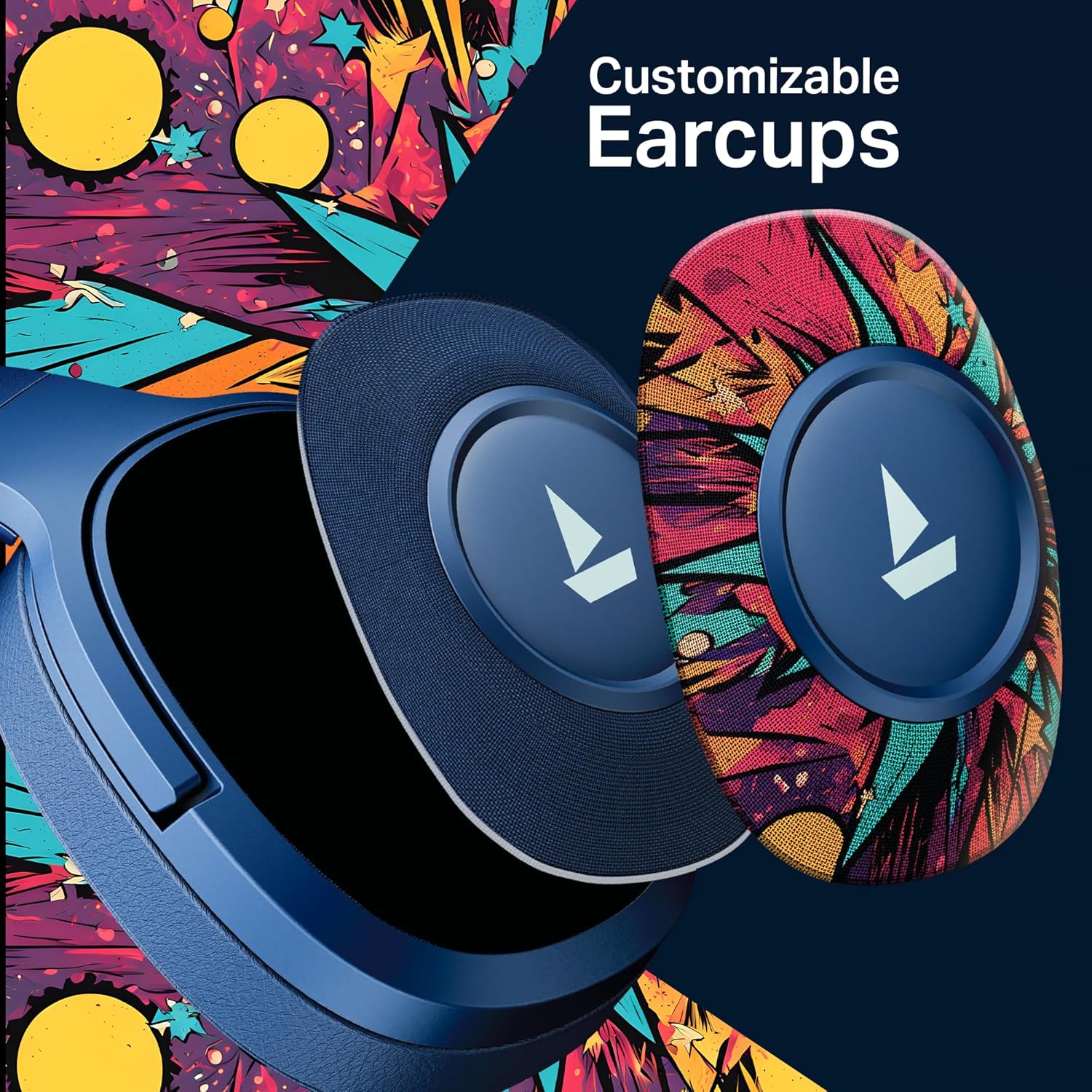
Foto: nkọwa zuru ezu view demonstrating how the customizable earcups can be removed and replaced on the headphones.
Nkwado ngwa 5.5 boAt Hearables
Enhance your experience by downloading the boAt Hearables App. The app provides additional features and user guides.

Image: A smartphone showing the boAt Hearables App interface, including a QR code for easy access. Scan the QR code or visit https://l.ead.me/bdAX6k ka ibudata ngwa.
6. Nlekọta
- Nhicha: Jiri ákwà dị nro ma kpọọ nkụ hichaa ekweisi gị. Ejila ihe nhicha ma ọ bụ ihe mgbaze.
- Nchekwa: Chekwaa ekweisi n'ebe dị jụụ, kpọrọ nkụ na-adịghị na ìhè anyanwụ kpọmkwem na oke okpomọkụ.
- Nlekọta batrị: To prolong battery life, charge the headphones regularly, even if not in frequent use. Avoid fully discharging the battery for extended periods.
7. Nchọpụta nsogbu
| Nsogbu | Ihe nwere ike ime | Ngwọta |
|---|---|---|
| Igwe ekweisi anaghị agba ọkụ. | Batrị dị ala. | Chajie ekweisi nke ọma. |
| Enweghị ike ijikọ na ngwaọrụ. | Bluetooth not enabled, headphones not in pairing mode, or device too far. | Ensure Bluetooth is on, headphones are in pairing mode (flashing red/blue), and within range (10 meters). Try restarting both devices. |
| Enweghị ụda ma ọ bụ obere olu. | Volume too low on headphones or device, incorrect audio output selected, or loose AUX cable. | Adjust volume on both devices. Check audio output settings. Ensure AUX cable is securely connected. |
| Njikọ na-adịte aka. | Interference, device too far, or low battery. | Move closer to the device, avoid obstacles, and ensure headphones are charged. Avoid environments with strong Wi-Fi or other Bluetooth signals. |
8. Nkọwapụta
| Njirimara | Nkọwa |
|---|---|
| Aha Nlereanya | Ọkpụkpụ Rockerz 550 |
| Teknụzụ Njikọta | Bluetooth v5.4, 3.5 mm Jack |
| Ụdị ọkwọ ụgbọ ala ọdịyo | Ọkwọ ụgbọala dị ike |
| Nha ọkwọ ụgbọ ala | 50mm |
| Ndụ batrị | Ruo awa 100 |
| Ụdị ntị | N'elu Ntị |
| Njikwa mkpọtụ | Kewapụ ụda na-agafe agafe |
| Usoro njikwa | Pịa bọtịnụ |
| Ibu Ibu | 250 grams |
| Akụkụ ngwaahịa | 17 x 9 x 20 cm |
| Ụdị batrị | Lithium ion (nwere ike ibugharị) |
| Onye nrụpụta | Imagine Marketing Ltd |
| Mba onye si | China |

Foto: Ihe dị n'ime view highlighting the 50mm audio drivers, responsible for the boAt Signature Sound.
9. Akwụkwọ ikike na nkwado
Your boAt Rockerz Plus 550 headphones come with a standard manufacturer's warranty. Please refer to the warranty card included in your package for specific terms and conditions.
For technical support, service, or warranty claims, please contact boAt customer service:
- Onye nrụpụta: Imagine Marketing Ltd
- Email: info@imaginemarketingindia.com
- Nkwado n'ịntanetị: Visit the official boAt websaịtị maka FAQ na akụrụngwa nkwado.


