1. Okwu mmalite
This manual provides detailed instructions for the assembly, operation, and maintenance of your BEISHI Motorized TV Stand with Wheels. Please read this manual thoroughly before installation and use to ensure proper function and safety. Keep this manual for future reference.
2. Ozi nchekwa dị mkpa
Failure to follow these safety instructions may result in property damage or personal injury.
- Always secure the stand when in use to prevent tip-over.
- Do not place heavy objects on the lower shelf exceeding its weight capacity.
- Keep the remote control out of reach of young children to prevent choking hazards.
- Always lock the wheels when the stand is stationary to ensure stability.
- Ensure the area beneath the TV is clear before lowering the height to prevent obstructions.
- Ekwela ka ibu arọ kachasị elu nke kilogram 70 (154 lbs) maka TV ahụ gafere.
- Hụ na usoro VESA nke TV gị dabara na ihe nkwụnye ahụ (100x100mm ruo 600x400mm).
3. Ihe ngwugwu
Nyochaa na akụrụngwa niile dị na enweghị mmebi tupu ịmalite mgbakọ. Ọ bụrụ na akụkụ ọ bụla na-efu ma ọ bụ mebie, biko kpọtụrụ nkwado ndị ahịa.
- Main Stand Components (Base, Columns, TV Mount)
- Wooden Shelf & Panel
- Motorized Height Adjustment System
- Njikwa anya
- Caster Wheels (with locking mechanism)
- Hardware Kit (screws, washers, spacers, tools)
- Akwụkwọ ntuziaka
4. Ntuziaka Mgbakọ
Soro usoro ndị a nke ọma maka njikọta kwesịrị ekwesị. A na-atụ aro ka mmadụ abụọ nọrọ maka usoro ụfọdụ, ọkachasị mgbe ị na-etinye TV.
- Bupụ ma chọpụta akụkụ: Lay out all components on a soft, clean surface. Refer to the parts list in your hardware kit to identify each piece.
- Kpọkọta ntọala: Attach the vertical columns to the base feet, ensuring all screws are securely tightened.
- Wụnye Wheel Wheel: Securely attach the locking caster wheels to the base feet. Ensure the locking mechanism functions correctly.
- Attach the Wooden Shelf: Mount the wooden shelf and panel to the designated positions on the vertical columns.
- Install the Motorized System: Integrate the motorized height adjustment mechanism into the stand structure as per the detailed diagrams in your included guide. Connect all necessary cables.
- Prepare TV for Mounting: Attach the TV mounting brackets to the back of your television, ensuring the correct VESA pattern screws and spacers are used. Refer to your TV's manual for specific VESA hole locations.
- Wụnye TV ahụ: Carefully lift the TV and hook the brackets onto the TV mount on the stand. Secure the TV with the safety screws or locking mechanisms provided.
- Njikọ Ike: Plug the power cord for the motorized system into a suitable electrical outlet.

Foto: Ofeview of stand dimensions, VESA compatibility, and weight capacity.

Foto: Zuru ezu view of the motorized mechanism and TV mounting brackets.
5. Ntuziaka ọrụ
5.1 Mgbanwe Elu Eletriki
The BEISHI Motorized TV Stand features an electric height adjustment system controlled by a remote.
- Gbazi Elu: Use the UP and DOWN buttons on the remote control to smoothly adjust the TV height between 46.5 inches and 62.2 inches.
- Ntọala ebe nchekwa: The stand allows you to store two preferred height settings. To set a memory position:
- Adjust the stand to your desired height.
- Press the 'SET' button once.
- Press either 'M1' or 'M2' button within 3 seconds to save the current height to that memory slot.
- Icheta Ntọala Nchekwa: Press 'M1' or 'M2' to automatically move the TV to the saved height.
- Ọnọdụ ụlọ: Press the 'HOME' button to return the TV to a default or pre-set home position.

Image: Electric height adjustment range.
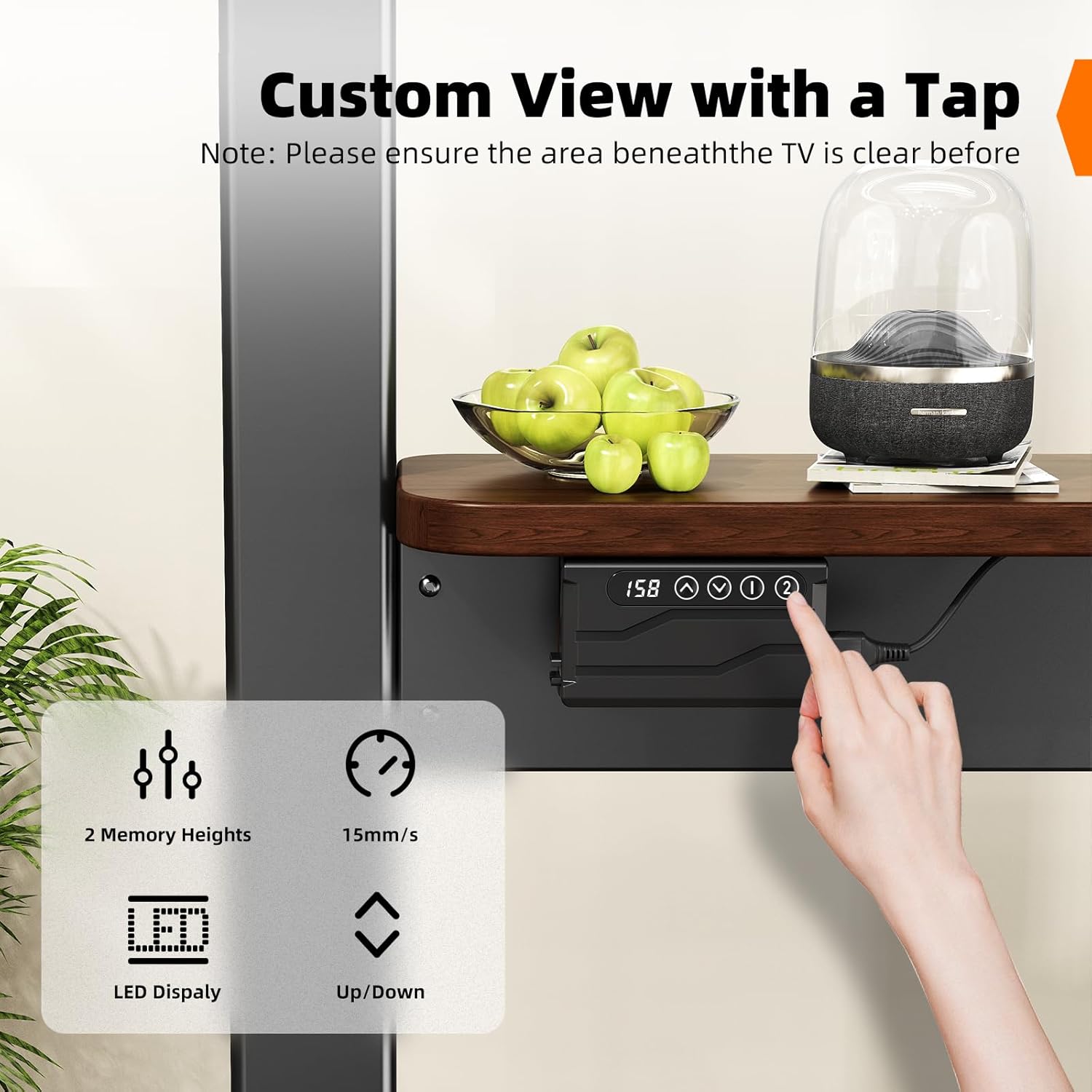
Image: Control panel for height adjustment and memory presets.
5.2 Njem na wiil mkpọchi
The stand is equipped with caster wheels for easy movement and locking mechanisms for stability.
- Ịkwaga ihe nkwụnye ahụ: Unlock all caster wheels before moving the stand. Gently push the stand to your desired location.
- Securing the Stand: Once the stand is in position, engage the locking mechanism on all wheels to prevent unintended movement.

Image: Caster wheels with 360-degree rotation and locking function.
6. Akụrụngwa Ngwaahịa
- Motorized Height Adjustment: Electric system with remote control for smooth height adjustments from 46.5" to 62.2". Includes 2 memory presets.
- Ndakọrịta sara mbara: Supports LCD, LED, and OLED 4K TVs from 37 to 86 inches, with VESA standards from 100x100mm to 600x400mm. Maximum TV weight capacity is 154 lbs (70 kg).
- Nhazi mkpanaka: Equipped with lockable caster wheels for easy relocation and secure positioning.
- Nchekwa agbakwunyere: Features a wooden shelf (25.59" x 7.87") capable of holding up to 22 lbs, suitable for media devices, gaming consoles, or other accessories. Includes a detachable top shelf for projectors.
- Ihe owuwu na-adịgide adịgide: Sturdy carbon steel frame ensures stable support.

Image: Wooden storage shelf details.
7. Nlekọta
To ensure the longevity and proper functioning of your TV stand, follow these maintenance guidelines:
- Nhicha: Jiri ákwà dị nro ma kpọọ nkụ hichaa ihe ndobe ahụ. Maka akara siri ike, jiri obere d hichaa ya.amp cloth with mild soap, then dry immediately. Avoid abrasive cleaners or solvents.
- Nyochaa ngwaike: Na-elele skru na bolts niile iji hụ na ha siri ike. Tinyegharịa ọzọ ma ọ dị mkpa.
- Nyocha moto: Ensure the motorized components are free from dust and obstructions. Do not attempt to lubricate or disassemble the motor.
- Njikwa USB: Keep all power and TV cables neatly organized to prevent snagging or damage during movement or height adjustment.
8. Nchọpụta nsogbu
If you encounter any issues with your BEISHI Motorized TV Stand, refer to the table below for common problems and solutions.
| Nsogbu | Ihe nwere ike ime | Ngwọta |
|---|---|---|
| Stand does not move up or down. | Power cord disconnected; Remote control battery low; Motor obstruction. | Check power connection; Replace remote batteries; Remove any obstructions around the motor or columns. |
| Njikwa anya anaghị aza. | Remote batteries depleted; Remote out of range; Signal interference. | Replace remote batteries; Ensure remote is pointed at the receiver; Reduce interference from other electronic devices. |
| TV wobbles or feels unstable. | Wheels unlocked; Loose assembly screws; TV weight exceeds capacity. | Lock all caster wheels; Re-tighten all assembly screws; Ensure TV weight is within 154 lbs limit. |
| Memory presets not saving/recalling. | Usoro nchekwa na-ezighi ezi. | Follow the memory preset instructions carefully: adjust height, press 'SET', then press 'M1' or 'M2' within 3 seconds. |
If the problem persists after attempting these solutions, please contact BEISHI customer support for further assistance.
9. Nkọwapụta
| Njirimara | Nkọwapụta |
|---|---|
| Ụdị | BEISHI |
| Nlereanya | B0FHGSX9LB |
| Ndakọrịta nha TV | 37-86 sentimita asatọ |
| Max TV Weight Capacity | 154 lbs (70 n'arọ) |
| Ndakọrịta VESA | 100x100mm ruo 600x400mm |
| Oke ndozi ịdị elu | 46.5 sentimita asatọ - 62.2 sentimita asatọ |
| Ihe onwunwe | Carbon ígwè |
| Ibu Ibu | 45.7 pound |
| Akụkụ ngwugwu | 51.5 x 11.5 x 6 sentimita asatọ |
| Storage Shelf Capacity | 22 n'arọ |
| Agba | Nwa |
10. Akwụkwọ ikike na nkwado
BEISHI products are manufactured with quality and durability in mind. This product comes with a standard manufacturer's warranty against defects in materials and workmanship. For specific warranty details, claims, or technical support, please refer to the warranty card included with your product or contact BEISHI customer service directly through their official websaịtị ma ọ bụ onye na-ere ahịa ebe a zụrụ ngwaahịa ahụ.