Okwu mmalite
Welcome to your new Baseus EH10 NC Bluetooth Headphones. These over-ear headphones feature -45dB Hybrid Active Noise Cancellation, Hi-Res and LDAC audio support, 5 AI microphones for clear calls, and multi-point connectivity. This manual provides detailed instructions for setup, operation, and maintenance to ensure optimal performance and longevity of your device.
Ihe ngwugwu
- 1 x Baseus EH10 NC ANC Headphones
- 1 x eriri USB (USB-C)
- Akwụkwọ ntuziaka onye ọrụ 1 x (akwụkwọ a)
Ngwaahịa gafereview
The Baseus EH10 NC headphones are designed for comfort and superior audio quality. Familiarize yourself with the physical components for ease of use.
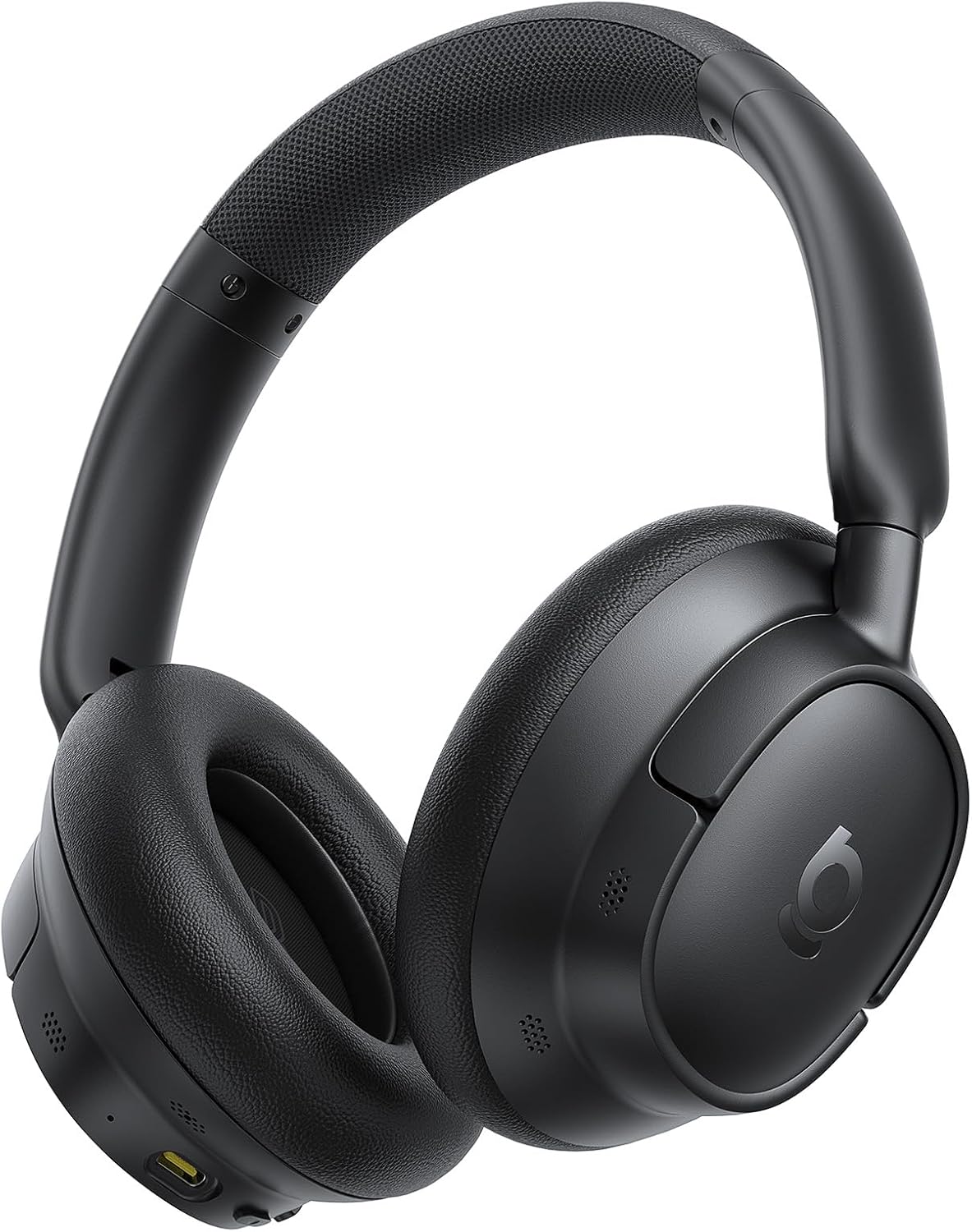
The image displays the Baseus EH10 NC over-ear headphones in black, showcasing the earcups, headband, and general design. The left earcup typically features control buttons and a charging port.

The front of the product packaging for the Baseus EH10 NC headphones, highlighting key features such as -45dB ANC, 40mm dynamic drivers, CloudComfort, 80-hour battery life, and Hi-Res Audio certification.

The back of the product packaging, illustrating features like SuperBass 2.0, long-lasting playtime, and CloudComfort. It also includes regulatory information and contact details for support.
Melite
Ịchaji ekweisi
The headphones come with a built-in rechargeable Lithium-Ion battery. Before first use, it is recommended to fully charge the headphones.
- Jikọọ eriri USB-C na-enye chaja na ọdụ ụgbọ mmiri dị na ekweisi.
- Jikọọ nsọtụ nke ọzọ nke eriri na isi iyi ike USB dakọtara (dịka ọmụmaatụ, nkwụnye mgbidi, ọdụ ụgbọ USB kọmputa).
- The indicator light will show charging status and turn off or change color when fully charged.
A full charge provides up to 80 hours of playtime with ANC disabled, or 55 hours with ANC enabled. A quick 10-minute charge can provide approximately 10 hours of playtime.
Njikọ Bluetooth
Iji jikọọ ekweisi gị na ngwaọrụ site na Bluetooth:
- Gbaa mbọ hụ na agbanyụrụ ekweisi.
- Press and hold the power button until the indicator light flashes rapidly, indicating pairing mode.
- Na ngwaọrụ gị (smartphone, tabletị, kọmpụta), mee ka Bluetooth nwee ike wee chọọ ngwaọrụ dị.
- Select "Baseus EH10 NC" from the list of detected devices.
- Once connected, the indicator light will stop flashing and remain solid or turn off, depending on the model.
The headphones support Bluetooth 6.0 for stable wireless communication.
Ntuziaka ọrụ
Nkagbu Noise nọchiri anya (ANC)
The Baseus EH10 NC headphones feature -45dB Hybrid Active Noise Cancellation to reduce ambient noise. This allows for a more focused listening experience.
- ANC na: Press the dedicated ANC button (or multi-function button, refer to specific button layout) to activate noise cancellation.
- Ụdị ụda gburugburu: Press the ANC button again to switch to Ambient Sound Mode, which allows you to hear your surroundings while audio plays.
- ANC kwụsịrị: Press the ANC button a third time to turn off all noise control modes.
Ngwugharị ọdịyo
Use the control buttons on the earcup to manage your audio:
- Gwuo/kwụsịtụ: Naanị pịa bọtịnụ ọrụ ọtụtụ.
- Track na-esote: Pịa bọtịnụ ọtụtụ ọrụ ugboro abụọ.
- Gara aga Track: Pịa bọtịnụ ọtụtụ ọrụ ugboro atọ.
- Elu elu/ala: Jiri bọtịnụ olu raara onwe ya nye.
These headphones support Hi-Res and LDAC audio, providing high-fidelity sound. SuperBass 2.0 technology enhances low frequencies for a richer bass experience.
Njikwa Oku
The headphones are equipped with 5 AI microphones and an ENC system for clear calls, even in noisy environments.
- Azịza/Kwụsị Oku: Naanị pịa bọtịnụ ọrụ ọtụtụ.
- Jụ oku: Pịa ma jide bọtịnụ ọtụtụ ọrụ maka ihe dị ka sekọnd abụọ.
Multi-Point Njikọta
The Baseus EH10 NC supports multi-point connection, allowing you to connect to two devices simultaneously. This enables seamless switching between audio sources.
- Pair the headphones with the first device as described in the "Bluetooth Pairing" section.
- Once connected, temporarily disconnect Bluetooth on the first device.
- Put the headphones back into pairing mode and pair them with the second device.
- Reconnect Bluetooth on the first device. The headphones should now be connected to both devices.
Audio will switch automatically between devices based on active playback or incoming calls.
Nlekọta
Nhicha
- Jiri akwa dị nro, kpọrọ nkụ, hichaa ekweisi.
- Do not use abrasive cleaners, solvents, or strong chemicals, as these may damage the surface or internal components.
- Ensure no liquid enters the earcups, charging port, or microphone openings.
Nchekwa
- Chekwaa ekweisi n'ebe dị jụụ, kpọrọ nkụ, pụọ na ìhè anyanwụ kpọmkwem na oke okpomọkụ.
- When not in use for extended periods, charge the battery periodically (e.g., once every three months) to maintain its lifespan.
- Avoid placing heavy objects on the headphones to prevent damage.
Nchọpụta nsogbu
If you encounter issues with your Baseus EH10 NC headphones, refer to the following common solutions:
- Enweghị ike: Ensure the headphones are fully charged. Connect them to a power source and check the charging indicator.
- Enweghị ike ijikọ: Make sure the headphones are in pairing mode (indicator flashing) and within 10 meters of your device. Turn off and on Bluetooth on your device, then try pairing again.
- Enweghị ụda: Check volume levels on both the headphones and your connected device. Ensure the headphones are correctly paired and selected as the audio output device.
- ANC Adịghị irè: Ensure the earcups form a good seal around your ears. Check that ANC is enabled and that you are in a suitable environment for noise cancellation.
- Okwu Ogo oku: Ensure the microphones are not obstructed. Move to an area with less background noise. Check your device's call settings.
- Njikọ na-adịte aka: Ensure there are no significant obstacles between the headphones and your device. Avoid environments with strong electromagnetic interference.
If the problem persists, try resetting the headphones (refer to the full product manual for specific reset instructions, if available) or contact customer support.
Nkọwapụta
| Njirimara | Nkọwa |
|---|---|
| Nlereanya | Baseus EH10 NC |
| Ụdị | Baseus |
| Teknụzụ Njikọta | Ikuku (Bluetooth 6.0) |
| Njikwa mkpọtụ | Mkpọtụ Na-arụ Ọrụ (-45dB Ngwakọta ANC) |
| Ụdị Ihe | N'elu Ntị |
| Oke ugboro ugboro | 20Hz - 40kHz |
| Ndụ batrị | Ruo awa 80 (ANC kwụsịrị), awa 55 (ANC na-agbanyụ) |
| Nchaji ọdụ ụgbọ mmiri | USB-C |
| Igwe okwu | 5 AI Microphones with ENC |
| Nkwado ọdịyo | Hi-Res, LDAC |
| Ogologo ọrụ kacha | 10 mita |
| Ọkwa Nguzogide mmiri | Mmiri na-egbochi mmiri |
| Ibu Ibu | 0.42 kilogram |
| Akụkụ ngwugwu | 22.6 x 22.6 x 6.2 cm |
| Batrị gụnyere | Yes (1 Lithium Ion) |
Akwụkwọ ikike na nkwado
For product support, warranty information, or technical assistance, please contact Baseus customer service using the details below. Please retain your proof of purchase for any warranty claims.
Nkwado zuru ụwa ọnụ:
- Ekwentị: +1 800 220 8056
- Email: care@baseus.com





