Okwu mmalite
The Masajoy Spark 06 Wireless Headset is designed for clear communication and versatile connectivity in professional and personal environments. It features Bluetooth V5.3, 2.4G wireless via a USB A/C dongle, and a wired 3.5mm audio connection. Equipped with an AI noise-cancelling microphone and comfortable earcups, this headset aims to provide a reliable audio experience for calls, meetings, and music.

Image: User wearing the Masajoy Spark 06 headset, demonstrating its use in a work setting.
Ihe ngwugwu
Chọpụta na ihe niile dị na ngwugwu:
- Igwe ekweisi ikuku nwere igwe okwu
- USB A / C Dongle
- USB C to 3.5MM Audio Cable
- Pịnye C Nchaji USB
- Akwụkwọ ntuziaka onye ọrụ
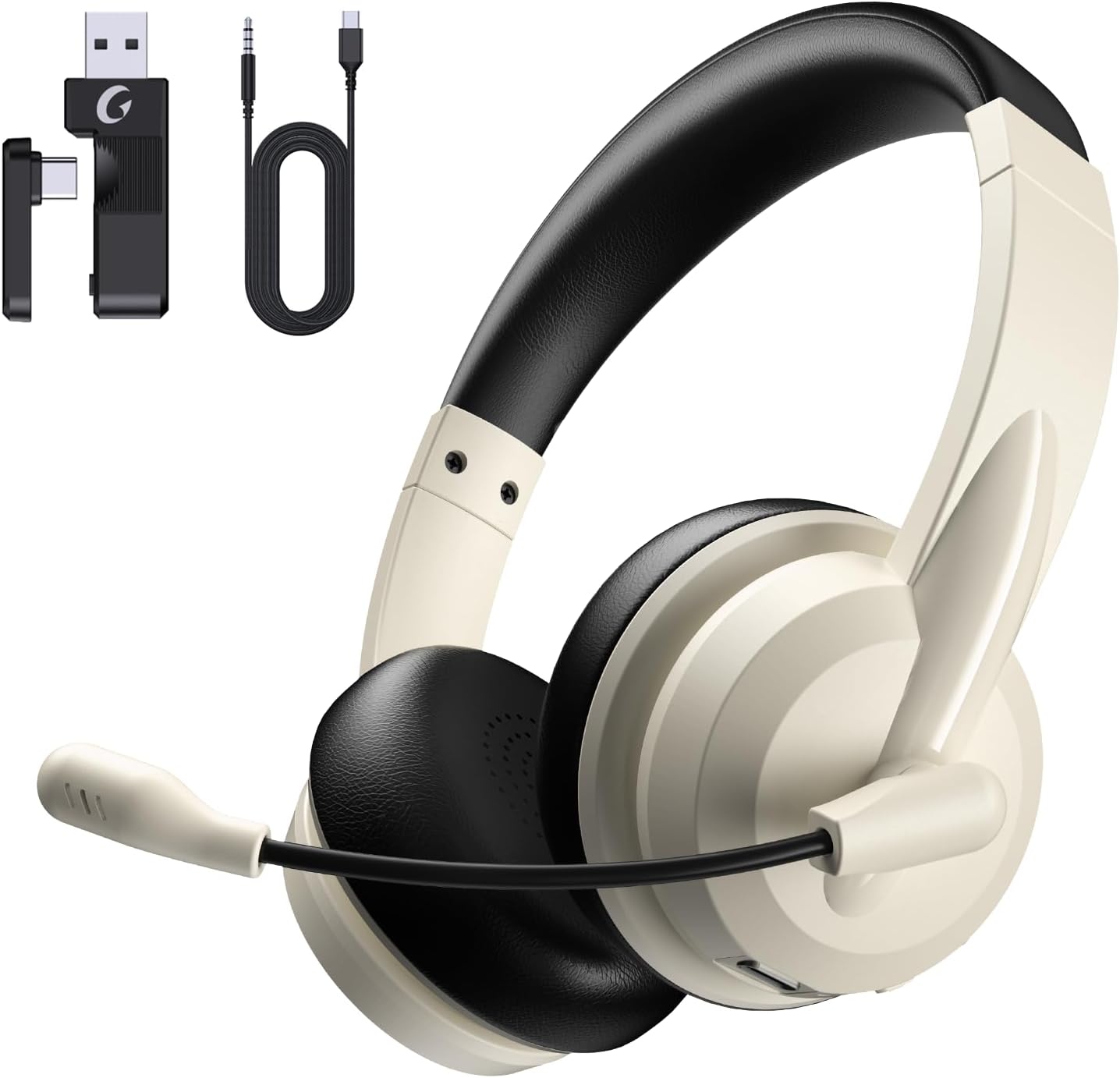
Image: The Masajoy Spark 06 headset shown with its accompanying accessories, including the USB A/C dongle and various cables.
Ngwaahịa gafereview
The Masajoy Spark 06 headset features an ergonomic design for extended wear and clear audio performance.
- Ihe mkpuchi isi nwere ike idozi: For a comfortable fit across various head sizes.
- Protein Memory Foam Earcups: Soft and breathable for all-day comfort.
- Rotatable Microphone Boom: Allows for precise positioning and mute function activation.
- Ndị ọkwọ ụgbọ ala 40mm: Deliver clear and balanced sound.

Foto: A nso nso view highlighting the soft, breathable protein memory foam earcups and the adjustable headband for comfort.

Foto: Ihe dị n'ime view of the earcup, illustrating the 40mm audio drivers responsible for sound quality.
Melite
1. Ịchaji ekweisi
Before first use, fully charge the headset. Connect the included Type C Charging Cable to the headset's charging port and to a USB power source. The LED indicator will show charging status. A full charge takes approximately 2.5 hours.
2. Ijikọ ekweisi
The Masajoy Spark 06 offers three connection methods:
Bluetooth V5.3 Connection
- Gbaa mbọ hụ na agbanyụrụ ekweisi.
- Pịa ma jide bọtịnụ ike ruo mgbe akara ọkụ ọkụ na-acha anụnụ anụnụ na ọbara ọbara, na-egosi ọnọdụ njikọ.
- On your device (smartphone, laptop), enable Bluetooth and search for "Masajoy Spark 06".
- Select the headset to connect. The LED will turn solid blue once connected.
2.4G Wireless Connection (USB A/C Dongle)
- Plug the USB A or USB C side of the dongle into an available port on your computer.
- Gbanye ekweisi ahụ. Ọ ga-anwa ijikọ na dongle ahụ na akpaghị aka.
- The LED indicator on the headset will turn solid blue when connected.
Wired 3.5mm Audio Cable Connection
- Connect one end of the USB C to 3.5MM Audio Cable to the headset's USB-C port.
- Connect the other end (3.5mm jack) to your device's 3.5mm audio port.
- The headset will function as a wired headset. Power is not required for this mode.
Note: This headset does not support dual device connection simultaneously via Bluetooth and 2.4G wireless.

Image: Illustration of the Bluetooth V5.3 and 2.4GHz dual connection options, showing the USB A/C dongle and Bluetooth pairing with devices.
Ntuziaka ọrụ
Gbanyụọ/ Gbanyụọ
- Ike Na: Pịa ma jide bọtịnụ ike maka sekọnd iri na ise.
- Gbanyụọ: Pịa ma jide bọtịnụ ike maka sekọnd iri na ise.
Njikwa Oku
- Azịza/Kwụsị Oku: Pịa bọtịnụ Multi-function ozugbo.
- Jụ oku: Pịa ma jide bọtịnụ ọtụtụ ọrụ maka sekọnd iri na abụọ.
Egwu Egwu
- Gwuo/kwụsịtụ: Pịa bọtịnụ Multi-function ozugbo.
- Olu elu: Pịa bọtịnụ + Mpịakọta.
- Olu ala: Pịa bọtịnụ olu.
- Track na-esote: Pịa ma jide bọtịnụ Volume +.
- Gara aga Track: Pịa ma jide bọtịnụ olu.
Ọrụ Ogbi Igwe Okwu
To mute the microphone, simply rotate the microphone boom to the upright (vertical) position. A voice prompt will confirm "MIC mute". To unmute, rotate the microphone boom back down to the speaking position.

Image: A diagram illustrating the 270-degree rotation capability of the microphone boom, which activates the mute function when moved to the upright position.
Mkpuchi mkpọtụ AI
The headset features AI noise cancellation technology to reduce background noise during calls, ensuring clearer voice transmission. This feature is automatically active when using the microphone in Bluetooth connection mode.
Note: The AI Noise Cancellation feature is only available when the headset is connected via Bluetooth.

Image: Depiction of the AI noise-cancelling microphone in action, showing how it filters out background noise for clear communication.
Nlekọta
- Nhicha: Jiri akwa dị nro dị nro hichaa ekweisi. Ejila kemịkalụ siri ike ma ọ bụ ihe abrasive.
- Nchekwa: Chekwaa ekweisi n'ebe dị jụụ, kpọrọ nkụ na-adịghị na ìhè anyanwụ kpọmkwem na oke okpomọkụ.
- Nlekọta batrị: Ka ịgbatị ndụ batrị ogologo, zere ịchaji ekweisi ugboro ugboro. Na-ana ya ụgwọ oge niile, ọbụlagodi ma ọ bụrụ na ejighị ya ogologo oge.
Nchọpụta nsogbu
| Nsogbu | Ihe nwere ike ime | Ngwọta |
|---|---|---|
| Enweghị ụda sitere na ekweisi | Headset not connected; Volume too low; Device audio output incorrect. | Ensure headset is connected (Bluetooth, 2.4G, or wired). Increase headset and device volume. Check device's audio output settings. |
| Igwe okwu anaghị arụ ọrụ | Microphone muted; Incorrect input device selected; AI Noise Cancellation not active (if not Bluetooth). | Rotate mic boom down to unmute. Check device's microphone input settings. Ensure Bluetooth connection for AI Noise Cancellation. |
| Enweghị ike ijikọ site na Bluetooth | Headset not in pairing mode; Device Bluetooth off; Interference. | Put headset in pairing mode (flashing blue/red). Enable Bluetooth on device. Move closer to device, away from other wireless devices. |
| 2.4G dongle not connecting | Dongle not properly inserted; Headset not powered on. | Ensure dongle is fully inserted into a working USB port. Power on the headset. |
| Ndụ batrị dị mkpụmkpụ | Headset not fully charged; Battery degradation over time. | Ensure headset is fully charged (2.5 hours). If battery life significantly decreases, contact support. |
Nkọwapụta
| Njirimara | Nkọwa |
|---|---|
| Aha Nlereanya | Spark 06 |
| Teknụzụ Njikọta | Wireless (Bluetooth, 2.4G), Wired (3.5mm) |
| Ụdị Bluetooth | 5.3 |
| Oke Bluetooth | Ruo 36 ụkwụ (mita 11) |
| Njikwa mkpọtụ | Passive Noise Cancellation (earcups), AI Noise Cancellation (microphone, Bluetooth mode only) |
| Ụdị ọkwọ ụgbọ ala ọdịyo | Ọkwọ ụgbọala dị ike |
| Mgbochi | 40 Ohm |
| Oke ugboro ugboro | 20Hz - 20,000Hz |
| Oge Nchaji | Awa 2.5 |
| Oge Okwu | Ruo awa 30 |
| Oge Egwu Egwu | Ruo awa 25 |
| Oge Njikere | Ruo awa 400 |
| Ibu Ibu | 0.3 Kilogram (10.5 ounces) |
| Ihe onwunwe | Acrylonitrile Butadiene Styrene (ABS) |
| Ngwa dakọtara | Laptops, Desktops, iPhones, Mac devices |
Akwụkwọ ikike na nkwado
Masajoy products are designed for reliability and performance. For warranty information, please refer to the specific warranty card included with your product or visit the official Masajoy website. If you encounter any issues or require technical assistance, please contact Masajoy customer support through the contact information provided on the product packaging or the official websaịtị.


