Okwu mmalite
Thank you for choosing the Boytond YYK-526 Bluetooth 5.4 Earhook Headset. This manual provides detailed instructions for setting up, operating, and maintaining your new headset. Please read this manual thoroughly before use to ensure optimal performance and longevity of your device.
The YYK-526 features advanced Bluetooth 5.4 technology for stable connections, CVC8.0 noise cancellation for clear calls, a long-lasting battery with a portable charging case, and a comfortable earhook design suitable for various activities including remote work, driving, and online meetings.
Ihe ngwugwu
Biko lelee ngwungwu maka ihe ndị a:
- Boytond YYK-526 Bluetooth Earhook Headset (1 unit)
- Nchaji 500mAh
- Igwe nchaji USB
- Akwụkwọ ntuziaka onye ọrụ
- USB Bluetooth Adapter (for PC/Tablet compatibility)
- Ear tips (S/M/L sizes)

Image: Contents of the Boytond YYK-526 headset package, including the earhook headset, charging case, USB cable, and user manual.
Ngwaahịa gafereview
The Boytond YYK-526 headset is designed for comfort and functionality. It features a multi-function button (MFB) for easy control of calls and music, and a flexible earhook for a secure fit.

Image: The Boytond YYK-526 earhook headset shown alongside its portable charging case and a USB adapter.
Akụkụ ndị bụ isi:
- Bluetooth Bluetooth: Ensures stable, high-speed, and low-power consumption connectivity.
- CVC8.0 Noise Cancellation: Enhances call clarity by reducing ambient noise.
- Mechie ọrụ: Allows you to mute your microphone during calls for privacy.
- Ogologo ndụ batrị: Up to 12 hours of talk/music time per charge, with the 500mAh charging case providing up to 100 hours of total usage.
- Njikọta akpaaka: Connects automatically to previously paired devices upon power-on.
- Njikwa otu bọtịnụ: Simplifies operations for music playback, call management, and voice assistant activation.
- Ergonomic Earhook Design: Provides a secure and comfortable fit for extended wear.
- Left/Right Ear Compatibility: The earhook and microphone can be rotated 180° and 270° respectively for use on either ear.

Image: Diagrams illustrating the 180-degree rotation of the earhook and 270-degree rotation of the microphone for left or right ear use.
Melite
1. Charging the Headset and Case
Before first use, fully charge the headset and the charging case.
- Place the headset into the charging case.
- Jiri eriri USB enyere jikọọ igbe chaja ahụ na isi iyi ike USB.
- The LED display on the charging case will indicate the battery level. A full charge takes approximately 1.5 hours.
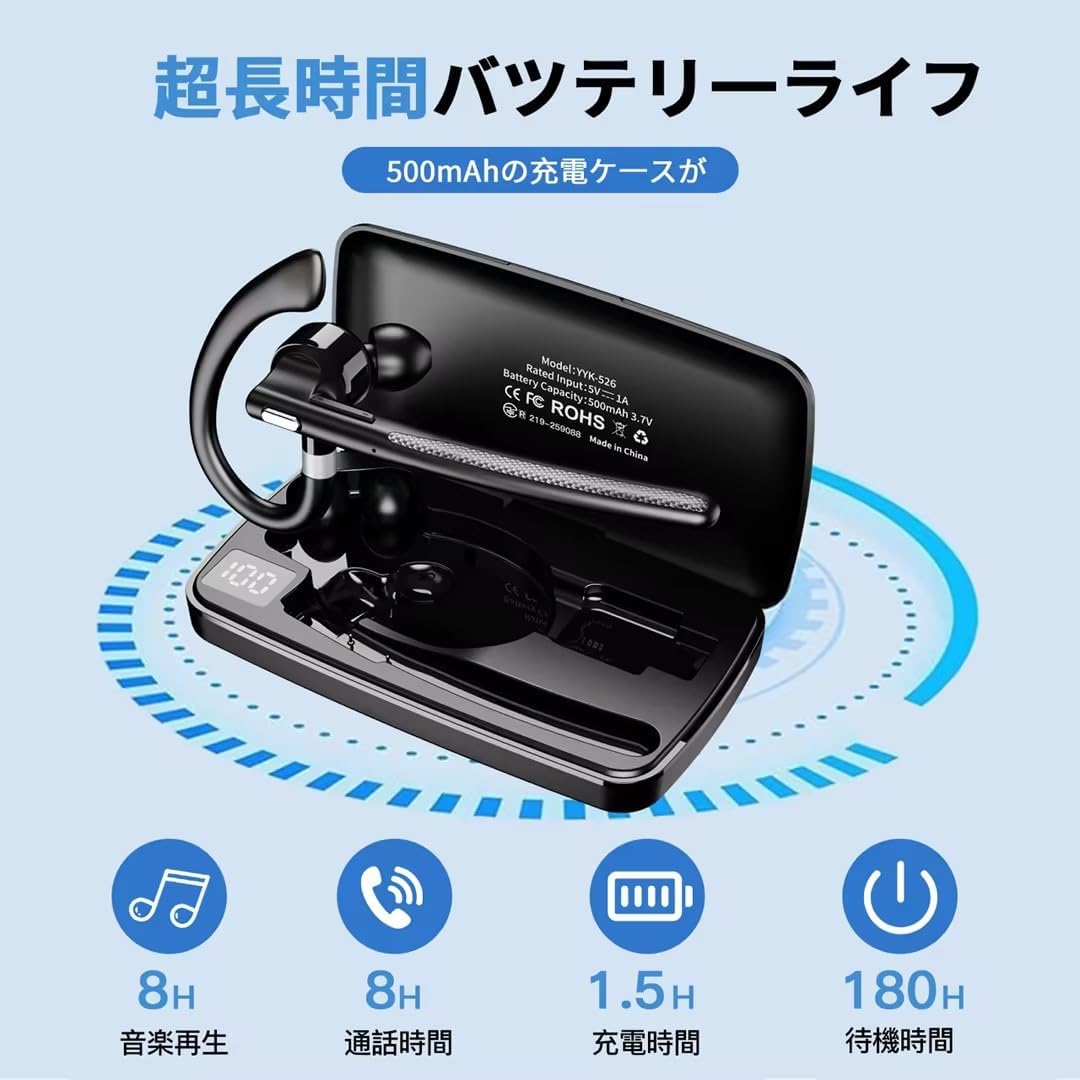
Image: Diagram showing the battery life of the headset (up to 12 hours music/talk time) and the charging case (500mAh, providing multiple recharges for a total of up to 100 hours).
2. Ijikọ na ngwaọrụ
The YYK-526 supports automatic pairing after the initial setup.
- Njikọ oge mbụ:
- Take the headset out of the charging case. It will automatically enter pairing mode (indicated by a flashing LED).
- Na ekwentị gị, mbadamba, ma ọ bụ kọmputa, mee ka Bluetooth rụọ ọrụ ma chọọ ngwaọrụ dị.
- Select "YYK-526" from the list of devices.
- Once connected, the LED indicator on the headset will stop flashing.
- Njikọta akpaaka: After the first successful pairing, the headset will automatically connect to the last paired device when powered on and within range (up to 10 meters without obstacles).
- Using the USB Bluetooth Adapter: For devices without built-in Bluetooth or for enhanced stability, plug the included USB Bluetooth adapter into your computer or tablet. The headset will automatically pair with the adapter.

Image: Illustration of the Boytond YYK-526 headset connecting to a smartphone and a laptop via a USB Bluetooth adapter, highlighting Bluetooth 5.4 and a 10-meter range.

Image: Close-up of a circuit board highlighting the Bluetooth 5.4 chip, emphasizing stable and high-speed connection.
Ntuziaka ọrụ
The headset features a multi-function button (MFB) for various controls. Specific button functions may vary slightly depending on your connected device.
Gbanyụọ/ Gbanyụọ
- Ike Na: Take the headset out of the charging case, or press and hold the MFB for approximately 3 seconds.
- Gbanyụọ: Place the headset back into the charging case, or press and hold the MFB for approximately 5 seconds.
Njikwa Oku
- Azịza/Kwụsị Oku: Pịa MFB otu ugboro.
- Jụ oku: Press and hold the MFB for approximately 2 seconds.
- Nọmba Ikpeazụ emegharịgharịrị: Pịa MFB ugboro abụọ.
- Mechie ọrụ: During a call, press the MFB once to mute/unmute your microphone. This prevents the other party from hearing your voice, useful for privacy during confidential discussions.

Image: Depicts the mute function during a call and the activation of Siri/Google Assistant for hands-free operation while driving.
Egwu Egwu
- Gwuo/kwụsịtụ: Pịa MFB otu ugboro.
- Track na-esote: Pịa MFB ugboro abụọ.
- Gara aga Track: Triple-press the MFB.
- Njikwa olu: Volume adjustments are typically controlled via your connected device.
Voice Assistant (Siri/Google Assistant)
- Mee ka onye enyemaka olu rụọ ọrụ: Press and hold the MFB for approximately 2 seconds (when not on a call). This will activate your device's voice assistant (e.g., Siri, Google Assistant), allowing for hands-free commands.
Nlekọta
- Keep the headset and charging case clean and dry. Wipe with a soft, dry cloth.
- Zere ikpughe ngwaọrụ ahụ na oke okpomọkụ, iru mmiri, ma ọ bụ ihe ndị na-emebi emebi.
- Store the headset in its charging case when not in use to protect it and keep it charged.
- Anwala ịkwasa ma ọ bụ rụkwaa ngwaọrụ n'onwe gị, n'ihi na nke a ga-emebi akwụkwọ ikike.
- Ensure the charging contacts on both the headset and the case are free from dust and debris for proper charging.
Nchọpụta nsogbu
| Nsogbu | Ngwọta |
|---|---|
| Igweisi anaghị agba ọkụ. | Ensure the headset is charged. Place it in the charging case or connect the case to power. |
| Enweghị ike ijikọ na ngwaọrụ. |
|
| Enweghị ụda ma ọ bụ obere olu. |
|
| Ogo oku adịghị mma. |
|
| Ekweisi na-akwụsịkarị. |
|
Nkọwapụta
| Njirimara | Nkọwa |
|---|---|
| Nọmba nlereanya | YYK-526 |
| Ụdị Bluetooth | 5.4 |
| Ntinye ntị | Ntị |
| Njikwa mkpọtụ | CVC8.0 Noise Cancellation |
| Mgbochi | 13 ohms |
| Ikike batrị (Ika Nchaji) | 500mAh |
| Oge Nchaji | Ihe dị ka awa 1.5 (maka ịchaji zuru oke) |
| Talk/Music Playback Time (Headset) | Ihe ruru. 10-12 awa |
| Oge Mkpọghachi (na Ikpe) | Ruo awa iri abụọ |
| Oge Njikere | Ihe ruru. awa 180 |
| Ikuku iche | Ruo mita 10 (na-enweghị ihe mgbochi) |
| Akụkụ (Ngwugwu) | 14.8 x 7.6 x 2.6 cm |
| Ibu (Ngwugwu) | 90 g |
| Ndakọrịta | Devices with Bluetooth functionality (smartphones, tablets, PCs) |
Akwụkwọ ikike na nkwado
This product is covered by a manufacturer's warranty. For specific warranty terms and conditions, please refer to the documentation included in your package or contact Boytond customer support.
For technical support, troubleshooting assistance, or any inquiries regarding your Boytond YYK-526 headset, please contact our customer service team. Contact information can typically be found on the product packaging or the official Boytond websaịtị.
Nkwenye: This device complies with the technical standards of the Radio Law for wireless equipment.


