1. Okwu mmalite
This manual provides detailed instructions for the proper use and maintenance of your HIDIZS AP80 Pro-X MP3 Player. Please read this manual thoroughly before operating the device to ensure optimal performance and longevity. Keep this manual for future reference.
2. Ngwaahịa gafereview
The HIDIZS AP80 Pro-X is a high-resolution portable music player designed for exceptional audio quality and versatile functionality.
Akụkụ ndị bụ isi:
- Dual ESS9219C DACs: Delivers pristine sound with high dynamic range and low distortion.
- FPGA-driven Native DSD256 Decoding: Ensures bit-perfect audio accuracy.
- MQA Final 8X Unfolding: Provides studio-grade lossless audio.
- Bi-directional Bluetooth 4.2: Supports UAT, LDAC, and CSR aptX for high-quality wireless audio transmission and reception.
- Multi-functional Capabilities: Includes a step counter and e-book function.
- USB DAC Functionality: Enhances audio quality for computers and mobile devices.
- CNC-milled Aluminum Unibody: Durable and compact design with a Japanese ALPS volume wheel.
- Ogologo ndụ batrị: Up to 40-day standby and 8-11 hours playback.
Ngwa gụnyere:
- HIDIZS AP80 Pro-X MP3 Player
- Screen Protector (x2)
- Ụdị-C USB
- Type-C to Type-C OTG Cable
- Akwụkwọ ntuziaka onye ọrụ
- Akwụkwọ ikike kaadị

Ọgụgụ 2.1: N'ihu na azụ view of the HIDIZS AP80 Pro-X MP3 Player.

Figure 2.2: Aluminum Alloy CNC Integration Design of the AP80 Pro-X, highlighting its compact size and robust build.

Figure 2.3: All items included in the HIDIZS AP80 Pro-X retail package.
3. Nhazi
3.1 Nchaji izizi
Before first use, fully charge the device using the provided Type-C cable and a compatible USB power adapter (not included). The battery indicator on the screen will show charging status.
3.2 Ịtinye kaadị Micro SD
The AP80 Pro-X supports Micro SD cards up to 512GB (and potentially 1TB as per user reviews). Locate the Micro SD card slot on the side of the device. Gently insert the card until it clicks into place. To remove, push the card in slightly until it springs out.

Figure 3.1: The Micro SD card slot on the AP80 Pro-X, illustrating expandable storage for music.
3.3 Gbanyụọ ma ọ bụ gbanyụọ
Press and hold the power button (usually located on the side) for a few seconds to turn the device on or off. A short press will toggle the screen on/off.
4. Ntuziaka ọrụ
4.1 Basic Navigation and Controls
The AP80 Pro-X features a Samsung 2.45" IPS HD touchscreen and physical buttons for navigation and control.
- Ihuenyo mmetụ aka: Navigate menus and select options by tapping and swiping.
- ALPS Volume Wheel: Tụgharịa ka ịhazie olu.
- Bọtịnụ anụ ahụ: Dedicated buttons for Play/Pause, Next/Fast-forward, and Previous/Rewind.
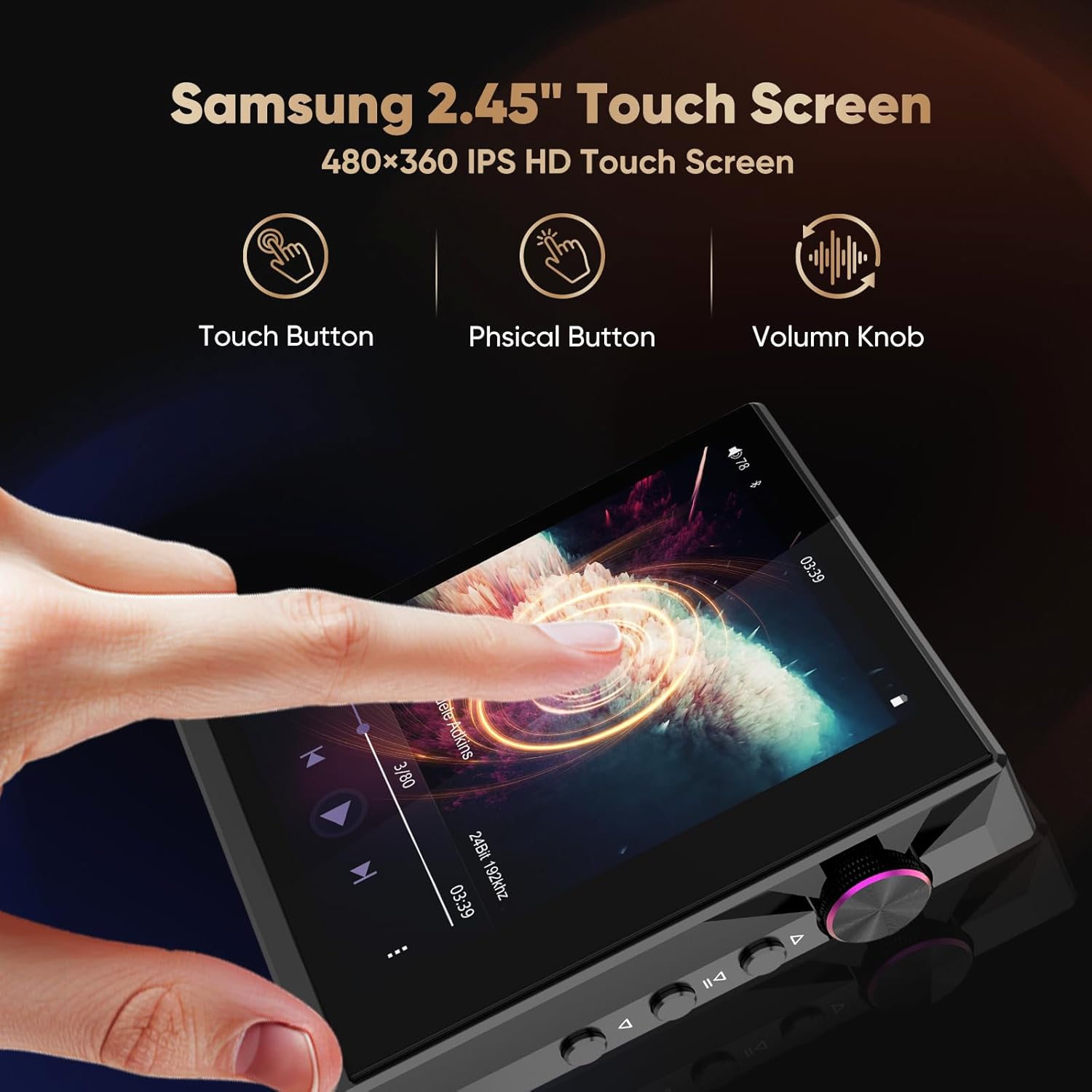
Figure 4.1: The 2.45-inch IPS HD touchscreen and physical control buttons on the AP80 Pro-X.

Figure 4.2: Detail of the ALPS volume wheel and playback control buttons.
4.2 Ngwugharị ọdịyo
The AP80 Pro-X supports a wide range of audio formats, including MQA 8X, LDAC, apt-X, AAC, USB DAC, DSD256, WAV (84kHz/32bit), APE (96kHz/24bit), FLAC (384kHz/32bit), MP3 (384kHz/320kbps), WMA (384kHz/32bit), AIFF (384kHz/32bit), and OGG (48kHz/16bit).

Figure 4.3: Visual representation of the various audio file formats supported by the AP80 Pro-X.
4.3 Njikọ Bluetooth
The device features bi-directional Bluetooth 4.2, allowing it to act as both a Bluetooth audio source and a Bluetooth DAC ampna -emegharị ihe.
- Connecting to Bluetooth Headphones/Speakers: Navigate to the Bluetooth settings, enable Bluetooth, and pair with your desired device.
- Using as a Bluetooth DAC: Connect your smartphone to the AP80 Pro-X via Bluetooth to use the player's DAC for enhanced audio output.

Figure 4.4: The AP80 Pro-X's two-way Bluetooth 4.2 functionality, connecting to various devices.

Figure 4.5: Illustration of streaming lossless audio from a smartphone to the AP80 Pro-X, and playing downloaded audio from the AP80 Pro-X via Bluetooth.
4.4 USB DAC Functionality
Connect the AP80 Pro-X to your computer (macOS 10.7+, iPadOS, Windows XP/7/8/10 and newer systems) or mobile phone using the provided Type-C cable to use it as an external DAC for improved audio quality.

Figure 4.6: The AP80 Pro-X functioning as a bidirectional USB DAC, enhancing audio for mobile and PC devices.

Figure 4.7: The AP80 Pro-X connected as a powerful external DAC AMP to a phone and PC, compatible with various operating systems.
4.5 HiBy Link and MSEB Tuning
Utilize the HiBy Link feature for remote control, playlist management, cover synchronization, and advanced MSEB (Mage Sound 8-Ball) sound tuning directly from your smartphone.

Figure 4.8: HiBy Link allows remote control and management of the AP80 Pro-X from a smartphone.

Figure 4.9: The MSEB tuning interface for customizing sound profiles.
4.6 Special Features: Step Counter & E-book
The AP80 Pro-X includes a built-in step counter for tracking workouts and an e-book reader for convenient reading.

Figure 4.10: The AP80 Pro-X's integrated step counter and e-book reader.
5. Nlekọta
- Nhicha: Jiri akwa dị nro dị nro hichaa ngwaọrụ ahụ. Zere ndị na-ehicha mmiri mmiri ma ọ bụ ihe abrasive.
- Nlekọta batrị: To prolong battery life, avoid fully discharging the device frequently. Store in a cool, dry place when not in use for extended periods.
- Nchedo ihuenyo: Apply the provided screen protectors to prevent scratches.
- Nchekwa: Debe ngwaọrụ ahụ pụọ na oke okpomọkụ, ìhè anyanwụ kpọmkwem na mmiri.
6. Nchọpụta nsogbu
| Nsogbu | Ihe nwere ike ime | Ngwọta |
|---|---|---|
| Ngwaọrụ anaghị agbanwu ọkụ | Low battery; device frozen | Charge the device; perform a hard reset (refer to manufacturer's websaịtị maka ntuziaka akọwapụtara). |
| Enweghị mmepụta ụda | Volume too low; headphones not connected properly; incorrect output mode selected | Increase volume; re-insert headphones; check output settings (e.g., balanced vs. single-ended). |
| Nsogbu njikọ Bluetooth | Bluetooth disabled; device out of range; interference | Ensure Bluetooth is enabled; move closer to the paired device; restart both devices. |
| Egwu files not recognized | Enweghị nkwado file usoro; rụrụ arụ file; Micro SD card issue | Check supported formats; re-transfer files; reformat or replace Micro SD card. |
If you encounter issues not listed here or if the suggested solutions do not resolve the problem, please contact HIDIZS customer support.
7. Nkọwapụta
| Njirimara | Nkọwa |
|---|---|
| Aha Nlereanya | AP80 PRO-X |
| DAC Chips | Dual ESS9219C |
| Nchọpụta DSD | DSD256 Native Decoding |
| MQA Support | MQA Final 8X Unfolding |
| Ụdị Bluetooth | 4.2 (Bi-Directional) |
| Codec Bluetooth | UAT, LDAC, CSR aptX |
| Nha ihuenyo | 2.45 Inches IPS HD Touchscreen |
| Ike Nchekwa ebe nchekwa | Expandable via Micro SD (up to 512 GB officially, 1TB reported) |
| Batrị | 1 Lithium Polymer (gụnyere) |
| Oge nkwughachi | 8-11 awa |
| Oge Njikere | 40 ụbọchị |
| Teknụzụ Njikọta | Bluetooth, USB Port, Mobile Phone USB Decode |
| Ngwa dakọtara | Computers, cars, cellphones, tablets, IEMs |
| Ibu Ibu | 2.54 ounces |
| Akụkụ ngwugwu | 5 x 3.74 x 1.85 sentimita asatọ |
8. Akwụkwọ ikike na nkwado
Your HIDIZS AP80 Pro-X MP3 Player comes with a warranty. Please refer to the included Warranty Card for details on coverage and terms. For technical support, product inquiries, or service, please visit the official HIDIZS websaịtị ma ọ bụ kpọtụrụ ndị ahịa ha ọrụ.
Official HIDIZS Store: Visit the Hidizs Store
9. Related Videos
HIDIZS AP80 PRO-X Music Player Appearance Display
Vidiyo a na-enye nkọwa zuru okeview of the HIDIZS AP80 Pro-X music player, showcasing its design and physical features.
Ihe ọkpụkpọ HiFi MP3
This video demonstrates general features and capabilities of a HiFi MP3 player, which may be applicable to the AP80 Pro-X.
Oilsky Hi-Res Audio Player G88
This video showcases features of another Hi-Res audio player, providing context for similar functionalities found in the AP80 Pro-X.


