Okwu mmalite
This manual provides detailed instructions for the safe and effective use of your iBstone Nova Hearing Aids. Please read this manual thoroughly before using the device to ensure proper operation and to maximize your hearing experience. The iBstone Nova Hearing Aids are designed to provide clear sound with smart noise cancelling technology, offering comfort and ease of use for adults and seniors.
Ihe ngwugwu
Nyochaa na etinyere ihe niile edepụtara n'okpuru na ngwugwu gị:

Image: The package contents include the charging case, two hearing aids, an anti-lost strap, a cleaning brush, wax guard filters, a USB cable, a user manual, silicone ear domes, and dry tablets.
- iBstone Nova Hearing Aids (Left and Right)
- Akpa Nchaji enwere ike ibugharị
- Igwe nchaji USB
- Silicone Ear Domes (various sizes)
- Wax Guard Filters
- Nhicha ahịhịa
- Anti-Lost Lanyard
- Dry Tablets (for dehumidifying capsule)
- Akwụkwọ ntuziaka (akwụkwọ a)
Melite
1. Nchaji mbụ
Before first use, fully charge the hearing aids and the charging case.
- Connect the USB charging cable to the charging case and a power source.
- Place the hearing aids into their respective slots in the charging case (L for left, R for right).
- The indicator lights on the case will illuminate to show charging status. A full charge typically takes about 1.5 hours for the hearing aids. The charging case provides approximately 3 full recharges for the hearing aids.

Image: The hearing aids are shown charging in their case, connected via a USB cable. Indicator lights on the case display the battery level. One light indicates 25% remaining power in the case.
2. Selecting Ear Domes
Choose the ear dome size that provides the most comfortable and secure fit, and minimizes sound leakage or whistling.
- Experiment with the different sizes and styles of silicone ear domes provided.
- A proper fit is crucial for optimal sound quality and to prevent feedback.

Image: A four-step guide illustrates how to fit the hearing aids: 1. Choose the right size of ear domes. 2. Place the device into the ear canal correctly, noting L/R markings. 3. Adjust for comfort and security. 4. Press the button to adjust volume/mode.
3. Inserting the Hearing Aids
Identify the left (L) and right (R) hearing aids. Gently insert each aid into the corresponding ear canal until it feels secure and comfortable.
Ntuziaka ọrụ
1. Gbanyụọ / gbanyụọ
- Gbanyụọ/ gbanyụọ akpaaka: The hearing aids automatically turn on when removed from the charging case and turn off when placed back into the case.
2. Adjusting Volume and Modes
The iBstone Nova features a single multi-function button for easy control.
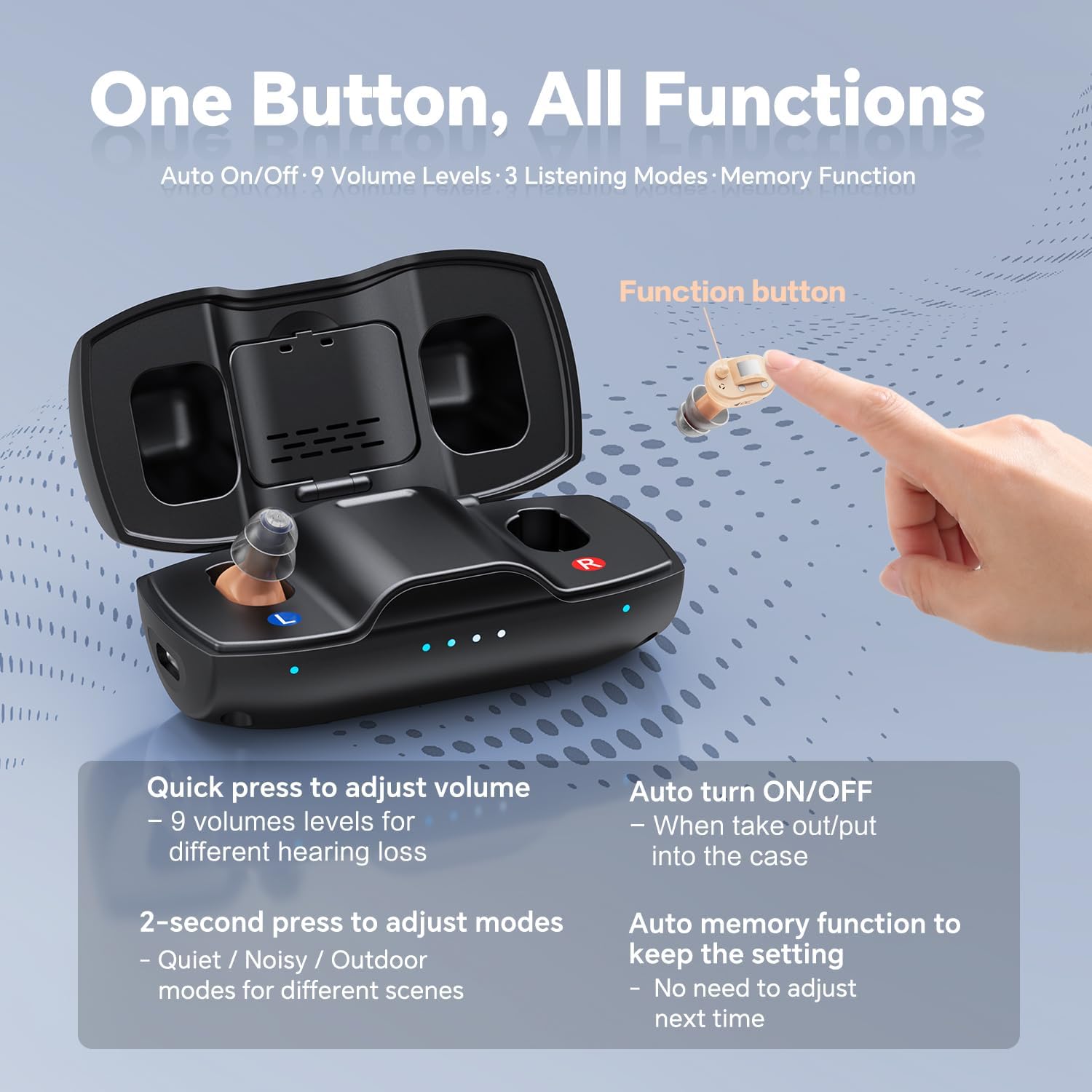
Image: A close-up of the iBstone Nova hearing aid highlights its single function button. Text describes its functions: quick press for volume, 2-second press for modes, auto on/off, and auto memory function.
- Ndozi olu:
- A quick press of the function button will cycle through 9 volume levels.
- Adjust to a comfortable listening level.
- Nhọrọ ụdị:
- A Pịa 2-sekọnd of the function button will cycle through 3 listening modes:
- Ụdị dị jụụ: For calm environments.
- Noisy Mode: Enhances speech in environments with background noise.
- Ụdị n'èzí: Optimized for open-air settings.
- The device has an auto-memory function, retaining your last setting when turned off and on.
- A Pịa 2-sekọnd of the function button will cycle through 3 listening modes:
Nlekọta
1. Nhicha kwa ụbọchị
- Use the provided cleaning brush to gently remove any earwax or debris from the ear domes and the hearing aid body.
- Wipe the hearing aids with a soft, dry cloth. Do not use water or cleaning solutions directly on the devices.
2. Dehumidifying
The charging case includes a built-in dehumidifying capsule to protect your hearing aids from moisture.
- Place the dry tablets into the designated compartment within the charging case.
- Store your hearing aids in the charging case with the dry tablets when not in use to extend their lifespan.

Image: This image displays several features, including the anti-lost strap, the built-in dehumidifying capsule in the charging case, the portable charging case, and various ear domes for optimal fitting.
3. Replacing Wax Guard Filters
Regularly check the wax guard filters and replace them if they appear clogged with earwax. Refer to the detailed instructions in the full user manual for replacement procedures.
Nchọpụta nsogbu
If you experience any issues with your iBstone Nova Hearing Aids, please refer to the following common solutions:
| Nsogbu | Ihe nwere ike ime | Ngwọta |
|---|---|---|
| No Sound or Weak Sound | Low battery, clogged ear dome/wax guard, incorrect volume setting. | Charge the hearing aids. Clean or replace the ear dome/wax guard. Increase volume. |
| Whistling or Feedback | Improper fit, ear dome too small, earwax blockage. | Re-insert the hearing aid. Try a larger ear dome. Clean ear canal or hearing aid. |
| Ụda na-adịte aka | Low battery, loose connection in charging case, moisture. | Ensure full charge. Check placement in charging case. Use dehumidifying capsule. |
| Hearing Aid Not Charging | Improper placement in case, faulty cable/adapter, dirty charging contacts. | Ensure proper alignment in case. Try a different cable/adapter. Clean charging contacts. |
Ọ bụrụ na nsogbu ahụ ka dị, biko kpọtụrụ nkwado ndị ahịa.
Nkọwapụta
- Ụdị: Nova
- Onye nrụpụta: iBstone
- Ụdị batrị: Rechargeable (1 A battery included)
- Oge nchaji: Approximately 1.5 hours for hearing aids
- Oge ojiji: Up to 80 hours per charge (with charging case backup)
- Ọkwa olu: 9
- Ụdị ntị: 3 (Quiet, Noisy, Outdoor)
- Akụkụ (Ngwugwu): 6.73 x 4.21 x 2.13 sentimita asatọ
- Ibu (Ngwugwu): 11.36 ounces
Akwụkwọ ikike na nkwado
iBstone stands behind its products. For any questions or assistance, please contact our customer support team.
- Nkwado ndị ahịa: U.S.-based phone support is available to assist with any after-sales problems.
- Ozi akwụkwọ ikike: Please refer to the warranty card included in your package or contact customer support for detailed warranty terms.

Image: A group of professionals in lab coats represents the iBstone support team, emphasizing real-human instant service, US-based replacement & repairment, and comprehensive manual & video instruction.
For further assistance, please visit the official iBstone website or contact the support team directly.


