1. Okwu mmalite
Daalụ maka ịzụrụasing the ZEBRONICS Zeb Paradise Neo Wireless Headphones. This manual provides detailed instructions for setup, operation, and maintenance of your device. Please read this manual carefully before use to ensure proper functionality and to maximize your listening experience.
Key features of your Zeb Paradise Neo headphones include 40mm drivers for clear audio, up to 50 hours of playback, rapid charging, a dedicated gaming mode with low latency, three EQ modes, Environmental Noise Cancellation (ENC), and dual pairing capability.

Image 1.1: ZEBRONICS Zeb Paradise Neo Wireless Headphones. This image shows a front-side view of the black ZEBRONICS Zeb Paradise Neo wireless headphones, highlighting their sleek design and on-ear form factor.
2. Ihe ngwugwu
Gbaa mbọ hụ na ihe niile dị na ngwugwu:
- ZEBRONICS Zeb Paradise Neo Wireless Headphones (1 Unit)
- USB Type-C Charging Cable (1 Unit)
- AUX Cable (1 Unit)
- QR Code Guide (1 Unit)
3. Ngwaahịa gafereview
Familiarize yourself with the headphone components:
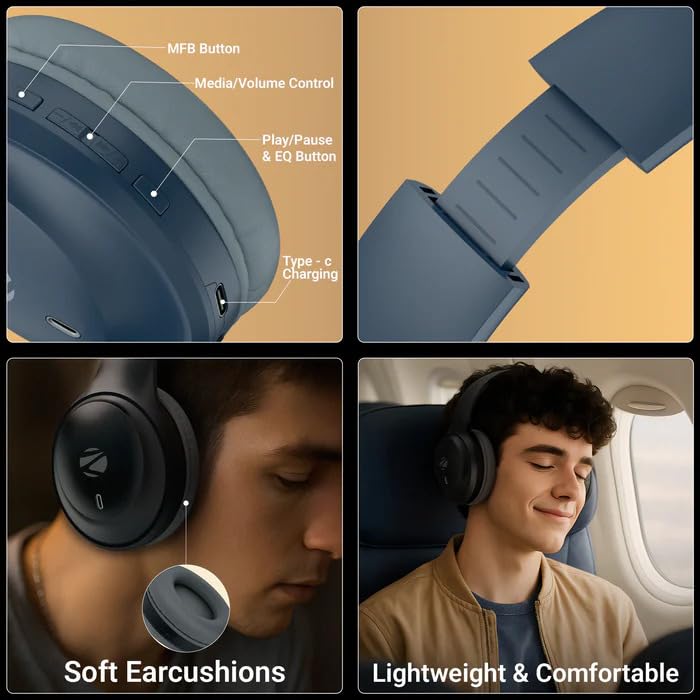
Image 3.1: Headphone Controls and Features. This image displays the various control buttons and features on the ZEBRONICS Zeb Paradise Neo headphones. It highlights the MFB (Multi-Function Button), Media/Volume Control buttons, Play/Pause & EQ Button, and the Type-C Charging port. It also shows the soft ear cushions and the lightweight, comfortable design.
- Bọtịnụ MFB: Multi-Function Button for power, pairing, and call management.
- Media/Volume Control: Buttons for adjusting volume and navigating tracks.
- Play/Pause & EQ Button: Controls playback and switches between EQ modes.
- Ụdị-C ọdụ ụgbọ mmiri: Maka ijikọ eriri nchaji.
- Ọdụ ụgbọ mmiri AUX: Maka njikọ ọdịyo wired.
- Igwe okwu: Maka ọrụ oku na onye enyemaka olu.
4. Ntọala na Nchaji
4.1 Nchaji izizi
Before first use, fully charge the headphones. Connect the supplied USB Type-C charging cable to the headphone's charging port and the other end to a USB power adapter (not included) or a computer's USB port.
- Ihe ngosi LED uhie ga-enwu n'oge a na-achaji.
- The LED indicator will turn off once charging is complete.
- Oge nchaji dị ihe dịka awa 1.5.
- Rapid charging provides approximately 7 hours of use from a 10-minute charge.
4.2 Gbanyụọ/ gbanyụọ
- Ike Na: Press and hold the MFB button for approximately 3 seconds until the LED indicator flashes blue.
- Gbanyụọ: Press and hold the MFB button for approximately 5 seconds until the LED indicator flashes red and then turns off.
5. Ntuziaka ọrụ
5.1 Njikọ Bluetooth
- Gbaa mbọ hụ na agbanyụrụ ekweisi nke ọma ma gbanyụọ ya.
- Press and hold the MFB button for approximately 5-7 seconds until the LED indicator flashes red and blue alternately. This indicates pairing mode.
- Na ekwentị mkpanaaka gị, gbanye Bluetooth wee chọọ ngwaọrụ dị.
- Select "ZEB-PARADISE NEO" from the list of found devices.
- Once paired, the LED indicator will flash blue intermittently.
The headphones will automatically attempt to connect to the last paired device when powered on.
5.2 Njikọta abụọ
The Zeb Paradise Neo supports dual pairing, allowing connection to two Bluetooth devices simultaneously.
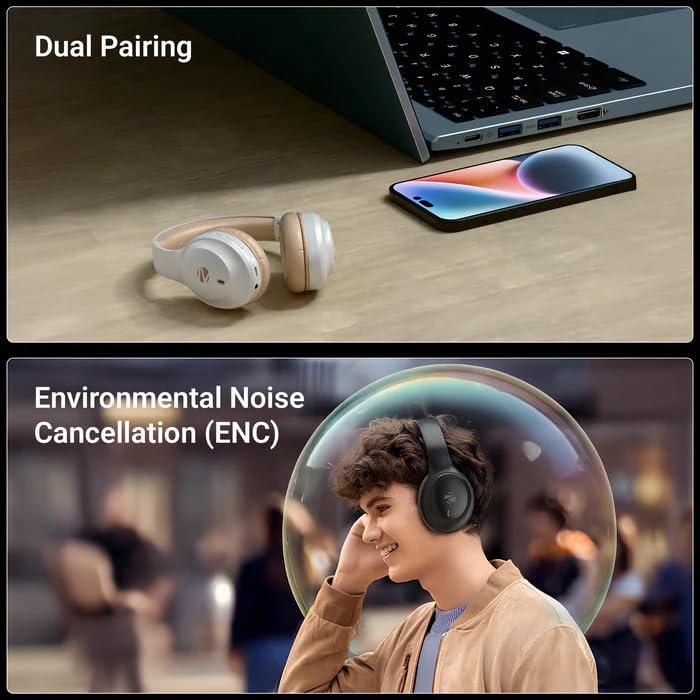
Image 5.1: Dual Pairing Capability. This image illustrates the dual pairing feature of the ZEBRONICS Zeb Paradise Neo headphones, showing them connected to both a laptop and a smartphone simultaneously. This allows seamless switching between audio sources.
- Pair the headphones with the first device (e.g., smartphone) as described in Section 5.1.
- Disable Bluetooth on the first device. The headphones will re-enter pairing mode.
- Pair the headphones with the second device (e.g., laptop).
- Re-enable Bluetooth on the first device. The headphones should now be connected to both devices.
Audio will play from the device that is actively transmitting sound. You may need to manually select the headphones as the output device on one of the connected sources.
5.3 Ọrụ oku
- Azịza/Kwụsị Oku: Pịa bọtịnụ MFB otu ugboro.
- Jụ oku: Press and hold the MFB button for approximately 2 seconds.
- Nọmba Ikpeazụ emegharịgharịrị: Double-press the MFB button.
Ụdị EQ 5.4
The headphones feature 3 Equalizer (EQ) modes to customize your audio experience. Press the Play/Pause & EQ button to cycle through the available modes (e.g., Bass Boost, Balanced, Treble Boost).
5.5 Ụdị Egwuregwu (Ọnọdụ Dị Ala)
Activate Gaming Mode for reduced audio latency, ideal for gaming. Refer to the QR code guide for specific instructions on activating and deactivating Gaming Mode, as this may vary.
5.6 AUX Mode (Wired Connection)
To use the headphones with a wired connection, connect the supplied 3.5mm AUX cable to the headphone's AUX port and the other end to your audio source's 3.5mm audio jack. The headphones will automatically switch to AUX mode.
6. Nlekọta
- Nhicha: Jiri akwa dị nro dị nro hichaa ekweisi. Ejila kemịkalụ siri ike ma ọ bụ ihe abrasive.
- Nchekwa: Chekwaa ekweisi n'ebe dị jụụ, kpọrọ nkụ na-adịghị na ìhè anyanwụ kpọmkwem na oke okpomọkụ.
- Nlekọta batrị: To prolong battery life, avoid fully discharging the headphones frequently. Charge them regularly, even if not in use for extended periods.
- Mkpughe mmiri: These headphones are not waterproof. Avoid exposure to water or moisture.
7. Nchọpụta nsogbu
| Nsogbu | Ngwọta enwere ike |
|---|---|
| Headphones not powering on. | Gbaa mbọ hụ na ebubo ekweisi. Jikọọ na isi iyi ike wee nwaa ọzọ. |
| Enweghị ike ijikọ na ngwaọrụ. |
|
| Enweghị ụda ma ọ bụ obere olu. |
|
| Njikọ na-adịte aka. |
|
8. Nkọwapụta
| Aha Nlereanya | Paradise Neo (ZEB-WHP 11) |
| Ụdị Bluetooth | 5.4 |
| Ikuku iche | 10 mita (enweghị ihe mgbochi) |
| Nha ọkwọ ụgbọ ala | 40mm |
| Mmetụta Ọkà Okwu | 32Ω |
| Nzaghachi ugboro ugboro | 20Hz - 20kHz |
| Mmetụta | 99dB ± 3dB |
| Mgbochi igwe okwu | 2.2k |
| Mmetụta igwe okwu | -38dB±3dB |
| Oge Nchaji | awa 1.5 |
| Oge nkwughachi | Up to 50 hours* (at 50% volume) |
| Oge Okwu | Ruo awa 40* |
| Nha ịbụ | 161g |
| Akụkụ ngwaahịa (W x D x H) | 18.8 x 8.4 x 21.5 cm (Package dimension) |
*Battery life may vary based on usage, volume levels, and environmental factors.
9. Akwụkwọ ikike na nkwado
Maka ozi gbasara akwụkwọ ikike na nkwado ndị ahịa, biko gaa na ntuziaka koodu QR dị na ngwugwu gị ma ọ bụ gaa na ZEBRONICS gọọmentị websaịtị. Debe akwụkwọ nnata ịzụrụ maka akwụkwọ ikike.
Manufacturer: Zebronics India Pvt Ltd.
Country of Origin: India.


