1. Okwu mmalite
This manual provides essential information for the proper setup, operation, and maintenance of your MINIX NUC150 Mini PC. Please read this guide thoroughly before using the device to ensure optimal performance and longevity.
Ihe ngwugwu
Nyochaa na etinyere ihe niile edepụtara n'okpuru na ngwugwu gị:
- 1 x MINIX NUC150 Mini PC
- 1 x 19V/3.42A Power Adapter with US/EU/UK Plug
- 1 x HDMI USB
- 1 x VESA Mount
- Akwụkwọ ntuziaka onye ọrụ 1 x (akwụkwọ a)

Image: Contents of the MINIX NUC150 Mini PC package, including the mini PC, power adapter, HDMI cable, VESA mount, and user manual.
2. Ngwaahịa gafereview
The MINIX NUC150 is a compact and powerful mini PC designed for various applications, from business and remote work to education and home entertainment. Its small form factor allows for flexible placement.
Akụkụ anụ ahụ na ịdị arọ
- Akụkụ (LxWxH): 4.61 x 4.37 x 1.42 sentimita (117 x 111 x 36 mm)
- Arọ: 13 ounces (ihe dị ka 0.37 n'arọ)
Nhazi Port
The MINIX NUC150 features a comprehensive set of ports for connectivity. Familiarize yourself with the port locations for easy setup.
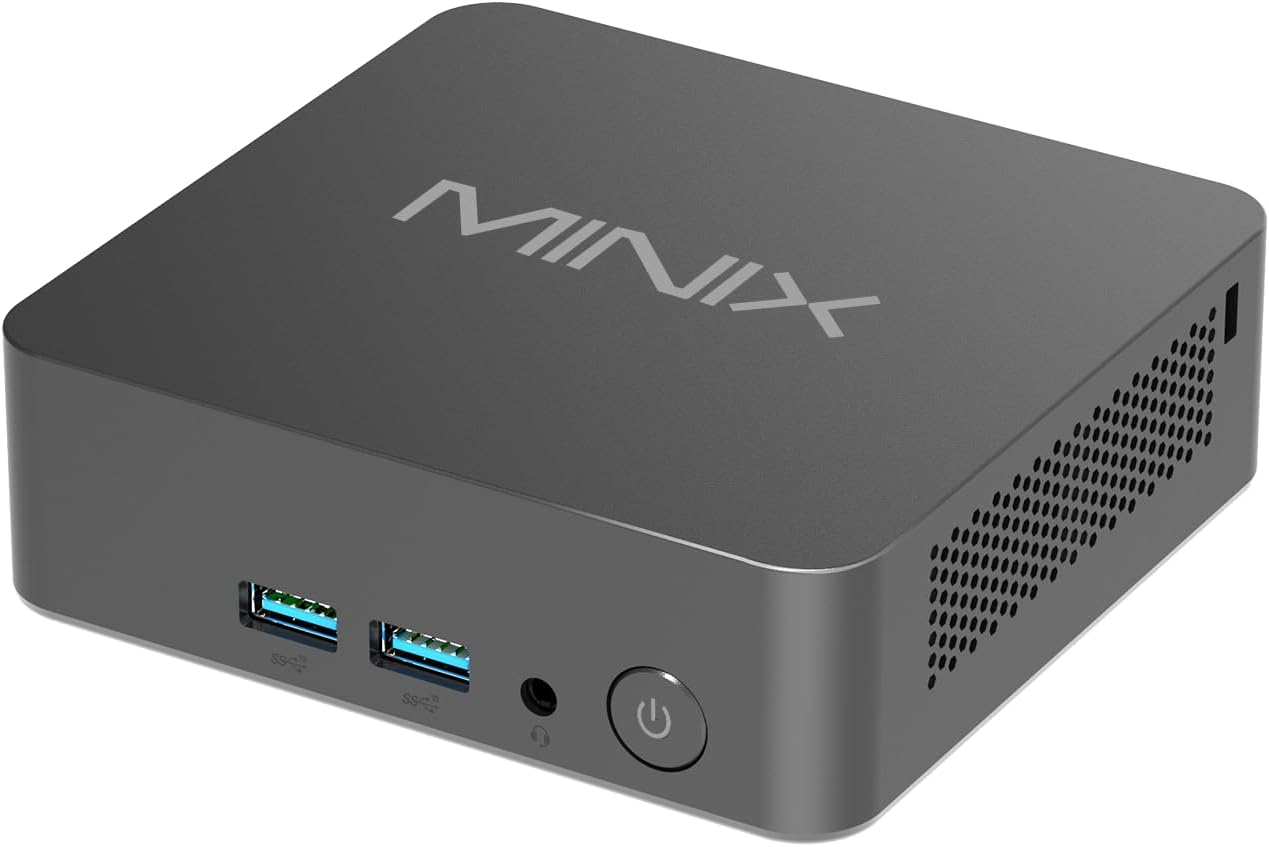
Foto: N'ihu view of the MINIX NUC150 Mini PC, showing two USB 3.0 ports, an audio jack, and the power button.

Image: Diagram illustrating all ports on the MINIX NUC150 Mini PC, including USB-A 2.0, USB-A 3.2, HDMI, DC Jack, Type-C (DP/PD/USB-C 3.2), RJ45 LAN, Kensington Lock, and Audio Jack.
3. Nhazi
Follow these steps to set up your MINIX NUC150 Mini PC.
Nzọụkwụ 1: Jikọọ Peripherals
- Connect your monitor(s) to the HDMI ports or the USB-C port using appropriate cables. The device supports up to three 4K@60Hz displays.
- Connect your keyboard and mouse to the available USB-A ports.
- If using a wired network, connect an Ethernet cable to one of the 2.5G Ethernet ports.
- Connect any other desired peripherals (e.g., external storage, speakers) to the appropriate ports.

Image: The MINIX NUC150 Mini PC connected to three 4K monitors, demonstrating its triple display capability.
Nzọụkwụ 2: Njikọ Ike
- Connect the power adapter to the DC Jack on the mini PC.
- Tinye nkwụnye ọkụ n'ime oghere mgbidi.
Nzọụkwụ 3: Gbanyụọ
- Press the power button located on the front of the mini PC. The power LED will illuminate.
- The system will boot into Windows 11 Pro. Follow the on-screen instructions for initial setup, including language, region, network connection, and user account creation.
4. Ntuziaka ọrụ
The MINIX NUC150 Mini PC comes pre-installed with Windows 11 Pro and is ready for immediate use after initial setup. Below are key operational features.
Processor na arụmọrụ
The device is powered by an Intel N150 Processor, featuring 4 cores and 4 threads, with a max boost frequency of 3.6 GHz and 6MB total cache. This processor is designed for efficient daily tasks, video playback, and general productivity.

Image: A diagram highlighting the Intel N150 Processor with its specifications: 4 Cores, 4 Threads, 6M Total Cache, and Max Boost Frequency of 3.6 GHz.
Ebe nchekwa na Nchekwa
The NUC150 includes 16GB of DDR5-4800MHz RAM and a 512GB M.2 PCIe SSD. The system supports memory expansion up to 32GB and storage expansion up to 4TB via additional M.2 slots.

Foto: Ime view of the MINIX NUC150 Mini PC, showing the 16GB DDR5 RAM module and the 512GB M.2 PCIe 3.0 NVMe SSD.
Ngosipụta mmepụta
The mini PC supports up to three 4K@60Hz displays simultaneously through its dual HDMI 2.1 ports and one USB-C port (DisplayPort 1.4 compatible). This configuration is suitable for multitasking and high-definition visual applications.
Network and Wireless Connectivity
The device offers robust connectivity options:
- Wi-Fi 6 (802.11ax): Maka ohere ịntanetị ikuku dị elu.
- 2.5G Ethernet: For fast and stable wired network connections.
- Bluetooth Bluetooth: Maka ijikọ ihe ndị ọzọ na-anaghị ekwe ntị dịka ahụigodo, òké, na ngwaọrụ ọdịyo.

Image: The MINIX NUC150 Mini PC connected via an Ethernet cable, with icons indicating Wi-Fi 6 and Bluetooth 5.2 capabilities.
USB-C Port Functionality
The USB-C port on the MINIX NUC150 supports multiple functions:
- Nyefee data: USB 3.2 Gen2 speeds.
- Ihe ngosi: DisplayPort 1.4, supporting 4K@60Hz.
- Nnyefe ike: Up to 15W output.

Image: Close-up of the MINIX NUC150 Mini PC's rear, highlighting the two USB-C 3.2 Gen2 ports and their data, display, and power output capabilities.
5. Nlekọta
Regular maintenance helps ensure the longevity and optimal performance of your MINIX NUC150 Mini PC.
Nhicha
- Gently wipe the exterior of the mini PC with a soft, dry, lint-free cloth.
- Avoid using liquid cleaners or abrasive materials, as these can damage the finish or internal components.
- Ensure ventilation openings are clear of dust and debris to prevent overheating. Use compressed air if necessary, holding the can upright to prevent liquid discharge.
Mmelite ngwanrọ
Keep your Windows 11 Pro operating system and drivers updated. Regular updates provide security enhancements, bug fixes, and performance improvements.
- Gaa na Ntọala > Mmelite Windows iji lelee ma wụnye mmelite dị.
- Allow the system to restart as required after updates.
Mgbasawanye nchekwa
The MINIX NUC150 offers flexible storage expansion options:
- It includes one M.2 2280 PCIe SSD slot (occupied by the pre-installed 512GB SSD).
- An additional M.2 2242 PCIe SSD slot is available, which also supports SATA 3.0 SSDs, allowing for up to 4TB of total storage.
- Consult a qualified technician for hardware upgrades to avoid damaging the device.
6. Nchọpụta nsogbu
If you encounter issues with your MINIX NUC150 Mini PC, refer to the following common troubleshooting steps. If the problem persists, contact customer support.
Enweghị Ike / Sistemụ Anaghị Amalite
- Hụ na e jikọtara ihe nkwụnye ọkụ eletrik ahụ nke ọma na obere PC na ebe ọkụ eletrik na-arụ ọrụ.
- Nyochaa na oghere ọkụ na-arụ ọrụ site na iji ngwaọrụ ọzọ nwalee ya.
- Press the power button firmly. If the power LED does not light up, there may be an issue with the power supply or the unit itself.
Enweghị mmepụta ihe ngosi
- Check that the HDMI or USB-C cables are securely connected to both the mini PC and the monitor(s).
- Ensure the monitor is powered on and set to the correct input source (e.g., HDMI 1, DisplayPort).
- Try connecting to a different monitor or using a different cable to rule out external display issues.
Okwu Njikọta netwọkụ
- Ekwenyere (Ethernet): Check if the Ethernet cable is properly connected to both the mini PC and your router/modem. Verify that your router/modem is working correctly.
- Ikuku (Wi-Fi): Hụ na Wi-Fi na-arụ ọrụ na ntọala Windows. Lelee ma ọ bụrụ na ejikọrọ gị na netwọk ziri ezi nakwa na etinyere paswọọdụ ahụ nke ọma. Malitegharịa rawụta/modem gị.
System Performance Issues
- Mechie ngwa na-adịghị mkpa na-agba n'azụ.
- Hụ na Windows na draịva emelitere.
- Jiri ngwanrọ antivirus a ma ama lelee ma ọ bụ malware.
- Monitor system temperatures to ensure the device is not overheating.
7. Nkọwapụta
Detailed technical specifications for the MINIX NUC150 Mini PC.
| Njirimara | Nkọwapụta |
|---|---|
| Ụdị | MINIX |
| Nọmba nlereanya | NUC150 |
| Sistemụ nrụọrụ | Windows 11 Pro |
| Nhazi | Intel N150 (3.6 GHz Celeron, 4 Cores, 4 Threads, 6MB Cache) |
| RAM | 16GB DDR5 (4800 MHz), enwere ike ịgbasa ruo 32GB |
| Draịvụ ike | 512GB M.2 PCIe x4 SSD, expandable up to 4TB (via M.2 2280 PCIe and M.2 2242 PCIe/SATA slots) |
| Ihe eserese eserese | Intel Graphics (Agbakwunyere) |
| Mkpebi ihuenyo kacha | 4K Pixels (3840 x 2160) |
| Ngosipụta mmepụta | 2x HDMI 2.1, 1x USB-C (DP 1.4) - Triple 4K@60Hz support |
| Ụdị ikuku | Wi-Fi 6 (802.11ax), Bluetooth 5.2 |
| Ethernet | 2.5G Ethernet |
| ọdụ ụgbọ mmiri USB | 3x USB 3.0, 1x USB 2.0, 1x USB-C (Data/DP 1.4/PD 15W) |
| Audio | Jack ọdịyo |
| Ibu Ibu | 13 ounces (0.37 n'arọ) |
| Akụkụ ngwaahịa (LxWxH) | 4.61 x 4.37 x 1.42 sentimita (117 x 111 x 36 mm) |
8. Akwụkwọ ikike na nkwado
MINIX is committed to providing reliable products and customer satisfaction.
Ozi akwụkwọ ikike
For specific warranty terms and conditions, please refer to the warranty card included with your product or visit the official MINIX website. Generally, MINIX products come with a limited warranty covering manufacturing defects.
Nkwado ndị ahịa
If you require technical assistance or have questions regarding your MINIX NUC150 Mini PC, please use the following methods:
- Nkwado n'ịntanetị: Visit the official MINIX websaịtị maka FAQs, nbudata ndị ọkwọ ụgbọala, na akụrụngwa nkwado.
- Ọrụ ndị ahịa Amazon: If purchased via Amazon, you can contact support through your Amazon account:
"Login Amazon" > "Your Account" > "Your orders" > "Ask Product Question"


