Okwu mmalite
The Razer BlackShark V3 X HyperSpeed is a wireless esports gaming headset designed for high-performance audio and clear communication across multiple platforms. This manual provides essential information for setting up, operating, maintaining, and troubleshooting your headset.
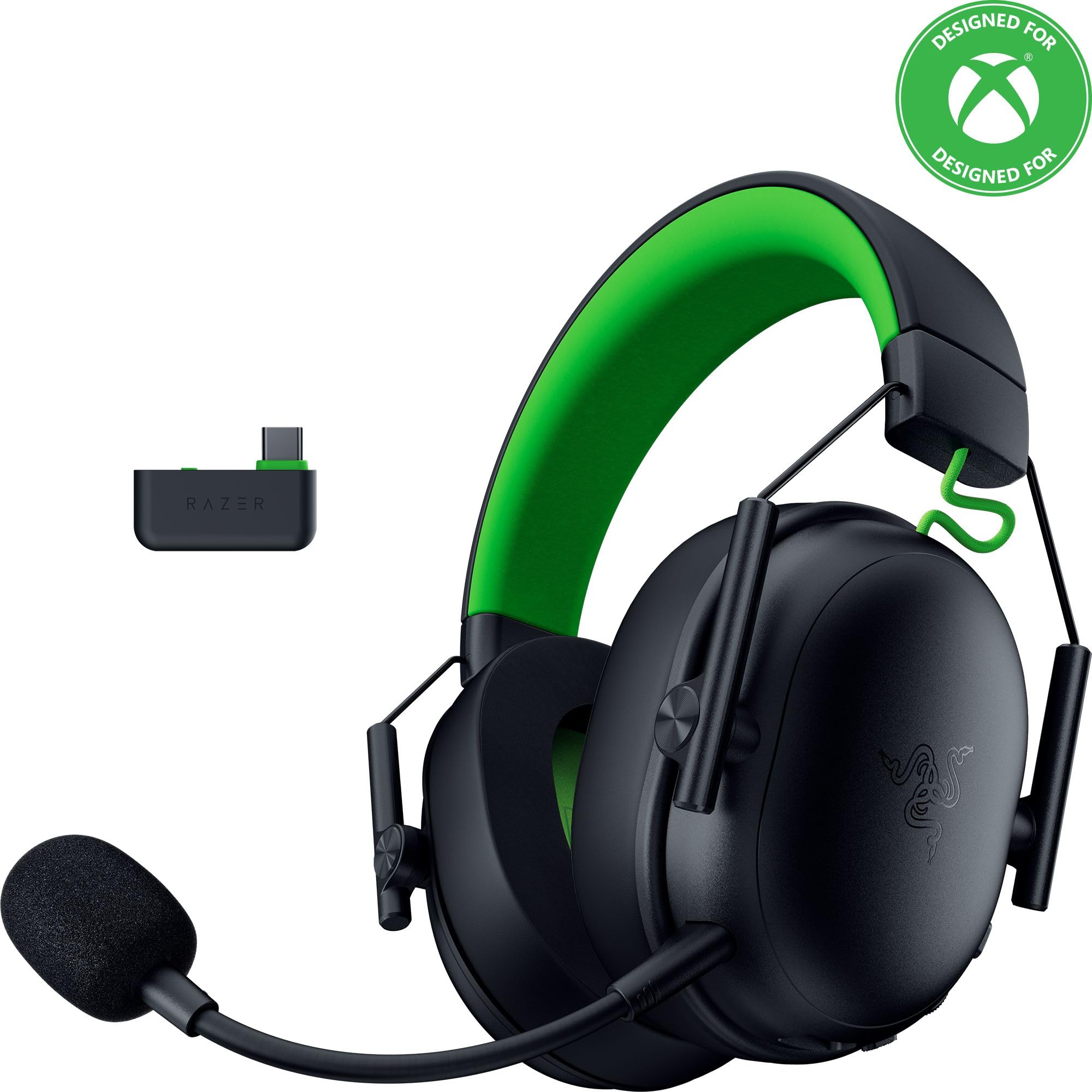
Image: The Razer BlackShark V3 X HyperSpeed Wireless Gaming Headset, showcasing its design and detachable microphone.
Kedu ihe dị na Igbe ahụ
Hụ na ihe ndị a niile dị na ngwugwu gị:
- Razer BlackShark V3 X HyperSpeed Wireless Gaming Headset
- USB Type C Razer HyperSpeed Wireless Dongle
- Detachable Razer HyperClear Cardioid 9.9mm Mic
- USB Type A to Type C Cable (for charging and wired connection)
- USB Type A to Type C Adapter Cable
- Akwụkwọ ntuziaka (akwụkwọ a)

Image: The Razer BlackShark V3 X HyperSpeed headset on a stand next to its retail packaging, illustrating the product and its box.
Melite
1. Ịchaji ekweisi
Before initial use, fully charge your headset using the provided USB Type A to Type C cable. Connect the USB-C end to the headset's charging port and the USB-A end to a powered USB port.
2. Ịtinye Igwe okwu
Insert the detachable Razer HyperClear Cardioid 9.9mm Mic into the microphone port located on the left earcup. Ensure it is securely connected.

Image: Close-up of the Razer BlackShark V3 X HyperSpeed headset showing the detachable HyperClear Cardioid microphone attached.
3. Njikọta Nhọrọ
The headset supports three modes of connectivity: 2.4 GHz HyperSpeed Wireless, Bluetooth, and wired USB-C.
- 2.4 GHz HyperSpeed Wireless (PC, Mac, PS5, Nintendo Switch, Xbox Series X|S, Xbox One):
Insert the USB Type C Razer HyperSpeed Wireless Dongle into an available USB-C port on your device. If your device only has USB-A ports, use the provided USB Type A to Type C Adapter Cable. Ensure the switch on the dongle is set to 'USB' for PC/Mac/PS5/Switch or 'XBOX' for Xbox consoles. The headset will automatically connect. - Bluetooth (Smartphones, Tablets, Handheld Gaming Devices):
With the headset powered on, press and hold the power button until the LED indicator blinks blue, indicating pairing mode. On your device, search for and select "Razer BlackShark V3 X HyperSpeed" from the list of available Bluetooth devices. - Wired USB-C:
Connect the headset directly to your device using the USB Type A to Type C Cable. This mode provides audio and microphone functionality without relying on battery power.

Image: The Razer BlackShark V3 X HyperSpeed headset alongside its USB-C wireless dongle, illustrating the wireless connectivity component.

Image: A visual representation of the headset's three connectivity modes: 2.4 GHz Wireless, Bluetooth, and USB, highlighting its versatility.
Na-arụ ọrụ ekweisi
1. Njikwa karịrịview
Igwe ekweisi a nwere njikwa pụrụ iche dị na ite ntị:
- Bọtịnụ ike: Press and hold to power on/off. Single press to switch between 2.4 GHz HyperSpeed Wireless and Bluetooth modes.
- Bọtịnụ Ogbi Ogbi: Pịa ka ogbi ma ọ bụ gbanyụọ igwe okwu.
- Wheel olu: Adjusts the overall audio volume.
- Mic Monitoring Wheel: Adjusts the volume of your own voice heard through the headset (sidetone).

Foto: Akụkụ view of the Razer BlackShark V3 X HyperSpeed headset, highlighting the location of the power button, volume wheel, and mic mute button.
2. Audio Quality and Features
- Razer TriForce 50mm Drivers Gen-2: Experience powerful, clear audio with enhanced positional accuracy for competitive gaming.
- Razer HyperClear Cardioid 9.9mm Mic: The detachable microphone features a unidirectional pickup pattern to focus on your voice and minimize background noise.
- Ụda Gburugburu: Enjoy immersive surround sound with Windows Sonic on Xbox and 7.1 Surround Sound on PC for precise audio cues.

Foto: Ihe gbawara view of the Razer TriForce 50mm Drivers Gen-2, illustrating their internal components for powerful and clear audio.

Image: The Razer BlackShark V3 X HyperSpeed headset surrounded by sound waves, representing its advanced surround sound capabilities for Xbox and PC.
3. Nkasi Obi na Nhazi
Weighing just 270g, the headset is designed for extended gaming sessions with plush memory foam cushions and a fatigue-free design.

Image: The Razer BlackShark V3 X HyperSpeed headset with an icon representing its ultra-lightweight design, emphasizing comfort for long gaming sessions.
4. Official Product Video
Video: An official product video from Razer showcasing the BlackShark V3 headset line, highlighting its features and design for esports performance.
Nlekọta
1. Nhicha
- Jiri ákwà dị nro ma kpọọ nkụ hichaa elu ekweisi ahụ.
- Maka ihe mkpuchi ntị, jiri nwayọ hichaa ya na mgbasa oziamp cloth and mild soap if necessary, then dry thoroughly. Avoid excessive moisture.
- Ejila kemịkalụ siri ike ma ọ bụ ihe abrasive.
2. Nchekwa
- Chekwaa ekweisi n'ebe dị jụụ, kpọrọ nkụ na-adịghị na ìhè anyanwụ kpọmkwem na oke okpomọkụ.
- When not in use, consider placing it on a headset stand to maintain its shape and prevent damage.
Nchọpụta nsogbu
No Audio/Poor Audio Quality
- Lelee olu: Ensure the volume wheel on the headset is turned up.
- Njikọta: Verify the headset is correctly connected via 2.4 GHz dongle, Bluetooth, or USB-C. For 2.4 GHz, ensure the dongle switch is set to the correct platform (USB/XBOX).
- Ntọala ngwaọrụ: Confirm the headset is selected as the default audio output device in your computer's or console's sound settings.
- Tinyegharịa ụzọ: For wireless connections, try re-pairing the headset with your device.
Igwe okwu anaghị arụ ọrụ
- Lelee ogbi: Hụ na bọtịnụ mkpọtụ igwe okwu dị na ekweisi anaghị arụ ọrụ.
- Mic Connection: Verify the detachable microphone is securely inserted into the port.
- Ntọala ngwaọrụ: Confirm the headset microphone is selected as the default input device in your computer's or console's sound settings.
- nlekota igwe igwe: Adjust the mic monitoring wheel to hear your own voice, confirming mic functionality.
Okwu Njikọta
- Ntinye aka: Wepụ na ngwaọrụ ikuku ndị ọzọ nwere ike ịkpata ndabichi.
- Oke: Ensure you are within the effective range of the wireless dongle or Bluetooth connection.
- Dongle Switch: Double-check that the switch on the USB-C dongle is set to the correct position (USB for PC/Mac/PS5/Switch, XBOX for Xbox).
Battery Life Shorter Than Expected
- Ịchaji: Gbaa mbọ hụ na chajịrị ekweisi nke ọma tupu ejie ya.
- Ojiji: High volume levels or continuous use of certain features can reduce battery life.
Nkọwapụta
| Aha Nlereanya | BlackShark V3 X HyperSpeed |
| Nọmba nlereanya | RZ04-05420200-R3U1 |
| Teknụzụ Njikọta | Bluetooth, USB, 2.4 GHz Wireless |
| Ụdị ọkwọ ụgbọ ala ọdịyo | Dynamic Driver (Razer TriForce 50mm Drivers Gen-2) |
| Nzaghachi ugboro ugboro | 12 Hz - 28 kHz |
| Mmetụta | 106 dB |
| Igwe okwu | Detachable Razer HyperClear Cardioid 9.9mm Mic |
| Njikwa mkpọtụ | Mwepu ụda |
| Ngwa dakọtara | Xbox Series X|S, Xbox One, PS5, PS4, PC, Mac, Nintendo Switch, Smartphones, Tablets |
| Ibu Ibu | 270 grams (without mic) |
| Batrị | 1 batrị lithium ion (gụnyere) |
| Ụdị Bluetooth | 5.3 |
Akwụkwọ ikike na nkwado
For warranty information, technical support, or further assistance, please visit the official Razer support websaịtị. Debe ihe akaebe nke ịzụrụ maka akwụkwọ ikike.
Nkwado n'ịntanetị: www.razer.com/support


