Okwu mmalite
This manual provides essential information for setting up, operating, and maintaining your Lenovo Yoga 7 2-in-1 2025 Copilot+ PC. This device combines the functionality of a laptop with the versatility of a tablet, featuring a 16-inch WUXGA touchscreen, AMD Ryzen AI 7 350 Processor, and Windows 11 Pro.
Please read this manual thoroughly to ensure proper use and to maximize the performance and longevity of your device.
Kedu ihe dị na Igbe ahụ
- Lenovo Yoga 7 2-in-1 laptop computer
- Batrị (agbakwunyere)
- Ihe nkwụnye ọkụ na eriri
- Lenovo Linear Pen
Ngwaọrụ agwụlaview
The Lenovo Yoga 7 2-in-1 is designed for flexibility and performance. It features a 360° hinge allowing transitions between laptop, tablet, stand, and tent modes. The device includes a touchscreen and a Lenovo Linear Pen for precise input.

Figure 1: Lenovo Yoga 7 2-in-1 in laptop mode.
Ọdụ ụgbọ mmiri na njikọ
Familiarize yourself with the various ports and connectors on your device for optimal connectivity.
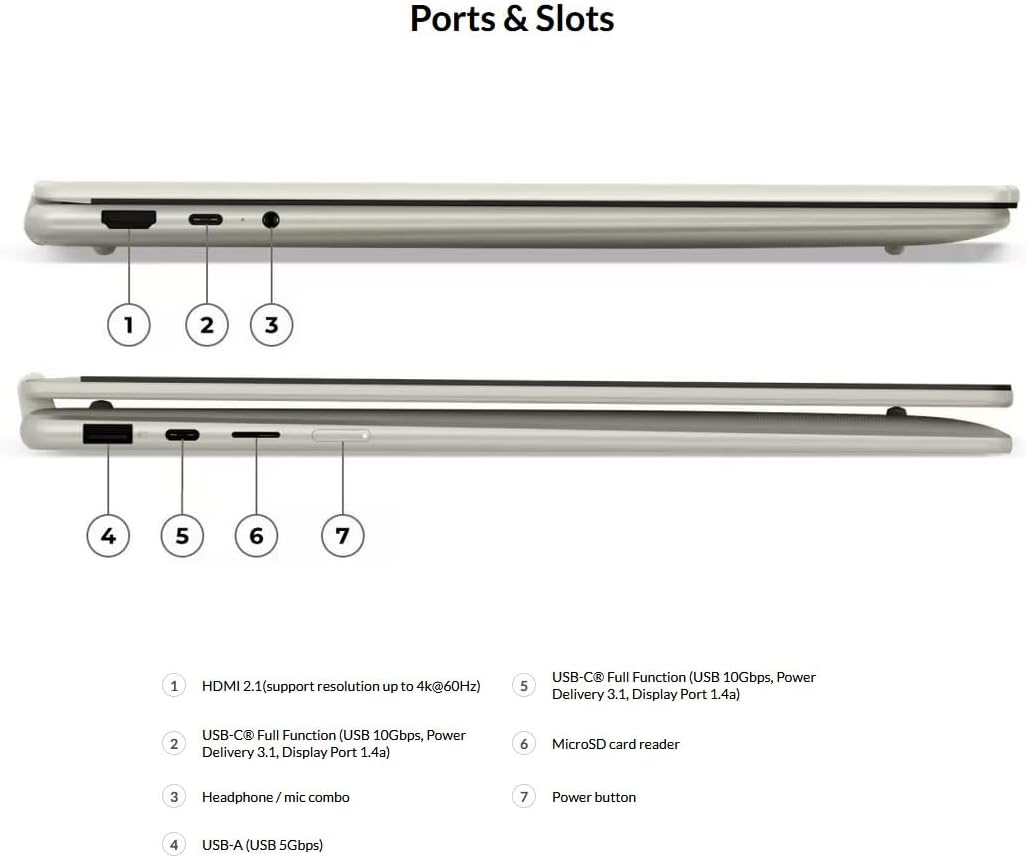
Figure 2: Ports and Slots Diagram.
- HDMI2.1: Supports resolution up to 4K at 60Hz.
- USB-C (USB 10Gbps / USB 3.2 Gen 2): With USB Power Delivery 3.1 and DisplayPort 2.1 UHBR10.
- Headphone / microphone combo jack (3.5mm): Maka ntinye na ntinye ọdịyo.
- USB-A (USB 5Gbps / USB 3.2 Gen 1): Always On functionality.
- USB-C (USB 10Gbps / USB 3.2 Gen 2): With USB Power Delivery 3.1 and DisplayPort 1.4a.
- MicroSD card reader: Maka ịgbasa nchekwa ma ọ bụ mbufe files.
- bọtịnụ ike: Iji gbanye/gbanyụọ ngwaọrụ ahụ ma ọ bụ mee ka ọ hie ụra.
Melite
Ike mbụ Gbanye
- Jikọọ ihe nkwụnye ọkụ na ngwaọrụ na nkwụnye ọkụ.
- Press the Power button (refer to Figure 2, item 7) to turn on the device.
- Soro ntuziaka dị na ihuenyo iji mezue ntọala Windows 11 Pro mbụ, gụnyere nhọrọ asụsụ, njikọ netwọk, na ịmepụta akaụntụ onye ọrụ.
Njikọ Peripherals
- Ngwa USB: Connect USB-A or USB-C peripherals (e.g., external drives, mice, keyboards) to the corresponding ports.
- Ngosipụta mpụga: Use the HDMI 2.1 port or a USB-C port with DisplayPort functionality to connect an external monitor.
- Ngwa ọdịyo: Plug headphones or external speakers into the 3.5mm combo jack.
Ntuziaka ọrụ
Using the 2-in-1 Modes
Your Yoga 7 features a 360° hinge, allowing it to adapt to various usage scenarios:
- Ụdị laptọọpụ: Nhazi laptọọpụ nkịtị maka ide ihe na mmepụta ihe.
- Ụdị ụlọ ntu: Ideal for presentations or watching media in confined spaces.
- Ụkpụrụ guzoro: Positions the screen closer for touch interaction, suitable for media consumption.
- Ụdị mbadamba: Fold the screen back completely for a full tablet experience, optimized for touch and pen input.
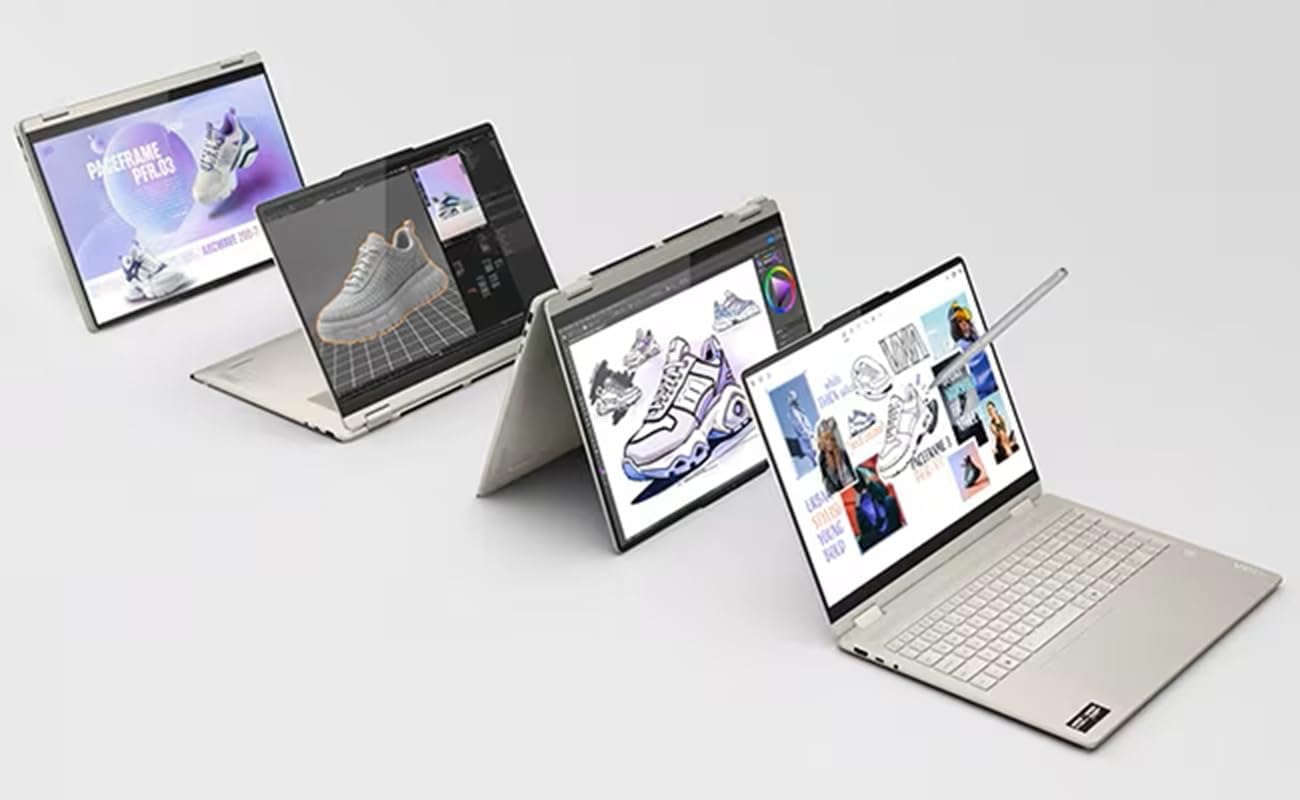
Figure 3: The Yoga 7 2-in-1 adapting to various modes.
Using the Lenovo Linear Pen
The included Lenovo Linear Pen supports tilt and pressure detection for precise input. It can be used for drawing, writing, and navigating the touchscreen.

Figure 4: Using the Lenovo Linear Pen in tablet mode.
Copilot Integration
The device features Copilot, an AI assistant integrated with Windows 11 Pro. You can interact with Copilot using voice commands to:
- Search across applications and platforms.
- Create images and draft content.
- Receive coding assistance.
- Generate action items and translations from meetings.
Smart Note Functionality
Smart Note streamlines your note-taking process:
- Capture ideas directly from the lock screen.
- Synchronize notes with Microsoft OneNote.
- Convert handwritten notes to text.
- Link audio recordings directly to your notes for contextual playback.

Figure 5: Smart Note in action, showing handwritten input and audio integration.
Keyboard and Fingerprint Reader
- The backlit keyboard features optimized 1.5mm key travel and ergonomically designed concave keycaps for comfortable and precise typing.
- The integrated fingerprint reader provides secure and convenient login.
Nlekọta
Nlekọta izugbe
- Keep the device clean using a soft, lint-free cloth. Avoid harsh chemicals.
- Protect the screen from scratches by using the Lenovo Linear Pen carefully and avoiding sharp objects.
- Zere ikpughe ngwaọrụ ahụ na oke okpomọkụ, ìhè anyanwụ kpọmkwem, ma ọ bụ oke iru mmiri.
- Gbaa mbọ hụ na ikuku ikuku dị mma site na igbochi ikuku ikuku.
Njikwa batrị
- The 70Wh rechargeable Li-ion battery supports Rapid Charge Express, providing approximately 3 hours of runtime with a 15-minute charge.
- Lenovo AI Core optimizes battery performance and extends longevity through adaptive charging and smart battery technology.
- For long-term storage, charge the battery to about 50-60% and store the device in a cool, dry place.
Nchọpụta nsogbu
If you encounter issues with your Lenovo Yoga 7 2-in-1, consider the following common troubleshooting steps:
- Ngwaọrụ anaghị agbanye: Gbaa mbọ hụ na ejikọrọ ihe nkwụnye ọkụ na nchekwa yana batrị nwere ụgwọ zuru oke. Gbalịa ijide bọtịnụ ike maka 10-15 sekọnd.
- Nsogbu ihuenyo: If the screen is blank or flickering, try connecting an external monitor to determine if the issue is with the internal display or graphics card. Update display drivers.
- Ịrụ ọrụ nwayọ: Close unnecessary applications, check for background processes, ensure sufficient free storage space, and update Windows and drivers.
- Peripheral not recognized: Ensure the peripheral is properly connected. Try a different port or restart the device. Check device manager for driver issues.
- Pen not responding: Ensure the pen battery is charged (if applicable) and that the pen is properly paired or recognized by the system.
- ekpo oke ọkụ: Ensure air vents are clear. Avoid using the device on soft surfaces that can block ventilation. Reduce heavy workload if possible.
Maka okwu ndị dị mgbagwoju anya, rụtụ aka na nkwado Lenovo websaịtị ma ọ bụ kpọtụrụ ndị ahịa.
Nkọwapụta
| Njirimara | Nkọwa |
|---|---|
| Nhazi | AMD Ryzen AI 7 350 Processor (2.00 GHz up to 5.00 GHz, "Zen 5" microarchitecture) |
| Ebe nchekwa | 16 GB LPDDR5X-7500MT/s (Soldered) |
| Nchekwa | 1 TB SSD M.2 2242 PCIe Gen4 TLC |
| Ngosipụta | 16" WUXGA (1920 x 1200), IPS, Glare, Touch, 45%NTSC, 300 nits, 60Hz, Glass, Dolby Vision |
| Eserese | Integrated AMD Radeon 860M |
| Igwefoto | 1080P FHD IR Hybrid with Dual Microphone and Privacy Shutter |
| Batrị | 70Wh Rechargeable Li-ion Battery, supports Rapid Charge Express |
| Njikọta | Wi-Fi 7 2x2 BE 160MHz & Bluetooth 5.4 |
| Ahụigodo | Backlit, English (US) QWERTY, 1.5mm key travel, concave keycaps |
| Sistemụ nrụọrụ | Windows 11 Pro 64 |
| ọdụ ụgbọ mmiri |
|
| Akụkụ (LxWxH) | 14.21 x 10.11 x 0.62 sentimita asatọ |
| Ibu | Ihe dịka 4.30 lbs |
| Agba | Seashell (Note: Product images show a light silver/gold color) |
Akwụkwọ ikike na nkwado
Your Lenovo Yoga 7 2-in-1 PC comes with a 1 Year Courier or Carry-in Warranty. You may be able to extend coverage up to 5 years by registering your computer with Lenovo.
For warranty claims, technical support, or to register your product, please visit the official Lenovo support website or contact their customer service. Keep your proof of purchase and product serial number handy.
The device has been tested against 12 military-grade requirements and over 200 quality checks to ensure durability.


