1. Ngwaahịa gafereview
The GIGABYTE B840M Eagle WIFI6 is a Micro-ATX motherboard designed for AMD Socket AM5 processors, supporting AMD Ryzen 9000, 8000, and 7000 series. It features DDR5 memory support, dual M.2 slots, PCIe 4.0 connectivity, USB 3.2 Gen 1, WIFI6, and 2.5GbE LAN. This motherboard is engineered to provide a stable and high-performance foundation for your personal computer system.


2. Atụmatụ igodo
- AMD Socket AM5: Na-akwado AMD Ryzen 9000 / Ryzen 8000 / Ryzen 7000 Series Processors.
- DDR5 dakọtara: Enwere oghere 2 DIMM maka ebe nchekwa DDR5.
- Nhazi ike: Robust 5+2+2 power phase design for stable performance.
- Thermals: Equipped with VRM and M.2 Thermal Guards for efficient heat dissipation.
- Njikọta: Includes PCIe 4.0, 2x M.2 Slots, and USB-C ports.
- Enyi na N'onwe Gị: Features M.2 EZ-Latch, PCIe EZ-Latch, and Wi-Fi EZ-Plug for simplified installation.
- Njikọta: Integrated WIFI6 and 2.5GbE LAN for high-speed network connectivity, plus BT 5.3.
3. Ntuziaka Nhazi
This section provides a general guide for installing your GIGABYTE B840M Eagle WIFI6 motherboard. Always refer to the detailed instructions provided with your CPU, RAM, and other components for specific installation procedures.
3.1. Nkwadebe
- Ensure your workspace is clean and well-lit.
- Discharge static electricity by touching a grounded metal object before handling components.
- Gather all necessary components: CPU, CPU cooler, RAM, M.2 SSDs, graphics card, power supply, and PC case.
3.2. Nwụnye CPU
- Locate the AMD Socket AM5 on the motherboard.
- Mepee ihe nchekwa nchekwa CPU.
- Jiri nlezianya hazie CPU ahụ na oghere ahụ, hụ na triangle ọlaedo dị na CPU ahụ dabara na triangle dị na oghere ahụ. Emanyela CPU ahụ ka ọ banye n'ọnọdụ ya.
- Mechie ihe njide iji chekwaa CPU ahụ.
3.3. Ntinye ihe mkpuchi CPU
Install your chosen CPU cooler according to its manufacturer's instructions. Ensure proper thermal paste application for optimal cooling.
3.4. Nwụnye RAM
- Mepee mkpachị ndị ahụ na nsọtụ abụọ nke oghere DDR5 DIMM.
- Align the RAM module with the slot, ensuring the notch on the module matches the key in the slot.
- Pịa ala na nsọtụ abụọ nke RAM ruo mgbe obere vidiyo ga-adaba n'ebe.
3.5. M.2 SSD nwụnye
The motherboard features 2 M.2 slots with EZ-Latch. Refer to the motherboard diagram for their locations.
- Locate an M.2 slot and remove the M.2 Thermal Guard if present.
- Fanye M.2 SSD n'ime oghere n'otu akụkụ.
- Gently push down the SSD and secure it using the M.2 EZ-Latch mechanism.
- Reinstall the M.2 Thermal Guard.
3.6. Nkwanye motherboard
- Install the I/O shield into your PC case (if not pre-attached).
- Hazie motherboard ahụ na ihe ndị na-egbochi ya na PC gị.
- Chekwaa motherboard na skru, na-ahụ na ịghara ịkachi.
3.7. Njikọ ike
- Jikọọ 24-pin ATX isi ike njikọ site na ike gị na motherboard.
- Connect the 8-pin (or 4+4-pin) ATX 12V CPU power connector.
3.8. Front Panel and Peripheral Connections
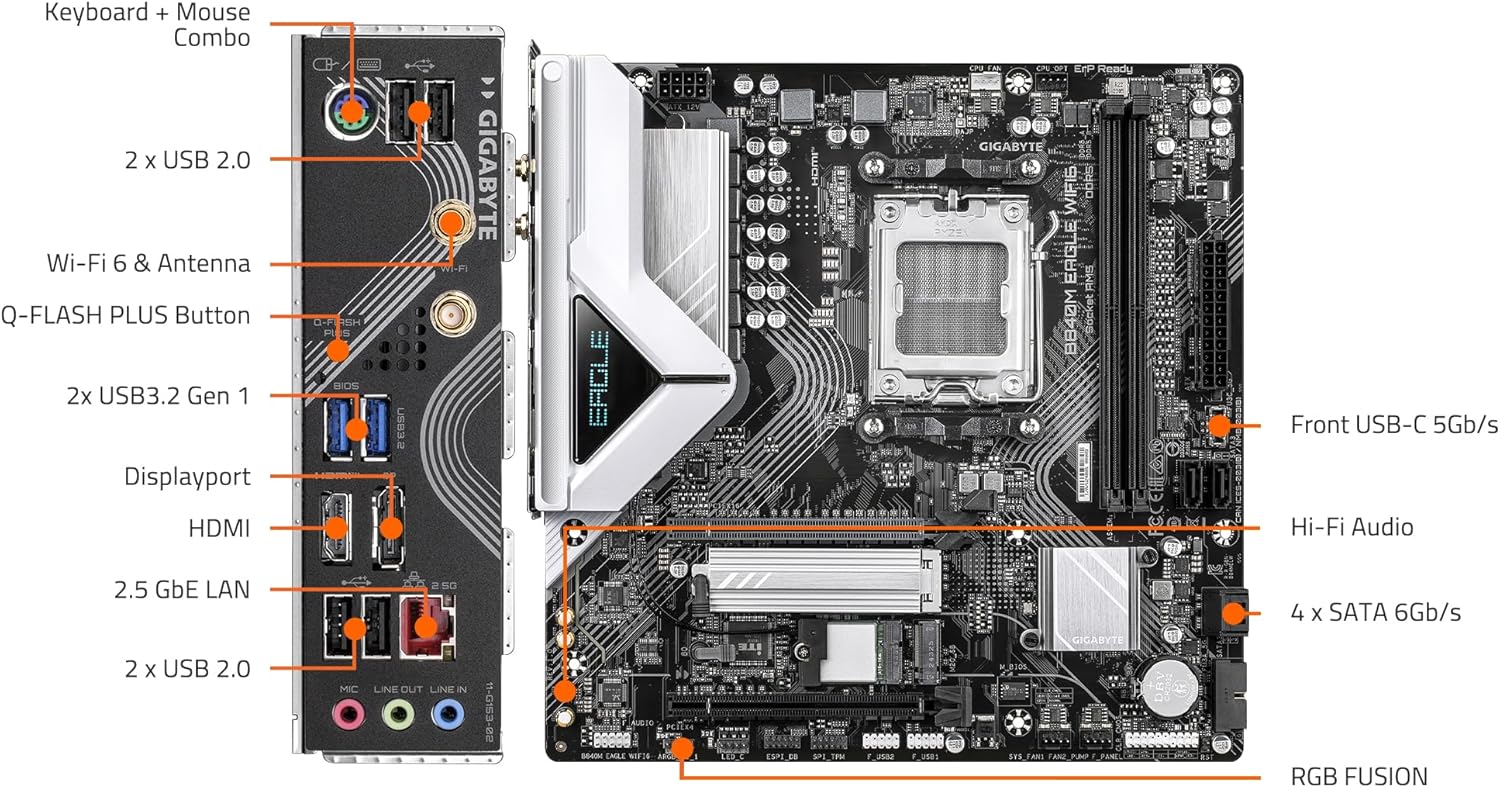
Connect the front panel headers (power button, reset button, USB ports, audio jacks) and other peripherals (SATA drives, case fans) to the appropriate headers on the motherboard. Refer to the labeled diagram below for assistance.

3.9. Ntinye kaadị eserese
- Open the PCIe EZ-Latch on the primary PCIe x16 slot.
- Insert your graphics card firmly into the slot until it clicks into place.
- Jiri skru chekwaa kaadị eserese na akpa PC.
- Jikọọ eriri ọkụ PCIe ọ bụla dị mkpa site na ọkụ ọkụ gị na kaadị eserese.
4. Ntuziaka ọrụ
4.1. Mbido mbụ na ntọala BIOS/UEFI
- After connecting all components and peripherals, power on your system.
- Pịa igodo ahọpụtara (na-emekarị DEL or F2) during startup to enter the BIOS/UEFI setup utility.
- Configure boot order, system time, and other essential settings as needed. Save changes and exit.
4.2. Nrụnye Sistemụ Ọrụ
Tinye ihe nrụnye sistemụ arụmọrụ gị (draịvụ USB ma ọ bụ DVD) wee soro ntuziaka ndị dị na ihuenyo iji wụnye sistemụ arụmọrụ kachasị amasị gị.
4.3. Nwụnye ọkwọ ụgbọala
After OS installation, install the latest drivers for your motherboard, graphics card, and other components. You can find the latest drivers on the GIGABYTE official website for your B840M Eagle WIFI6 motherboard.
4.4. Njikọ netwọkụ
- Ekwentị LAN: Connect an Ethernet cable to the 2.5GbE LAN port on the rear I/O panel.
- Wireless (WIFI6): Attach the included Wi-Fi antennas to the connectors on the rear I/O panel. Ensure Wi-Fi drivers are installed for wireless connectivity.
5. Nlekọta
Nlekọta anya mgbe niile na-enyere aka hụ na ogologo ndụ na arụmọrụ kacha mma nke motherboard na sistemụ PC gị.
- Nhicha uzuzu: Periodically clean dust from inside your PC case, especially from fans, heatsinks, and motherboard components, using compressed air. Ensure the system is powered off and unplugged before cleaning.
- Mmelite BIOS/UEFI: Lelee GIGABYTE website for the latest BIOS/UEFI updates. Updates can improve compatibility, stability, and performance. Follow GIGABYTE's instructions carefully when updating the BIOS.
- Mmelite ọkwọ ụgbọala: Keep your system drivers updated to ensure compatibility and optimal performance with new software and hardware.
- Nyocha akụrụngwa: Occasionally check all cable connections (power, data, front panel) to ensure they are secure.
6. Nchọpụta nsogbu
This section addresses common issues you might encounter. For more complex problems, refer to the GIGABYTE support websaịtị ma ọ bụ kọntaktị nkwado teknụzụ.
6.1. Enweghị Ike / Enweghị POST (Nnwale Onwe Onye Na-arụ Ọrụ)
- Ensure all power cables (24-pin ATX, 8-pin CPU, PCIe power) are securely connected.
- Verify the power supply is switched on and functioning correctly.
- Check front panel connections, especially the power button header.
- Tinyegharịa modul RAM na kaadị eserese.
- Try booting with minimal components (CPU, one RAM stick, graphics card) to isolate the issue.
- Clear CMOS by removing the CMOS battery for a few minutes or using the clear CMOS jumper (refer to motherboard manual for exact location).
6.2. Enweghị Nkwụsi Ike na Sistemụ/Ọdachi
- Gbaa mbọ hụ na ndị ọkwọ ụgbọ ala niile emelitere.
- Lelee okpomọkụ CPU na GPU ka ị kwụsị ikpo oke ọkụ.
- Gbaa ngwaọrụ nyocha ebe nchekwa ka ịlele maka RAM adịghị mma.
- Lelee ike ọkọnọtage zuru ezu maka ihe niile.
6.3. Okwu Njikọta netwọkụ
- Mara: Check Ethernet cable connection and router/modem status. Ensure LAN drivers are installed.
- Ikuku: Ensure Wi-Fi antennas are properly attached and Wi-Fi drivers are installed. Check Wi-Fi network settings in your operating system.
6.4. Achọpụtaghị ihe ndị dị n'akụkụ
- Ensure the peripheral is correctly connected to the appropriate port.
- Install the latest drivers for the peripheral.
- Test the peripheral on another port or another system if possible.
7. Nka na ụzụ nkọwa
| Njirimara | Nkọwapụta |
|---|---|
| Socket CPU | AMD Socket AM5 |
| Ndị nhazi dakọtara | AMD Ryzen 9000 / Ryzen 8000 / Ryzen 7000 Series |
| Chipset | AMD B840 |
| Teknụzụ ebe nchekwa RAM | DDR5 |
| Ebe nchekwa | 2x DIMMs |
| Ọsọ elekere ebe nchekwa | Ruo 5200 MHz (ma karịa site na OC) |
| Nchekwa | 2x M.2 Slots, 4x SATA 6Gb/s |
| Egwuregwu PCIe | PCIe 4.0 |
| ọdụ ụgbọ mmiri USB | USB 3.2 Gen 1, USB-C |
| Netwọk | WIFI6, 2.5GbE LAN, BT 5.3 |
| Ụdị Ihe | Micro-ATX |
| Akụkụ (LxWxH) | 8.82 x 8.82 x 1 sentimita asatọ |
| Ibu Ibu | 4.4 pound |
| Nkwado Sistemụ arụmọrụ | Windows 11 |
8. Akwụkwọ ikike na nkwado
Maka ozi zuru ezu gbasara akwụkwọ ikike, nkwado teknụzụ, nbudata ọkwọ ụgbọala, na mmelite BIOS, biko gaa na GIGABYTE gọọmentị website. You can find product-specific support by navigating to the support section and searching for your model, B840M Eagle WIFI6.
GIGABYTE Official Websaịtị: https://www.gigabyte.com/
Always ensure you are downloading software and drivers from the official manufacturer's website to prevent security risks.


