Okwu mmalite
This manual provides detailed instructions for the COLMI R12 Smart Ring. It covers setup, operation, maintenance, and troubleshooting to ensure optimal use of your device. The COLMI R12 is designed to monitor various health metrics and support multiple sports activities, offering a convenient way to track your well-being.

Image: The COLMI R12 Smart Ring, available in black and gold, highlighting its smart display and intelligent touch features.
Ntuziaka nhazi
1. Sizing and Purchase
Tupu ịzụtaasing your COLMI R12 Smart Ring, it is recommended to acquire a COLMI Sizing Kit to determine the correct ring size for comfortable and accurate data collection. Proper fit is crucial for reliable sensor readings.
2. Nchaji mbụ
Upon receiving your COLMI R12 Smart Ring, place it on the provided wireless charging stand. Ensure the ring is correctly seated for charging to begin. A full charge is recommended before first use.
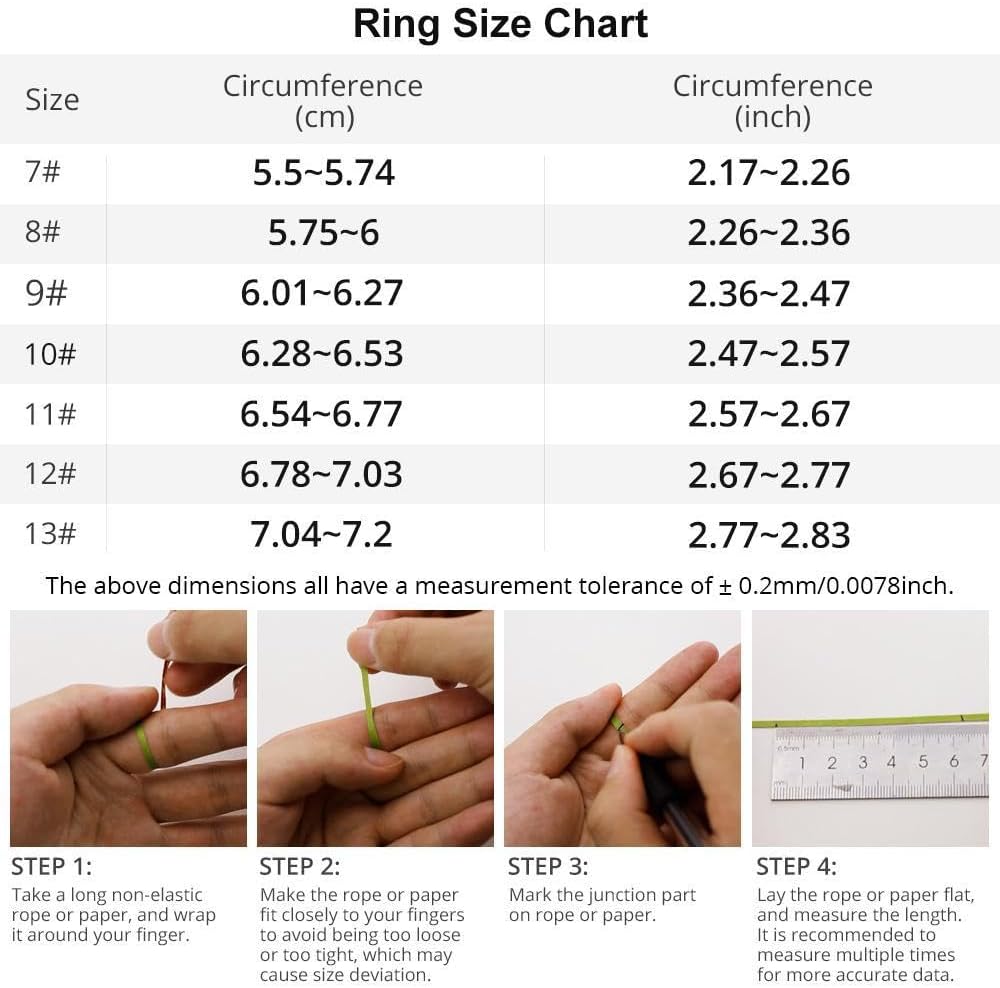
Image: The COLMI R12 Smart Ring placed on its dedicated wireless charging pad, indicating the charging process.
3. Nbudata ngwa na ijikọ
- Download the companion application (e.g., 'Q Ring' app) from your smartphone's app store (compatible with iPhone and Android devices).
- Mepee ngwa ahụ ma soro ntuziaka na ihuenyo ka ịmepụta akaụntụ ma ọ bụ banye.
- Gbaa mbọ hụ na agbanyere Bluetooth nke ama gị.
- Within the app, search for and select your COLMI R12 Smart Ring to initiate the pairing process. Confirm any pairing requests on both the app and, if prompted, on the ring's display.

Image: A visual guide illustrating the four steps for setting up the COLMI R12 Smart Ring, from sizing to app pairing.
Ntuziaka ọrụ
1. Touch and Display Functions
The COLMI R12 features a touch-sensitive display. You can easily check the current time, step count, and battery level directly on the ring without needing to access your mobile phone or watch. This functionality enhances convenience for daily time management and activity monitoring.

Image: The COLMI R12 Smart Ring showcasing its digital display with current time and step count.
2. Health Measurement
The smart ring supports various health measurements, including heart rate, blood oxygen saturation, and sleep patterns. These data points are recorded and can be viewed in detail within the connected application, generating comprehensive health reports.
- Nlekota obi obi: The ring continuously monitors your heart rate. You can manually check your heart rate at any time through the app.
- Nleba anya ikuku oxygen: Tracks your blood oxygen levels to provide insights into your respiratory health.
- Nleba anya ụra: Analyzes your sleep quality, including light sleep, deep sleep, and awake times, to help you develop better sleep habits.

Image: Screenshot of the COLMI R12 companion app displaying daily activity statistics such as total steps, distance, and calories consumed.

Image: The COLMI R12 Smart Ring's app interface showing detailed heart rate monitoring data over time.

Image: The COLMI R12 Smart Ring's app interface displaying sleep monitoring data, including total awake time, light sleep, and deep sleep duration.
3. Ụdị egwuregwu
When connected to the app, the COLMI R12 supports multiple sports modes. It can record various exercise data, including exercise time, steps, distance, and calories consumed, providing comprehensive tracking for your physical activities.
4. Remote Camera Control
The smart ring can be used to remotely control your mobile phone's camera. By waving your hand while the ring is connected to your phone, you can trigger the camera shutter to capture photos.

Image: A user demonstrating how the COLMI R12 Smart Ring can control a smartphone camera with a simple hand gesture.
Nlekọta
1. Ịchaji
The COLMI R12 Smart Ring utilizes wireless charging. Always use the provided dedicated charging stand and cable for optimal performance and to prevent damage. Charging is convenient, especially when traveling.

Image: The COLMI R12 Smart Ring being charged wirelessly on its dock, illustrating the ease of smart charging.
2. Mmiri Nguzogide
The COLMI R12 Smart Ring features 1ATM water resistance. This means it is resistant to splashes and brief immersion. However, it is not suitable for swimming or showering. Avoid exposing the product to water for extended periods. If it comes into contact with water, please dry it immediately.
3. Nhicha na Nlekọta
To clean your smart ring, gently wipe it with a soft, dry cloth. Avoid using abrasive materials or harsh chemicals, as these can damage the finish and electronic components.
Nchọpụta nsogbu
- Ring not turning on: Ensure the ring is fully charged. Place it on the charging dock for at least 30 minutes.
- Enweghị ike ijikọ ya na ekwentị: Check if Bluetooth is enabled on your phone. Ensure the ring is charged and within range. Restart both the ring and your phone, then try pairing again through the app.
- Data ahụike ezighi ezi: Ensure the ring is worn correctly and snugly on your finger. A loose fit can affect sensor accuracy. Clean the sensor area on the inside of the ring.
- App not syncing data: Verify that the ring is connected to the app via Bluetooth. Check your phone's internet connection. Try closing and reopening the app.
- Ndụ batrị dị mkpụmkpụ: Ensure the ring is fully charged. Excessive use of certain features or frequent display activation may consume more power.
Nkọwapụta
| Njirimara | Nkọwa |
|---|---|
| Nọmba nlereanya | COLMI R12 |
| Ike batrị | 15 ndeamp Hours (Nonstandard Battery) |
| Teknụzụ Njikọta | Bluetooth |
| Ikuku Communication Standard | Bluetooth |
| Ndakọrịta sistemụ arụmọrụ | Android, iOS |
| Ike Nchekwa ebe nchekwa | 1 MB |
| Ibu Ibu | 100 grams (3.53 ounces) |
| Atụmatụ pụrụ iche | Control photography, Multiple sports modes, Record exercise data, Heart Rate, Blood Oxygen, Sleep Tracking |
| Mmiri Nguzogide | 1ATM |
| Onye nrụpụta | Shenzhen COLMl Technology Co., Ltd |
Chart nha mgbanaka
Refer to the following chart for ring size measurements. It is recommended to use a sizing kit for the most accurate fit.
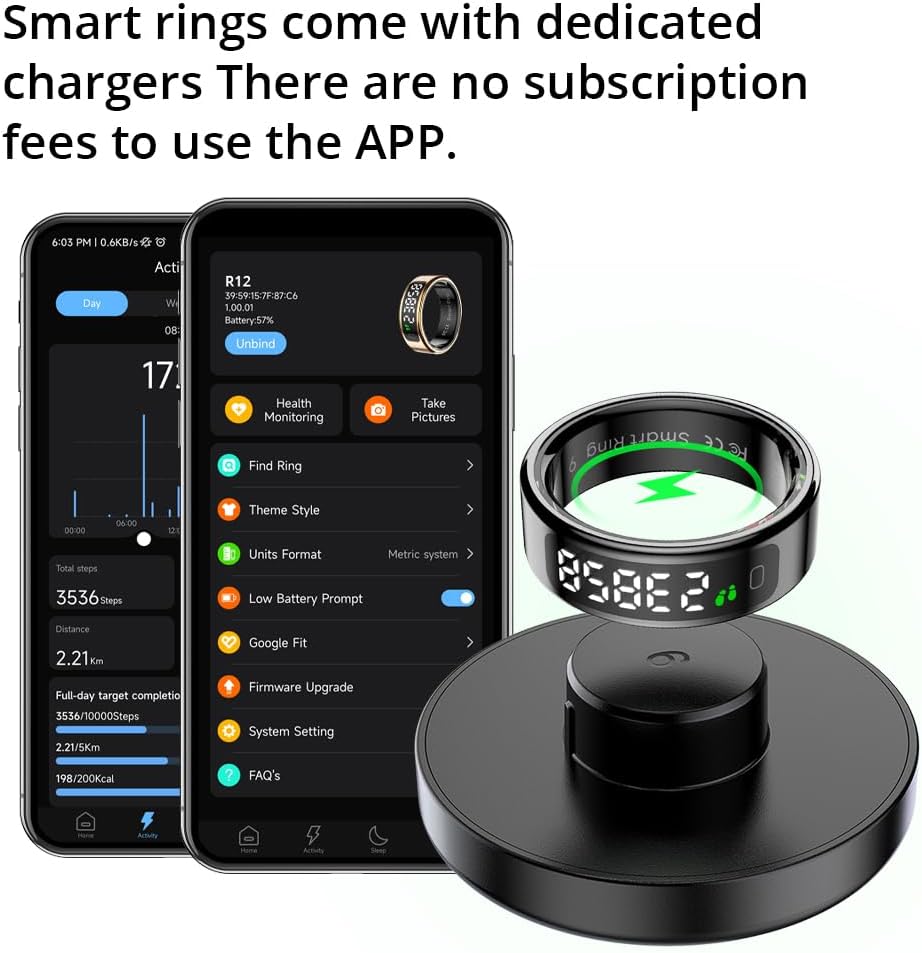
Image: A detailed ring size chart showing circumference measurements in centimeters and inches, along with a four-step visual guide for measuring finger size using a rope or paper.
Ozi akwụkwọ ikike
The COLMI R12 Smart Ring comes with a manufacturer's warranty. For specific details regarding warranty coverage and duration, please refer to the documentation included in your product packaging or contact customer support.
Nkwado ndị ahịa
For any usage or quality problems, please contact our professional after-sales service team. We are committed to providing support and assistance for your COLMI R12 Smart Ring.
You can find more information and contact details on the official COLMI brand store: COLMI Official Store


