Okwu mmalite
This manual provides essential information for the safe and efficient operation of your Philips LED Olas Ceiling Fan. Please read these instructions carefully before installation and use, and retain them for future reference. This ceiling fan combines a dimmable LED light with a powerful fan, designed to provide optimal air circulation and customizable lighting for your home.
Ozi nchekwa
Ihe dị mkpa: Always disconnect power at the main circuit breaker before installation, maintenance, or cleaning. Installation must be performed by a qualified electrician in accordance with local wiring regulations.
- Gbaa mbọ hụ na ihe nrụnye nwere ike ịkwado ibu nke fan.
- Debe oghere kacha nta nke mita 2.3 (ụkwụ 7.5) site n'ala ruo n'ákwà fan.
- Do not insert objects into the path of the rotating blades.
- Ngwa a bụ naanị maka ime ụlọ.
- Use only the remote control provided for operation.
Ihe ngwugwu
Chọpụta na akụrụngwa niile dị tupu ịmalite nrụnye:
- Philips LED Olas Ceiling Fan unit
- Njikwa anya
- Mounting hardware (screws, brackets, etc.)
- Akwụkwọ ntuziaka (akwụkwọ a)
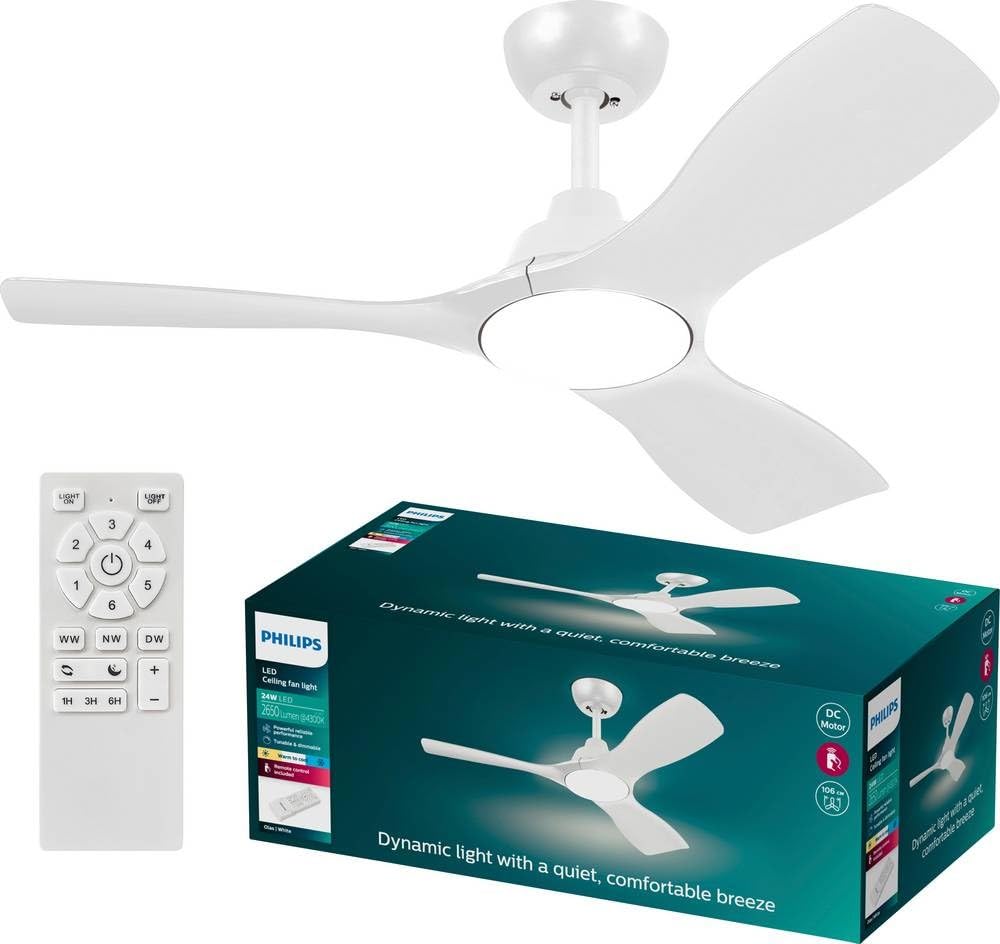
Figure 1: Philips LED Olas Ceiling Fan. This image displays the complete ceiling fan unit, featuring three sleek white blades and a central integrated LED light.
Ntọala na nwụnye
Professional installation is recommended. Follow these general steps:
- Ịkwụsị ike: Turn off power at the circuit breaker to avoid electrical shock.
- Nwụnye bracket: Securely attach the mounting bracket to a ceiling joist or a suitable electrical junction box capable of supporting the fan's weight.
- Wiring: Connect the fan's electrical wires to the household wiring according to the wiring diagram provided in the separate installation guide (if applicable) or by a qualified electrician. Ensure all connections are secure.
- Mgbakọ Fans: Attach the fan motor housing to the mounting bracket. Install the fan blades and light fixture as per the specific instructions included with your product.
- Ntọala njikwa anya: Insert batteries (not included) into the remote control. Pair the remote with the fan if required (refer to specific pairing instructions).
- Mweghachi ike: Restore power at the circuit breaker and test the fan's operation.

Figure 2: Fan Motor Housing and Blade Connection. This image provides a closer view of the fan's central unit, showing where the blades connect to the motor housing and the integrated LED light.
Ntuziaka ọrụ
Your Philips LED Olas Ceiling Fan can be controlled using the provided remote control or a compatible wall switch.
Ọrụ njikwa anya:
- Gbanyụọ/ Gbanyụọ: Pịa Gbanye/ Gbanyụọ bọtịnụ iji gbanye fan na gbanye ma ọ bụ gbanyụọ.
- Ọsọ onye ofufe: Jiri ihe FAN ọsọ buttons to cycle through different fan speeds (e.g., Low, Medium, High). The powerful fan is designed for effective air circulation.
- Mgbanwu/ Gbanyụọ: Pịa ÌHÈ button to control the integrated LED light independently.
- Igha: Jiri ihe DIMMER buttons (often marked with + and -) to adjust the brightness of the LED light. The light is dimmable and customizable.
- SceneSwitch: If available, press the SCENESWITCH button to cycle through pre-set lighting scenes.
- Ụdị okpomọkụ/oyi: The fan features year-round usability. Press the MODE button (or a dedicated switch on the fan motor housing) to switch between summer mode (downward airflow for cooling) and winter mode (upward airflow for heat distribution).
The fan's silent motor ensures quiet operation while providing powerful airflow.
Nlekọta
Nlekọta anya mgbe niile na-eme ka arụmọrụ kacha mma na ogologo ndụ nke onye na-akwado uko ụlọ gị.
- Nhicha: Jiri ihe dị nro na-efesa agụba fan na ụlọ moto, damp cloth. Do not use abrasive cleaners or solvents. Ensure the fan is turned off and power is disconnected before cleaning.
- Nyocha agụba: Lelee mma ọkpọkọ ma ọ bụ mmebi ọ bụla. Dochie mmakọ ndị mebiri emebi ozugbo.
- Nleba anya nke siri ike: Periodically check all screws and connections for tightness. Retighten as necessary.
- Isi mmalite ọkụ: The integrated LED light source is designed for long life. If replacement is ever needed, consult a qualified technician.
Nchọpụta nsogbu
If you encounter issues with your Philips LED Olas Ceiling Fan, refer to the following common problems and solutions:
| Nsogbu | Ihe nwere ike ime | Ngwọta |
|---|---|---|
| Onye ofufe anaghị ebido. | Enweghị ọkụ ọkụ; eriri rụrụ arụ; remote njikwa batrị anwụọla. | Check circuit breaker; ensure all wiring connections are secure; replace remote control batteries. |
| Fan na -ama jijiji. | Loose mounting screws; unbalanced blades. | Tighten all mounting screws; ensure blades are securely attached and balanced (balancing kit may be required). |
| Ìhè anaghị arụ ọrụ. | No power to light; faulty LED module; remote control issue. | Check power supply; ensure light is turned on via remote/switch; contact support if LED module is suspected faulty. |
| Njikwa anya anaghị arụ ọrụ. | Batrị nwụrụ anwụ; ebe dịpụrụ adịpụ adịghị ejikọta. | Replace batteries; re-pair remote control with the fan (refer to specific pairing instructions). |
Ọ bụrụ na nsogbu ahụ dịgidere mgbe ị nwara azịza ndị a, biko kpọtụrụ nkwado ndị ahịa.
Nkọwapụta
| Ụdị | Philips LED |
| Nọmba nlereanya | 8720169369979 |
| Akụkụ (L x W x H) | 106 cm x 106 cm x 31 cm (Diameter 106 cm, Height 31 cm) |
| Agba | Ọcha |
| Ihe onwunwe | Ọla |
| Voltage | 220 volts (AC) |
| Ụdị bọlbụ | Igwe ọkụ agbakwunyere |
| Flux na-egbuke egbuke | 1500 Lumen |
| Ulo oru ike | 62.5 lm/W |
| Ngwa gụnyere | Njikwa anya |
| Ụdị nwụnye | Ugwu elu ụlọ |
| Ojiji ime ime/n'èzí | Ime ụlọ |
Akwụkwọ ikike na nkwado
Philips LED products are designed for reliability and performance. This product comes with a 1-year availability of spare parts.
For technical assistance, warranty claims, or further information, please refer to the contact details provided with your purchase documentation or visit the official Philips LED websaịtị.
Mara: Debe ihe akaebe nke ịzụrụ ihe maka ebumnuche ikike.


