1. Okwu mmalite
This manual provides essential instructions for the safe and efficient operation, installation, and maintenance of the Bitmain Antminer APW11 Hydro Power Supply, model APW111721C. This power supply unit is designed for use with Bitmain Antminer hydro-cooled mining systems, including the S19hyd 198T, S21 hyd 335T, and S21 XPhyd 473T models. Please read this manual thoroughly before installation and use.
2. Ozi nchekwa
- Ihe ize ndụ eletrik: Ensure all power connections are secure and correctly rated. Disconnect power before performing any maintenance or installation.
- Sistemụ jụrụ oyi: This power supply is designed for hydro-cooling. Ensure the liquid cooling system is properly installed and free of leaks before operation.
- Igwe ikuku: Although hydro-cooled, ensure adequate airflow around the unit to prevent overheating of other components.
- Nwụnye ọkachamara: Installation should be performed by qualified personnel familiar with high-power electrical and liquid cooling systems.
- gburugburu arụ ọrụ: Operate the unit within specified temperature and humidity ranges to ensure longevity and performance.
3. Ihe ngwugwu
Nyochaa na ihe niile dị na emebighị emebi mgbe ebupụ ya.
- Bitmain Antminer APW11 Hydro Power Supply (APW111721C)
- Associated power cables (if included with purchase)
- Mounting hardware (if included with purchase)
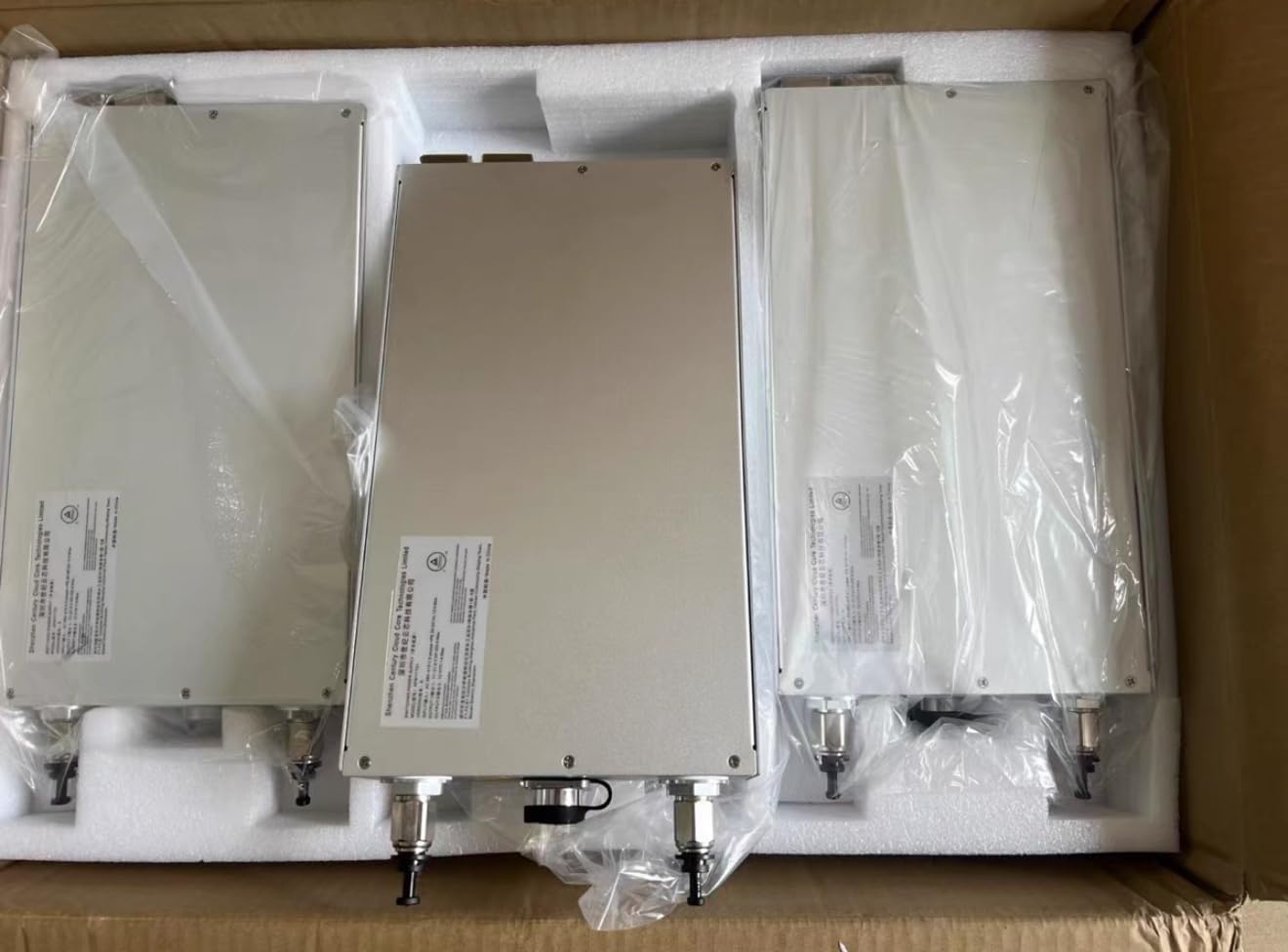
Figure 3.1: Three APW11 Hydro Power Supplies in their packaging, showing the units ready for installation.
4. Nkọwapụta
| Njirimara | Nkọwa |
|---|---|
| Nọmba nlereanya | APW111721C |
| Mpụta Wattage | 4000 Watt |
| Akụkụ ngwaahịa (L x W x H) | 12.99 x 7.87 x 2.76 sentimita (330 x 200 x 70 mm) |
| Ibu Ibu | 13.2 pound (6 Kilogram) |
| Ụdị Ihe | ATX (Specialized for Hydro Cooling) |
| Ndakọrịta | Bitmain Antminer S19hyd 198T, S21 hyd 335T, S21 XPhyd 473T |
5. Ntọala na nwụnye
Proper installation is crucial for the performance and safety of your APW11 Hydro Power Supply. Follow these steps carefully:
- Ịkwanye: Securely mount the APW11 power supply in a stable location, ensuring it is compatible with your Antminer hydro-cooling system's chassis.
- Liquid Cooling Connection: Connect the liquid cooling lines to the designated ports on the power supply. Ensure all connections are tight and leak-free. Refer to your Antminer's manual for specific liquid cooling system setup.
- Njikọ Ntinye Ike: Connect the appropriate high-voltage power input cable to the power supply. Ensure the power source meets the unit's voltage na ugbu a chọrọ.
- Power Output Connection: Connect the power output cables from the APW11 to your Antminer mining rig. Verify all connections are correct and secure.
- Ngwakọta sistemu: Integrate the power supply with the overall mining system, ensuring all data and control cables (if any) are connected.
- Nyocha Ike Tupu: Before applying power, double-check all connections, especially liquid cooling lines for leaks and electrical connections for proper seating.

Foto 5.1: Top view of the APW11 Hydro Power Supply, highlighting the liquid cooling ports and power input connector. This view is crucial for understanding connection points.

Ọgụgụ 5.2: Zuru ezu view of the APW11 Hydro Power Supply's connection panel, displaying the model number (APW111721C) and a warning label, indicating critical connection points and safety information.
6. Ọrụ
Once installed, operating the APW11 Hydro Power Supply is straightforward, as it integrates with your Antminer system.
- Ike Na: After verifying all connections, apply power to the system. The power supply will initiate and provide power to the connected Antminer.
- Nleba anya: Monitor the power supply's status through your Antminer's management interface. Ensure stable voltage and current delivery.
- Ọrụ nkịtị: The APW11 is designed for continuous operation in a hydro-cooled environment.
- Gbanyụọ: To shut down the system, follow the proper shutdown procedure for your Antminer, then disconnect the main power to the APW11.
7. Nlekọta
Regular maintenance ensures the longevity and optimal performance of your power supply.
- Liquid Cooling System Check: Periodically inspect the liquid cooling lines and connections for any signs of leaks or blockages. Ensure the coolant level is adequate.
- Mwepụ uzuzu: While hydro-cooled, dust can still accumulate on external surfaces. Gently clean the exterior of the power supply with a soft, dry cloth. Emeghela nkeji.
- Iguzosi ike n'ezi ihe njikọ: Annually, or as needed, check all electrical and liquid cooling connections to ensure they remain secure.
- Nleba anya gburugburu: Hụ na gburugburu ebe ọrụ na-adịgide n'ime oke okpomọkụ na iru mmiri akọwapụtara.
8. Nchọpụta nsogbu
This section addresses common issues you might encounter with the APW11 Hydro Power Supply.
| Nsogbu | Ihe nwere ike ime | Ngwọta |
|---|---|---|
| Enweghị mpụta ike | Main power not connected; faulty power cable; internal fault. | Check main power connection. Test with a different power cable. If issue persists, contact support. |
| Sistemu ekpo oke ọkụ | Liquid cooling system malfunction; insufficient coolant; blocked lines. | Inspect liquid cooling system for leaks or blockages. Ensure proper coolant levels. Refer to Antminer manual for cooling system diagnostics. |
| Unstable Power Delivery | Loose connections; power source instability; internal fault. | Verify all electrical connections are secure. Check the stability of your main power source. Contact support if the problem continues. |
9. Akwụkwọ ikike na nkwado
For warranty information and technical support, please refer to the official Bitmain website or contact your authorized reseller. Keep your purchase receipt and product serial number (found on the unit's label) for warranty claims.
Onye nrụpụta: Bitmain
Ụdị: APW111721C


