Okwu mmalite
Thank you for choosing the GOBOULT Soniq Over Ear Bluetooth Headphones. These headphones are designed to provide a superior audio experience with features like 70 hours of playtime, 40mm bass drivers, Zen™ ENC microphone, Type-C fast charging, and dual device pairing. This manual will guide you through the setup, operation, and maintenance of your new headphones to ensure optimal performance.
Kedu ihe dị na Igbe ahụ
Biko lelee ọdịnaya nke ngwugwu ahụ ka ị hụ na ihe niile dị:
- Soniq Headphone
- -Dị-C Nchaji USB
- Akwụkwọ ntuziaka onye ọrụ
- Okpu ntị (etinyere ya na mbụ)
- Akwụkwọ ikike kaadị
Njirimara ngwaahịa gafereview
The GOBOULT Soniq headphones come equipped with several advanced features:
- Ogologo oge egwuregwu: Up to 70 hours of audio playback on a single charge.
- Customizable EQ Modes: Gbanwee ụda profiles for bass boost, balanced audio, or vocal clarity.
- Mkpuchi mkpọtụ gburugburu (ENC): Na-eme ka o doo anya site n'ibelata mkpọtụ ndabere.
- Dual Device Pairing: Seamlessly connect and switch between two devices simultaneously.
- Powerful Audio Drivers: 40mm bass-boosted drivers for rich sound.
- Teknụzụ Bluetooth kachasị ọhụrụ: Bluetooth 5.4 for faster pairing and stable connections.
- Nhazi dị mma: Lightweight build with cushioned earcups for prolonged wear.
- Nguzogide mmiri: IPX5 rating for splash, rain, and sweat protection.
- Tactile Controls: Easy-to-use physical buttons for volume, playback, and mode switching.
- AI Voice Assistant Support: Compatible with Google Assistant and Siri.

Foto: Ofeview of key features including 70H battery, EQ modes, ENC, dual pairing, 40mm drivers, and Bluetooth 5.4.

Image: Close-up of the GOBOULT Soniq headphone earcup highlighting the 40mm power-packed bass neodymium drivers with BoomX™ Technology and Memory Foam.
Ntuziaka nhazi
1. Ịchaji ekweisi
Before first use, fully charge your GOBOULT Soniq headphones. Use the provided Type-C charging cable to connect the headphones to a compatible USB power source.
- Ụgwọ zuru ezu na-enye ihe ruru awa 70 nke oge egwuregwu.
- Fast charging feature: 10 minutes of charge provides approximately 8 hours of playtime.
- The LED indicator will show charging status and turn off or change color when fully charged.

Image: GOBOULT Soniq headphones connected via Type-C cable, illustrating 70 hours playtime and fast charging capability.
2. Ịgbanye / gbanyụọ
To power on, press and hold the Power button for approximately 3 seconds until the LED indicator lights up. To power off, press and hold the Power button again for 3 seconds until the LED indicator turns off.
3. Njikọ Bluetooth
Soro usoro ndị a ka ijikọ ekweisi gị na ngwaọrụ enyere Bluetooth aka:
- Gbaa mbọ hụ na agbanyụrụ ekweisi nke ọma ma gbanyụọ ya.
- Press and hold the Power button for 5-7 seconds until the LED indicator flashes red and blue alternately, indicating pairing mode.
- Na ngwaọrụ gị (smartphone, tabletị, laptọọpụ), gbanye Bluetooth wee chọọ ngwaọrụ dị.
- Select "GOBOULT Soniq" from the list of found devices.
- Once connected, the LED indicator will flash blue slowly or remain solid blue.

Image: GOBOULT Soniq headphones highlighting Bluetooth 5.4 for fast and stable connection.
Ntuziaka ọrụ
1. Njikwa ntọala
The headphones feature tactile buttons for easy control:
- Bọtịnụ ike: Pịa ma jide ya ka ọ gbanye/gbanyụọ. Pịa obere oge maka egwuregwu/kwụsịtụ.
- Elu elu (+): Obere pịa ka iwelie olu. Pịa ogologo maka egwu ọzọ.
- Mpịakọta ọnụ (-): Obere pịa ka ibelata olu. Pịa ogologo maka egwu gara aga.
- Multi-function Button (often combined with Power or a dedicated button): Answer/End calls, activate voice assistant.

Image: Close-up of the right earcup showing tactile button controls for volume and play/pause.
2. Ụdị EQ
Customize your audio experience with multiple EQ modes. Press the dedicated EQ button (or a specific combination, refer to quick start guide if available) to cycle through modes:
- Ụdị Mgbakwunye Bass: Enhances low frequencies for a deeper bass sound.
- Ụdị Nhazi: Na-enye ọkachamara ụda na-anọpụ ichefile suitable for various genres.
- Ụdị olu: Optimizes mid-range frequencies for clearer vocals.
- Ụdị egwuregwu: Reduces latency for a more synchronized gaming audio experience (60ms ultra-low latency).
- Ụdị egwu: Ọkachamara ọdịyo ọkọlọtọfile for general music listening.
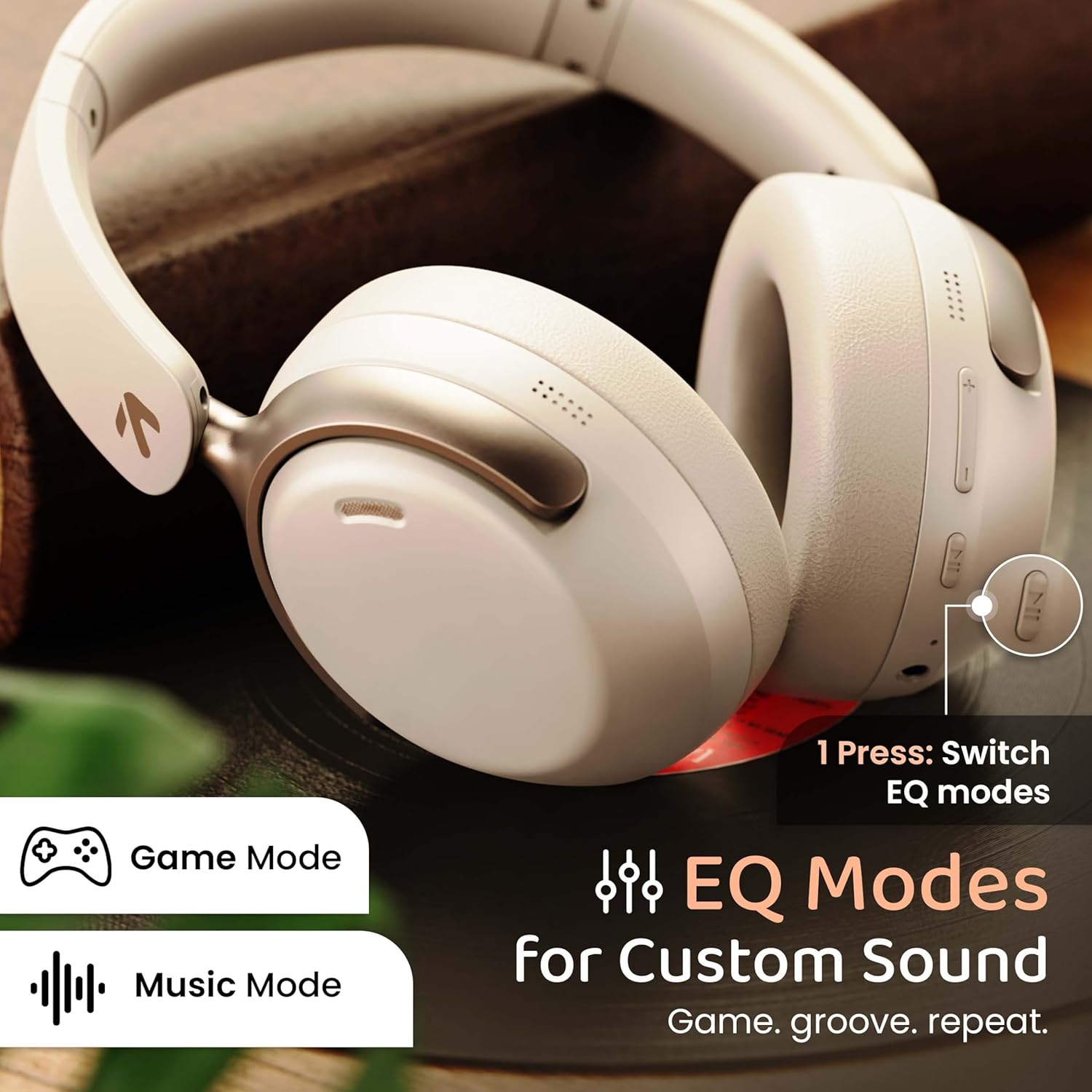
Image: GOBOULT Soniq headphones illustrating the EQ modes for custom sound, including Game Mode and Music Mode.

Image: GOBOULT Soniq headphones highlighting Combat™ Gaming Mode with 60ms ultra-low latency, tailored for mobile gaming and real-time sound accuracy.
3. Njikọ Ngwaọrụ Abụọ
The headphones support dual device pairing, allowing you to connect to two devices simultaneously and switch between them seamlessly.
- Pair the headphones with the first device as described in the "Bluetooth Pairing" section.
- Gbanyụọ Bluetooth na ngwaọrụ mbụ.
- Jikọọ ekweisi na ngwaọrụ nke abụọ.
- Re-enable Bluetooth on the first device. The headphones should automatically connect to both devices.
- Audio will play from the device currently active. To switch, pause audio on the first device and start playing on the second.

Image: GOBOULT Soniq headphones demonstrating dual device connectivity with a laptop and a smartphone.
4. Wired Mode (AUX)
For a wired connection, use a standard 3.5mm AUX cable (not included) to connect the headphones to your audio source. In wired mode, the headphones operate passively, and the built-in microphone will not function.

Image: GOBOULT Soniq headphones showing the option for wireless mode and an optional wired mode via AUX cable, noting that the mic is off in wired mode.
5. Environmental Noise Cancellation (ENC) for Calls
The Zen™ ENC microphone technology helps reduce ambient noise during calls, ensuring clearer conversations. This feature is automatically active during phone calls.

Image: Close-up of the GOBOULT Soniq headphone earcup highlighting the Zen™ ENC Mic for processed calling, ambient noise isolation, enhanced call experience, and sharper voice clarity.
6. Onye enyemaka olu
Activate your device's voice assistant (Google Assistant or Siri) by pressing the multi-function button (or specific button, refer to quick start guide) for approximately 2 seconds.

Image: GOBOULT Soniq headphones with icons for Google Assistant and Siri, indicating personalized AI assistant support.
Nlekọta na nlekọta
- Nhicha: Jiri ákwà dị nro ma kpọọ nkụ hichaa ekweisi gị. Ejila ihe nhicha ma ọ bụ ihe mgbaze.
- Nguzogide mmiri: The headphones are IPX5 water resistant, meaning they are protected against splashes, rain, and sweat. Do not submerge them in water or expose them to strong jets of water.
- Nchekwa: Mgbe ejighị ya, chekwaa ekweisi n'ebe dị jụụ, kpọrọ nkụ, pụọ na ìhè anyanwụ kpọmkwem na oke okpomọkụ. Nhazi a na-agbanwe agbanwe na-enye ohere maka nchekwa kọmpat.
- Nlekọta batrị: Ka ịgbatị ndụ batrị ogologo, zere ịchaji ekweisi ugboro ugboro. Na-ana ha ebubo mgbe niile, ọbụlagodi na ọ bụghị iji ya mgbe niile.
Image: GOBOULT Soniq headphones illustrating IPX5 water resistance, indicating protection against splash, rain, and sweat.

Image: GOBOULT Soniq headphones showcasing their adjustable headband, foldable design, and movable earcups for maximum comfort and portability.
Nchọpụta nsogbu
| Nsogbu | Ngwọta enwere ike |
|---|---|
| Igwe ekweisi anaghị agba ọkụ. | Ensure the headphones are charged. Connect to a power source using the Type-C cable. |
| Enweghị ike ijikọ na ngwaọrụ. |
|
| Enweghị ụda ma ọ bụ obere olu. |
|
| Microphone not working in wired mode. | The built-in microphone is not active when using the AUX wired connection. This is normal operation. |
| Njikọ na-adịte aka. |
|
Nkọwapụta
| Njirimara | Nkọwa |
|---|---|
| Aha Nlereanya | AirBass |
| Teknụzụ Njikọta | Bluetooth, Wired, Wireless |
| Teknụzụ nzikọrịta ozi ikuku | Bluetooth 5.4 |
| Oke Bluetooth | 10 mita |
| Nha ọkwọ ụgbọ ala ọdịyo | 40 Millimita |
| Ụdị ọkwọ ụgbọ ala ọdịyo | Ọkwọ ụgbọala dị ike |
| Ndụ batrị | Awa 40 |
| Nchaji ọdụ ụgbọ mmiri | Type-C Fast Charging Jack |
| Njikwa mkpọtụ | Nkagbu mkpọtụ gburugburu (ENC) |
| Ọkwa Nguzogide mmiri | IPX5 (Splash, Rain, Sweat Proof) |
| Oge Latịn | 60 Milliseconds (Game Mode) |
| Ụdị ntị | N'elu Ntị |
| Ihe onwunwe | Memory Foam (Ear Cushions) |
| Ibu Ibu | 227 grams |
| Akụkụ ngwaahịa (LxWxH) | 17 x 5.5 x 19 centimita |
| Ụdị njikwa | Button, Google Assistant |
| Mgbochi | 32 ohms |
| Mmetụta | 118 dB |
Akwụkwọ ikike na nkwado
Your GOBOULT Soniq Over Ear Bluetooth Headphones come with a 1-afọ emeputa akwụkwọ ikike from the date of purchase. This warranty covers manufacturing defects and ensures the reliability of your product.
For warranty claims, technical support, or any inquiries, please refer to the contact information provided on the warranty card included in your package or visit the official GOBOULT support websaịtị.
Please retain your purchase receipt as proof of purchase for warranty validation.


