1. Okwu mmalite
Daalụ maka ịzụrụasing the EMERIO AF-132833 Dual Digital Air Fryer. This appliance is designed to prepare a variety of meals using hot air circulation, offering a healthier alternative to traditional frying with little to no added oil. Its dual-zone design and SYNC FINISH function allow for efficient and simultaneous cooking of different dishes.
Please read this instruction manual thoroughly before first use to ensure safe operation, optimal performance, and proper maintenance of your appliance. Keep this manual for future reference.
2. Ntuziaka nchekwa dị mkpa
Mgbe ị na-eji ngwa eletriki, ekwesịrị ịgbaso usoro nchekwa nchekwa bụ isi mgbe niile iji belata ihe egwu ọkụ, ujo eletrik na mmerụ ahụ n'ahụ mmadụ, gụnyere ihe ndị a:
- Gụọ ntuziaka niile tupu i jiri ngwa.
- Emetụla ebe dị ọkụ aka. Jiri aka ma ọ bụ mkpọ.
- Iji kpuchido ọkụ eletrik, etinyela eriri, plọg, ma ọ bụ ngwa ahụ n'ime mmiri ma ọ bụ mmiri mmiri ọzọ.
- Nleba anya dị mkpa mgbe ụmụaka na-eji ngwa ọ bụla ma ọ bụ nso.
- Kpupu na ntinye mgbe ejighị ya na tupu ihicha. Kwe ka ọ dị jụụ tupu ịtinye ma ọ bụ wepụ akụkụ.
- Ejila ngwa ọ bụla nwere eriri ma ọ bụ plọg mebiri emebi rụọ ọrụ, ma ọ bụ mgbe ngwa ahụ dara ma ọ bụ mebie n'ụzọ ọ bụla.
- Iji mgbakwunye ngwa nke onye nrụpụta ngwa anaghị akwado nwere ike bute mmerụ ahụ.
- Ejila n'èzí.
- Ekwela ka eriri kwụgide n'akụkụ tebụl ma ọ bụ counter, ma ọ bụ metụ ebe dị ọkụ aka.
- Etinyela na ma ọ bụ nso gas na-ekpo ọkụ ma ọ bụ ọkụ eletrik, ma ọ bụ na oven ọkụ.
- Ekwesịrị iji nlezianya mee ihe mgbe ị na-ebugharị ngwa nwere mmanụ ọkụ ma ọ bụ ihe ọ bụla na-ekpo ọkụ.
- Buru ụzọ tinye plọg mgbe niile na ngwa, wee tinye eriri n'ime oghere mgbidi. Iji kwupu njikọ, gbanyụọ njikwa ọ bụla ka ọ bụrụ "gbanyụọ", wee wepụ plọg na mpụta mgbidi.
- Ejila ngwa maka ndị ọzọ na-abụghị ebumnuche ebumnuche.
- Gbaa mbọ hụ na etinyere ngwa ahụ n'elu ebe kwụsiri ike, nke na-egbochi okpomọkụ, pụọ na mgbidi na ngwa ndị ọzọ iji nye ohere maka ikuku ikuku kwesịrị ekwesị.
- Never fill the baskets with oil.
3. Ngwaahịa gafereview
Familiarize yourself with the components of your EMERIO AF-132833 Air Fryer.
3.1 Main Unit and Components

Foto: N'ihu view of the EMERIO AF-132833 Dual Digital Air Fryer, showcasing the digital control panel and the two independent cooking baskets.
- Isi ngalaba: E nwere ihe na-ekpo ọkụ, fan, na panel njikwa.
- Nkata esi nri (x2): Removable drawers for holding food during cooking. Each has a 4.5L capacity.
- Efere Crisper (x2): Non-stick plates inserted into the cooking baskets to allow air circulation around food and drain excess fat.
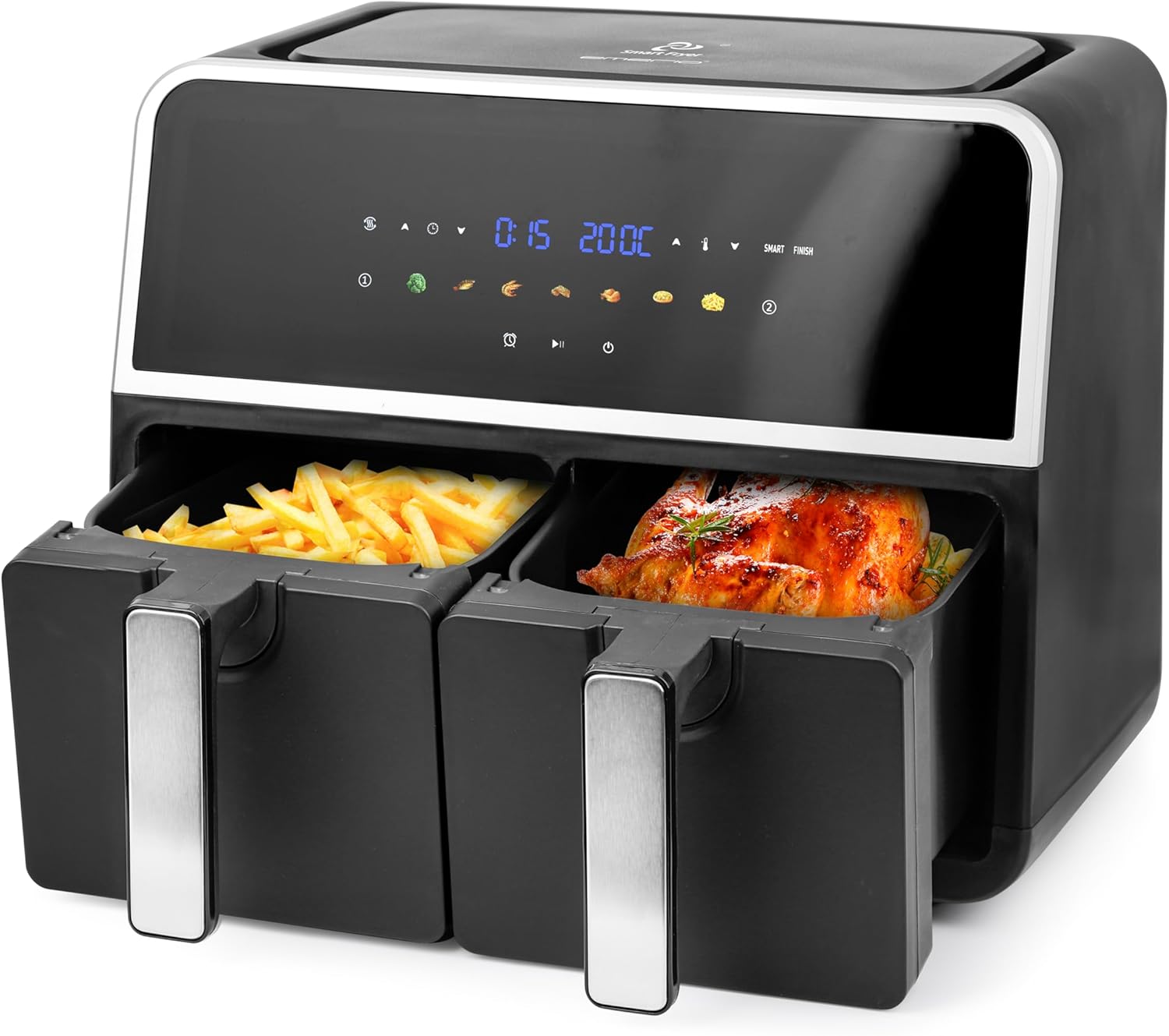
Image: The EMERIO AF-132833 Air Fryer with both cooking baskets partially pulled out, one containing french fries and the other a roasted chicken, demonstrating its dual cooking capability.

Image: Two empty cooking baskets of the EMERIO AF-132833 Air Fryer, shown from an angle, highlighting their design and handles.

Image: Two black crisper plates with slotted designs, designed to fit into the cooking baskets of the EMERIO AF-132833 Air Fryer, allowing for optimal air circulation.
3.2 Ogwe njikwa
The digital control panel features an LED display and touch controls for easy operation.
- Ikanam Display: Shows time, temperature, and selected program.
- Basket Indicators (1 & 2): Indicate which basket is currently selected or being programmed.
- Temperature Control Buttons (▲/▼): Gbanwee okpomọkụ isi nri.
- Time Control Buttons (▲/▼): Hazie oge nri.
- Akara ngosi mmemme edobere: Seven pre-programmed settings for common foods (e.g., fries, chicken, fish, meat, vegetables, baking, reheating).
- SYNC FINISH Button: Synchronizes the cooking end times for both baskets.
- Bọtịnụ mmalite/kwụsịtụ: Na-amalite ma ọ bụ na-akwụsị usoro nri.
- Bọtịnụ ike: Gbanyụọ ma ọ bụ gbanyụọ ngwa ahụ.
4. Nhazi
- Iwepu: Jiri nlezianya wepụ ihe fryer ikuku na ihe nkwakọ ngwaahịa niile. Gbaa mbọ hụ na akụrụngwa niile dị na enweghị mmebi.
- Nhicha izizi: Tupu e jiri ya mee ihe mbụ, jiri mmiri ọkụ na ncha saa nkata esi nri na efere ndị na-akpọ nkụ. Sachaa nke ọma ma kpọọ nkụ kpamkpam. Jiri mgbasa ozi hichaa isi ihe ahụ.amp akwa .
- Nkwanye: Place the air fryer on a stable, level, and heat-resistant surface. Ensure there is adequate space (at least 10 cm) around the appliance for proper ventilation. Do not place it directly under cabinets or near flammable materials.
- Tinye efere Crisper: Tinye efere ndị dị nkọ n'ala nke nkata nri ọ bụla.
- Njikọ ike: Plug the power cord into a grounded wall outlet. The appliance will enter standby mode.
5. Ntuziaka ọrụ
5.1 Basic Arụmọrụ
- Ike Na: Pịa bọtịnụ Ike iji gbanye ngwaọrụ ahụ. Ngosipụta ahụ ga-enwu.
- Họrọ Basket: Press the Basket 1 or Basket 2 icon to select the desired cooking zone.
- Tọọ okpomọkụ: Use the Temperature Control buttons (▲/▼) to adjust the cooking temperature (e.g., 80°C - 200°C).
- Tọọ oge: Use the Time Control buttons (▲/▼) to adjust the cooking time (e.g., 1 - 60 minutes).
- Malite isi nri: Pịa bọtịnụ Mmalite/kwụsịtụ ka ịmalite usoro nri.
- Kwụsị/ maliteghachi: During cooking, press the Start/Pause button to pause. Press again to resume.
- Kwụsị isi nri: To stop cooking, press and hold the Power button for a few seconds.
5.2 Iji Mmemme atọrọ
The air fryer comes with 7 preset programs for convenience. These programs have pre-set time and temperature settings that can be adjusted if needed.
- Ike Na: Pịa bọtịnụ ike.
- Họrọ Basket: Press the Basket 1 or Basket 2 icon.
- Họrọ Mmemme: Press the desired preset program icon (e.g., fries, chicken). The display will show the default time and temperature.
- Gbanwee (Nhọrọ): You can adjust the time and temperature using the respective control buttons if desired.
- Malite isi nri: Pịa bọtịnụ Malite/kwụsịtụ.
5.3 Ọrụ Mmecha Mmekọrịta
The SYNC FINISH function ensures that both baskets complete their cooking cycles at the same time, even if they have different cooking times and temperatures.
- Program Basket 1: Select Basket 1, set its desired temperature and time (or choose a preset). Do NOT press Start.
- Program Basket 2: Select Basket 2, set its desired temperature and time (or choose a preset). Do NOT press Start.
- Activate SYNC FINISH: Press the SYNC FINISH button. The appliance will calculate and adjust the start times for each basket so they finish simultaneously.
- Malite isi nri: Press the Start/Pause button. The air fryer will begin cooking, with the second basket starting later if necessary.
5.4 Dual Zone Cooking
You can cook two different foods simultaneously without using the SYNC FINISH function if their cooking times are similar or if you prefer to manage them independently.
- Program Basket 1: Select Basket 1, set temperature and time, then press Start/Pause.
- Program Basket 2: Select Basket 2, set temperature and time, then press Start/Pause.
- Both baskets will cook independently. Monitor each basket's progress.
5.5 Ndụmọdụ Isi Nri Izugbe
- Maka nsonaazụ kacha mma, kpochaa fryer ikuku maka nkeji 3-5 tupu ịtinye nri.
- Shake or toss smaller items (like fries) halfway through cooking to ensure even crisping.
- Do not overfill the baskets. Overfilling can prevent even cooking and crisping.
- Some foods may benefit from a light coating of oil for extra crispiness.
- Always check food for doneness, especially meat and poultry, using a food thermometer.
6. Nhicha na mmezi
Nhicha mgbe niile na-eme ka ogologo ndụ na arụmọrụ kachasị mma nke fryer ikuku gị.
- Kpupu ma dị jụụ: Mgbe niile, gbanyụọ ihe e ji esi nri ikuku n'ime ebe a na-esi n'ọkụ eletrik ma hapụ ya ka ọ jụọ oyi kpamkpam tupu e hichaa ya.
- Nkata nhicha na efere Crisper:
- Remove the cooking baskets and crisper plates.
- These parts are dishwasher safe. Alternatively, wash them in warm, soapy water using a non-abrasive sponge.
- Sachaa nke ọma ma kpoo kpamkpam tupu ị chịkọta ma ọ bụ chekwaa ya.
- Na-ehicha ngalaba isi:
- Jiri mgbasa ozi hichapụ mpụta fryer ikukuamp akwa . Ejila ihe mkpocha abrasive ma ọ bụ ihe nchacha.
- Jiri mgbasa ozi hichaa ime ngwa ahụamp akwa. Ọ bụrụ na ọ dị mkpa, jiri ihe nhicha dị nro.
- Ejila akụkụ isi na mmiri ma ọ bụ mmiri mmiri ọ bụla ọzọ.
- Nchekwa: Hụ na ihe e ji esi nri ikuku dị ọcha ma kpọọ nkụ tupu e debe ya. Debe ya n'ebe dị jụụ ma kpọọ nkụ.
7. Nchọpụta nsogbu
Rụtụ aka na ngalaba a maka okwu nkịtị na azịza ha.
| Nsogbu | Ihe nwere ike ime | Ngwọta |
|---|---|---|
| Fryer ikuku anaghị agbanwuo. | Ejinyeghị ngwa ngwa. Ọkụ ọkụ anaghị arụ ọrụ. | Ensure the power cord is securely plugged into a grounded outlet. Test the outlet with another appliance. |
| A naghị esi nri nke ọma. | Baskets are overfilled. Food was not shaken/tossed. | Do not overfill baskets. Shake or toss food halfway through cooking. Ensure crisper plates are correctly inserted. |
| Nri adịghị crispy. | Too much moisture in food. Not enough oil (for some foods). Temperature too low. | Pat food dry before air frying. Lightly coat some foods with oil. Increase temperature slightly. |
| Anwụrụ ọkụ na-acha ọcha na-abịa site na ngwa. | Mfọda griiz sitere na ojiji gara aga. A na-esi nri abụba abụba. | Hichaa nkata na efere ndị dị nkọ nke ọma mgbe ejiri ya mee ihe ọ bụla. Maka nri abụba, wụsa abụba gabigara ókè n'ime mmiri mgbe ị na-esi nri. |
If the problem persists after checking the above, please contact customer support.
8. Nkọwapụta
| Njirimara | Nkọwa |
|---|---|
| Nọmba nlereanya | AF-132833 |
| Ụdị | Emerio |
| Ike | 2 x 4.5 Liters (Total 9 Liters) |
| Ike/Wattage | 1700 Watt |
| Voltage | 230 volts |
| Akụkụ ngwaahịa | 36.1 x 39.8 x 32.4 cm |
| Ibu | 7.3 n'arọ |
| Ihe onwunwe | Plastic, igwe anaghị agba nchara |
| Atụmatụ pụrụ iche | 7 Programs, Digital Control, Dual Chamber, LED Display, Oil-free Frying, Sync Finish, Temperature Control, Automatic Shut-off |
9. Akwụkwọ ikike na nkwado
This product is covered by a manufacturer's warranty. Please refer to the warranty card included with your purchase for specific terms and conditions. For technical support, troubleshooting assistance, or to inquire about replacement parts, please contact Emerio customer service through their official websaịtị ma ọ bụ ozi kọntaktị enyere na nkwakọ ngwaahịa gị.
Debe ihe akaebe nke ịzụrụ ihe maka akwụkwọ ikike.


