1. Ntuziaka nchekwa dị mkpa
Please read this user manual carefully before using the Bagotte Robot Vacuum and Mop Model A21. Keep this manual for future reference.
- Enwere ike iji ngwa a ụmụaka ndị gbara afọ 8 na karịa yana ndị nwere ike anụ ahụ, mmetụta uche ma ọ bụ nke uche ma ọ bụ enweghị ahụmahụ na ihe ọmụma ma ọ bụrụ na enyerela ha nlekọta ma ọ bụ ntụziaka gbasara iji ngwa ahụ n'ụzọ dị nchebe ma ghọta ihe egwu dị na ya. .
- Ụmụaka agaghị eji ngwa eji egwu egwu egwu. Ụmụaka agaghị eme nhicha na nlekọta onye ọrụ na-enweghị nlekọta.
- Jiri naanị ihe nkwụnye ike mbụ nke onye nrụpụta nyere.
- Do not use the robot in environments with open flames or fragile objects.
- Ensure the charging station is placed on a level surface against a wall, with no obstacles within 1 meter on either side and 2 meters in front.
- Before cleaning, remove power cords, small objects, and any items that could entangle the robot.
- Do not immerse the robot or its electronic components in water.
- Turn off the robot and unplug the charging station before performing any maintenance or cleaning.
2. Ihe ngwugwu
Hụ na ihe niile dị na ya dị ma dịkwa mma mgbe ị na-ewepụ ha.

Image: All items included in the Bagotte Robot Vacuum A21 package.
- A21 Robot Vacuum Cleaner * 1
- Charging Station * 1
- Remote Control (2 AAA batteries included) * 1
- Ihe nkwụnye ọkụ * 1
- 2-in-1 Water Tank * 1
- Ahịhịa akụkụ * 2
- Mop Holder * 1
- Mop Cloth * 2
- Hepa Filters * 1
- Ahịhịa na-ehicha* 1
- Akwụkwọ ntuziaka onye ọrụ * 1
3. Ngwaahịa gafereview
The Bagotte A21 is a 3-in-1 robot vacuum designed for vacuuming, sweeping, and mopping. It features a slim design, powerful suction, and multiple control options.

Image: Bagotte Robot Vacuum A21 main unit and accessories.
Ngwa nke isi ihe
- Ihe mkpuchi kachasị: Power button, Wi-Fi indicator.
- Ihe mgbochi ihu: Collision sensors.
- Nchicha akụkụ: For sweeping edges and corners.
- wiil ndị na-anya ụgbọala: For movement.
- Tankị ájá/mmiri: Integrated unit for dry and wet cleaning.
- Kọntaktị na-akwụ ụgwọ: For automatic recharging.
- Bottom Sensors: Cliff sensors to prevent falls.
4. Nhazi
4.1 Ebe a na-etinye ọdụ chaja
Place the charging station against a wall on a hard, level surface. Ensure there are no obstacles within 1 meter (3.3 feet) to the left and right, and 2 meters (6.6 feet) in front of the charging station. This allows the robot to return for charging without obstruction.

Image: Robot vacuum returning to its charging station.
4.2 Nchaji izizi
Connect the power adapter to the charging station and plug it into a wall outlet. Place the robot onto the charging station, ensuring the charging contacts align. For first-time use, charge the robot for at least 6 hours to ensure the battery is fully conditioned.
4.3 Ịwụnye ahịhịa akụkụ
Attach the side brushes to the corresponding posts on the bottom of the robot until they click into place. Ensure the brushes are securely fastened.
4.4 Installing the 2-in-1 Water Tank/Dustbin
To use the mopping function, fill the water tank with clean water. Attach the mop cloth to the mop holder, then slide the mop holder onto the water tank. Insert the combined 2-in-1 water tank/dustbin unit into the back of the robot until it clicks securely.

Image: Components for 3-in-1 cleaning functionality.
5. Ntuziaka ọrụ
5.1 Gbanyụọ ma ọ bụ gbanyụọ
- Ike Na: Press and hold the power button on the robot for a few seconds until the indicator light turns on.
- Gbanyụọ: Pịa ma jide bọtịnụ ike ahụ ruo sekọnd ole na ole ruo mgbe ọkụ ihe ngosi ahụ gbanyụrụ.
5.2 Ụdị nhicha
The robot offers four cleaning modes to suit different needs:

Image: Illustration of different cleaning modes.
- Nhicha akpaaka: The robot automatically cleans in a systematic pattern.
- Nhicha ncha: The robot cleans a specific area in a spiral pattern for concentrated cleaning.
- Nchacha ọnụ: Robot ahụ na-ehicha mgbidi na nsọtụ arịa ụlọ.
- Ncha akwụkwọ ntuziaka: Control the robot's direction using the remote control or app.
5.3 App Control (Tuya Smart App)
Download the Tuya Smart app from your smartphone's app store. Follow the in-app instructions to connect your robot to your home's 2.4GHz Wi-Fi network. The app allows for advanced control and scheduling.
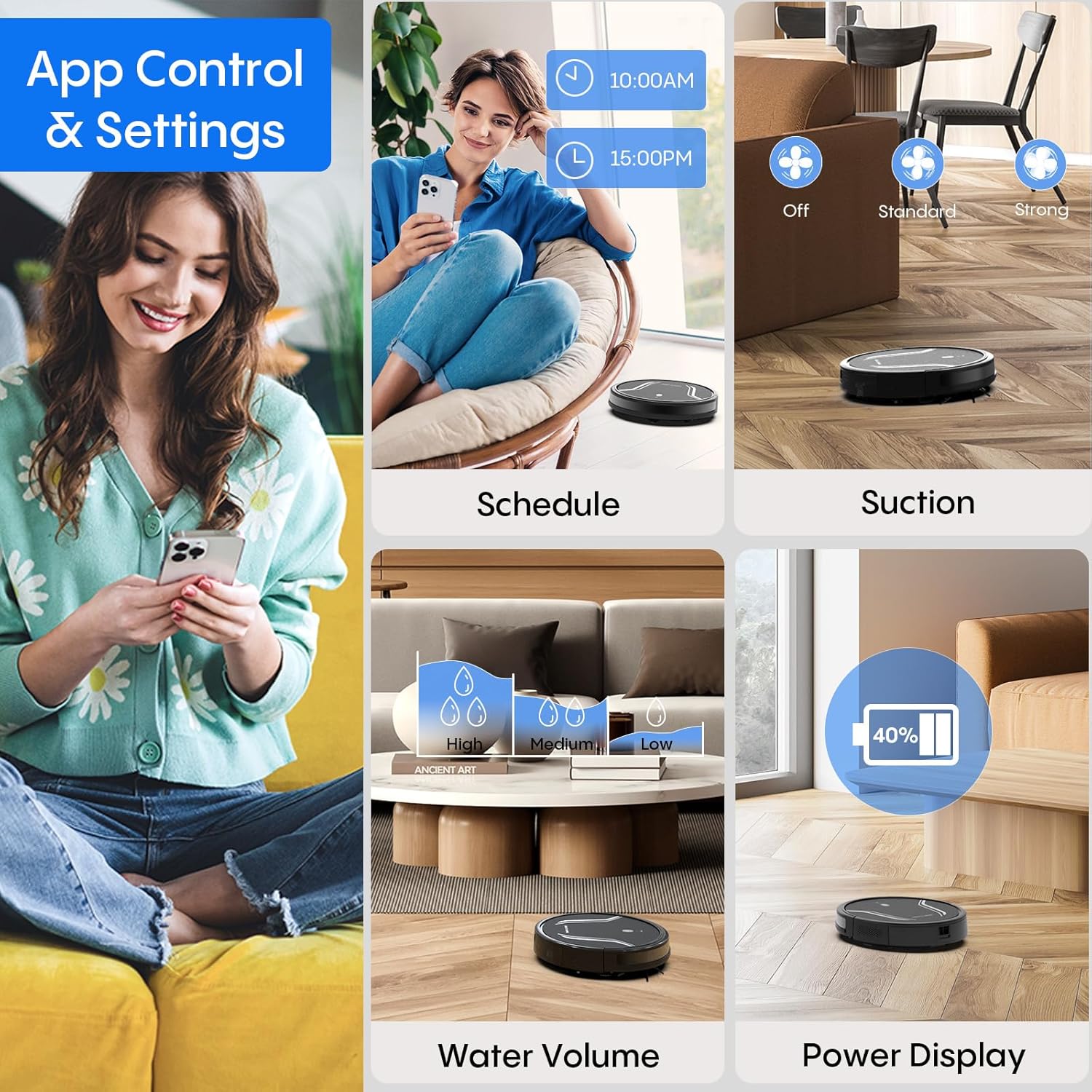
Image: App control interface for the robot vacuum.
- Ịhazi oge: Tọọ oge kpọmkwem maka robot ahụ ka ọ na-ehicha onwe ya.
- Ụdị nhicha: Select desired cleaning modes.
- Ike imi: Adjust suction levels (e.g., Standard, Strong).
- Oke mmiri: Control water flow for mopping (e.g., Low, Medium, High).
- Ọnọdụ batrị: Monitor the robot's battery level.
- Find My Robot: Locate the robot if it gets stuck or lost.
5.4 Ime Remote
Use the included remote control to manually direct the robot, start/pause cleaning, select cleaning modes, and send it back to the charging station.
5.5 Njikwa olu (Alexa/Google Assistant)
Once connected to the Tuya Smart app, you can link your robot to Amazon Alexa or Google Assistant for voice commands. For example, say "Alexa, turn on the robot."

Image: Robot vacuum controlled via voice command.
5.6 Automatic Recharging
When the battery level is low, the robot will automatically return to its charging station to recharge. You can also manually send it back using the app or remote control.
6. Nlekọta
Nlekọta anya mgbe niile na-eme ka arụ ọrụ kacha mma ma gbasaa ogologo ndụ nke oghere robot gị.
6.1 Na-ekpofu uzuzu uzuzu
Press the release button to remove the 2-in-1 water tank/dustbin unit. Open the dustbin cover and empty its contents into a trash bin. It is recommended to empty the dustbin after each cleaning cycle.
6.2 Nzacha nhicha
Remove the HEPA filter and sponge filter from the dustbin. Tap them gently to remove dust. The filters are not washable and should be replaced every 3-6 months, depending on usage.
6.3 Nhicha ahịhịa n'akụkụ
Periodically check the side brushes for tangled hair or debris. Carefully remove any obstructions. If brushes are worn or damaged, replace them with new ones.
6.4 Sensọ nhicha
Wipe the cliff sensors (located on the bottom of the robot) and the charging contacts (on both the robot and charging station) with a clean, dry cloth. This ensures proper navigation and charging.
6.5 Cleaning Mop Cloth and Water Tank
After each mopping session, remove the mop cloth and wash it thoroughly. Allow it to air dry completely before reattaching. Empty any remaining water from the water tank and rinse it out. Ensure the water tank is dry before storage.
7. Nchọpụta nsogbu
Ọ bụrụ na ị hụ nsogbu na ihe eji ehicha robot gị, lee nsogbu na ngwọta ndị a na-ahụkarị:
| Nsogbu | Ihe nwere ike ime | Ngwọta |
|---|---|---|
| Robot anaghị agbanye | Batrị dị ala; Apịghị bọtịnụ ike nke ọma | Charge the robot; Press and hold the power button until the indicator lights up. |
| Robot anaghị akwụ ụgwọ | Charging contacts are dirty; Charging station not powered | Clean charging contacts on both robot and station; Ensure power adapter is plugged in. |
| Robot na-arapara mgbe mgbe | Too many obstacles; Cliff sensors are dirty | Clear the cleaning area of loose cables and small objects; Clean cliff sensors. |
| Arụmọrụ nhicha na-adịghị mma | Dustbin full; Filters clogged; Side brushes worn | Empty dustbin; Clean or replace filters; Clean or replace side brushes. |
| Ọrụ mopping anaghị arụ ọrụ | Water tank empty; Mop cloth not attached; Water flow setting too low | Fill water tank; Attach mop cloth correctly; Adjust water flow setting in the app. |
| Enweghị ike ijikọ na Wi-Fi | Incorrect Wi-Fi password; Not 2.4GHz network; Robot too far from router | Verify password; Ensure router is 2.4GHz; Move robot closer to router during setup. |
8. Nkọwapụta
| Njirimara | Nkọwa |
|---|---|
| Nọmba nlereanya | A21 |
| Akụkụ ngwaahịa | 15 x 12.5 x 4 sentimita asatọ |
| Ibu Ibu | 7.24 pound |
| Ike imi | Ruo 5000Pa |
| Ikike igbe uzuzu | 250mL (integrated with water tank) |
| Ike tank mmiri | 200mL (integrated with dust box) |
| Ụzọ njikwa | App, Remote Control, Voice Control (Alexa/Google Assistant) |
| Ndakọrịta Wi-Fi | 2.4GHz naanị |
| Njirimara akpaaka | Auto-recharge, Obstacle avoidance, Fall prevention |
9. Akwụkwọ ikike na nkwado
Bagotte provides a 12-month service warranty for the Robot Vacuum and Mop Model A21. For technical support, warranty claims, or any questions regarding your product, please contact Bagotte customer service through the official websaịtị ma ọ bụ ikpo okwu ịzụrụ ihe.
Please have your model number (A21) and purchase information ready when contacting support.


