Okwu mmalite
This manual provides instructions for the XINFUTE SRC-4020-01 remote control, designed for use with Caixun Smart LCD LED Voice TVs. Please read this manual thoroughly before using the remote control to ensure proper operation and to maximize its lifespan.
Melite
Ntinye batrị
Ihe njikwa anya chọrọ batrị AAA abụọ (anaghị etinye ya).
- Chọta ebe batrị dị n'azụ nke njikwa anya.
- Mikpuo mkpuchi nke ebe batrị ahụ ala iji mepee ya.
- Tinye batrị AAA abụọ, hụ na njedebe ndị dị mma (+) na nke na-adịghị mma (-) kwekọrọ na eserese dị n'ime ngalaba ahụ.
- Dochie mkpuchi nke batrị ahụ site n'ịtụgharị ya elu ruo mgbe ọ pịa ebe ọ dị.
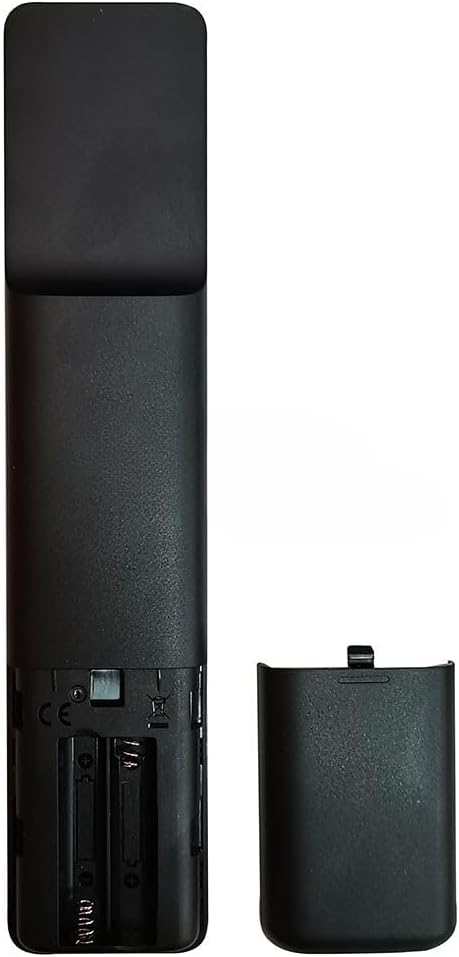
Image: Back of the remote control with the battery cover removed, illustrating the battery insertion points.
Mara:
- Agwakọtala batrị ochie na nke ọhụrụ.
- Ejikọtala batrị alkaline, ọkọlọtọ (carbon-zinc), ma ọ bụ batrị nwere ike ịgbanye (nickel-cadmium).
- Wepụ batrị ma ọ bụrụ na ejirighị njikwa remote ahụ ruo ogologo oge.
Pairing (if necessary)
This remote control is typically ready to use with compatible Caixun Smart TVs without additional pairing. If the remote does not respond, ensure batteries are correctly installed and try pointing it directly at the TV's IR receiver. For voice control functionality, refer to your TV's user manual for specific pairing instructions, as this may vary by TV model.
Ntuziaka ọrụ
The XINFUTE SRC-4020-01 remote control provides intuitive access to your Caixun Smart TV's functions.
Ọrụ ndị bụ isi

Foto: N'ihu view of the remote control, displaying its various buttons.
- Bọtịnụ ike: Gbanyụọ ma ọ bụ gbanyụọ TV.
- Elu elu/ala: Adjusts the TV's volume.
- Ọwa elu/ala: Na-agbanwe ọwa TV.
- Mpempe igodo nsoroụzọ (elu/ala/ekpe/aka nri/OK): A na-eji ya agagharị na menus ma họrọ nhọrọ.
- Azu/Ọpụpụ: Na-alaghachi na ihuenyo gara aga ma ọ bụ pụọ na menu.
- Ụlọ: Accesses the TV's smart home screen or main menu.
- Mechie: Mutes or unmutes the TV's audio.
- Ntinye/Isi mmalite: Changes the input source (HDMI, AV, etc.).
Njikwa olu
This remote control supports voice commands for compatible Caixun Smart LCD LED Voice TVs. To use voice control:
- Press and hold the dedicated Voice button (usually indicated by a microphone icon).
- Speak your command clearly into the microphone located on the remote control.
- Release the Voice button when you have finished speaking.
Mara:
- Ensure your TV is connected to the internet for voice control features to function correctly.
- Voice control functionality and available commands may vary depending on your TV model and software version.
Nlekọta
- Clean the remote control regularly with a soft, dry cloth.
- Do not use liquid cleaners or abrasive materials, as they may damage the surface or internal components.
- Keep the remote control away from direct sunlight, heat sources, and moisture.
- Zere ịdapụ njikwa remote ma ọ bụ ibute ya nnukwu nsogbu.
Nchọpụta nsogbu
| Nsogbu | Ihe nwere ike ime | Ngwọta |
|---|---|---|
| Njikwa anya anaghị aza. | Ịtinye batrị nwụrụ anwụ ma ọ bụ na-ezighi ezi. | Dochie batrị ọhụrụ na nke ọhụrụ, na-ahụ polarity ziri ezi (+/-). |
| Njikwa anya anaghị aza. | Ihe mgbochi dị n'etiti remote na TV. | Ensure a clear line of sight between the remote control and the TV's IR receiver. |
| Njikwa anya anaghị aza. | Remote control needs re-pairing (for some functions like voice). | Refer to your TV's user manual for specific pairing instructions. |
| Njikwa olu anaghị arụ ọrụ. | TV not connected to the internet or voice feature not enabled. | Check your TV's network connection and settings. Ensure the voice button is pressed and held while speaking. |
Nkọwapụta
- Ụdị: SRC-4020-01
- Akara: XINFUTE
- Ngwa dakọtara: Caixun Smart LCD LED Voice Televisions
- Njirimara Pụrụ Iche: Ergonomic imewe
- Ọnụọgụ ngwaọrụ akwadoro kacha: 1
- Agba: As Shown (Black)
- Isi mmalite ike: Batrị 2 x AAA (anaghị etinye ya)
Akwụkwọ ikike na nkwado
All products are inspected before shipment. If you are not satisfied with your purchase, please contact the seller within 24 hours of receipt. For further assistance or inquiries, please refer to the seller's contact information provided at the point of purchase.
For specific TV-related issues or advanced features, please consult your Caixun TV's official user manual or support resources.


