1. Okwu mmalite
This manual provides detailed instructions for the installation, operation, and maintenance of the TOMZN TOVPD3-63VA Din Rail 3 Phase Adjustable Over and Under Voltage Protector Relay with Current Protection. This device is designed to safeguard electrical equipment from voltage fluctuations and overcurrent conditions in three-phase systems.
Please read this manual thoroughly before installation and operation to ensure proper use and to prevent damage to the device or connected equipment.

Foto 1: N'ihu view of the TOMZN TOVPD3-63VA Din Rail 3 Phase Voltage Protector Relay.
2. Ozi nchekwa
ỊDỌ AKA NA NTỊ: Ihe egwu nke ujo eletriki. Ndị ọrụ ruru eru kwesịrị ịrụ ọrụ nrụnye na mmezi.
- Kwụpụ ọkụ eletrik mgbe niile tupu ị wụnye ma ọ bụ rụzie ngwaọrụ ahụ.
- Gbaa mbọ hụ na njikọ waya niile echekwabara ma soro koodu eletriki mpaghara.
- Ejila ngwaọrụ arụ ọrụ na mmiri ma ọ bụ damp ọnọdụ.
- Nyochaa voltage and current ratings of your system match the device specifications.
- Never attempt to open or repair the device yourself. Refer to qualified service personnel.
3. Atụmatụ igodo
The TOMZN TOVPD3-63VA offers robust protection and monitoring capabilities:
- Instant Fault Response: Detects and reacts to electrical abnormalities within milliseconds to prevent equipment damage.
- Sistemụ nchekwa ọtụtụ: Comprehensive coverage against overcurrent, under-voltage, phase loss, and short circuits.
- Ogologo Ọkwa ụlọ ọrụ: Heavy-duty construction with flame-retardant materials for demanding environments.
- Ndakọrịta Universal: Works with AC/DC systems, motors, transformers, and power distribution panels.
- Clear Visual Indicators: LED status lights and fault alarms for quick system diagnostics.
- Adjustable over-voltage, n'okpuru-voltage, and over-current protection thresholds.
- Asymmetry and phase sequence protection.
- Adjustable active time and reconnect time.
- Akwụkwọ ntuziaka voltage and current calibration capability.
4. Product Variants
The TOVPD3 series is available in several configurations to suit different electrical systems. The primary differences lie in the current rating and the presence of a neutral (N) connection, which affects the voltage display and wiring:
- 63A With N (3X120V/3X220V/3X230V): Designed for 3-phase systems with a neutral line. Each phase voltage (L1, L2, L3) is displayed relative to the neutral. For example, in a 3*220V+N system, each phase will display 220V.
- 63A without N (380V): Designed for 3-phase systems without a neutral line. The device displays the line-to-line voltage for each phase (e.g., L1-L2, L2-L3, L3-L1), typically showing 380V across all phases.
- 100A With N (3X220V): Similar to the 63A With N variant but with a higher current capacity.
- 100A without N (380V): Similar to the 63A without N variant but with a higher current capacity.
Ensure you select the correct variant for your specific electrical installation.
5. Ihe mejupụtara na Ngosipụta
The device features a clear digital display and intuitive control buttons for monitoring and configuration.
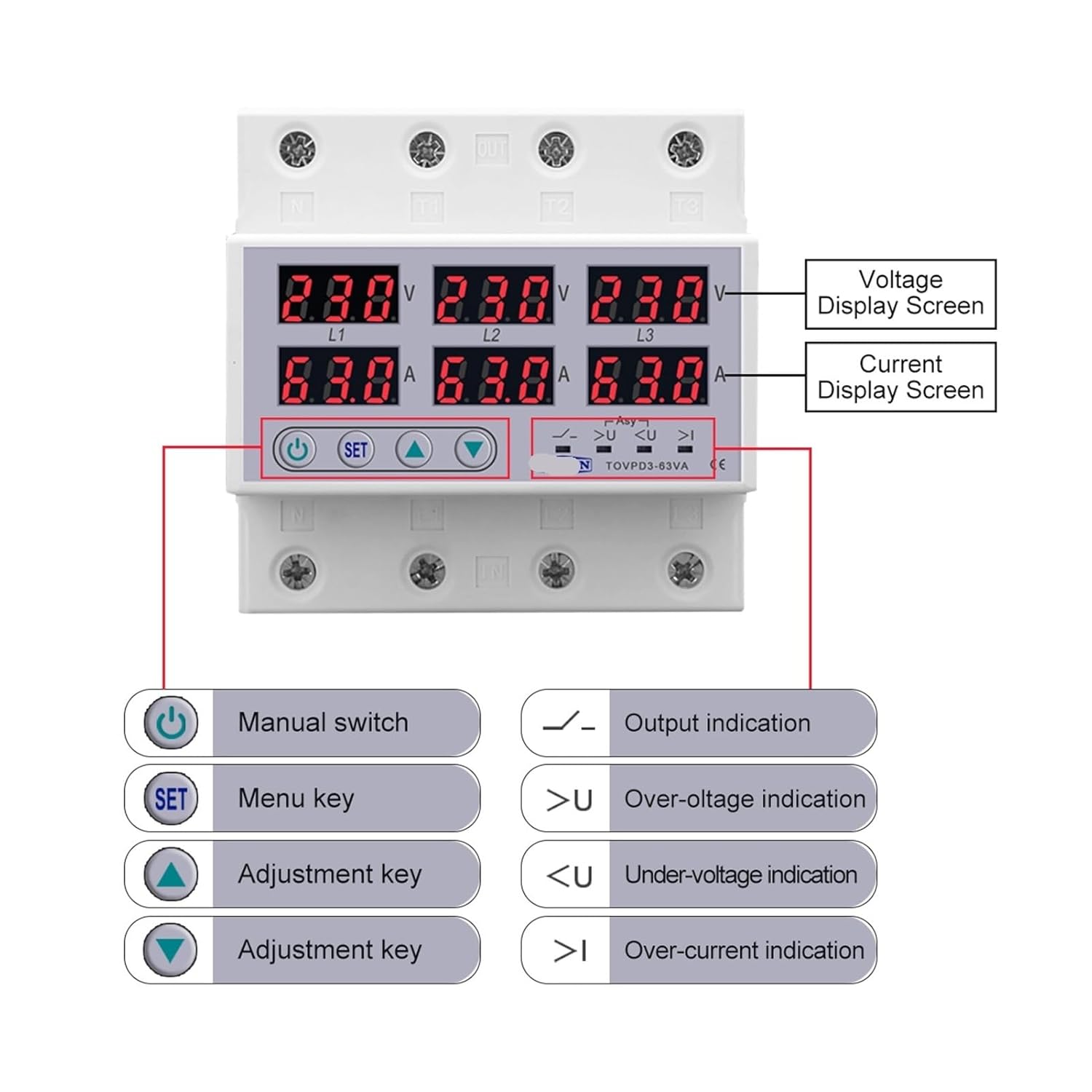
Figure 2: Labeled components and display of the TOMZN TOVPD3-63VA.
Ihuenyo 5.1
- Voltage Display Screen (V): Na-egosi voltage for each phase (L1, L2, L3).
- Current Display Screen (A): Shows the current for each phase (L1, L2, L3).
5.2 Control Buttons and Indicators
- Manual Switch (Power Button): Used to manually turn the output on or off.
- SET (Menu Key): Enters the setting menu and confirms selections.
- Adjustment Keys (Up/Down Arrows): Used to navigate menu options and adjust parameter values.
- Ngosipụta mpụta: LED indicator for output status.
- N'elu voltage Indication (>U): LED indicator illuminates when an over-voltaga na-achọpụta ọnọdụ e.
- N'okpuru-voltage Indication (<U): LED indicator illuminates when an under-voltaga na-achọpụta ọnọdụ e.
- Over-current Indication (>I): LED indicator illuminates when an over-current condition is detected.
- Asymmetry Indication (Asy): LED indicator illuminates when phase asymmetry is detected.
6. Nwụnye
6.1 Na-arịgo
The TOMZN TOVPD3-63VA is designed for Din Rail mounting. Ensure the Din Rail is securely installed in an appropriate electrical enclosure, away from moisture and excessive heat.
6.2 Waya
IMPORTANT: Disconnect all power before proceeding with wiring.
- Identify the input (IN) and output (OUT) terminals on the device. The terminals are typically labeled L1, L2, L3, and N (if applicable).
- Connect the incoming three-phase power supply to the 'IN' terminals (L1, L2, L3). If your model includes a neutral connection, connect the neutral line to the 'N' terminal.
- Connect the load (equipment to be protected) to the 'OUT' terminals (L1, L2, L3). If your model includes a neutral connection, connect the load's neutral line to the 'N' output terminal.
- Ensure all connections are tight and secure to prevent loose contacts, which can cause overheating or malfunction.
- Double-check all wiring against your system's electrical diagram and local codes before restoring power.
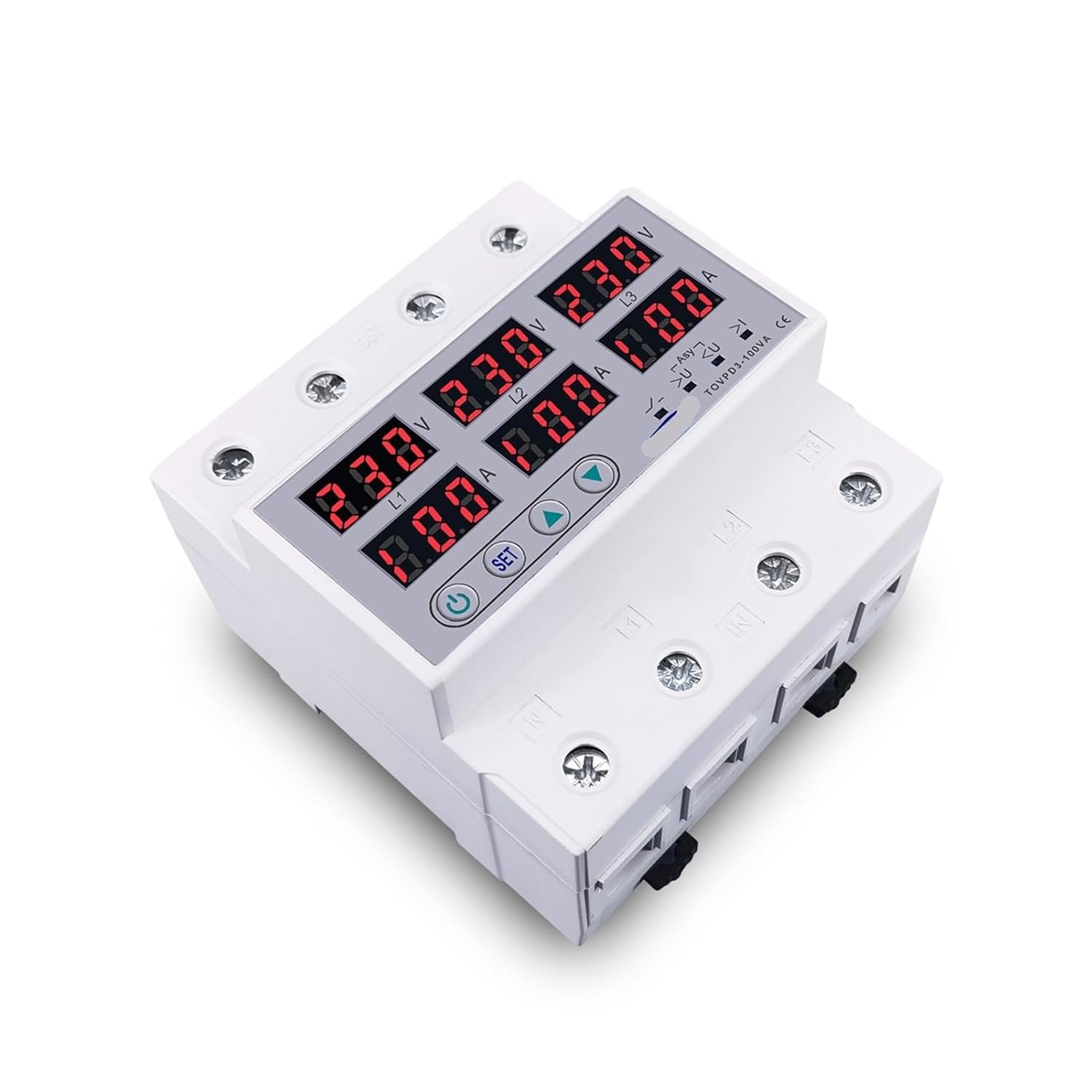
Ọgụgụ 3: N'elu-ala view illustrating the input and output terminals for wiring.
7. Ọrụ
7.1 Ike mbido
- After completing the wiring, restore power to the circuit.
- The device display will illuminate, showing the current voltage and current readings for each phase.
- The device will perform a self-check and, if no faults are detected, will connect the output after the configured reconnect time.
7.2 Ntọala paramita
To adjust protection parameters:
- Pịa ma jide SET button for a few seconds to enter the setting menu.
- Jiri ihe Up na Ala adjustment keys to navigate through the parameters (e.g., Over-voltage threshold, Under-voltage threshold, Over-current threshold, Active time, Reconnect time, Asymmetry threshold, Phase sequence protection enable/disable).
- Pịa SET again to select a parameter for adjustment.
- Jiri ihe Up na Ala igodo ịgbanwe uru.
- Pịa SET to confirm the new value and move to the next parameter or exit the menu.
- If no buttons are pressed for a certain period, the device will automatically exit the setting menu and save changes.
7.3 Nhazi akwụkwọ ntuziaka
The device supports manual calibration of voltage and current readings for enhanced accuracy. Refer to the device's on-screen menu for specific calibration steps, typically involving comparing readings with a known accurate meter and adjusting the device's internal values.
8. Nlekọta
The TOMZN TOVPD3-63VA is designed for minimal maintenance. However, periodic checks are recommended:
- Nlele anya: Regularly inspect the device for any signs of physical damage, discoloration, or loose connections.
- Nhicha: Keep the device clean and free from dust and debris. Use a dry, soft cloth for cleaning. Do not use solvents or abrasive cleaners.
- Nyochaa arụmọrụ: Periodically verify the device's protection functions by simulating fault conditions (if safely possible and recommended by a qualified electrician) or by observing its normal operation.
9. Nchọpụta nsogbu
If you encounter issues with your TOMZN TOVPD3-63VA, refer to the following common problems and solutions:
| Nsogbu | Ihe nwere ike ime | Ngwọta |
|---|---|---|
| Ngwaọrụ anaghị agbanwu ọkụ. | No input power; incorrect wiring. | Check power supply and wiring connections. Ensure input voltage dị n'ime nkọwapụta. |
| Output is off, and a protection indicator is lit. | N'elu voltage, n'okpuru-voltage, over-current, or phase fault detected. | Identify the fault indicated by the LED. Rectify the electrical issue in the system. The device will automatically reconnect after the set reconnect time once the fault clears. |
| Display shows incorrect voltage/ugbua. | Calibration required; sensor issue. | Perform manual calibration as described in Section 7.3. If the issue persists, contact support. |
| Device frequently trips. | Protection thresholds set too low/high; unstable power supply. | Review and adjust protection parameters (Section 7.2) to match system requirements. Investigate power supply stability. |
If the problem persists after attempting these solutions, please contact a qualified electrician or the product manufacturer for assistance.
10. Nkọwapụta
| Njirimara | Nkọwa/Uru |
|---|---|
| Nọmba nlereanya | TOVPD3-63VA (Base Model) |
| Enyere aha ugbu a | 63A, 100A (depending on variant) |
| Ogo Voltage | 3*220V+N, 3*380V (depending on variant) |
| Ọrụ nchedo | N'elu voltage, Under-voltage, Over-current, Asymmetry, Phase Sequence |
| Oke ndị nwere ike idozi | N'elu voltage, Under-voltage, Over-current thresholds, Active time, Reconnect time |
| Ngosipụta | Digital Voltage (V) and Current (A) for each phase |
| Ụdị nkwụnye | 35mm Din Rail |
| Asambodo | CE |
| Akụkụ ngwugwu | Ihe dịka 0.39 x 0.39 x 0.39 sentimita asatọ |
| Ibu Ibu | Ihe dị ka 3.53 ounces |
11. Akwụkwọ ikike na nkwado
This product is manufactured to high-quality standards. For specific warranty information, please refer to the documentation provided at the time of purchase or contact your retailer. In case of technical issues or questions not covered in this manual, please reach out to the product manufacturer or your supplier for support.


